Hello! Welcome to the first lesson of your personalized course preparing you for the PL-400: Microsoft Power Platform Developer exam.
Given your extensive experience with Dynamics 365, C#, and system integration, you're already familiar with some of the most powerful aspects of what we now call the Power Platform, particularly Model-driven Apps and Dataverse plugins. This course is designed to build on that strong foundation, formalize your knowledge across the entire platform, and focus on the advanced, developer-centric skills needed for the PL-400 certification.
Today, we'll start at the architectural level. The goal of this lesson is to equip you with a framework for designing solutions by selecting the most appropriate Power Platform components for a given business scenario. We will explore the "what" and "why" behind choosing a Canvas App versus a Model-driven App, or a Power Automate flow versus a Dataverse plugin—decisions that are central to building efficient and scalable solutions.
Let's begin.
1. The Power Platform: A Suite of Tools
At its core, the Power Platform is a suite of applications, services, connectors, and a data platform (Dataverse) that provides a rapid application development environment. As a developer, it's helpful to think of these not as isolated products but as a toolbox. The key to effective solution design is knowing which tool to pick for the job.
The main components you'll be working with are:
- Power Apps: For building custom business applications.
- Power Automate: For automating processes and workflows.
- Dataverse: The scalable, secure data backbone for the platform.
- Power Pages: For building external-facing websites.
- Power BI: For business analytics and data visualization.
- Microsoft Copilot Studio: For creating AI-powered chatbots.
While you've worked deeply with the technologies that underpin Model-driven Apps and Dataverse, the platform offers a much broader palette.
2. Understanding the "Big Three" App Types
The first major decision in solution design is often the user interface. Power Apps provides three distinct types of applications, each with a different design philosophy and purpose.
To get a solid overview, please watch the following video from Reza Dorrani. It provides an excellent breakdown of Canvas Apps, Model-driven Apps, and Power Pages (referred to by its former name, Power Apps Portals).
Power Apps Types | Canvas Vs Model Driven Vs Portals | Beginner Tutorial
This video provides a clear introduction to the three main types of Power Apps. Pay close attention to the fundamental differences in their design approach and intended use cases.
Please watch the sections on the 'three types of power app' (01:49 - 03:40), 'model driven apps' (14:47 - 18:39), and 'power apps portals' (24:01 - 25:51). As you watch, consider how the 'data-first' approach of Model-driven apps compares to the 'UI-first' approach of Canvas apps.
To solidify this, let's also look at the direct comparison provided in the same video. This summary table is a valuable reference.
Power Apps Types | Canvas Vs Model Driven Vs Portals | Beginner Tutorial
Now, let's review a direct feature-by-feature comparison of the app types. This will help you internalize the trade-offs.
Watch the 'feature comparison' section from 28:45 to 38:02. Focus on the differences in responsiveness, licensing, data storage, and the handling of large datasets (delegation), as these are critical factors in your architectural decisions.
From your Dynamics 365 work, you are intimately familiar with Model-driven Apps. Their strength lies in building complex, data-centric, end-to-end business processes where the user interface (forms, views, dashboards) is generated from the underlying Dataverse data model.
Canvas Apps, in contrast, start with the user experience. You have pixel-perfect control over the UI, making them ideal for task-specific or role-based mobile apps where a highly tailored and branded experience is required.
Power Pages are the go-to for providing secure access to your Dataverse data for external users (e.g., customers, partners) or anonymous users through a public-facing website.
3. The Well-Architected Framework: A Method for Choosing
Having a good "feel" for the components is one thing; applying a structured decision-making process is another. Microsoft's Well-Architected Framework provides principles for making sound architectural choices.
Let's review the key strategies for selecting services.
Select the right services and features recommendation for ...
This article from Microsoft Learn, titled 'Recommendations for selecting the right services and features', outlines the core principles for making architectural decisions on the platform. It's the theoretical foundation for what we are discussing.
Please read the sections 'Key design strategies', 'Understand services', 'Prefer platform features', and 'Evaluate business logic requirements'. As you read, focus on how these principles would guide your decision between using a platform feature (like a business rule) versus writing custom code (like JavaScript or a plugin).
Key Takeaways from the Framework:
- Start with Requirements: Always begin by understanding the functional and non-functional requirements, including performance targets, security, and user personas.
- Prefer Platform Features: Before writing custom code, always check if a built-in feature can do the job. This is a crucial mindset shift. For example, use a Business Rule for simple form validation before writing JavaScript; use a calculated or rollup field before writing a plugin to do simple math. This reduces maintenance overhead and leverages platform optimizations.
- Understand Service Limits: Be aware of platform constraints like API request limits, Dataverse storage capacity, and connector throttling. A well-designed solution works within these limits.
- Evaluate Business Logic Requirements: This is where your developer skills are most critical. You have many options for implementing logic:
- Client-side: Business Rules (no-code), JavaScript (pro-code)
- Server-side: Power Automate Flows (low-code), Dataverse Plugins (pro-code, C#), Custom APIs (pro-code, C#)
The decision of where to implement logic is not always clear-cut. Your C# background makes you proficient with plugins, but a Power Automate flow might be better for an asynchronous process that integrates with external systems via pre-built connectors. We will dive much deeper into this specific trade-off in Module 2.
4. The "No Cliffs" Philosophy: Where Code Fits In
A common concern with low-code platforms is hitting a wall where the built-in capabilities aren't enough. The Power Platform is explicitly designed with a "no cliffs" philosophy, meaning there are always extensibility points for professional developers to step in.
This article from CODE Magazine provides an excellent developer-centric perspective on the platform.
Power Platform ❤ Code Developers
This article, 'Power Platform ❤ Code Developers', does a great job of explaining how the platform is built on Azure and how it provides numerous extension points for developers.
Please read the sections 'Power Platform Is Built On Azure', 'No Cliffs', and 'Extending Dataverse with Plugins and Custom APIs'. This will connect the platform's capabilities back to familiar concepts like Azure services and C# development.
As the article highlights, you can always inject custom code where it's needed:
- Custom Connectors: To integrate with any REST API.
- Power Apps Component Framework (PCF): To build custom UI controls with TypeScript.
- Dataverse Plugins & Custom APIs: To implement complex, synchronous, and transactional server-side logic in C#.
- Azure Functions: To handle complex processing that can be called from the platform.
5. Putting it all Together: Architectural Patterns
Let's look at how these components combine to form real-world solutions.

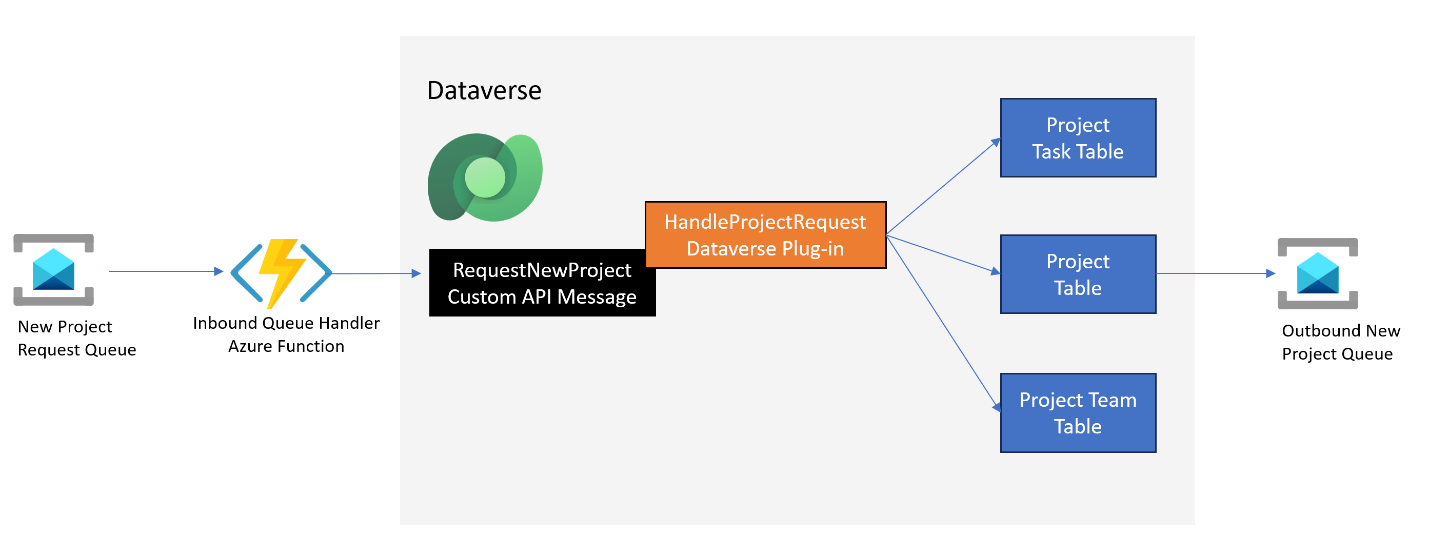
Test your understanding!
A field service company needs a solution for its technicians and back-office staff.
Requirements:
- Technicians need a mobile-first app to view their daily jobs, access customer details, capture photos of completed work, and get a digital customer signature. The UI must be simple and optimized for on-the-go use.
- Back-office staff need a comprehensive desktop interface to manage customer accounts, create and schedule jobs, dispatch technicians, and view reports on job completion rates.
- All data must be stored in a single, secure, centralized database.
- When a job is completed, an automated email with a summary and the captured photos should be sent to the customer.
Based on these requirements, propose a high-level solution architecture. Which Power Platform components would you choose for each part of the solution, and why?
Show answer
A great solution would be a "fusion" of several Power Platform components:
- Technician Mobile App: A Canvas App is the ideal choice. It allows for a pixel-perfect, task-focused mobile UI. Critically, it can leverage device capabilities like the camera (for photos) and pen input (for signatures).
- Back-Office Application: A Model-driven App is perfect for this. It provides a rich, data-centric interface for managing customers, jobs, and scheduling. The back-office staff get standard views, forms, and dashboards with minimal development effort.
- Central Database: Dataverse is the clear winner here. It provides a single, secure source of truth for both the Canvas App and the Model-driven App to work from. Its robust security model can ensure technicians only see their own jobs while back-office staff have broader access.
- Automated Customer Email: A Power Automate Cloud Flow would handle this perfectly. The flow can be triggered when a job status in Dataverse is changed to "Completed." It can then pull the job details and associated photos, compose an email, and send it to the customer. This is a classic automation scenario where Power Automate excels.
This hybrid approach plays to the strengths of each component, resulting in a more effective and efficient solution than trying to force a single app type to do everything.
Conclusion
In this lesson, we've established a foundational framework for Power Platform solution design. You've seen that while your Dynamics 365 background gives you a head start, the platform offers a wider array of tools.
Key Takeaways:
- App Types have Clear Purposes: Choose Canvas Apps for UI-first, task-focused apps; Model-driven Apps for data-first, process-centric apps; and Power Pages for external-facing websites.
- Design is a Deliberate Process: Apply principles from the Well-Architected Framework. Start with requirements, prefer built-in features over custom code where appropriate, and be mindful of service limitations.
- Code has its Place: The "no cliffs" philosophy ensures you can always use your developer skills to extend the platform with plugins, PCF controls, custom connectors, and Azure integrations.
- Fusion is Powerful: The most effective solutions often combine multiple components, using the right tool for the right job.
In our next lesson, we will zoom in on a critical architectural decision: analyzing the trade-offs between Dataverse and external data sources like SharePoint or SQL Server. This will build directly on today's concepts as we explore the pros and cons of where to store your application's data.