Hello! Welcome back to your preparation for the PL-400 exam.
In our last lesson, we established a clear hierarchy of data sources, concluding that for scalable, secure, and feature-rich business applications, Dataverse is the premier choice. A key reason for this is its sophisticated, built-in security model, which you're already familiar with from your work with Dynamics 365.
Today, we will build directly on that foundation. Your learning outcome is to design a security model for a multi-tenant scenario using environments, business units, and security roles. This is a critical skill for any developer building a Software as a Service (SaaS) application on the Power Platform—a common and advanced use case. We'll move beyond the basics of security roles and business units to focus on the architectural patterns required to serve multiple customers from a single application instance securely.
1. Understanding Multi-Tenancy in the Power Platform
At its core, a multi-tenant architecture allows a single instance of an application to serve multiple customers (tenants). The primary challenge is ensuring absolute data isolation: one tenant must never be able to access, modify, or even know about another tenant's data.
Architecturally, there are a few ways to achieve this. Let's review the main models to understand the context for our Dataverse-specific design.
Building Multi-Tenant SaaS Applications with Power Platform
The article 'Building Multi-Tenant SaaS Applications with Power Platform' provides an excellent overview of multi-tenancy. It explains the business case and the fundamental data isolation models.
Please read the introduction ('Understanding Multi-Tenancy: Beyond the Basics') and the section 'Data Isolation Models: Choosing Your Foundation'. Pay close attention to the descriptions of the Silo, Bridge, and Pool models, and why the Pool model is the most practical choice for most Power Platform scenarios.
As the article highlights, while the Silo model (one environment per tenant) offers maximum isolation, it comes with high overhead. The Pool model, where all tenants share the same database and tables but are separated by a TenantId column, is far more efficient. Dataverse's security model is perfectly designed to implement this Pool model robustly, creating "virtual silos" without you having to manually add a TenantId filter to every single query.
2. The Layered Security Architecture for Multi-Tenancy in Dataverse
Now, let's construct the standard multi-tenant security architecture in Dataverse using the components you're already familiar with. This architecture is layered, with each component playing a specific role in ensuring data isolation.
Layer 1: Environments as Security Containers
An environment is the top-level container for all your Power Platform assets (apps, flows, tables). Before even considering the security model within Dataverse, it's crucial to have a clear environment strategy.
To get a foundational understanding of the role of environments and the different layers of security, let's watch a segment of this video.
007 Power Platform Security and Governance Part 1 of 3
This video from Kent Weare provides a clear overview of the foundational security layers in Power Platform, starting with tenants and environments.
Please watch the security overview. This covers the role of tenants and environments, and then introduces the five layers of security. This will help you place the Dataverse security model within the broader platform context.
For a SaaS application, your environment strategy would typically look like this:
- Production Environment: A single, dedicated production environment hosts the live application for all your customers.
- Sandbox/Test Environments: Used for testing new versions of your application before deploying to production.
- Developer Environments: Each developer on your team has their own personal developer environment to build and work on features in isolation.
We will discuss environment strategy in more detail later, but for now, understand that all our multi-tenant logic will be built inside a single Production environment.
Layer 2: Business Units, Security Roles, and Teams
This is where your Dynamics 365 expertise comes into play. We will use Business Units (BUs), Security Roles, and Teams to implement the "Pool" model discussed earlier.
The following reading explains this layered approach perfectly.
Building Multi-Tenant SaaS Applications with Power Platform
Let's return to the 'Building Multi-Tenant SaaS Applications' article. This next section is the core of our lesson, detailing how to use Dataverse components to achieve tenant isolation.
Please locate the section 'Implementing Multi-Tenancy in Dataverse: A Layered Security Architecture'. Under this heading, read the security layers. This covers how Business Units act as tenant boundaries, how to design Security Roles for tenant isolation, and how Teams simplify user management.
Let's consolidate this into a clear, repeatable pattern:
- Business Units as Tenant Boundaries: In your single Production environment, create a new child Business Unit under the root BU for each customer tenant. For example, if you have customers A, B, and C, you will have BUs named
Tenant - A,Tenant - B, andTenant - C. - Design Tenant-Specific Security Roles: Create a set of custom security roles. For example, a "Tenant User" role. In this role, all privileges for custom tables (and standard tables like Account and Contact if used) should be set to Business Unit scope. This is the crucial step that enforces the "virtual silo." A user in
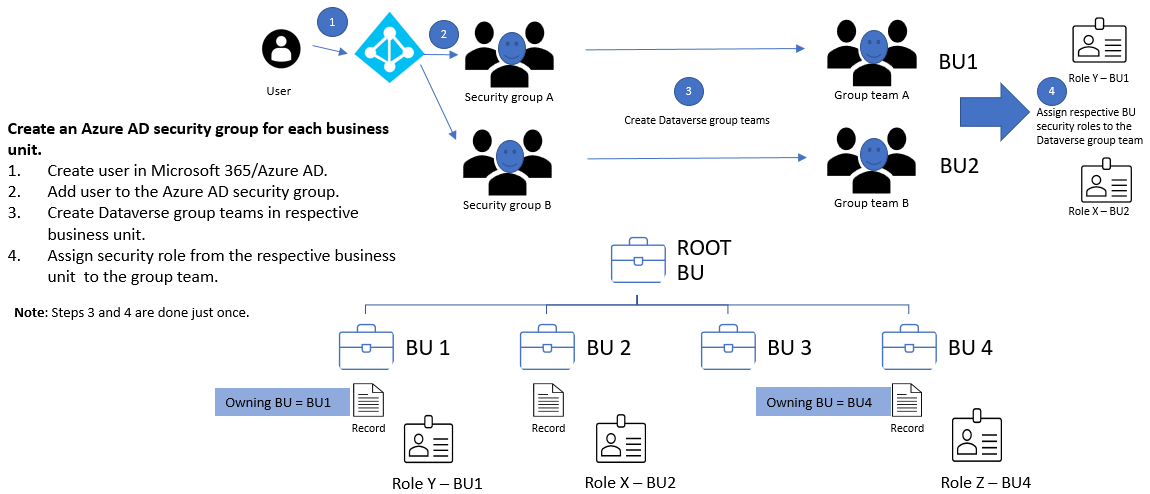
Tenant - Awith this role can only see records owned by theTenant - ABusiness Unit. - Use Teams for User Management: For each tenant BU, create a Dataverse Team (Type = Owner). Assign your "Tenant User" security role to this team. When you onboard a new user for a customer, you simply add them to the corresponding Dataverse Team. This is much more scalable than managing individual user role assignments.
A common and highly effective pattern is to link your Dataverse security to Azure Active Directory (now Entra ID) security groups.
3. Handling Cross-Tenant Access with Modernized Business Units
The traditional model is rigid: a user belongs to one BU, and their access is determined by that BU's hierarchy. But what about your own support staff? How do they access data in multiple tenant BUs to troubleshoot issues?
In the past, this required complex workarounds like sharing records or creating multiple user accounts. Today, we use Modernized Business Units. This feature allows a user in one BU to be assigned a security role from a different BU, enabling a "matrix" access pattern.
First look at Modernized Business Units in Microsoft Dataverse
Scott Durow provides an excellent explanation and demo of this powerful new feature. It's a fundamental shift in how Dataverse security can be managed.
Watch the video, paying special attention to the explanation of the old challenges, how the new functionality works, and the summary of the fundamental shift. This directly addresses the scenario of a support team needing cross-tenant access.
The key takeaways are:
- You can now assign a security role to a user from any business unit, not just their own.
- The record's
Owning Business Unitis now a distinct field, decoupled from the recordOwner's business unit. - For your multi-tenant scenario: Your support team users would reside in your own company's BU (e.g., "ISV Support BU"). When they need to access a customer's data, you would programmatically or manually assign them a role (e.g., "Tenant Admin") from that specific customer's BU. This grants them temporary, targeted access without changing their primary BU.
4. A Note on Multi-Tenancy at the Azure AD Level
It's important to distinguish the model we've discussed from another form of "multi-tenancy".
- Model 1 (Our Focus - SaaS Provider): You build and host the app in your own Power Platform tenant. Customers (users) from different organizations access your single application instance. We use Business Units to separate them.
- Model 2 (ISV App - Multi-AAD Tenant): You build an application that is designed to be installed by customers into their own Power Platform tenants.

Model 2 involves registering your app as a "multi-tenant" application in Azure AD. When a customer wants to use your app, their admin grants consent, and an "Application User" is created in their Dataverse environment. Your backend code then authenticates as this application user to interact with their data. While a deeper dive is a topic for Azure integration, it's crucial to recognize this as a distinct architectural pattern. For today's outcome, we are focused on Model 1.
Test your understanding!
You are designing a SaaS helpdesk application on the Power Platform. You have two customers: "Alpha Corp" and "Beta LLC". Your own company is "SaaS Inc."
Your requirements are:
- Users from Alpha Corp must only see Alpha Corp tickets.
- Users from Beta LLC must only see Beta LLC tickets.
- A support team from SaaS Inc. needs to be able to see and manage tickets for both Alpha Corp and Beta LLC.
Describe the high-level security model you would design in your production environment using Business Units, Security Roles, and Teams. How would you enable access for the SaaS Inc. support team?
Show answer
- Business Units: Create three child Business Units under the root:
Alpha Corp,Beta LLC, andSaaS Inc.. - Security Roles: Create a "Helpdesk User" role with Business Unit level Read/Write/Create privileges on the
Tickettable. - Teams: Create a Dataverse Team in the
Alpha CorpBU named "Alpha Corp Users" and another in theBeta LLCBU named "Beta LLC Users". Assign the "Helpdesk User" role to both of these teams. When onboarding users, add them to their respective company's team. - Support Team Access: Place the support team users in the
SaaS Inc.Business Unit. To grant them access to customer data, enable and use Modernized Business Units. Assign the "Helpdesk User" (or a more privileged "Helpdesk Admin") role to the support users from theAlpha CorpBU and from theBeta LLCBU. This gives them access to both tenants' data without them having to switch BUs or use workarounds.
Conclusion
You now have a robust and modern framework for designing a secure multi-tenant application on the Power Platform. Your existing knowledge of Dynamics 365 security is a massive advantage, and by applying it to this SaaS pattern, you're operating at an advanced architectural level.
Key Takeaways:
- The standard multi-tenant pattern in Dataverse uses Business Units within a single environment to create "virtual silos" for each customer.
- Security Roles with
Business Unitscope are the primary mechanism for enforcing these tenant boundaries. - Modernized Business Units are the solution for enabling cross-tenant access for privileged users, such as your internal support staff, breaking the old hierarchical limitations.
- This Dataverse-centric model is distinct from a multi-AAD-tenant model, where your app is installed in each customer's own environment.
In our next lesson, we will zoom back into the data layer. Now that we've designed the security container for our data, we'll focus on how to design a Dataverse data model, selecting appropriate relationship types and behaviors to enforce business logic and optimize performance.