Hello! Welcome to the final lesson in our module on Power Platform Solution Architecture.
In our last lesson, we established the fundamental ALM principle of using unmanaged solutions for development and managed solutions for deployment. This ensures that your downstream environments like UAT and Production are stable, versioned, and protected from ad-hoc changes.
But what happens when you need to deploy an update? Or when multiple managed solutions from different teams touch the same component? Or when a quick, unmanaged hotfix is applied directly in production? This is where the concept of solution layering comes into play. It's the engine that powers versioning and conflict resolution in Dataverse.
Today, we will address the learning outcome: Explain the concept of solution layers and the merge behavior of solution components. Understanding this is crucial for troubleshooting deployment issues and designing complex, multi-solution architectures.
1. The Hierarchy of Customizations: Solution Layers
Every component in a Dataverse environment, like a table, form, or app, can be thought of as a stack of layers. The final behavior of that component is determined by the properties defined in the top-most layer.
There are two fundamental types of layers:
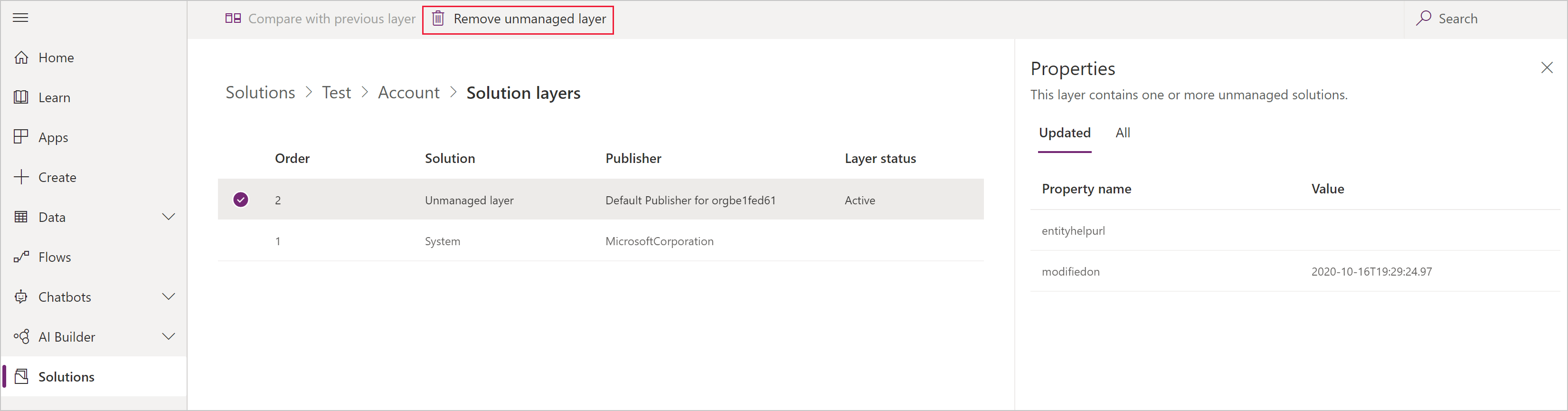
- The Unmanaged Layer: There is only one unmanaged layer in an environment. All ad-hoc customizations you make directly in an environment (often called "active customizations") and all components imported via an unmanaged solution reside in this single layer. This layer always sits at the very top of the stack.
- Managed Layers: Below the unmanaged layer, there can be multiple managed layers. Each managed solution you import creates its own layer. If you import
Solution Aand thenSolution B, the stack will look like this:Solution B(top),Solution A(bottom). This is often called a "Last one in wins" model. At the very bottom of all managed layers is the System layer, which contains the default platform components.
The following article from Microsoft Learn provides the official definition.
To start, please read the introductory section of the Microsoft Learn article 'Solution layers' to solidify your understanding of the basic layering structure.
Read the section titled 'Solution layers', focusing on the distinction between the 'Unmanaged layer' and 'Managed layers', and the description of how multiple managed solutions are stacked.
This image provides a great visual from the Power Apps interface, showing how you can inspect these layers.
2. Manipulating Layers: Upgrades, Updates, and Patches
The different options you see when importing a solution are, in effect, tools for manipulating these layers. Your extensive experience with deployments will make the strategic implications of these choices immediately apparent.
The following video provides an excellent practical demonstration of how different import choices affect the solution layers and the overall state of the environment.
Managed Properties Power Apps | Update /Upgrade Solution | Patch Solution | Clone Solution Powerapps
This video from DS TechMirror provides a hands-on look at the 'Upgrade', 'Update', 'Stage for Upgrade', and 'Patch' options. Watching these demos will make the abstract concept of layers very concrete.
Please watch the following segments carefully: Upgrade vs. Update (09:18 - 20:51): Pay close attention to the difference in outcomes. Notice how 'Upgrade' correctly removes a deleted column, while 'Update' leaves it behind, causing the target environment to become out of sync with the source. Stage for Upgrade (20:40 - 26:46): Observe how this creates a temporary holding solution (_Upgrade). This is a perfect demonstration of a temporary top layer that is later merged down. Patching and Cloning (26:46 - 36:53): See how a 'Patch' creates a new, small, dependent solution layer for a minor fix and how 'Cloning' the parent solution rolls up (merges) these patch layers into a new base version.
Let's summarize the behaviors you just saw in the video:
- Upgrade: This is the standard, recommended approach. It replaces the entire old solution layer with the new one. If a component was deleted in the source, it gets deleted in the target. This keeps environments in sync.
- Update: This option merges the new solution with the old one. It adds new components but does not remove components that were deleted in the source. This should generally be avoided as it leads to environment drift.
- Stage for Upgrade: This imports the new version as a temporary
_Upgradelayer on top of the old one. The system's behavior is defined by this top layer. However, the old solution is not removed until you explicitly click "Apply Upgrade," which then merges the layers and cleans up the old version. This allows for a controlled cutover. - Patch: A patch is a small, dependent solution used for minor updates or hotfixes. It creates a new layer on top of its parent solution. Patches are useful because they are lightweight and can be easily uninstalled to revert a specific change.
- Clone Solution: This action merges all existing patches for a solution into a new, single version of the base solution, effectively "flattening" the layers. This unlocks the parent solution for the next cycle of major development.
3. "Top Wins" vs. Merge Behavior
Now that we know how layers are created and stacked, the final question is: how does the system calculate the final behavior of a component? For most components, the rule is simple: Top Wins. Whatever is defined in the top-most layer is what you get at runtime.
However, for a few specific and complex components, Dataverse is smarter. Instead of just taking the top layer, it merges the definitions from different layers together.
The Microsoft Learn article 'Solution layers' explains this critical distinction. It's essential to know which components merge and which ones don't.
Read the section 'Merge behavior'. Focus on identifying the three component types that have special merge logic, as all others follow the 'Top wins' rule.
As the article states, the components with special merge behavior are:
- Model-driven Apps
- Forms
- Site Maps
Given your background with Dynamics 365, understanding how form customizations are merged is particularly important.
How managed solutions are merged in Power Platform
This companion article, 'How managed solutions are merged', provides the specific details for how forms and other components are handled.
Read the sections 'Merge form customizations' and 'Merge navigation (SiteMap) customizations'. For forms, pay special attention to the concept of the 'Conflicts Tab' and the best practice of adding new fields into new containers (tabs or sections) to avoid merge conflicts.
The Form Merge Process
When multiple solution layers modify the same form, the system doesn't just pick one version. It reads the FormXML from each layer and combines them.
- Additive Changes: If
Solution Aadds Field A to a form section andSolution Badds Field B to the same section, the final form will show both Field A and Field B. - Conflicts: If changes conflict in a way the system can't resolve, it will create a Conflicts Tab on the form and place the problematic components there. It's then up to a customizer to move these components to their desired location in an unmanaged layer and remove the tab.
- Best Practice: To avoid conflicts, when you are customizing a form from another managed solution, it's best to add your new fields or controls inside new container elements (like a new tab or a new section on an existing tab) rather than adding them directly into a container from the base solution.
Test your understanding!
You have a production environment with the following solutions installed in order:
- VendorSolution v1.0 (Managed): Contains the Account table and a main form. On the form, it sets the "Account Name" field to be Business Required.
- YourSolution v1.0 (Managed): Also customizes the Account main form. It adds a new section with a custom field called "Approval Status".
After these are deployed, a junior developer logs into production and, as a quick fix, makes an unmanaged customization to make the "Phone" field Business Required.
Describe the final state of the Account main form. What is the layer stack for the form, and which properties come from which layer?
Show answer
The final form will be a merge of all three layers.
Layer Stack (from top to bottom):
- Unmanaged Layer
- YourSolution v1.0 (Managed)
- VendorSolution v1.0 (Managed)
- System Layer
Final Form Behavior:
- The "Phone" field will be Business Required. This property comes from the Unmanaged Layer, which is at the top.
- The form will include the new section containing the "Approval Status" field. This is merged in from the YourSolution v1.o layer.
- The "Account Name" field will be Business Required. This property is inherited from the VendorSolution v1.0 layer. Since neither of the top two layers overrode this specific property, the definition from the lower layer applies.
This demonstrates how the system merges the form structure from different layers while applying a "top wins" rule for individual property settings.
Conclusion
You have now completed the solution architecture module. By understanding the principles of managed solutions and the mechanics of solution layering, you have the foundational knowledge for building, deploying, and maintaining robust and governable Power Platform applications.
Key Takeaways:
- Customizations exist in a stack of layers: a single Unmanaged layer at the top, followed by one or more Managed layers.
- For most components, the Top Wins rule applies: the top-most layer defines the component's behavior.
- For Forms, Model-driven Apps, and Site Maps, the platform intelligently merges definitions from multiple layers.
- Solution import options (
Upgrade,Update,Patch) are tools for developers to strategically manage these layers during the ALM process.Upgradeis the standard, whilePatchesare for tactical fixes.
Up Next:
With our ALM foundation firmly in place, we will pivot in the next module to advanced server-side development. Drawing on your deep experience with classic Dynamics 365, we will start by exploring a critical strategic decision in modern plugin development: evaluating synchronous vs. asynchronous plugin execution and selecting the appropriate pipeline stages for different business requirements.