Hello! Welcome to your second lesson.
In our last session, we explored JSON, the standard format for structuring data that applications use to communicate. You learned how to read and interpret JSON objects and arrays—the "what" of data exchange.
Today, we'll build on that by exploring how that data is actually requested and transported across the web. We will focus on the most common standard for this process: the REST API. This lesson is designed to help you understand the fundamental "conversation" between a user interface and a server. For you as a designer and aspiring architect, this is the critical link between the beautiful, intuitive interfaces you create and the data that brings them to life.
This brings us to our learning outcome for this lesson: Explain the request/response cycle of a REST API (method, endpoint, status codes, body).
1. What is a REST API?
An API, or Application Programming Interface, is essentially a set of rules that allows different software applications to talk to each other. REST (REpresentational State Transfer) is the most popular architectural style for creating these rules.
Think of it like ordering food at a restaurant:
- You (the client) have a menu of options.
- The kitchen (the server) has the food (resources).
- You give a structured order to the waiter (the API).
- The waiter brings back exactly what you asked for.
REST APIs work over the web using the same protocol as your web browser (HTTP). They allow a client (like a mobile app or a website) to request a "representation" of the "state" of a resource from a server. In simpler terms, you ask for data about something (like a user profile, a product, or a list of transactions), and the server sends it back, usually in JSON format.
To get a quick visual overview of what a REST API is and why it's so common, please watch the first minute of this video.
What Is REST API? Examples And How To Use It: Crash Course System Design #3
This short clip from ByteByteGo's series on System Design gives a high-level introduction to REST APIs.
Watch from 00:07 to 00:56. Focus on understanding that a REST API is a standard way for applications to communicate over the internet.
Now that you have a general idea, let's break down how this "conversation" actually happens. The entire process is called the request-response cycle.
2. The Request-Response Cycle
Every interaction with a REST API follows a simple cycle:
- The client (e.g., your mobile app) initiates a request to the server.
- The request travels over the network to the server.
- The server processes the request.
- The server generates a response and sends it back to the client.
- The client receives the response and takes action (e.g., displays the data in the UI).
To understand this cycle, we need to look at the anatomy of both the request and the response.

Let's dissect each part of this diagram.
3. The Anatomy of a Request
A client's request is a structured message that tells the server exactly what it wants. It consists of four main parts.
To guide our exploration, please use the following article as a reference. We'll be looking at specific parts of it as we go.
The core components of an API-based HTTP request
This article, 'The core components of an API-based HTTP request,' provides a clear, component-by-component breakdown of how API requests are structured. We will use it to understand each piece of the puzzle.
You don't need to read the whole article at once. Keep it open and refer to the specific sections mentioned below as we cover each component. Start by skimming the introduction to see the six parts it will cover (we'll focus on the main ones).
a. The Endpoint (The "Where")
An endpoint is a specific URL that represents a resource. It's the address where you send your request. A service will have different endpoints for different resources.
https://api.twitter.com/2/usersmight be the endpoint for users.https://api.twitter.com/2/tweetsmight be the endpoint for tweets.
For more details and examples, read section 1 of "The core components of an API-based HTTP request."
b. The Method (The "What")
The method is an HTTP verb that tells the server what action you want to perform on the resource. The four most common methods map directly to the CRUD acronym (Create, Read, Update, Delete):
| Method | Action | CRUD Equivalent |
|---|---|---|
| GET | Retrieve data | Read |
| POST | Create new data | Create |
| PUT | Update/replace existing data | Update |
| DELETE | Remove data | Delete |
This is a fundamental concept. The method you choose defines the entire purpose of your request.
Please watch this segment to see how these methods relate to actions you'd take in an application.
This clip from IBM Technology explains the core HTTP methods by mapping them to the familiar CRUD operations.
Watch from 04:13 to 05:14. Pay close attention to how each verb—POST, GET, PUT, DELETE—corresponds to a specific action.
Now, read section 2 of "The core components of an API-based HTTP request" for a textual summary of these methods.
c. The Headers (The "Metadata")
Headers provide additional information, or metadata, about the request. They are key-value pairs that aren't displayed to the user but are essential for the server to process the request correctly. Common headers include:
Authorization: Carries credentials to prove who you are (e.g., an API key or token).Content-Type: Tells the server what format the data in your request body is in (e.g.,application/json).
Read the section titled 'Introducing HTTP headers' within the article to see examples.
d. The Body (The "Message")
The body (also called the payload) contains the data you want to send to the server. This is where your knowledge of JSON comes in!
- POST requests use the body to send the new data you want to create.
- PUT requests use the body to send the updated data.
- GET requests do not have a body, as they are only for fetching data.
Read section 3 of the article ("HTTP Request Body") to understand when and why the body is used.
4. The Anatomy of a Response
Once the server processes the request, it sends a response back. The response also has a clear structure.
a. The Status Code (The "Result")
This is perhaps the most critical part of the response for a UI/UX designer. The HTTP status code is a 3-digit number that tells you the outcome of the request at a glance. They are grouped into categories:
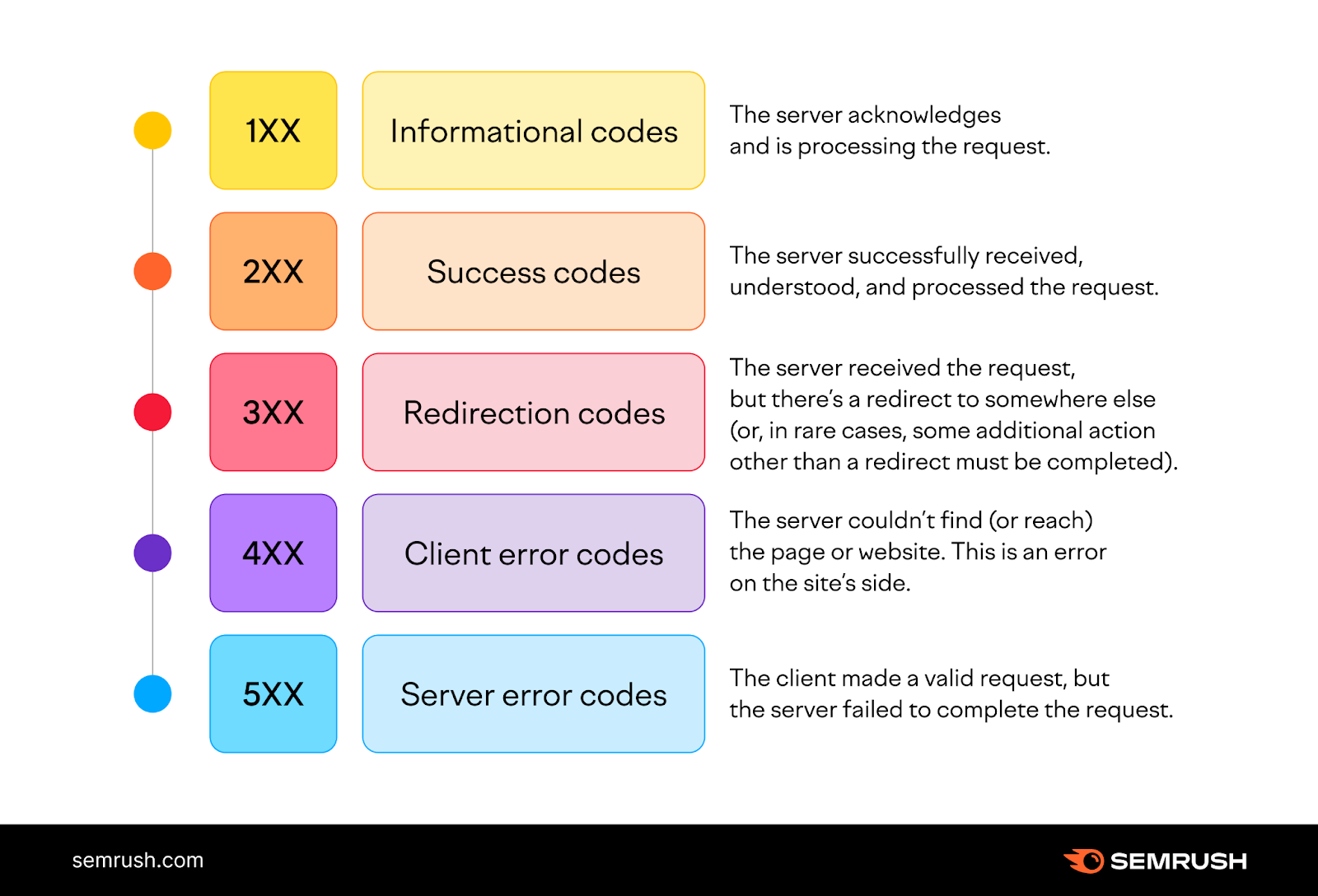
- 2xx (e.g.,
200 OK,201 Created): Success! Everything worked as expected. - 4xx (e.g.,
404 Not Found,401 Unauthorized): Client Error. Something was wrong with your request (e.g., you requested a resource that doesn't exist or you're not logged in). Your UI must handle this by showing an appropriate error message. - 5xx (e.g.,
500 Internal Server Error): Server Error. Something went wrong on the server's end. The user can't fix this, so your UI should inform them and suggest trying again later.
For a list of common codes, refer to the section 'HTTP Status Codes – Know if your request worked' in the article.
b. Headers and Body
The response also contains headers (e.g., telling the client how long to cache the data) and a body. For a successful GET request, the response body will contain the data you asked for, usually as a JSON object or array that your application can then parse and display.
Conclusion
You've now dissected the entire request-response cycle, the backbone of how modern digital products work. Understanding this flow is a massive step from being a UI/UX designer to becoming a system architect. It allows you to have more meaningful conversations with engineering teams and to design experiences that are not only beautiful but also technically sound and resilient.
Key Takeaways:
- REST APIs are a set of rules for applications to communicate over the web.
- The request-response cycle is the fundamental interaction pattern.
- A request consists of an endpoint (URL), a method (verb like GET, POST), headers (metadata), and an optional body (data payload).
- A response consists of a status code (outcome like 200, 404), headers, and a body containing the requested data or an error message.
- As a designer, you must consider how the UI will react to different status codes—success, client errors, and server errors.
In our next lesson, we will look at API contracts. Now that you know how the conversation works, we'll examine the "rulebook" or documentation that defines the specific endpoints, methods, and data structures for a given API. This will enable you to read API documentation and understand exactly what data is available for you to use in your designs.