Hello! Welcome to the next lesson in our module on "Architecting Agentic Systems."
In our last lesson, you designed the "contract" for an agent's tool-use function—defining its name, purpose, parameters, and return values. You specified what a tool can do and what it needs to work. But what happens when the agent encounters a task that is too complex, too risky, or simply outside the scope of its defined tools?
Today, we'll answer that question. Your learning outcome is to diagram a human-agent-human escalation path with defined triggers for handoff. This is a fundamental pattern for building safe and reliable AI systems.
From a UI/UX perspective, this is not about designing a failure state, but a collaboration state. You are designing the graceful and context-rich moment when an automated system intelligently decides to involve a human expert. This ensures user trust and successful outcomes, even when automation reaches its limit.
Why Escalate? The "Human-in-the-Loop" Pattern
An AI agent shouldn't be expected to handle every situation perfectly. For high-stakes decisions, complex problems, or emotionally charged interactions, bringing a human into the loop is a feature, not a bug. It provides a crucial safety and quality control layer.
This image provides a simple conceptual model for this division of labor.

To see a practical example, let's watch the introduction to a video that explains this concept using a banking agent.
How to Build Human-in-the-Loop for AI Agents (Practical Guide)
The video 'How to Build Human-in-the-Loop for AI Agents' by Dave Ebbelaar starts by explaining why this pattern is so beneficial in real-world applications.
Watch the first 1 minute and 37 seconds. Notice how the banking agent can handle simple tasks like checking a balance but requires human approval for a high-value money transfer. This is the essence of an escalation trigger.
The Triggers: When to Hand Off to a Human
The decision to escalate can't be arbitrary. A robust system relies on well-defined triggers. An agent must be able to detect specific signals in the conversation or task that indicate a human should take over.
Let's explore the common categories of these triggers.
AI Escalation Management: Mastering Handoffs in Modern Support
The article 'AI Escalation Management' provides an excellent, detailed list of the critical triggers that should drive an AI to escalate a task.
Read the section titled 'The Triggers That Should Drive AI Escalation'. As you read, categorize the triggers in your mind. For example, 'Severity' is about the task, while 'Sentiment' is about the user.
Based on that reading and other best practices, we can group escalation triggers into four main categories:
-
Confidence-Based Triggers: The agent's own uncertainty is the signal.
- Low Confidence Score: The model's confidence in its understanding of the user's intent, the data it retrieved, or the answer it generated is below a set threshold.
-
Task-Based Triggers: The inherent nature of the task requires a handoff.
- High Severity/Risk: The task involves a security issue, a large financial transaction, or a potential compliance breach (e.g., transferring $5,000, discussing a medical diagnosis).
- High Complexity: The problem requires multi-step reasoning, troubleshooting, or knowledge outside the agent's defined domain.
- High-Value Interaction: The user is a VIP customer, is approaching a contract renewal, or has been identified as a churn risk.
-
User-Based Triggers: The user's input or emotional state is the signal.
- Explicit Request: The user directly asks to speak to a person (e.g., "connect me to an agent").
- Negative Sentiment: The agent detects frustration, anger, or confusion in the user's language.
-
Performance-Based Triggers: The agent's interaction history is the signal.
- Repetition/Loops: The user asks the same question multiple times, indicating the agent's responses are not helpful.
- SLA Breach: A response is taking too long, risking a breach of the service-level agreement.
The Escalation Path: A Diagram of the Handoff
Now that we know when to escalate, let's map out how. The "human-agent-human" path describes the flow of control and information. It often looks like this:
- Human (User) initiates a task with an Agent.
- The Agent begins processing but detects a trigger.
- The Agent escalates to a Human (Expert/Approver).
- The Human (Expert) reviews the context and provides input (e.g., approval, a decision, an answer).
- The Agent receives the human's input and resumes the task to completion.
This diagram shows how escalation to a human is one of several possible handoffs in a system.
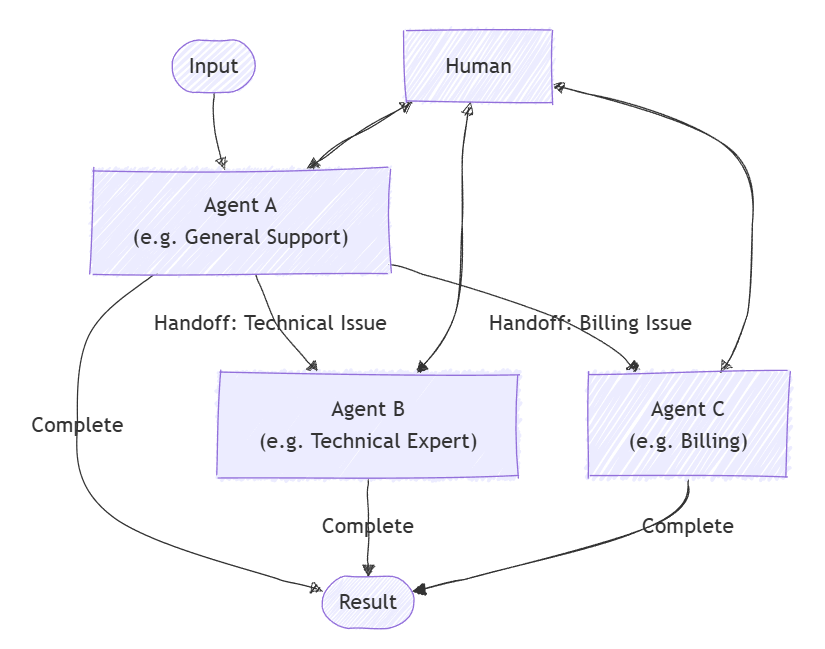
To build this flow correctly, the system needs a specific architecture. A critical mistake would be to just pause the agent's process and wait. This is fragile and doesn't work in real applications where users might take minutes or hours to respond. The robust solution involves saving the agent's state and resuming later.
How to Build Human-in-the-Loop for AI Agents (Practical Guide)
Let's return to the 'How to Build Human-in-the-Loop' video. The second half explains the full architectural pattern for a real-time chat application.
Watch the segment from 12:19 to 19:17. Follow the diagram step-by-step. Pay close attention to the role of the 'State Store' (database) and how the process is not paused but rather halted and then resumed via a new, separate request. This is the core of a scalable escalation architecture.
The key architectural steps you just saw are:
- Trigger Detection: The agent identifies a reason to escalate (e.g., transfer amount > $100).
- State Serialization: The agent stops and saves its current context to a database. This includes the conversation history, the pending action, and any parameters (e.g., transfer amount and recipient).
- Handoff to Human: The system presents a UI to the human expert/approver, asking for input.
- Human Input: The human makes a decision (e.g., clicks "Approve").
- Stateless Resume: The human's decision triggers a new API call. The system loads the saved state from the database, combines it with the human's input, and resumes the process.
Your Turn: Diagram an Escalation Path
Let's apply this by diagramming an escalation path for a fintech application.
Scenario: An AI assistant helps a user set up a new recurring monthly payment. The business rule is that any new recurring payment over $1,000/month requires manual approval from the user for security.
Your Task:
Create a simple sequence diagram or flowchart that illustrates the human-agent-human escalation path for this scenario.
Instructions:
- Your diagram should include the following actors/components:
- User
- Frontend (Chat UI)
- AI Agent (Backend)
- State Store (Database)
- Map out the flow of events, starting from the user's initial request.
- Clearly label the Trigger for the escalation.
- Indicate where the agent's State is Saved and where it is Loaded.
- Show the final confirmation being sent back to the user.
Take about 10-15 minutes for this task. The goal is to visually represent the architectural pattern we've just discussed.
Click to see an example diagram
Here is a simplified sequence diagram for the scenario:
sequenceDiagram
    participant User
    participant Frontend
    participant AI Agent
    participant State Store

    User->>Frontend: "Set up a recurring payment of $5000/month to 'Landlord'"
    Frontend->>AI Agent: process_payment_request(amount: 5000, recipient: "Landlord")

    AI Agent->>AI Agent: **Trigger:** amount > 1000, requires approval
    AI Agent->>State Store: **Save State:** {action: "transfer", amount: 5000, ...}

    AI Agent->>Frontend: Signal: "approval_required"
    Frontend->>User: Display UI: "Approve $5000/month payment?" [Approve] [Deny]

    User->>Frontend: Clicks [Approve]
    Frontend->>AI Agent: execute_approved_action(approval: true, state_id: "xyz")

    AI Agent->>State Store: **Load State** using state_id "xyz"
    AI Agent->>AI Agent: Resume process: Execute payment setup
    AI Agent->>Frontend: Signal: "payment_setup_complete"

    Frontend->>User: Display message: "Your recurring payment is now set up."
Conclusion
You've now learned how to design one of the most important safety and collaboration features in an AI system. By defining clear triggers and architecting a robust handoff mechanism, you ensure that agents can operate autonomously for most tasks while seamlessly bringing in human expertise when it matters most.
Key Takeaways:
- Human-in-the-loop (HITL) is a design pattern where an AI escalates to a human for approval, expertise, or empathy.
- Escalation is driven by specific triggers, which can be based on the agent's confidence, the task's nature, the user's input, or the system's performance.
- A scalable escalation architecture involves halting the process, serializing (saving) the agent's state, and resuming via a new request after receiving human input. This avoids fragile, long-running processes.
- Designing this path is a key UI/UX challenge, involving the clear communication of the need for escalation and the design of the interface for human intervention.
Next Lesson Preview
In this lesson, we saw an agent hand off a task to a human. In our next lesson, we will expand on this idea of coordination to see how an agent can orchestrate a workflow involving multiple steps or even multiple other agents. We will learn how to create an interaction flow diagram for a multi-step agent orchestration workflow.