Introduction
In our previous lesson, we established the two fundamental parameters of digital audio: sample rate and bit depth. You learned how they define the resolution of a digital audio signal on the time and amplitude axes, respectively. We concluded that for professional work, recording at 24-bit with a sample rate of at least 48 kHz is the standard.
This lesson addresses the logical next question: how is this stream of digital ones and zeros packaged, stored, and shared? We will explore the world of digital audio file formats, the containers that hold our precious audio data. By the end of this lesson, you will be able to distinguish between the main categories of audio formats and identify the most common types—specifically WAV, AIFF, and MP3—and understand their precise roles in a professional audio workflow. This completes our foundational module on the principles of digital audio, preparing you to trace the signal path into the digital domain in our next module.
Containers and Codecs: The Building Blocks of a File
Before diving into specific formats, it's essential to understand two key terms: container and codec.
- A container is the file itself—the wrapper that holds everything together. It's identified by the file extension (e.g.,
.wav,.mp3). - A codec (short for coder-decoder) is an algorithm used to encode the audio data, often compressing it to save space. When you play the file, the same codec is used to decode the data back into an audio stream.
In some cases, like with MP3, the format name refers to both the container and the codec. In other cases, a single container type might hold audio encoded with different codecs. This distinction is crucial for understanding why different files of the same "type" can have vastly different characteristics.
The following video provides an excellent overview of the main categories of audio formats and clarifies the difference between a codec and a container.
Watch this segment from the video "Explaining Audio File Formats" by ExplainingComputers. It provides a clear introduction to the key concepts we'll be discussing.
Please watch the section that distinguishes between a codec and a container. This foundational knowledge will help you understand the rest of the lesson.
With that distinction in mind, let's categorize audio file formats based on how they handle the audio data.
The Three Categories of Audio File Formats
Audio file formats are generally divided into three main families, defined by their approach to data compression. It's important to note that "data compression" here is different from the "dynamic range compression" we use as an effect during mixing; this is purely about reducing file size.
What's the difference between audio file formats? - iZotope
This article from iZotope gives a clear and practical breakdown of the different categories of audio files.
Start by reading the section titled General audio file types. It defines the three key categories: uncompressed, lossless, and lossy.
As the article explains, these three categories represent a trade-off between audio fidelity and file size. Let's examine the formats you'll encounter most frequently in a professional studio.
1. Uncompressed Audio: The Studio Gold Standard
Uncompressed formats are the foundation of professional audio production. They store the audio data exactly as it was captured by the analog-to-digital converter, with no data removed or altered. This makes them the most accurate and highest-fidelity formats available. The two main uncompressed formats you will work with are WAV and AIFF.
- WAV (Waveform Audio File Format): Developed by Microsoft and IBM, this is the standard format for Windows-based systems, but it is universally compatible today.
- AIFF (Audio Interchange File Format): Developed by Apple, this is the native equivalent for macOS. Like WAV, it is now universally supported.
For all practical purposes in a modern studio, WAV and AIFF are functionally identical in terms of audio quality. They are the formats you will use for recording, editing, and mixing.

What's the difference between audio file formats? - iZotope
Let's continue with the iZotope article to understand the details of uncompressed formats.
Read the sections on .WAV and .AIFF files. Pay close attention to how they are described as the "gold standard" for studio recording. Also, read the .WAV vs. .AIFF comparison to understand why they are largely interchangeable.
The key takeaway is that when quality is paramount, uncompressed audio is non-negotiable. The large file size is a necessary trade-off for preserving every detail of the original recording.
2. Lossy Compressed Audio: For Efficient Distribution
While uncompressed files are perfect for production, their large size makes them impractical for streaming, emailing, or storing large libraries on portable devices. This is where lossy compression comes in.
MP3 (MPEG-1 Audio Layer III) is the most famous lossy format. It dramatically reduces file size (often by 90% or more) by permanently discarding audio data. It does this cleverly, using principles of psychoacoustics to remove frequencies and sounds that the human ear is less likely to notice, such as very high frequencies or quiet sounds that are "masked" by louder ones.
The degree of compression is controlled by the bitrate, measured in kilobits per second (kbps).
- A higher bitrate (e.g., 320 kbps) results in less data being discarded, leading to better audio quality and a larger file size.
- A lower bitrate (e.g., 128 kbps) results in a smaller file but with more noticeable audio degradation.
A modern successor to MP3 is AAC (Advanced Audio Coding), often found in .m4a containers. It generally provides better audio quality than MP3 at the same bitrate. This is the format used by Apple's iTunes Store and YouTube.
What's the difference between audio file formats? - iZotope
Now, let's explore the world of lossy compression using the same iZotope article.
Read the sections on the .MP3 file and the .M4A/MP4 file. The image analogy is particularly helpful for understanding the "lossy" concept. Pay attention to the discussion of bitrate and the comparison in the .MP3 vs. .M4A section.
3. Lossless Compressed Audio: Quality and Efficiency
There is a third category that offers a compromise: lossless compression. Formats like FLAC (Free Lossless Audio Codec) and ALAC (Apple Lossless Audio Codec) reduce file size by about 30-50% without discarding any audio data. They work much like a ZIP file; the data is compressed for storage and then perfectly reconstructed upon playback.
While these formats aren't as central to the daily studio workflow as WAV or MP3, they are excellent for archiving finished projects or for delivering high-resolution audio to listeners who value pristine quality without the massive file size of WAV.
Putting It All Together: Professional Use Cases
Understanding these formats is crucial for making the right decisions at every stage of a project. The choice always comes down to balancing quality and convenience. This flowchart provides a simple visual guide.
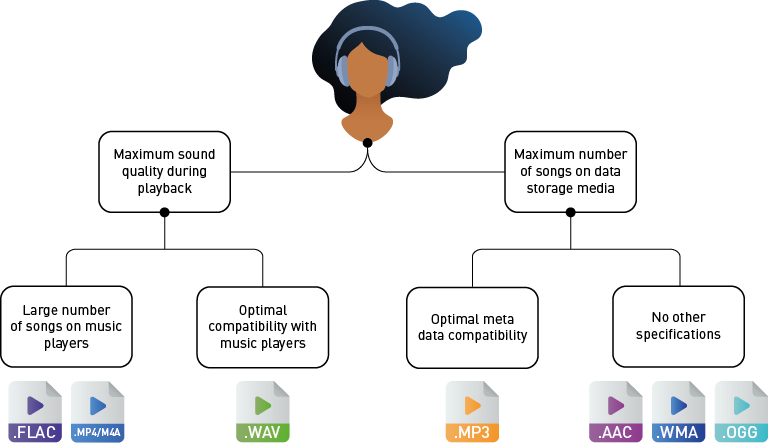
To solidify your understanding of professional workflow, let's look at some final recommendations.
What's the difference between audio file formats? - iZotope
This final reading from the iZotope article provides clear, actionable advice on which format to use and when.
Please read the section Which format should I use?. This synthesizes everything we've learned into a practical guide for studio work and client communication.
Here is a summary of the standard industry practice:
- Recording, Mixing, and Mastering: Always use an uncompressed format (WAV or AIFF) at 24-bit resolution to ensure maximum fidelity throughout the production process.
- Sending Previews to Clients: A high-bitrate MP3 (320 kbps) is often used for convenience when sending works-in-progress for feedback.
- Archiving Projects: Uncompressed WAV files are the professional standard for archival. Lossless formats like FLAC are also a viable option.
- Final Delivery to Consumer: This depends on the destination.
- For streaming services (Spotify, Apple Music), you'll typically upload a high-quality WAV, and the service will create its own compressed versions (e.g., Ogg Vorbis, AAC).
- For CD manufacturing, the final format is 16-bit, 44.1 kHz WAV.
- For selling directly to fans, providing multiple options like WAV, FLAC, and 320 kbps MP3 is a common practice.
Conclusion
This lesson completes our journey through the fundamental principles of digital audio. We have moved from the physics of sound waves to the digital representation of audio through sampling and bit depth, and finally to how this data is packaged into file formats.
Here are the key takeaways:
- Audio files consist of a container (the file) and a codec (the algorithm for encoding/decoding data).
- There are three main categories: Uncompressed (WAV, AIFF), Lossy Compressed (MP3, AAC), and Lossless Compressed (FLAC).
- Uncompressed formats (WAV/AIFF) are the standard for professional production, offering perfect audio fidelity at the cost of large file sizes.
- Lossy formats (MP3) are ideal for distribution and consumer listening, offering small file sizes by permanently removing less perceptible audio data.
- The choice of format is a critical workflow decision based on the specific task, balancing the non-negotiable quality needed for production with the convenience required for delivery.
You now have the essential theoretical knowledge of what digital audio is. In our next module, "The Recording Studio Signal Chain," we will begin to apply this knowledge by tracing the path of a sound from its source in the real world, through microphones, preamps, and converters, and into the DAW session you now know how to configure.