Hello again. In the previous lesson, you learned to classify information by its structure: structured, semi-structured, or unstructured. That tells us how information is organized. This lesson adds a different and equally important question:
What should happen to this business record over time?
An invoice, approval email, customer contract, database transaction, meeting minute, or scanned form may become a record when it documents business activity or a decision. Records management makes sure that such evidence remains available and trustworthy for as long as the organization needs it—and is then either securely disposed of or preserved in an archive.
By the end of this lesson, you will be able to map a business record through creation, active use, retention, archival, and disposal, and explain why archival transfer and destruction are two different possible outcomes.
A record has a life cycle
A business record is recorded information created or received as part of organizational work that provides evidence of an activity, decision, transaction, obligation, or relationship.
The format does not decide whether something is a record. All of the following could be records:
- an approved purchase order in an application;
- a signed PDF contract;
- a database entry recording a customer payment;
- minutes that capture a management decision;
- an email that formally approves an exception;
- a photograph documenting damage to an insured asset.
A personal email, a duplicate saved only for convenience, or a draft that was never used to make or document a decision may not be the official record. Organizations normally define these distinctions in policy.
Records management is the deliberate control of records from their creation to their final outcome. The major stages are often described as:
- Creation or receipt
- Active use
- Inactive retention and storage
- Final disposition—either secure destruction or transfer to an archive
The supplied Record Lifecycle image uses six labels rather than four. Its distribution stage is best understood as a controlled part of active use: records are shared with the people, systems, or external parties that need them. Its archive and disposition stages show the two different final paths a record can take.
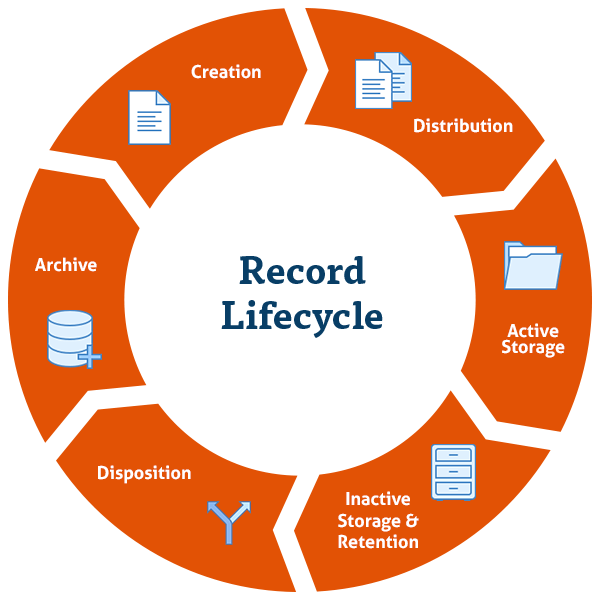
A useful distinction is:
- Retention means keeping a record for a required period.
- Archival preservation means keeping a record permanently because it has enduring historical, legal, cultural, or institutional value.
- Disposal means the final authorized action. It may be secure destruction for a temporary record or transfer to an archive for a permanent record.
So, “disposition” does not automatically mean “delete it.”
The New York State Archives overview below gives a concise explanation of the four lifecycle phases and the reasoning behind each one.
[PDF] The Records Life Cycle - New York State Archives |
Read this advisory from the New York State Archives to establish the lifecycle model before applying it to an enterprise example. Although it uses public-sector examples, its core distinction between active records, inactive retention, destruction, and archives applies broadly.
In the opening explanation, read the introductory material and all four numbered phases, beginning with the four lifecycle phases. Focus on what changes when a record moves from active use to inactive storage, and on why the final phase can lead either to destruction or archival transfer.
Stage 1: creation or receipt — capture evidence deliberately
The lifecycle begins when an organization creates a record or receives one from another party. This might happen when:
- an employee submits an expense claim;
- a customer signs a service agreement;
- an application creates an order-confirmation record;
- a supplier sends an invoice;
- a committee approves a policy and records the decision in minutes.
The goal at this point is not merely to save a file. It is to ensure that the organization can later identify the record, retrieve it, understand its context, and demonstrate that it is authentic.
For a digital record, this normally involves capturing useful metadata, connecting this lesson to the first lesson of the course. Typical metadata includes:
| Metadata item | Example for an expense claim | Why it matters |
|---|---|---|
| Record identifier | EXP-2026-00481 |
Distinguishes this claim from all others |
| Record type or series | Employee expense claims | Connects it to a retention rule |
| Creator or source | Employee ID E-1042 |
Shows origin and accountability |
| Creation date | 2026-03-12 | Supports search and retention calculations |
| Owner | Finance Operations | Identifies the responsible business area |
| Sensitivity | Internal—financial | Guides access and handling |
| Status | Submitted, approved, paid | Supports operational use |
| Related records | Purchase request, receipt, payment entry | Preserves context |
A record series is a group of records that arise from the same business function and are managed together. For example, all employee expense claims may form one record series; all supplier contracts may form another. A schedule is normally applied to the series, rather than requiring staff to invent a retention decision for every individual file.
At creation, the organization should also establish the authoritative or record copy. A single purchase order might exist in an email inbox, an ERP application, a shared drive, and a reporting export. The organization needs to know which version is the official evidence and how related copies are controlled.
Stage 2: active use — make the record useful, available, and protected
A record is active when people need to access it frequently to perform current work. It should be easy enough for authorized users to find, but not exposed to everyone.
For the expense-claim example, active use might include:
- an employee submitting the claim and attaching receipts;
- a manager reviewing and approving it;
- Finance checking policy compliance;
- Accounts Payable reimbursing the employee;
- an auditor later confirming that payment was properly authorized.
During this stage, the record may be distributed between people or systems. Distribution should be controlled: the right users receive the right version, while confidential material remains protected.
Active records therefore need several kinds of control:
- Retrievability: clear naming, indexing, classification, and search.
- Access control: only authorized people can view, edit, approve, or export the record.
- Integrity: changes are controlled, traceable, and do not undermine the record’s evidential value.
- Availability: the record remains accessible when operations need it.
- Backup and recovery: a system failure should not erase important evidence.
- Version control: staff can determine which document or record state is authoritative.
An important practical point: active does not mean permanent. A record can be vital to today’s operations and still be eligible for destruction later under an approved schedule.
The first segment of this video presents the active-to-inactive transition clearly; the later segment explains why final destruction must be authorized and documented.
The Basics of Records Management
Watch “The Basics of Records Management” from the New York State Archives. It gives a clear visual walkthrough of the lifecycle and emphasizes that final disposition is a managed decision, not an ad hoc cleanup activity.
Watch the lifecycle stages, especially the explanation of why inactive records still need to be organized and retrievable. Then watch authorized destruction to see why an organization records the basis and approval for disposal.
Stage 3: inactive retention — keep it, but manage it differently
A record becomes inactive when daily work no longer requires frequent access. It has not become unimportant; it still must be retained for a defined business, legal, regulatory, financial, contractual, or historical reason.
For example, an expense claim may become inactive after it has been approved, reimbursed, reconciled, and the relevant accounting period has closed. Finance staff may rarely open it, but it could still be needed for an audit, tax review, dispute, or investigation.
The record often moves to less expensive or less immediately accessible storage:
| Lifecycle state | Access expectation | Typical handling |
|---|---|---|
| Active | Frequent, operational access | Business application, team workspace, active repository |
| Inactive | Infrequent but still required | Managed records repository, lower-cost storage tier, controlled archive area |
| Permanent archive | Long-term preservation and access | Archival repository with preservation controls |
For electronic records, inactive storage is not simply an old folder nobody checks. The record should remain:
- identifiable and searchable;
- linked to its record category and retention rule;
- protected according to its sensitivity;
- readable despite changing software and file formats;
- available if a valid audit, regulatory inquiry, or legal matter requires it.
This is one reason “keep everything forever” is not good information management. Excess information increases storage and migration cost, slows search, makes discovery harder, and can create privacy and security risk—especially where personal or confidential information should no longer be held.
The retention schedule: the decision tool
A retention schedule is an approved set of instructions stating how long a record series must be retained and what must happen at the end of that period. In a business, it might be maintained by records management, Legal, Compliance, Finance, and the responsible business owner.
A schedule entry typically specifies:
| Schedule component | Illustrative example |
|---|---|
| Record series | Employee expense claims |
| Trigger event | End of the financial year in which reimbursement occurred |
| Retention period | Retain for the organization’s approved period |
| Final disposition | Secure destruction after the retention period |
| Exceptions | Suspend destruction when a legal hold applies |
| Responsible owner | Finance Operations |
The retention period begins from a stated trigger event, not necessarily on the day the record was created. Common triggers include contract expiry, employee termination, account closure, project completion, claim settlement, or the end of a fiscal year.
Do not invent retention periods from intuition. The applicable law, contract, regulation, policy, and jurisdiction determine the schedule. In architecture work, your responsibility is often to make sure the system can store the relevant classification, trigger, retention rule, disposal date, hold status, and evidence of final disposition.
A complete example: following a supplier contract
Consider a retailer that signs a three-year contract with a logistics provider. The signed contract is a business record because it documents a binding agreement, responsibilities, prices, and rights.
1. Creation and capture
The procurement team prepares the agreement, Legal reviews it, and both organizations sign the final version electronically.
The organization captures:
- contract ID;
- supplier name and supplier ID;
- effective and expiry dates;
- business owner;
- approved final version;
- associated purchase or sourcing event;
- sensitivity classification;
- contract record-series category;
- retention rule and trigger.
Draft versions may be useful working material, but the signed agreement is typically the authoritative record copy.
2. Active use and controlled distribution
During the contract term, Procurement, Operations, Finance, and Legal may use it to:
- check service-level commitments;
- approve invoices;
- resolve delivery disputes;
- review price changes;
- manage renewal or termination.
The signed copy needs controlled access because it may contain commercial terms. Staff should find it through an approved contract-management or records repository, rather than relying on an individual employee’s email inbox.
3. Inactive retention
When the contract expires and all operational activity ends, it may no longer be needed every day. However, it may need to be retained for the approved period because of audit, tax, liability, or dispute requirements.
It moves from active operational storage to inactive managed storage. The record is still protected, discoverable, and associated with the correct schedule.
4. A potential interruption: legal hold
Suppose the retailer and logistics provider enter a dispute about service failures. Legal issues a legal hold—also called a preservation hold or freeze notice—for records related to the dispute.
The hold pauses normal destruction. Even if the normal retention date is reached, the organization must preserve the relevant contract, emails, invoices, delivery records, and other evidence until Legal releases the hold.
A legal hold changes the timing of disposition; it does not automatically change the record’s underlying retention category.
5. Final disposition: disposal or archival transfer
Once the retention period has ended and there is no hold or other valid reason to continue retention, the approved schedule determines the outcome.
For most routine commercial contracts, the outcome is usually secure destruction. The organization should record what was destroyed, under which schedule rule, when, and with whose authorization.
Some records have enduring value beyond routine administration. A landmark agreement that created a major business, evidence of a significant corporate decision, or a historically important policy might be designated for permanent archival preservation. Its final disposition is then transfer to an archive rather than destruction.
The lifecycle can therefore be mapped as:
This is a mapping skill that will later transfer directly to information architecture. An architect needs to ask: Which system holds the record? Which metadata identifies it? Who owns the rule? Can the system enforce retention and holds? Can it prove what happened?
Common mistakes to avoid
Treating an “archive folder” as a true archive
Moving an email into an Outlook archive folder may remove it from immediate view, but it does not automatically mean the email has been classified, retained, preserved, or archived under a records policy. A real archival outcome includes a decision, a responsible authority, and preservation controls.
Treating backups as retention management
Backups support recovery after system failure. They are not automatically a records repository, and they do not replace a retention schedule. A record may need to be retained and searchable even when a backup is unavailable or impractical to search. Conversely, deleting the primary copy may not complete disposal if unmanaged copies persist in backups, exports, shared drives, or personal mailboxes.
Deleting information because it feels old
Records should not be deleted simply because storage is full or a folder looks outdated. Disposal should follow an approved schedule, check for holds, and be documented. This makes destruction defensible: the organization can show that it acted consistently and lawfully.
Retaining everything “just in case”
The opposite error is also costly. Keeping information indefinitely can increase breach exposure, privacy risk, storage cost, migration effort, and the volume that must be searched during legal discovery. Good records management means keeping records for the required period—not for an arbitrary longer period.
Forgetting accessibility
A record that technically still exists but cannot be located, opened, interpreted, or trusted has failed as evidence. Long-lived digital records may need format migration, metadata, integrity checking, and controlled access so they remain usable as technology changes.
A reusable lifecycle-map template
When you encounter a business record in a future project, create a concise lifecycle map using these fields:
| Question | What to document |
|---|---|
| What is the record? | Name, business purpose, and authoritative record copy |
| What business event creates it? | Creation or receipt trigger |
| Who owns it? | Accountable business function or role |
| Who uses it while active? | Teams, systems, and external parties with a legitimate need |
| What metadata identifies it? | ID, type, dates, owner, classification, related records |
| Where is it stored? | Active repository and inactive repository |
| What retention rule applies? | Record series, trigger event, retention period, authority |
| Can a hold apply? | Legal, audit, investigation, or other exception process |
| What happens at the end? | Secure destruction or archival transfer |
| How is the outcome proven? | Disposal authorization, audit log, transfer record, or certificate |
This template is intentionally technology-neutral. Later in the course, you will apply similar requirements to cloud services, governance tools, security controls, and Microsoft Purview. The principle remains the same: technology should support the lifecycle decision, not replace it.
Key takeaways
A record lifecycle gives an organization a controlled path from the moment evidence is created or received to its authorized final outcome.
- Creation/receipt captures the record and its essential metadata.
- Active use makes the record available for current work while protecting access and integrity.
- Inactive retention keeps the record accessible for its required period after frequent operational use has ended.
- A retention schedule defines how long a record series must be kept, the trigger for the retention period, and its approved final disposition.
- Disposition is the final authorized action: temporary records are securely destroyed, while permanent records are transferred to an archive.
- A legal hold pauses normal disposal when records may be needed for litigation, audit, investigation, or another formal matter.
- A folder labelled “archive,” a backup copy, or a manual deletion does not by itself demonstrate proper records management.
Next, you will identify the people who produce, own, manage, protect, and consume an information asset. That will add accountability to the lifecycle model: every stage needs clearly assigned roles, not merely a storage location.