Hello! In our last lesson, we completed the logic for the "sliding" pieces by implementing the queen's move generation. You saw how reusing the rook and bishop logic made that task incredibly simple—a great example of smart code design.
Today, we shift gears to a piece with a completely unique style of movement: the knight. This lesson will cover how to generate valid moves for knights using their L-shaped jump patterns.
Unlike the pieces we've covered so far, the knight doesn't move in straight lines and isn't blocked by other pieces. This means our ray-casting approach won't work here. We'll need a new strategy, which will be a fun and interesting challenge.
1. Understanding the Knight's "L-Shaped" Jump
The knight is the only piece that can "jump" over other pieces. Its move is often described as an "L-shape": two squares in one direction (horizontally or vertically) and then one square perpendicular to that.
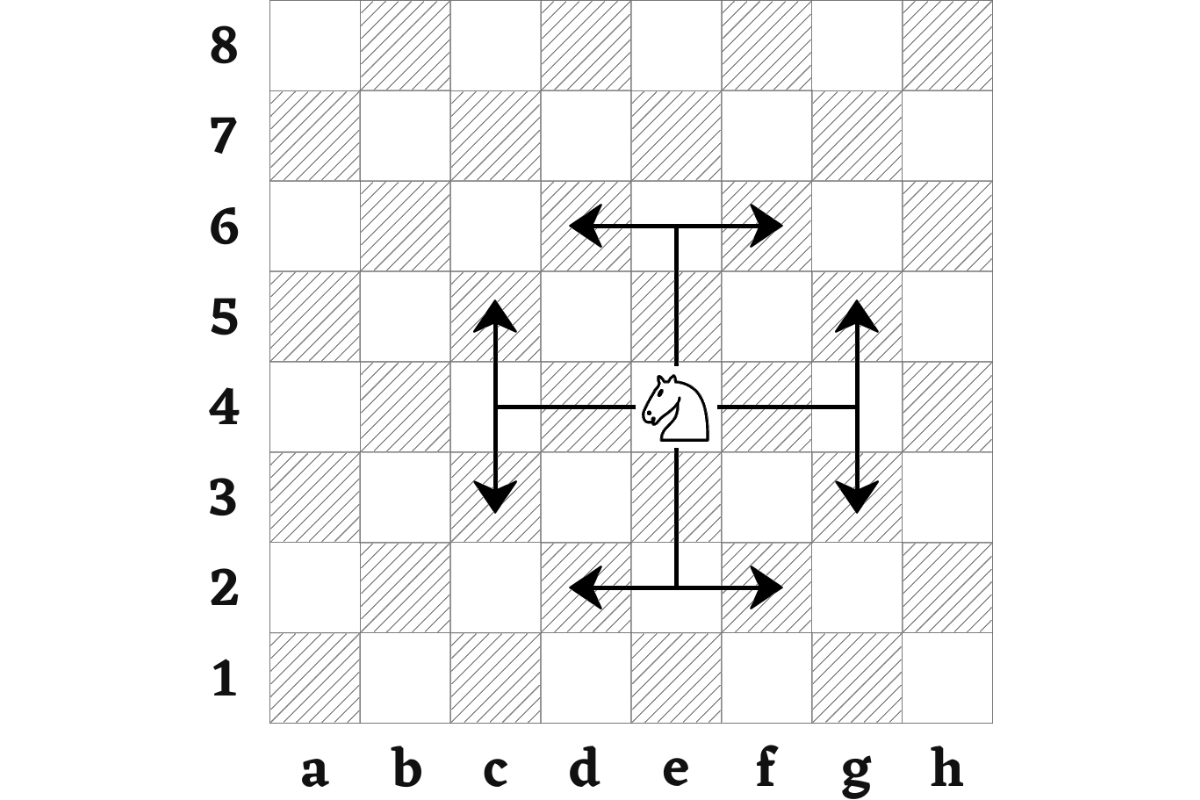
The key takeaway is that the path the knight takes is irrelevant. Only the start and end squares matter. Let's break down this L-shape into concrete coordinate changes.

As you can see from the diagram, a valid knight move is one where the absolute change in one axis is 1 and the absolute change in the other axis is 2. Because of this fixed pattern, we don't need to check for blocking pieces between the start and end squares. We only care about the final destination square.
2. A New Strategy: Fixed Move Offsets
Since a knight always moves to one of eight specific relative positions, we can hardcode these "move offsets" and check each one. This is a much simpler and more direct approach than the ray-casting we used for sliding pieces.
Our strategy will be:
- Define an array of the 8 possible
(dx, dy)offsets for a knight. - For each offset, calculate the potential destination square.
- Check if the destination is on the board.
- Check if the destination is occupied by a friendly piece. If so, it's an invalid move.
- If the destination is empty or occupied by an enemy piece, it's a valid move.
This approach is different from what we did for rooks and bishops, but it's perfectly suited for non-sliding pieces like the knight and, as you'll see later, the king.
3. Hands-On: Implementing Knight Moves
Let's write the code. Open your project and navigate to the file where you've been adding your move generation functions (e.g., src/move_generation.rs).
-
Define the
generate_knight_movesfunction. We'll start with the function signature and the list of move offsets. Note that we're usingi8for the offsets to represent both positive and negative movements.// In your move generation file use crate::{Board, Move, Piece, PieceColor, PieceType}; // Make sure you have the necessary imports pub fn generate_knight_moves(piece: &Piece, position: (u8, u8), board: &Board) -> Vec<Move> { let mut moves = Vec::new(); let (x, y) = position; // All 8 possible L-shaped move offsets for a knight let move_offsets: [(i8, i8); 8] = [ (1, 2), (1, -2), (-1, 2), (-1, -2), (2, 1), (2, -1), (-2, 1), (-2, -1), ]; // We'll add the loop logic here moves } -
Loop through the offsets and validate the moves. Now, we'll iterate over our
move_offsetsarray, calculate the target square for each, and check if it's a valid move.// Inside generate_knight_moves, after defining move_offsets for (dx, dy) in move_offsets.iter() { // Calculate the potential new position let new_x = x as i8 + dx; let new_y = y as i8 + dy; // Check 1: Is the new position on the board? if new_x >= 0 && new_x < 8 && new_y >= 0 && new_y < 8 { let target_pos = (new_x as u8, new_y as u8); // Check 2: Is the destination square occupied? match board.get_piece_at(target_pos) { Some(target_piece) => { // Check 3: Is it an enemy piece? If so, it's a valid capture. if target_piece.color != piece.color { moves.push(Move { from: position, to: target_pos }); } // If it's a friendly piece, we do nothing (not a valid move). } None => { // The square is empty, so it's a valid move. moves.push(Move { from: position, to: target_pos }); } } } }Note: I've assumed you have a helper method
get_piece_aton yourBoardstruct. If not, you can implement it like this:// In the impl Board block pub fn get_piece_at(&self, pos: (u8, u8)) -> Option<&Piece> { self.pieces[pos.0 as usize][pos.1 as usize].as_ref() }
This logic directly implements the strategy we discussed. It's clean, efficient, and tailored specifically to the knight's unique movement.
Let's look at another implementation. The Bevy chess tutorial uses a slightly different approach: it validates if a single target move is valid, rather than generating all of them. The core logic, however, is the same.
Chess game in Rust using Bevy - lmao
The article "Chess game in Rust using Bevy" implements move validation inside a method on the Piece struct. Take a look at the PieceType::Knight case.
In the code block for the is_move_valid function, find the match self.piece_type statement and look for the PieceType::Knight arm. You'll see the logical condition that checks if the absolute difference in coordinates is (2,1) or (1,2). This is the same rule we derived from the diagram, just applied to check a single move.
Our generate_knight_moves function effectively checks all 8 possible moves that would satisfy that condition.
4. Testing Your Knight Logic
As always, let's write a quick test to ensure our logic is correct. We'll add a test case to main.rs that places a knight on the board and verifies that it generates the correct moves, accounting for board edges and other pieces.
First, import the new function at the top of main.rs:
// At the top of src/main.rs
use move_generation::{... , generate_knight_moves}; // Add generate_knight_moves to your imports
Next, add this test block to the end of your main function. We'll place a knight at b1 (rank 1, file 1) and surround it with a few pieces.
// In src/main.rs, at the end of main()

println!("\nTesting Knight Move Generation:");

let mut test_board = Board::new(); // Clears the board
test_board.pieces[0][1] = Some(Piece { // White Knight at b1
    piece_type: PieceType::Knight,
    color: PieceColor::White,
});
test_board.pieces[2][0] = Some(Piece { // Friendly pawn at a3 (blocks one move)
    piece_type: PieceType::Pawn,
    color: PieceColor::White,
});
test_board.pieces[2][2] = Some(Piece { // Enemy pawn at c3 (valid capture)
    piece_type: PieceType::Pawn,
    color: PieceColor::Black,
});

let b1_pos = (0, 1);
if let Some(knight) = test_board.get_piece_at(b1_pos) {
    let knight_moves = generate_knight_moves(knight, b1_pos, &test_board);
    println!("\nMoves for test knight at b1: {:?}", knight_moves);
    println!("Total moves: {}", knight_moves.len());

    // Expected moves from b1 (0,1):
    // a3 (2,0) -> blocked by friendly pawn
    // c3 (2,2) -> valid capture
    // d2 (1,3) -> valid empty square move
    // Total should be 2
    assert_eq!(knight_moves.len(), 2);
}
Run cargo run. The assertion should pass, confirming that your function correctly identifies the two valid moves for the knight in this position. Try moving the knight to a central square like d4 (3,3) and removing the blocking pieces to see all 8 moves generated!
Conclusion
Great job! You've now implemented move generation for a non-sliding piece, adding another important tool to your chess engine's logic.
Key Takeaways:
- The knight's move is a fixed "L-shape" that can be represented by 8 coordinate offsets.
- Because knights "jump," their move generation does not require checking for blocking pieces along the path.
- The implementation strategy involves iterating through a fixed set of potential moves and validating each destination square for board boundaries and friendly pieces.
In our next lesson, we will implement move generation for the final piece: the king. Its logic will be similar to the knight's (checking a fixed set of surrounding squares), but even simpler. See you then