Hello! Welcome to our next lesson.
In the last session, we mastered Result<T, E> and the ? operator, giving us a robust way to handle operations that might fail. This is crucial for building reliable software.
Today, we're shifting our focus back to data structures. So far, we've defined single pieces of data with structs and represented choices with enums. But what if we need to handle a list of items, like all the possible moves for a chess piece? The number of moves isn't fixed—a queen in the center of the board has many more options than a trapped pawn.
This is where Vec<T> comes in. For this lesson, our goal is to create and manipulate ordered lists of data using Vec<T>. This is Rust's version of a dynamic array or list, a fundamental tool you'll use constantly in your chess project and beyond.
1. What is a Vec<T>?
You're familiar with arrays from C and Java. Rust has arrays too, but they have a fixed size that must be known when you write your code. A Vec<T>, short for "vector," is much more flexible. It's a list that can grow or shrink as your program runs.
Let's watch a quick introduction to what a Vec<T> is and how it differs from a fixed-size array.
Use the Rust Vec Type for Dynamically Expanding Arrays 🦀
This clip from Trevor Sullivan's channel provides a great overview of the Vec<T> type and its dynamic nature.
Watch from 00:50 to 01:42. The key takeaway is that Vec is for collections where you don't know the exact size ahead of time.
Under the hood, a Vec<T> stores its data on the heap. This is what allows it to be resized. The Vec structure itself, which lives on the stack, is just a small pointer to that heap data, along with its current length (how many items are in it) and its capacity (how much memory it has allocated).
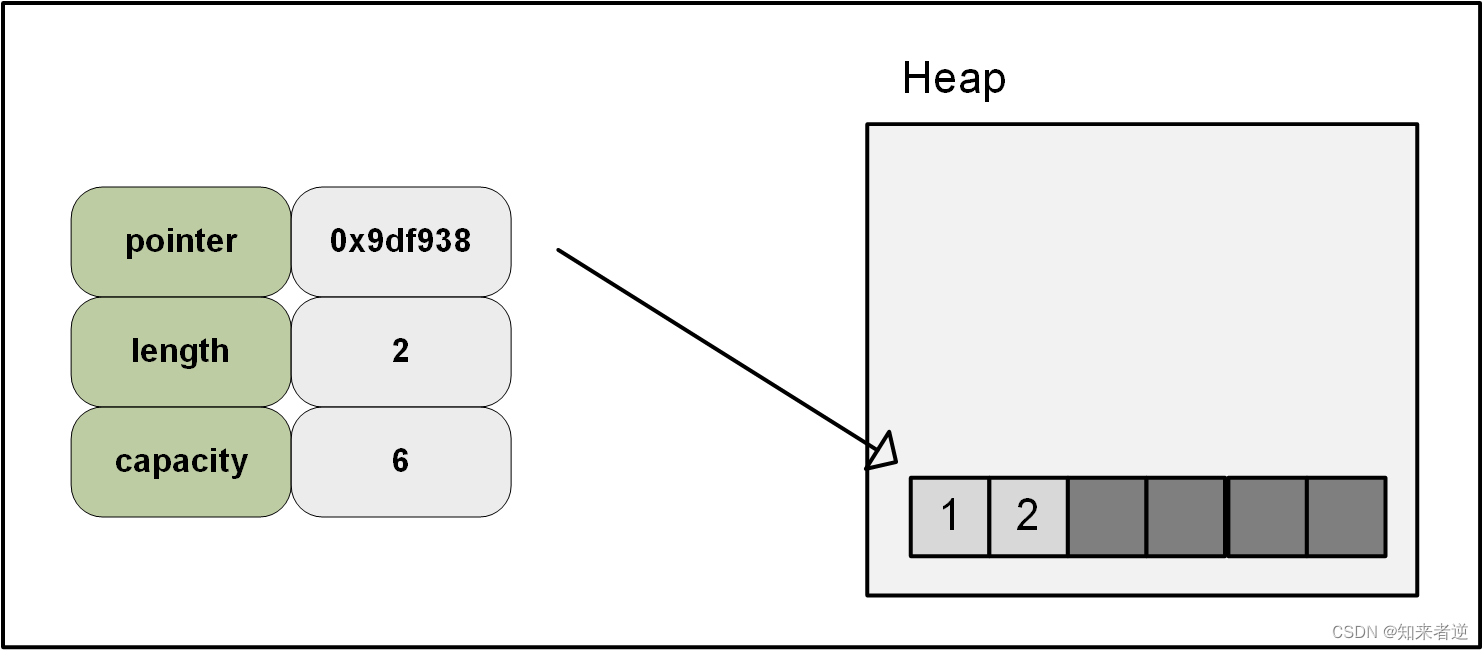
2. Creating and Populating a Vector
Now, let's get practical. How do you create a vector and add things to it? There are two common ways to create one, and adding items is straightforward.
Let's watch a video that demonstrates these initial steps.
This clip from The Dev Method channel shows the two main ways to initialize a vector and how to add new elements.
Watch from 00:44 to 04:26. Pay attention to the vec! macro for easy creation and the .push() method for adding elements. Note that you need to declare the vector as mut to be able to add to it.
To summarize the video:
- Create an empty vector:
let mut v: Vec<i32> = Vec::new();- You often need a type annotation (
Vec<i32>) so Rust knows what kind of data it will hold.
- You often need a type annotation (
- Create a vector with initial elements:
let mut v = vec![1, 2, 3];- The
vec!macro is the most common and convenient way. Rust can usually infer the type from the elements you provide.
- The
- Add an element:
v.push(4);- The
.push()method adds an element to the end of the vector. - This requires the vector to be mutable (
mut).
- The
3. Accessing and Modifying Vector Elements
Once you have a vector, you'll need to get data out of it. Like arrays in C and Java, you can access elements by their index. However, Rust provides a safer alternative that avoids program crashes.
This next clip is important because it highlights a key aspect of Rust's safety guarantees.
This video segment compares the two ways of accessing elements: direct indexing with [] and the safe .get() method.
Watch from 05:06 to 07:57. Focus on the difference in behavior when you try to access an index that is out of bounds. Notice how .get() returns an Option, a concept we covered two lessons ago.
This is a critical distinction:
v[index]: Gives you direct access. It's fast, but if the index is out of bounds, your program will panic (crash). Use this when you are certain the index is valid.v.get(index): Returns anOption<&T>. It returnsSome(&value)if the index is valid andNoneif it's out of bounds. This is the idiomatic Rust way to handle access that might fail, as it forces you to handle theNonecase.
Hands-On Practice: Your Favorite Games
Let's apply these concepts. In your src/main.rs file, create a vector to store the titles of some of your favorite video games.
- Create a new, mutable vector of
Strings using thevec!macro. Add two or three game titles. - Use
.push()to add another game to the list. - Print the number of games in your vector using the
.len()method. - Use the
.get()method to safely access the first game (index 0) and print its title. Use amatchstatement to handle theOption. - Now, try to
.get()a game at an index you know is out of bounds (e.g.,99). Yourmatchstatement should gracefully handle theNonecase.
fn main() {
    // 1. Create a vector with some initial game titles.
    let mut favorite_games = vec![
        String::from("The Witcher 3"),
        String::from("Cyberpunk 2077"),
    ];
    println!("Initial list: {:?}", favorite_games);

    // 2. Add another game.
    favorite_games.push(String::from("Elden Ring"));
    println!("After adding a game: {:?}", favorite_games);

    // 3. Print the length.
    println!("You have {} favorite games.", favorite_games.len());

    // 4. Safely access the first game.
    match favorite_games.get(0) {
        Some(game_title) => println!("The first game on the list is: {}", game_title),
        None => println!("There are no games on the list!"),
    }

    // 5. Try to access an out-of-bounds index.
    println!("\nTrying to access index 99...");
    match favorite_games.get(99) {
        Some(game_title) => println!("This shouldn't happen: {}", game_title),
        None => println!("As expected, there is no game at index 99."),
    }
}
Run this with cargo run. You'll see your code handle both valid and invalid access without crashing.
4. Iterating Over a Vector
Looping through all the elements in a list is a very common task. In Rust, how you iterate is closely tied to the ownership system. There are three main ways to do it, depending on whether you just need to read the data, modify it, or consume it entirely.
For an excellent summary of the different types of iterators, let's turn to a textual resource.
Working with Collections in Rust | A Comprehensive Guide
The article 'Working with Collections in Rust' provides clear, concise examples of the three main iteration methods. This will be a great reference for you.
Read the three short sections under '5. Understanding .iter(), .iter_mut(), and .into_iter() in Rust': **.iter()** - Immutable References **.iter_mut()** - Mutable References **.into_iter()** - Consuming the Collection Focus on what each method gives you (an immutable reference, a mutable reference, or an owned value) and when you would use each.
Let's summarize the key patterns:
- Immutable iteration (for reading): You borrow the elements without changing them.
for game in &favorite_games { println!("- {}", game); } // favorite_games is still available to use here. - Mutable iteration (for modifying): You get a mutable borrow of each element, allowing you to change it in place. Note the
*to dereference the mutable reference and modify the value itself.for game in &mut favorite_games { *game = format!("{} - Mastered!", game); } // favorite_games is now modified. - Consuming iteration (for taking ownership): The vector is moved into the loop, and you take ownership of each element. The vector cannot be used after the loop. This is less common but useful when you're transforming data and don't need the original list anymore.
for game in favorite_games {
    // `game` is now a String, not a &String.
    // The original `favorite_games` vector is gone.
}
// println!("{:?}", favorite_games); // This would cause a compile error!
5. Application to the Chess Project
How will we use this in our chess game? A Vec is the perfect tool to represent the list of valid moves for a piece.
Imagine we have a function that calculates where a rook can go from a given square. The number of moves depends on where other pieces are, so we can't use a fixed-size array. Instead, the function can build up a Vec of valid destination squares and return it.
Let's sketch out what that might look like. We haven't defined our Square struct yet, but we can create a placeholder for this example.
// We will define these types properly in a later lesson!


#[derive(Debug, Clone, Copy)] // We'll learn about `derive` soon
pub struct Square {
    pub file: u8, // 0-7 for a-h
    pub rank: u8, // 0-7 for 1-8
}

// A conceptual function to generate moves for a rook
fn generate_rook_moves(current_pos: Square) -> Vec<Square> {
    // Create an empty vector to store the moves.
    let mut moves = Vec::new();

    // --- In a real implementation, you would add logic here ---
    // 1. Check moves to the right until you hit the edge or another piece.
    // 2. Check moves to the left...
    // 3. Check moves up...
    // 4. Check moves down...
    // For now, let's just add a few dummy moves.

    moves.push(Square { file: current_pos.file + 1, rank: current_pos.rank });
    moves.push(Square { file: current_pos.file + 2, rank: current_pos.rank });
    moves.push(Square { file: current_pos.file, rank: current_pos.rank + 1 });

    // Return the completed list of moves.
    moves
}

fn main() {
    let rook_position = Square { file: 3, rank: 3 }; // Represents square d4
    let possible_moves = generate_rook_moves(rook_position);

    println!("Possible moves from d4: {:?}", possible_moves);
}
This is the core pattern we will use for every piece: create an empty Vec, populate it with valid moves according to the rules of chess, and return it.
Conclusion
Excellent work! You now understand Vec<T>, one of the most common and useful collection types in Rust.
Key Takeaways:
Vec<T>is a growable, ordered list, ideal for collections whose size changes at runtime.- You can create vectors with
Vec::new()or the convenientvec![]macro. - Use
.push()to add elements and.len()to get the size. - Access elements safely using
.get(index), which returns anOption, or directly with[index]if you are sure the index is valid. - Iterate over a vector immutably (
&), mutably (&mut), or by taking ownership, depending on your needs.
In our next lesson, we will look at deriving common traits. We've been adding #[derive(Debug)] to our structs to print them, but there are other powerful traits like Clone, Copy, and PartialEq that will make our chess-related structs much easier to work with. This will prepare us to build the core data structures for our game board.