Welcome back to your chess project!
In our last lesson, you built a parser that can understand chess moves written in UCI notation. This was a critical step in allowing a player to communicate with our game logic. Now that our program can "hear" the player, we need to give it a "heartbeat" to keep it running and manage the flow of the game.
This lesson is all about that heartbeat. We will create a main game loop that alternates turns between players. This loop will form the core structure of our playable console game, orchestrating everything from displaying the board to asking for player input and switching turns.
1. The Anatomy of a Game Loop
At its core, a turn-based game like chess follows a simple, repeating pattern:
- Show the current state of the game.
- Wait for the current player to act.
- Process the action.
- Switch to the other player.
- Repeat.
This repeating cycle is called the game loop. In many programming languages, this is implemented as a while (true) loop. Rust provides a dedicated keyword for this: loop.
Usability of infinite loop in Rust - Stack Overflow
Let's look at a quick discussion on Stack Overflow about the uses of Rust's loop keyword. It will clarify why it's the perfect tool for our game loop.
Read the question and the first two answers. Pay special attention to the comment in the second answer that provides a direct example for a command-line game: loop { game.turn() }. This is the exact pattern we're about to implement.
To manage the game's flow, our loop needs to know whose turn it is. This piece of information is part of the game state. We need to store it somewhere and update it after each valid move.
Let's look at a common way to structure the data for a chess game.
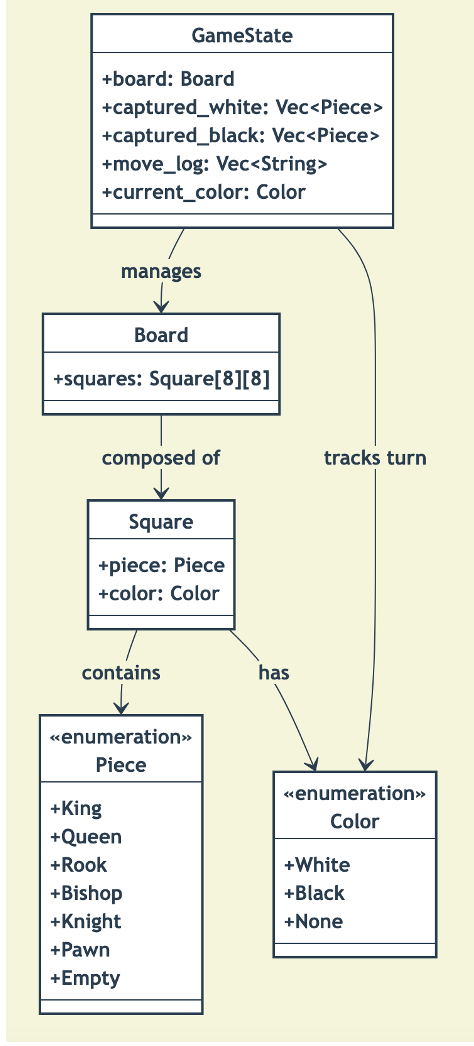
As the diagram shows, a central GameState object holds the board and, crucially, the current player's color. This is precisely the piece we need to add to our project.
2. Hands-On: Implementing Turn Management
Let's apply these concepts to our chess game. We'll start by creating a struct to manage the overall game state, then build the loop itself in main.rs.
Step 1: Create a Game Struct
While we could add the turn information directly to our Board struct, it's cleaner to create a new, higher-level struct that represents the entire game session. This separates the board's state (piece positions) from the game's state (current turn, move history, etc.).
Create a new Game struct, perhaps at the top of your main.rs file for now. It will hold the Board and the current_turn. We can use the Color enum you already have for this.
// In src/main.rs

use crate::board::{Board, Color}; // Make sure to import your Board and Color

pub struct Game {
    pub board: Board,
    pub current_turn: Color,
}

impl Game {
    /// Creates a new game with a standard starting position.
    pub fn new() -> Self {
        Game {
            board: Board::new(), // Assumes Board::new() sets up the starting position
            current_turn: Color::White, // White always moves first
        }
    }

    /// Switches the turn to the other player.
    pub fn switch_turn(&mut self) {
        self.current_turn = match self.current_turn {
            Color::White => Color::Black,
            Color::Black => Color::White,
        };
    }
}
This simple Game struct now encapsulates the two most important pieces of our game state: the board itself and whose turn it is. The switch_turn method gives us a clean way to alternate between players. This approach is directly inspired by how many game engines, including those for turn-based games, manage state transitions.
Step 2: Build the Main Loop
Now, let's replace the test code in your main function with the actual game loop. This loop will tie everything together: displaying the board, getting user input, and switching turns.
You'll need to use std::io to read a line from the console. This is a new concept, but the pattern is straightforward.
// In src/main.rs

mod board;
mod input; // Your module from the last lesson

use std::io;

// ... Game struct and impl block ...

fn main() {
    let mut game = Game::new();
    let mut user_input = String::new();

    // The main game loop!
    loop {
        // 1. Display the board and current turn
        game.board.print_board(); // You should already have a print_board method
        println!("{:?}'s turn to move.", game.current_turn);

        // 2. Clear previous input and prompt for a new one
        user_input.clear();
        println!("Enter your move (e.g., e2e4):");

        // 3. Read the user's input from the console
        io::stdin()
            .read_line(&mut user_input)
            .expect("Failed to read line");

        // 4. Parse the input
        // We trim the input to remove the newline character
        match input::parse_move(user_input.trim()) {
            Ok(mv) => {
                println!("Parsed move: {:?}", mv);
                // For now, we just parse and switch turns.
                // In the next lesson, we will validate and execute the move here.
                game.switch_turn();
            }
            Err(e) => {
                println!("Error parsing move: {}. Please try again.", e);
                // If parsing fails, we don't switch the turn. The loop continues
                // and asks the same player for input again.
            }
        }
        println!("--------------------");
    }
}
Let's break down what's happening inside the loop:
- Display State: We print the board and a message indicating whose turn it is. This gives the player the context they need to make a decision.
- Get Input: We use
io::stdin().read_line()to capture the player's typed command. - Process Input: We pass the input to your
parse_movefunction. - Update State:
- If the move is successfully parsed (
Ok), we print a confirmation and callgame.switch_turn(). - If parsing fails (
Err), we print an error and do not switch the turn, giving the same player another chance.
- If the move is successfully parsed (
Go ahead and run your program now. You should see the board, be prompted for a move, and after entering a validly formatted move (like e2e4), you should see the turn switch from White to Black!
3. The Bigger Picture: Game Architecture
The simple loop you just created is a fundamental pattern in game development. While our version is straightforward, it shares the same core ideas used in complex commercial games.
Programming a tactical strategy game in Godot 4
To see how this scales up, let's watch a segment from a developer building a tactical strategy game. He discusses how the main game loop is responsible for managing turns between different groups (players).
Watch from 02:31 to 04:39. The narrator explains how the 'Units' node is responsible for running the main game loop and cycling through 'Unit Groups' (which are analogous to our 'White' and 'Black' players). Then, skip to 09:08 - 10:41, where he details how the turn queue is managed by incrementing an index and looping, which is conceptually what our switch_turn method does, just for two players.
As you saw, the core principle is the same: a central manager (our Game struct, his Units node) is responsible for deciding whose turn it is and passing control to the appropriate entity. Our match statement in switch_turn is a simple version of the turn queue he describes.
Conclusion
Fantastic work! You have now implemented the heart of your chess game. The main loop provides the structure that turns your collection of data structures and functions into an interactive experience.
Key Takeaways:
- A game loop (
loopin Rust) is the central process that keeps a game running. - The game state must include information about the current turn (e.g., a
current_turnfield). - Alternating turns involves updating the game state after a valid player action.
- Handling invalid input gracefully (by not switching the turn) is crucial for a good user experience.
Preview of the Next Lesson
Currently, our loop accepts any correctly formatted move string, like a1h8, even if it's not a legal move for the piece on a1. In the next lesson, we will validate that a player's requested move is legal for the current turn. This will involve integrating the move generation and validation logic you've already built into our new game loop.