Hello! Welcome back to our course.
In the last lesson, we gave our Piece struct and PieceKind enum some behavior using impl blocks. We even got a sneak peek at the match expression when we implemented the value() method on PieceKind. You saw how it allowed us to check which variant we were dealing with and return a different value for each.
Today, we're going to explore match in detail. Think of it as a super-powered switch statement, which you might be familiar with from C or Java. However, match in Rust is far more powerful and safer, thanks to the compiler. It's one of the most common and useful control flow constructs in the language.
Our goal for this lesson is to master match so we can use it for exhaustive pattern matching. This will be absolutely critical for our chess game, as it's how we'll implement the different movement rules for each piece type.
1. The match Control Flow Construct
At its core, match allows you to compare a value against a series of patterns and execute code based on which pattern matches. The Rust documentation uses a great analogy: a match expression is like a coin-sorting machine. A coin falls through the first hole it fits into; similarly, a value is checked against each pattern, and the code for the first matching pattern is executed.
Each "pattern + code" combination is called an arm.
match some_value {pattern1 => { // code for when some_value matches pattern1 }pattern2 => { // code for when some_value matches pattern2 }_ => { // code for any other case }}
Let's start with a video that introduces the match expression and shows how it's commonly used with enums.
Enums and Pattern Matching in Rust
This video from Let's Get Rusty provides a clear introduction to the match expression using a Coin enum, which is very similar to how we'll use it for our PieceKind enum.
Watch from 06:55 to 07:47. Focus on how the match expression is structured with arms for each variant of the Coin enum.
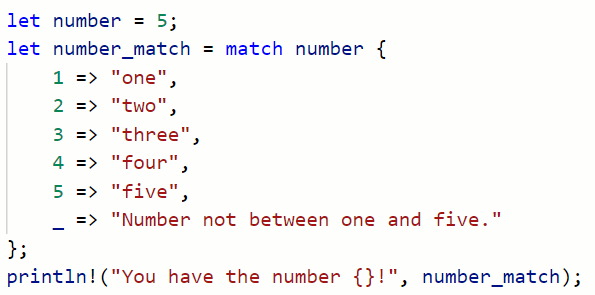
A simple match expression might look like this:
2. Exhaustiveness: Rust's Compile-Time Safety
One of the most powerful features of match is that it is exhaustive. This means you must cover every single possible case for the value you are matching against. If you forget a case, your code won't compile. This prevents a whole class of bugs common in other languages where you might forget to handle a specific value or state.
This is a feature you'll come to appreciate, as the compiler becomes your partner in writing correct code.
Matches Are Exhaustive - The Rust Programming Language
The official Rust book has an excellent section on why exhaustiveness is so important. It demonstrates what happens when you try to compile code with a non-exhaustive match.
Read the section 'Matches Are Exhaustive'. Pay close attention to the compiler error shown. This is exactly the kind of feedback Rust gives you to help you write more robust programs.
So what do you do if you have many possibilities, but only care about a few? You use the special wildcard pattern: _. The _ pattern will match any value that hasn't been matched by a preceding arm, satisfying the exhaustiveness requirement without forcing you to list every single possibility.
3. Advanced Pattern Matching
match can do much more than just check for simple enum variants or literal values.
Binding to Values in Patterns
Often, you need to extract the data stored inside an enum variant. match makes this easy by allowing you to bind the inner value to a new variable right in the pattern.
Enums and Pattern Matching in Rust
Let's return to the Let's Get Rusty video. It has a great example of this concept, where an enum variant for a Quarter holds the state it was minted in. The match expression extracts that state.
Watch from 07:47 to 08:41. Notice how the state variable is declared in the match arm (Coin::Quarter(state)) and then used in the code block for that arm.
This is a powerful feature we'll use later. For instance, when a pawn is promoted, we might have a Promotion(PieceKind) move variant, and we'd use match to extract which piece the pawn is being promoted to.
Matching on Different Types
match isn't limited to enums. It can work on almost any type, including integers, strings, and more. You can match against ranges of values or even add conditions, called "match guards."
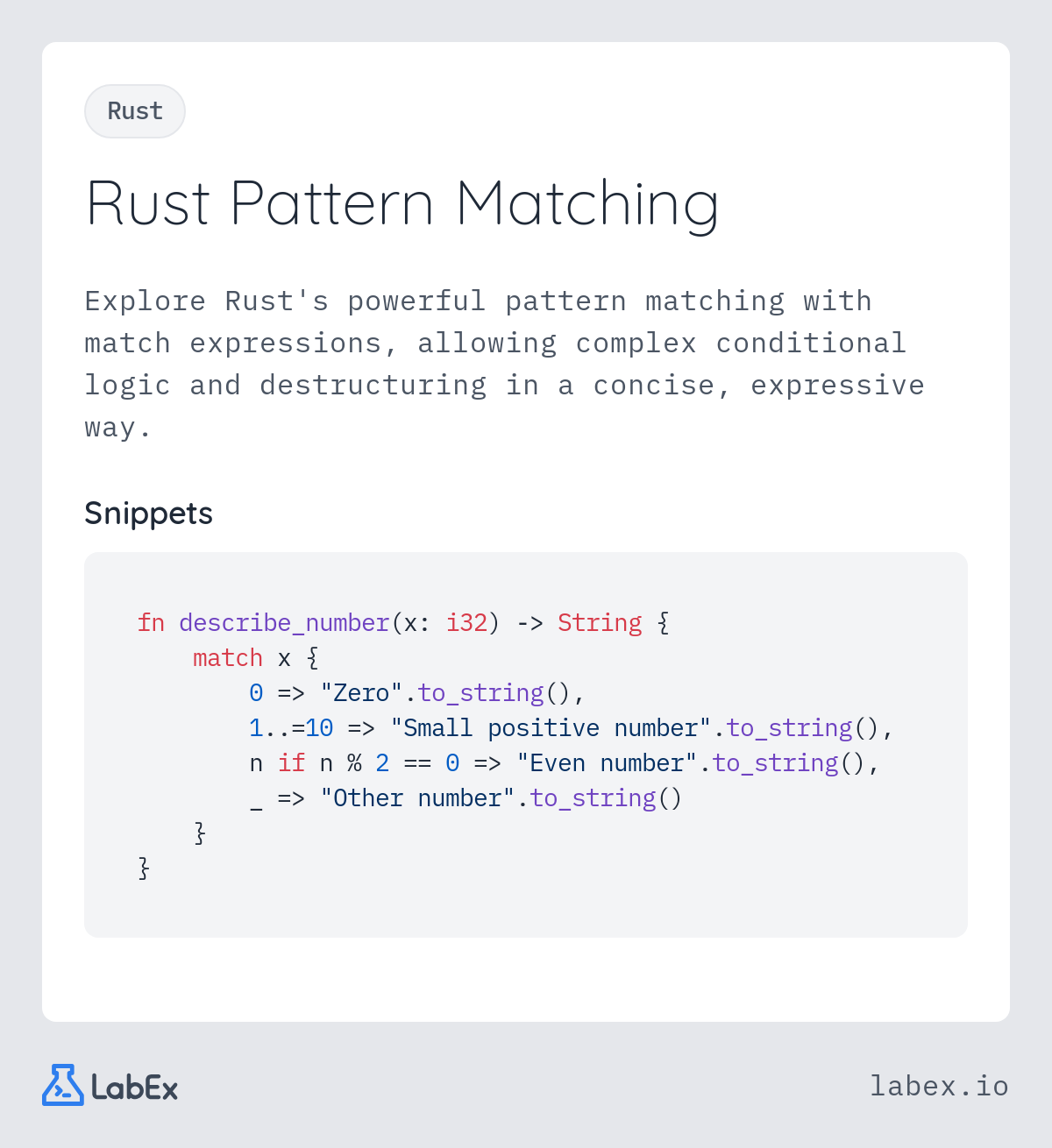
This flexibility makes match a go-to tool for complex conditional logic in Rust.
4. Hands-On: Scaffolding Our Chess Move Logic
Now, let's apply this to our chess project. The core logic of a chess game involves checking if a move is valid. This depends almost entirely on what kind of piece is moving. A pawn moves differently from a rook, which moves differently from a knight. This is a perfect use case for match!
We will create a new method is_move_valid for our Piece struct. For now, it will just be a skeleton that uses match to differentiate between the piece kinds. In future lessons, we'll fill in the real logic for each piece.
Task: Create the is_move_valid method.
- Open your
rust_chessproject insrc/main.rs. - Add a new method
is_move_validto theimpl Pieceblock. - Inside this method, use a
matchexpression onself.kind. - For each
PieceKind, just print a message and returntrue.
Here is the code to add. Try to understand how it fits with what we've learned.
// In your `impl Piece` block, add this new method.

// We've added placeholder parameters for the new position and a list of all pieces.
// We're not using them yet, but we will need them later.
// The `_` before the variable names tells Rust we know they are unused for now.
fn is_move_valid(&self, _new_position: (u8, u8), _pieces: &Vec<Piece>) -> bool {
    // Match against the 'kind' of the piece instance (`self`).
    match self.kind() {
        PieceKind::Pawn => {
            println!("Validating a Pawn move...");
            true
        }
        PieceKind::Rook => {
            println!("Validating a Rook move...");
            true
        }
        PieceKind::Knight => {
            println!("Validating a Knight move...");
            true
        }
        PieceKind::Bishop => {
            println!("Validating a Bishop move...");
            true
        }
        PieceKind::Queen => {
            println!("Validating a Queen move...");
            true
        }
        PieceKind::King => {
            println!("Validating a King move...");
            true
        }
    }
}


// In your `main` function, add these lines to test your new method.
fn main() {
    // ... (previous code)

    let white_queen = Piece::new(PieceKind::Queen, PieceColor::White);
    let all_pieces = vec![]; // An empty list of pieces for now.

    // Call our new method on the queen instance
    white_queen.is_move_valid((4, 4), &all_pieces);
}
When you run this with cargo run, you should see the message "Validating a Queen move..." printed to the console. You've successfully created the foundation for our entire move validation logic!
To see where we are headed, take a look at how a real chess tutorial implements this exact function.
is_move_valid method from Bevy Chess Tutorial
This chess tutorial blog post shows a complete, though complex, implementation of an is_move_valid function. Don't worry about understanding all the logic inside; focus on the overall structure.
Find the code block for the is_move_valid method. Notice how it's an impl Piece method that contains a large match self.piece_type block. This is exactly the pattern we just started building.
The code in that tutorial is the blueprint for what we will build over the next few modules. Our simple match block will eventually contain the full set of rules for each piece.
Conclusion
You've now learned about one of Rust's most powerful and distinctive features. match allows for expressive, safe, and robust conditional logic that you'll use constantly.
Key Takeaways:
matchallows you to compare a value against a series of patterns, or arms.matchexpressions must be exhaustive, meaning all possible cases must be handled. The compiler will give you an error if you miss one.- The
_wildcard pattern acts as a catch-all for any cases you don't want to handle explicitly. matcharms can bind variables to the data inside enums or other patterns, letting you extract and use that data.- This pattern is central to implementing the core logic of our chess game.
In several of today's examples, you saw match being used on a type called Option<T>. This is Rust's way of handling values that might be absent (like null in other languages). In our next lesson, we will focus entirely on Option<T> and see how we can use it to represent empty squares on our chessboard.