Hello! In our last lesson, we explored the core principles of REST, establishing that APIs use a standardized set of rules to interact with resources. We concluded by noting that when a server provides a representation of a resource, it's most often in a format called JSON.
This lesson is dedicated entirely to JSON (JavaScript Object Notation). As a QA Automation Engineer, a deep, practical understanding of JSON is non-negotiable. You will read JSON in every API response you validate and write JSON for nearly every POST or PUT request you send. Your experience with Postman and backend testing means you've already seen plenty of JSON, but our goal here is to formalize that knowledge so you can manipulate it programmatically with confidence.
By the end of this lesson, you will be able to read and write JSON structures of varying complexity, including objects, arrays, and nested data—the essential skill for creating and validating API test data.
What is JSON?
At its heart, JSON is a lightweight, text-based format for structuring data. It was derived from JavaScript but is now language-independent and supported by virtually every programming language, including Java. Its popularity in APIs stems from being both easy for humans to read and write, and easy for machines to parse and generate.
Let's start with a short video from freeCodeCamp.org that introduces what JSON is, why it's so widely used, and the fundamental data types it supports.
Learn JSON - Full Crash Course for Beginners
This video provides a great overview of JSON's role in modern development and a clear breakdown of its basic components.
Watch from the beginning until 02:41. Pay close attention to the six native data types mentioned: string, number, boolean, null, array, and object. These are the fundamental building blocks of any JSON document.
The Core Components: Objects and Key-Value Pairs
As the video explained, the two most important structures in JSON are objects and arrays. The entire system is built on these, combined with the basic data types.
A JSON object is an unordered collection of key-value pairs.
- It's enclosed in curly braces
{}. - Each key must be a string in double quotes (e.g.,
"name"). - Each key is followed by a colon
:. - The value follows the colon. It can be any of the six JSON data types.
- Key-value pairs are separated by commas
,.
Let's look at the basic syntax.
JSON Examples - Complete Guide with Real-World JSON Samples (2025) | JSON to Table Converter
This guide from JSONToTable provides clear, copy-paste ready examples of JSON syntax.
First, read the section Simple JSON Object Example to see a basic object. Then, review the Data Types Examples section, which shows all six types used as values within a single object.
Structuring Collections: Arrays
While objects are great for representing a single entity with its properties, we often need to work with lists of things. This is where JSON arrays come in.
An array is an ordered list of values.
- It's enclosed in square brackets
[]. - The values inside can be any valid JSON data type, including other arrays or objects.
- Values are separated by commas
,.
Arrays are extremely common in API responses. For example, a GET request to /users would likely return an array of user objects.
JSON Examples - Complete Guide with Real-World JSON Samples (2025) | JSON to Table Converter
This same guide has excellent examples of arrays.
Read the section on JSON Array Examples. Note the difference between a "Simple Array" (containing strings, numbers, etc.) and an "Array of Objects", which is a pattern you will encounter constantly in API testing.
Building Complexity: Nested Structures
The real power of JSON comes from its ability to nest these structures within one another. The value of a key can be another object, or an array. An array can contain objects. This allows for modeling complex, hierarchical data.
Let's look at a visual breakdown.
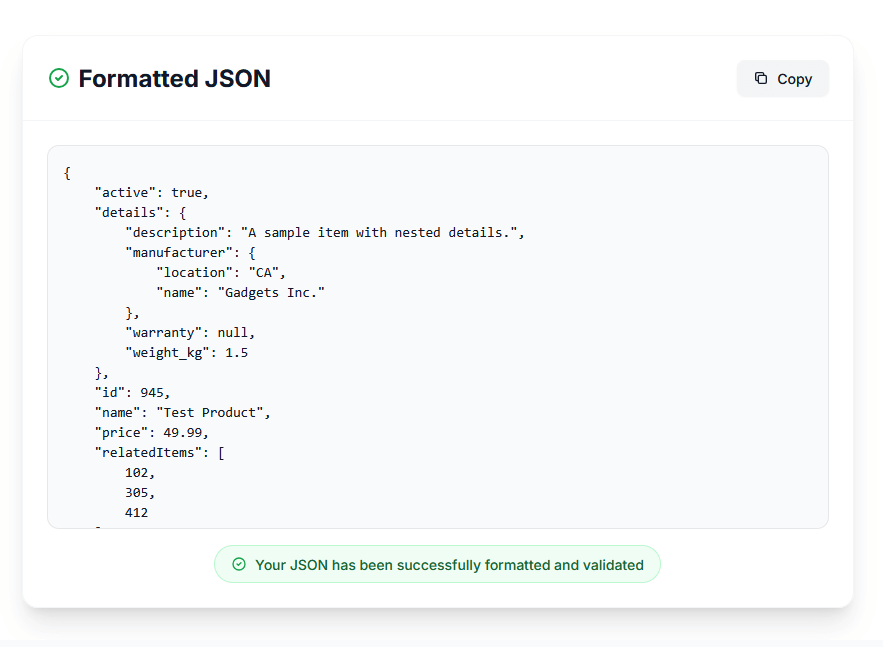
In the image above, the top-level entity is a product. It has simple key-value pairs like "id": 945 and "name": "Test Product". But it also has:
- A nested object: The value of the
"details"key is another complete JSON object containing its own keys ("description","manufacturer", etc.). - An array: The value of the
"relatedItems"key is an array of numbers.
Here is another example that explicitly labels the different types of nesting.

This structure is common for representing something like an e-commerce order. The main object is the order itself (orderId: 1001), and it contains nested objects (customer, address, payment) and an array of objects (line_items).
To understand the design thinking behind this, let's read a brief explanation. Your computer science background will make the concepts of "has-a" relationships and data grouping very familiar.
Advanced Data Structures in JSON: Nested Objects & Arrays
This article explains the purpose and use of nested structures.
Read the sections titled Nested Objects, Arrays of Objects, and Arrays within Objects. This will clarify why and when we use these different combinations to model data effectively.
Deconstructing a Real-World JSON
Now let's put it all together by analyzing a complex, real-world JSON structure. When you are writing tests, you will often face large JSON responses like this. The first step is always to understand its structure.
JSON Examples - Complete Guide with Real-World JSON Samples (2025) | JSON to Table Converter
This example of a company's organizational structure demonstrates multiple levels of nesting.
Carefully study the Company Organization Structure example. Try to trace the hierarchy before reading the breakdown below.
Let's break down that Company Organization Structure piece by piece:
- The entire document is a single JSON object.
- The top-level object has one key:
"company". Its value is another object. - The
"company"object contains:- Simple key-value pairs (e.g.,
"name": "TechCorp Inc"). - A nested object for
"headquarters". - An array of objects for
"departments".
- Simple key-value pairs (e.g.,
- Each object in the
"departments"array represents one department (Engineering, Marketing). Each of these objects contains:- An array of objects for
"employees".
- An array of objects for
- Each object in the
"employees"array represents one employee. Each of these objects contains:- An array of strings for
"skills". - An array of objects for
"projects"or"campaigns".
- An array of strings for
Being able to mentally (or physically) map out a JSON document like this is the first and most critical skill in response validation. You need to know the path to the data you want to check. For example, to find the status of "Project Gamma", you have to navigate through company -> departments (array) -> Engineering object -> employees (array) -> Bob Johnson object -> projects (array) -> Project Gamma object -> status. We will formalize this navigation process with JSONPath in a future lesson.
Writing Valid JSON: The Rules
When you send a POST or PUT request to create or update a resource, you will construct the request body in JSON. For the server to accept it, your JSON must be syntactically valid.
JSON Examples - Complete Guide with Real-World JSON Samples (2025) | JSON to Table Converter
This guide concludes with a simple list of the most important syntax rules.
Read the six rules in the section JSON Syntax Rules. The most common mistakes are using single quotes instead of double quotes and leaving a trailing comma after the last element in an object or array.
From Text to Object: The Concept of Parsing
A final, crucial concept is parsing. When your test receives an API response, it arrives as a single, long string of text. To work with it as a structured object and access its properties (e.g., response.data.user.id), the string must be parsed into a language-specific object. In your case, this will be a Java object.
The following video demonstrates this concept using JavaScript's JSON.parse function. The language is different, but the principle is identical to what you will do in Java with libraries like Gson or Jackson.
Learn JSON - Full Crash Course for Beginners
This clip clearly shows the difference between a JSON string and a parsed JSON object that you can actually interact with.
Watch the segment from 09:34 to 10:41. The key takeaway is that raw response data (a string) must be converted into a usable object.
Conclusion
In this lesson, we took a deep dive into the structure and syntax of JSON, the universal language for data exchange in REST APIs. You now have a solid foundation for both building request bodies and analyzing response payloads.
Here are the key takeaways:
- JSON data is structured in key-value pairs.
- The primary structures are objects (
{}) and arrays ([]). - JSON supports six data types: string, number, boolean, null, object, and array.
- Nesting objects and arrays allows for representing complex, hierarchical data.
- Adhering to strict syntax rules (like using double quotes and avoiding trailing commas) is essential for writing valid JSON.
- Raw JSON text must be parsed into a language-native object before you can programmatically access its data.
You have now completed the "HTTP & REST API Fundamentals" module. You understand how HTTP requests and responses work, the design principles of REST, and the structure of the data they exchange (JSON).
In our next lesson, we will begin the "Core Java & Maven for API Testing" module. We will start by setting up a new Maven project. This is the foundational step for organizing our code and managing all the necessary libraries (like REST Assured and TestNG) that we will use to build our API tests.