Welcome back! In our previous lesson, we disassembled the HTTP request, exploring how a client communicates its intent to a server. We saw how the URL, headers, and body work together to ask for a specific action on a resource.
Today, we'll complete the picture by examining the other side of this conversation: the HTTP response. After a server processes a request, it sends back a response message that contains the outcome and any requested data. Understanding this structure is fundamental for API test automation, as your tests will primarily involve sending requests and then validating the different parts of the response you receive.
By the end of this lesson, you will be able to describe the three core components of an HTTP response: the status line, headers, and body.
The Request-Response Cycle
Before we dive into the details of the response, let's visualize the entire communication loop. A client sends a request, and a server returns a response. Your work in Postman has given you practical experience with this cycle.
The image below illustrates a complete REST API interaction. On the left is a POST request to create a user, similar to what we studied previously. On the right is the server's response.
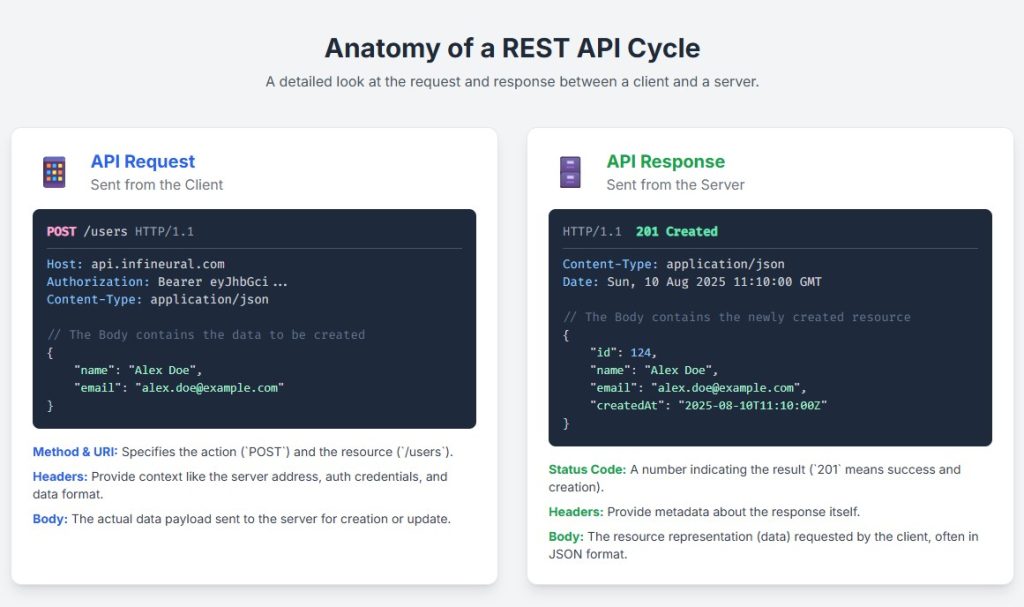
Notice the response on the right. It clearly indicates the outcome (201 Created), provides metadata about the response (headers), and includes the newly created resource in the body. These are the exact pieces we will be dissecting.
The Anatomy of an HTTP Response
Just like a request, an HTTP response has a standardized structure. It is composed of three main parts, which are clearly separated.
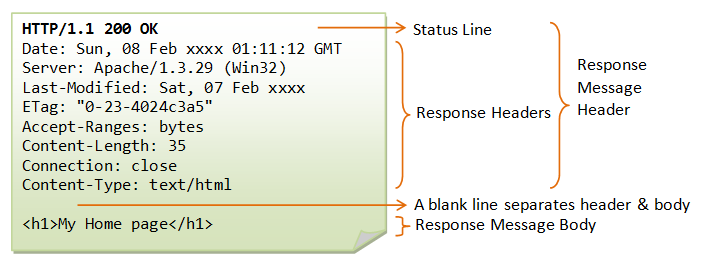
As you can see, every response message consists of:
- A Status Line: A summary of the outcome.
- Headers: Metadata about the response itself.
- A Body: The data or content being returned (this part is optional).
Let's get a formal definition of these parts.
This article from http.dev provides a concise and modern overview of the HTTP response structure.
Please read the section titled Response structure. This will formally introduce the three parts of the response message.
Now, let's examine each of these components in more detail.
1. The Status Line
The very first line of any HTTP response is the status line. It gives a quick, high-level summary of the server's reply. It contains three distinct pieces of information:
- HTTP Version: The version of the HTTP protocol being used (e.g.,
HTTP/1.1). - Status Code: A three-digit number that signifies the result of the request. This is the most critical part for automation, as it immediately tells you if the request was a success, a failure, or something else.
- Reason Phrase: A short, human-readable text description of the status code (e.g.,
OK,Created,Not Found).
To reinforce this, watch this brief clip that describes a successful response.
This video from Codecademy provides a simple, clear explanation of a response to a successful request.
Watch the segment from 00:02:50 to 00:03:11. Pay close attention to how the presenter breaks down the status line (HTTP/1.1 200 OK) into its constituent parts.
The status code is the single most important piece of information for a QA engineer. It's the first thing you will check in your automated tests. A 200 means something very different from a 404 or a 500. We will dedicate our entire next lesson to understanding these codes.
2. Response Headers
Following the status line are the response headers. Similar to request headers, these are key-value pairs that provide additional information, or metadata, about the response. While you may have set request headers in Postman, the server sets the response headers.
Some common and important response headers include:
Content-Type: Specifies the format of the data in the response body (e.g.,application/json,text/html). This is crucial for telling the client how to interpret the payload.Content-Length: Indicates the size of the response body in bytes.Date: The timestamp when the response was generated by the server.Server: Information about the server's software (e.g.,Apache,nginx).Location: Used in redirection responses (3xxstatus codes) to tell the client where to go next.
Let's refer back to our main article for a more detailed look.
This section of the article categorizes and explains various common response headers.
Read the section titled Response headers, and pay particular attention to the subsection on Representation metadata, which covers headers like Content-Type and Content-Length.
3. The Response Body
The final part of the response is the body (or payload). This is where the actual resource data you requested is located.
- If you send a
GETrequest to/users/123, the body will contain the JSON representation of user 123. - If you send a
POSTrequest to create a new user, the body will often contain the JSON for the newly created user, including its server-assigned ID.
As an automation engineer, you will spend a lot of time writing assertions that validate the contents of the response body.
It's important to know that not all responses have a body. For example, a 204 No Content response indicates success but intentionally includes no body. This is common for DELETE operations. A 304 Not Modified response, used for caching, also has no body.
This section explains the role of the response body and, importantly, when a response might not have one.
Please read the section titled Response body. Make sure you understand the scenarios where a response has no body, as this is a common case you'll need to handle in testing.
Conclusion
In this lesson, we've completed our tour of the fundamental HTTP communication cycle by deconstructing the server's response. Having a clear mental model of this structure is essential before you start writing automated checks against it.
Here are the key takeaways:
- An HTTP response consists of three parts: a Status Line, Headers, and an optional Body.
- The Status Line provides the immediate outcome via a numeric Status Code (like
200or404) and a human-readable reason phrase. - Headers contain metadata about the response, such as the
Content-Typeof the payload. - The Body contains the actual data payload, typically a JSON object in the context of REST APIs, and is the primary target for data validation.
We've established that the status code is the first and most direct signal of a request's outcome. In our next lesson, we will explore the different categories of HTTP status codes, from informational (1xx) to server errors (5xx), so you can interpret them correctly in your tests.