Welcome to our next lesson. In our previous session, we used command-line tools like readelf and objdump to dissect and inspect ELF binaries from a safe distance. Today, we close that distance and get our hands dirty. We're moving from passive analysis to active modification.
This lesson focuses on using a hex editor, one of the most fundamental tools in a reverse engineer's toolkit. You'll learn to inspect and modify the raw bytes of a binary file directly. This skill is the foundation for many reverse engineering tasks you're interested in, such as patching executables to bypass security checks, altering program behavior in malware analysis, and software cracking. Given your hands-on preference, we'll dive straight into practical techniques and tools.
What Is a Hex Editor?
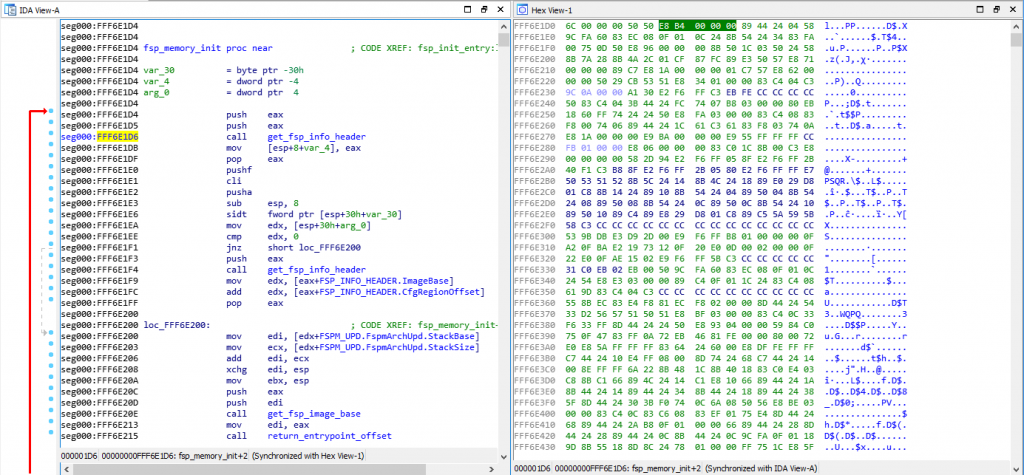
At its core, a file is just a sequence of bytes. While a text editor interprets these bytes as characters (like ASCII or UTF-8), a hex editor displays them as hexadecimal values. This gives you a raw, unfiltered view of the file's contents.
A typical hex editor has a three-column layout:
- Offset: The address or position of the byte within the file, usually shown in hex.
- Hexadecimal View: The raw byte values, displayed as two-digit hexadecimal numbers (e.g.,
41,FF,00). This is where you'll do most of your editing. - ASCII/Text View: The text representation of each byte. Printable characters are shown directly, while non-printable characters are often represented by a dot (
.).
This synchronized view allows you to see both the raw hex and its corresponding text interpretation, which is incredibly useful for finding and modifying data like strings.
Before we begin patching, there is one paramount rule: always overwrite, never insert or delete. Binary formats like PE and ELF rely on precise offsets for headers, sections, and code. Inserting or deleting a single byte will shift everything that follows, corrupting the file and making it unusable. Patching is about changing byte values in-place.
A Modern Tool for the Job: imHex
While you can use simple hex editors like HxD or even vim with the xxd utility, modern reverse engineering often benefits from more powerful tools. imHex is a cross-platform, open-source hex editor packed with features designed for reverse engineering. We will use it for some of our examples. I recommend downloading it from its official GitHub releases page to follow along.
The following reading provides an introduction to imHex and its interface.
Decoding and reverse engineering binary files with imhex
This article from codegive.com introduces the powerful imHex editor, its features, and its user interface. It's a great starting point for familiarizing yourself with a modern tool.
Please read the following sections to get acquainted with imHex: Introduction to imHex: Understand what makes it different from traditional hex editors. User Interface Overview: Familiarize yourself with the layout, especially the Hex View and Data Inspector. Basic Navigation & Editing: Learn the fundamental controls for opening, navigating, and editing files. The Data Inspector: This section explains a key feature that helps you quickly interpret byte values.
Walkthrough 1: Patching Data
The simplest form of patching is changing static data within a file, such as a configuration string, a message, or a URL. Let's walk through changing a string in a simple program.
Create a file named patch_me_string.c with the following code:
#include <stdio.h>

int main() {
    printf("Access Denied. Invalid Key.\n");
    return 0;
}
Compile it in your Linux environment:gcc -o patch_me_string patch_me_string.c
Our goal is to change the output message to "Access Granted. Welcome!".
- Open
patch_me_stringin your hex editor (e.g., imHex). - Search for the string. Most hex editors have a search function that can look for text (ASCII) strings. Search for "Access Denied".
- Modify the string. Once located, you can edit it in either the hex or ASCII pane. Carefully type over the original string with "Access Granted. Welcome!".
- Handle length differences. The new string is shorter than the old one. To prevent leftover characters from the old string ("id Key.") from being printed, you must overwrite them with null bytes (
00). A null byte terminates the string. - Save the file. Save your changes to a new file, for example,
patch_me_string_cracked. - Run it. Execute
./patch_me_string_crackedin your terminal. It should now print the new message.

The following guide from Null Byte provides another detailed example of this process, using IDA to find the string and a hex editor to patch it.
This article demonstrates the classic technique of patching a string in an executable.
Focus on the section titled Let's Ask to Hex Editors. It shows how to find the hex values for a string, calculate the new hex values, and overwrite them in the binary. Note the use of a 00 byte to terminate the shorter, new string.
Walkthrough 2: Patching Code
Modifying data is useful, but the real power of patching comes from altering a program's logic. This is typically done by changing assembly instructions. A common goal is to bypass a check, such as a license key validation.
Two primary techniques for this are:
- Inverting a Conditional Jump: Changing an instruction like
JNE(Jump if Not Equal) toJE(Jump if Equal), thereby reversing the program's decision. - NOPing Out Code: Replacing unwanted instructions with
NOP(No Operation, opcode0x90). The CPU simply slides overNOPinstructions, effectively deleting them from the execution flow.
The following video from LiveOverflow is an excellent, "old-school dirty" demonstration of patching a conditional jump using vim and xxd. This is a powerful technique to know, as it works on virtually any Linux system without specialized tools.
Patching Binaries (with vim, Binary Ninja, Ghidra and radare2)
LiveOverflow demonstrates how to patch a simple license check by changing a JNE to a JE.
Watch these two key segments: Analysis: The presenter uses a debugger to find the JNE instruction and its hex opcode (75). Patching with vim/xxd: This is the core of the technique. He opens the binary in vim, converts it to a hex dump with xxd, finds and changes the 75 byte to 74 (JE), converts it back to binary, and runs the patched file.
As LiveOverflow also shows later in the video, dedicated reverse engineering suites like IDA Pro, Ghidra, and Binary Ninja have integrated hex editors and patching features that make this process much easier.
Another common technique is to completely remove code by overwriting it with NOPs. The video below from OALabs demonstrates this workflow.
Quick And Dirty Binary Patching With A Hex Editor
This video shows how to patch a malware sample to disable a function by overwriting its code with NOP instructions.
Focus on these parts of the process: Identifying Opcodes: The presenter enables opcode display in IDA Pro to see the raw hex bytes for the instructions he wants to remove. Patching in a Hex Editor: He opens the binary in a hex editor, searches for the identified byte sequence, and replaces the unwanted code with a series of 90 bytes (the opcode for NOP).
Practical Exercise
Let's apply these code-patching concepts. Create a file named patch_me_logic.c:
#include <stdio.h>
#include <string.h>

int main(int argc, char *argv[]) {
    if (argc < 2) {
        printf("Usage: %s <password>\n", argv[0]);
        return 1;
    }

    if (strcmp(argv[1], "secret123") == 0) {
        printf("Access Granted!\n");
    } else {
        printf("Access Denied!\n");
    }

    return 0;
}
Compile it: gcc -o patch_me_logic patch_me_logic.c
Currently, it only grants access for the password "secret123". Your task is to patch the binary so that it grants access for any incorrect password.
Here's your plan:
- Analyze: Use
objdump -d patch_me_logicto view the disassembly. Find themainfunction. Locate the call tostrcmpand the conditional jump that follows it (it will likely be ajneorje). Thestrcmpfunction returns 0 if the strings are equal. Thetest eax, eaxinstruction after thecallchecks this return value. - Identify: Note the opcode of the conditional jump. A
jne(Jump if Not Equal, i.e., wrong password) will have opcode75. Aje(Jump if Equal, i.e., correct password) will have opcode74. - Patch: Open
patch_me_logicin a hex editor. Find the byte for the conditional jump and change it. If you want to grant access on a wrong password, you need to make the program jump to the "Access Granted" code path when the strings are not equal. If the original code isje(jumps when equal), change it tojne. If it'sjne(jumps when not equal), change it toje. - Verify: Save the patched file and run it with an incorrect password, like
./patched_logic wrongpass. It should now print "Access Granted!".
This exercise directly simulates the process of cracking a simple software protection mechanism.
Conclusion
You have now wielded the power of direct binary modification. While it can feel like performing surgery with a sledgehammer, hex editing is an indispensable skill for making precise, targeted changes to an executable when you don't have the source code.
Key takeaways from this lesson:
- A hex editor shows you the raw byte content of a file.
- The most critical rule is to overwrite bytes in-place and never insert or delete, which would corrupt the file structure.
- You can patch data (like strings) by finding their ASCII or hex representation and typing over them.
- You can patch code to alter program logic by changing instruction opcodes, such as inverting a conditional jump (
JE↔JNE) or disabling code withNOPs (0x90).
In our next lesson, we will explore a more nuanced way of analyzing programs. We'll move from static analysis and modification into the realm of dynamic analysis, using a debugger to step through a program's execution, observe its state in memory, and see how the operating system loads it.