Welcome to the third lesson in our module on binary formats. In our previous sessions, we explored the architecture of Windows executables, learning to identify PE file components both manually and with specialized tools like PE-bear. Today, we pivot from the Windows ecosystem to the world of Linux and Unix-like systems.
This lesson introduces the Executable and Linkable Format (ELF), the cornerstone of modern Linux binaries. Much like our initial exploration of PE files, we will focus on the theoretical structure. You will learn to identify the key components of an ELF file—its headers, sections, and entry point—and understand the crucial distinction between its linking and execution views. Your background in C will be particularly helpful here, as we will frequently refer to the C structures that define the ELF format.
The Anatomy of an ELF File: Two Views
Before we dive into the bytes and structures, it's essential to grasp the dual nature of an ELF file. Unlike PE files which have a more unified structure, ELF files are best understood through two different "views":
- The Linking View: This view is organized into sections and is primarily used by the linker during compilation (to combine object files into an executable) and by tools like debuggers and disassemblers for analysis. It contains detailed information about code, data, symbols, and relocation information.
- The Execution View: This view is organized into segments and is used by the operating system's loader when a program is run. A segment is a collection of one or more sections, grouped together with specific memory permissions (e.g., read-only, read-write, read-execute).
The following video provides an excellent introduction to ELF and masterfully explains this fundamental distinction between segments (for runtime) and sections (for link time).
In-depth: ELF - The Extensible & Linkable Format
This video from stacksmashing clearly introduces the ELF format and its uses, and, most importantly, lays the groundwork for understanding the difference between segments and sections.
Watch the first two minutes of the video, focusing on these key concepts: Main uses and the core concept: Understand the three main uses of ELF (executables, shared libraries, object files) and the crucial difference between segments and sections. An example of segments vs. sections: Pay attention to the visual explanation of how segments and sections can overlap and how segments tell the OS how to map the file into memory.
This distinction is critical: for a program to run, the OS only needs the segments defined in the program headers. The section information is not strictly necessary for execution, which is why it can be "stripped" from a binary to make it smaller and slightly more difficult to reverse engineer.
The ELF Header: The File's Road Map
Every ELF file begins with the ELF Header. This structure acts as a road map for the rest of the file, providing essential metadata and pointing to the other key components. Its role is directly analogous to the combination of the DOS_HEADER and NT_HEADERS in a PE file.
Given your comfort with C, the most direct way to understand the ELF header is by examining its defining structure, Elf64_Ehdr for 64-bit binaries.
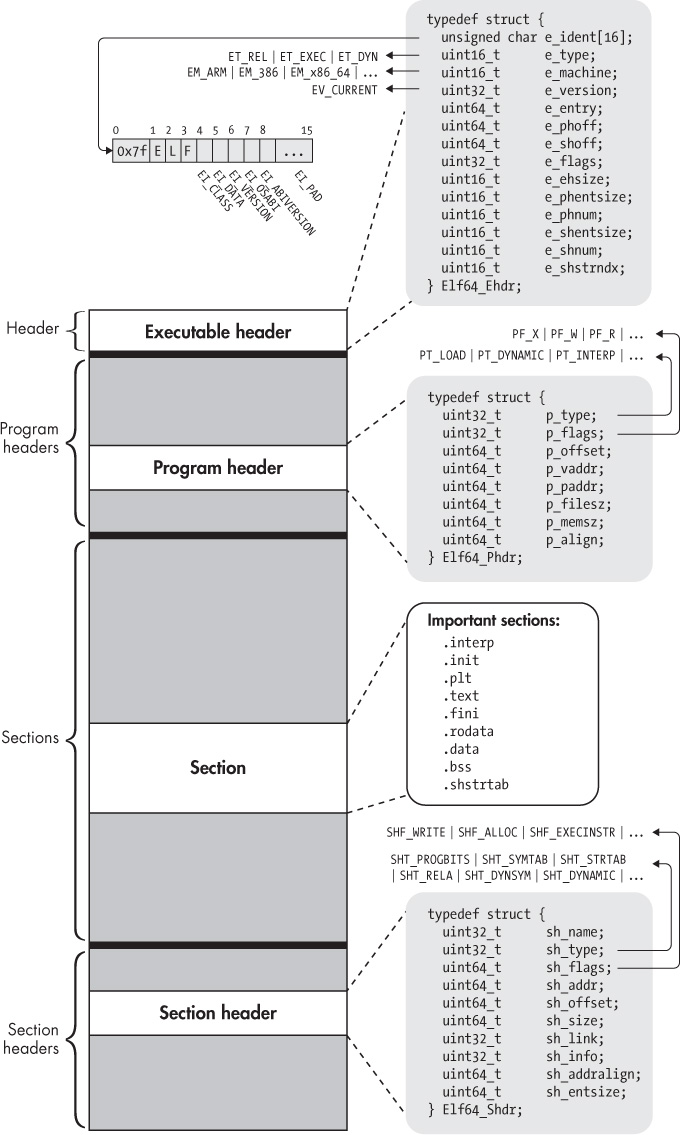
The video below provides a detailed, byte-by-byte walkthrough of the ELF header. The presenter examines the elf.h system header file, compiles a sample program, and then uses readelf and a hex editor to dissect the resulting binary's header. This practical approach to a theoretical topic should be very insightful.
Exploring the Linux ELF File Header
This video from embeddedarmdev offers a comprehensive, field-by-field examination of the ELF header. It connects the C struct definition directly to the raw hex and a tool's output.
Watch the video in its entirety. It's a fantastic deep-dive, but pay special attention to the following fields within the Elf32_Ehdr (the 32-bit version of the structure): e_ident: This 16-byte array contains the "magic number" 0x7FELF that identifies the file as ELF, as well as the class (32/64-bit), data encoding (endianness), and ABI version. e_type: Specifies if the file is an executable (ET_EXEC), a shared library (ET_DYN), or an object file (ET_REL). e_machine: The target instruction set architecture (e.g., ARM, x86-64). e_entry: This is the entry point address. It's the virtual address where the CPU will begin execution after the loader has mapped the file into memory. e_phoff: The file offset to the start of the Program Header Table. e_shoff: The file offset to the start of the Section Header Table.
From the ELF header alone, you can determine the file's architecture, its type, where execution begins, and where to find the tables that describe its segments and sections.
Program Headers and Segments (The Execution View)
The ELF header's e_phoff field points to the Program Header Table. This table is an array of Elf64_Phdr structures, each describing a segment. As mentioned, segments are what the kernel's loader uses to map the binary into memory.
Dissecting and exploiting ELF files
This article provides a clear, C-struct-based explanation of the program headers. It's an excellent textual reference to complement the video material.
Read the section titled The program header(s). Focus on understanding the Elf64_Phdr structure and the purpose of its key fields: p_type: Especially PT_LOAD (a segment to be loaded into memory) and PT_INTERP (specifies the dynamic linker, e.g., /lib64/ld-linux-x86-64.so.2). p_offset, p_vaddr: The file offset and the target virtual address for the mapping. p_filesz, p_memsz: The size of the segment on disk and the size it will occupy in memory. If p_memsz > p_filesz, the extra space is zero-filled (this is how the .bss section is handled). p_flags: The memory permissions for the segment: Read (R), Write (W), Execute (X). This is critical for analysis.
The relationship between sections (from the linking view) and segments (from the execution view) can now be visualized. Multiple sections are often bundled into a single segment. For example, the .text (code) and .rodata (read-only data) sections are typically placed together in a segment with Read and Execute permissions.

Section Headers and Sections (The Linking View)
The ELF header's e_shoff field points to the Section Header Table, an array of Elf64_Shdr structures. Each structure describes a section. These sections hold the bulk of the file's content: code, data, symbol tables, relocation info, and strings.
As a reverse engineer, you will spend most of your time analyzing the contents of these sections.
Dissecting and exploiting ELF files
Continuing with the same article, let's now look at the structure that defines the sections used for linking and analysis.
Read the section titled The Section header(s). As you read, focus on the Elf64_Shdr structure and the descriptions of the most common sections you will encounter: .text: Contains the actual executable instructions (machine code). .rodata: Contains read-only data, such as constant strings used in the program. .data: Contains initialized global and static variables. .bss: Defines a block of memory for uninitialized global and static variables. It has size in memory but takes up no space in the file itself. .got and .plt: The Global Offset Table and Procedure Linkage Table, which are crucial for dynamic linking of shared library functions. We will explore these in depth in a later module. .symtab and .strtab: The symbol table and string table, which contain information about functions and variables. .shstrtab: The section header string table, which contains the null-terminated strings for the names of the sections themselves. The sh_name field in each section header is simply an offset into this table.
Understanding what kind of data resides in each section is a foundational skill for reverse engineering. When you open a binary in a tool like Ghidra or IDA Pro, the tool parses these section headers to properly identify and label code, data, and other components.
Conclusion
In this lesson, we have dissected the theoretical structure of the ELF format, the standard for executables on Linux and other Unix-like systems. You now have the conceptual framework needed to navigate these complex files.
Here are the key takeaways:
- ELF files have two primary views: the Execution View (segments, for the OS loader) and the Linking View (sections, for linkers and analysts).
- The ELF Header (
Elf64_Ehdr) is the starting point, containing magic numbers, file type, architecture, and pointers to other structures. - The Entry Point, specified by
e_entryin the ELF header, is the virtual address where program execution begins. - Program Headers (
Elf64_Phdr) define segments, which instruct the loader how to map parts of the file into memory with specific permissions (Read, Write, Execute). - Section Headers (
Elf64_Shdr) define sections, which contain the actual code (.text), data (.data,.rodata), and other metadata vital for linking and analysis. While crucial for analysis, they are not required for execution.
In our next lesson, we will put this theory into practice. You will learn to use essential command-line tools like readelf and objdump to parse and analyze the headers and sections of real ELF binaries, reinforcing everything you've learned today.