Introduction
Welcome to your first lesson in the "Intermediate SQL for Analytics" module! As a data analyst, you'll often find that the data you receive is not perfectly clean or in the right format. This lesson tackles one of the most common data cleaning challenges: handling missing information and incorrect data types.
Your goal is to master data analysis, and a crucial first step is being able to prepare and clean your data effectively. You can't build a reliable Power BI dashboard or a predictive model on messy data. Today, we'll focus on three fundamental SQL functions that are essential for this task.
By the end of this 60-minute lesson, you will be able to use COALESCE, NULLIF, and CAST to handle null values and perform data type conversions, laying a solid foundation for the more complex queries we'll build in this course.
1. The Nature of NULL
Before we can handle NULL values, we must understand what they represent. In SQL, NULL is a special marker used to indicate that a data value does not exist in the database. It's crucial to distinguish this from a value of zero or an empty string. NULL means "unknown," "not applicable," or "missing."
For example, in a customer table, a NULL in the phone_number column doesn't mean the customer's phone number is "0"; it means we don't have their number on record.
To get a clear definition and see some common pitfalls, please read the following sections from the article "Handling NULL Values in SQL."
Handling NULL Values in SQL: Best Practices and ...
This article from DEV Community clearly explains the concept of NULL and the correct way to test for it in your queries.
Please read the sections titled "What Is NULL in SQL?" and "1. Use IS NULL and IS NOT NULL for Comparisons". Pay close attention to why you cannot use = NULL.
The key takeaway is that because NULL represents an unknown, it cannot be compared using standard operators like = or !=. The expression NULL = NULL actually evaluates to unknown, not true. Therefore, you must always use the IS NULL or IS NOT NULL operators to filter for rows with or without missing values.
Incorrect:
-- This will not return the rows you expect
SELECT * FROM Customers WHERE Phone = NULL;
Correct:
-- This correctly finds customers with a missing phone number
SELECT * FROM Customers WHERE Phone IS NULL;
2. Replacing NULL Values with COALESCE
Now that we know how to find NULL values, let's learn how to handle them. When performing calculations, NULL can be problematic. For instance, any arithmetic operation involving NULL results in NULL (e.g., 5 + NULL is NULL). This can silently ruin aggregations and calculations in your reports.
The COALESCE function is the standard, most flexible tool for solving this. It evaluates its arguments in order and returns the first one that is not NULL.
Syntax:COALESCE(argument_1, argument_2, ...)
For example, if you have a products table where the discount column can be NULL, you can replace NULL with 0 for calculation purposes:
SELECT
  product_name,
  price,
  discount,
  price - COALESCE(discount, 0) AS final_price
FROM products;
In this query, if discount is a number (e.g., 2.50), COALESCE returns that number. If discount is NULL, COALESCE moves to the next argument and returns 0.
3. Preventing Errors with NULLIF
Another useful function is NULLIF. It takes two arguments and returns NULL if they are equal. Otherwise, it returns the first argument.
Syntax:NULLIF(argument_1, argument_2)
At first, this might seem odd, but its most common use case is preventing division-by-zero errors. A division-by-zero error will stop your query, but dividing by NULL returns NULL, which is often more manageable.
Imagine you need to calculate a ratio, but the denominator might be zero.
-- This query will fail if any row has quantity = 0
SELECT
  total_sales / quantity AS sales_per_unit
FROM monthly_summary;

-- This query avoids the error
SELECT
  total_sales / NULLIF(quantity, 0) AS sales_per_unit
FROM monthly_summary;
In the second query, if quantity is 0, NULLIF(quantity, 0) returns NULL. The entire division total_sales / NULL then becomes NULL, and the query continues running without an error.
To solidify your understanding of COALESCE and NULLIF, please review the following resource.
Handling NULL Values in SQL: Best Practices and ...
This section of the previous article provides clear, practical examples for both COALESCE and NULLIF.
Read the section titled "2. Handle NULL in Calculations with COALESCE or NULLIF".
The image below provides a great at-a-glance comparison of these functions. Note that IFNULL is a function specific to MySQL, whereas COALESCE and NULLIF are part of the ANSI SQL standard and work across most databases (like PostgreSQL, SQL Server, etc.).

4. Changing Data Types with CAST
Another frequent task in data cleaning is converting data from one type to another. For example, a date might be stored as text ('2023-10-26'), or a price might be stored as text ('$99.99'). You cannot perform calculations or sorting correctly on these values without first converting them.
SQL can sometimes perform implicit (automatic) conversions, but relying on this can be risky and lead to unexpected results. The best practice is to use explicit conversion, where you tell the database exactly how to interpret the data.
The standard SQL function for this is CAST. It is supported by nearly all modern database systems.
Syntax:CAST(expression AS data_type)
For example, to convert a price column stored as VARCHAR into a numeric type for calculation:
SELECT
  product_name,
  'Price: ' || price AS price_text, -- This is string concatenation
  CAST(price AS DECIMAL(10, 2)) * 0.8 AS discounted_price -- This is a numeric calculation
FROM products;
Let's dive into an article that explains CAST in more detail.
Converting Data Types in SQL: Essential Techniques for Data Analysts
This article from LearnSQL.com discusses why data type conversion is important and introduces the standard CAST function.
Please read the introductory sections "Why Data Type Conversion in SQL Matters" and "Implicit vs. Explicit Data Type Conversion", then read the section "1. CAST Function".
5. Bringing It All Together
These functions are powerful on their own, but they are often used together to solve complex data cleaning problems.
Consider the following image. A developer is adding a Total_Salary column to an employee table. The logic needs to account for various pay structures: some employees have a SALARY, some have HOURLYWAGE, and some get COMMISSION. All these columns can contain NULLs.
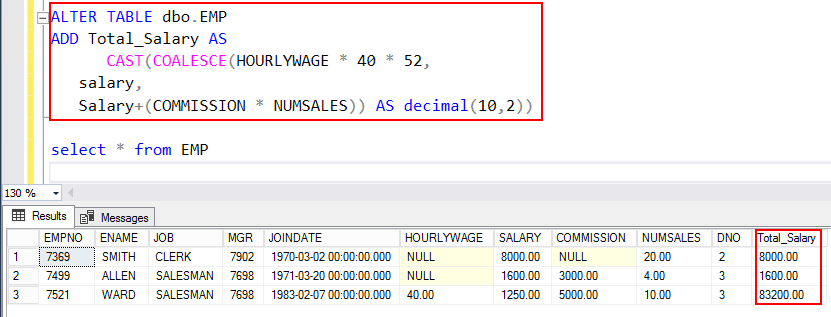
Let's break down the logic inside the COALESCE function:
HOURLYWAGE * 40 * 52: It first tries to calculate an annual salary for hourly workers. IfHOURLYWAGEisNULL, this entire expression results inNULL.SALARY: If the first expression wasNULL(e.g., for a salaried employee),COALESCEmoves to theSALARYcolumn. If it's notNULL, it uses this value.SALARY + COMMISSION * NUMSALES: IfSALARYwas alsoNULL, it tries to calculate a salary based on a base plus commission.- Finally, the entire result from
COALESCEis wrapped inCAST(... AS decimal(10,2))to ensure the new column has a consistent, appropriate numeric data type.
This is a perfect example of the kind of robust data preparation you will do as a data analyst.
Practice Exercise
Now it's your turn. Imagine you have a table named sales_data with the following structure and data:
| product_id | price_text | units_sold |
|---|---|---|
| 101 | '25.50' | 100 |
| 102 | '15.00' | NULL |
| 103 | '99.99' | 50 |
| 104 | '10.00' | 0 |
Write a SQL query that returns the product_id and a new column named total_revenue.
This query must:
- Convert the
price_textcolumn to a numeric data type. - Treat any
NULLvalue inunits_soldas0. - Calculate the revenue as price multiplied by units sold.
Challenge: Add another column named revenue_per_unit_sold. Use NULLIF to ensure your query doesn't fail for products with 0 units sold.
Click here to see the solution
SELECT
  product_id,
  -- Calculate total revenue
  CAST(price_text AS DECIMAL(10, 2)) * COALESCE(units_sold, 0) AS total_revenue,

  -- Challenge: Calculate revenue per unit, avoiding division by zero
  CAST(price_text AS DECIMAL(10, 2)) / NULLIF(COALESCE(units_sold, 0), 0) AS revenue_per_unit_sold

FROM sales_data;
Expected Output:
| product_id | total_revenue | revenue_per_unit_sold |
|---|---|---|
| 101 | 2550.00 | 25.50 |
| 102 | 0.00 | NULL |
| 103 | 4999.50 | 99.99 |
| 104 | 0.00 | NULL |
Explanation:
- In the
total_revenuecalculation,COALESCE(units_sold, 0)turns theNULLfor product 102 into0, so the multiplication15.00 * 0results in0.00. - In the challenge column, for product 104,
NULLIF(COALESCE(units_sold, 0), 0)becomesNULLIF(0, 0), which returnsNULL. This avoids a division-by-zero error.
Conclusion
Excellent work! In this lesson, you've learned three of the most practical functions for data cleaning and preparation in SQL. These are tools you will use daily in your data analysis work.
Key Takeaways:
NULLis not zero: It represents an unknown value and must be checked withIS NULLorIS NOT NULL.COALESCE(val1, val2, ...): Use this to provide default values and substituteNULLs, making your calculations robust.NULLIF(val1, val2): Use this to returnNULLwhen two values are equal, which is a clever way to prevent division-by-zero errors.CAST(expression AS data_type): This is the standard, portable way to explicitly convert a value to a different data type, ensuring your data is in the correct format for calculations, joins, and analysis.
In our next lesson, we will build upon this foundation. Now that you can clean and standardize individual data points, you'll learn how to write subqueries. This will allow you to perform multi-step analysis and answer much more complex business questions by nesting queries inside each other.