Hello! Welcome to your first lesson.
Given your strong foundation in C and systems programming, you have a solid mental model of how a program goes from source code to executable instructions that manipulate memory. Our goal in this course is to build upon that model to understand the unique, "under the hood" mechanisms of C++.
This first lesson addresses a fundamental question: How does the C++ build process work, and what makes it different from C's? We'll explore the four main stages of building a program—preprocessing, compilation, assembly, and linking—and pinpoint exactly where C++ diverges from C to support its powerful features like function overloading. By the end, you will be able to explain this entire pipeline, setting a strong foundation for the rest of the course.
The Build Pipeline: An Overview
At a high level, the process of turning a C++ source file into an executable is nearly identical to C. It involves a sequence of four distinct steps.
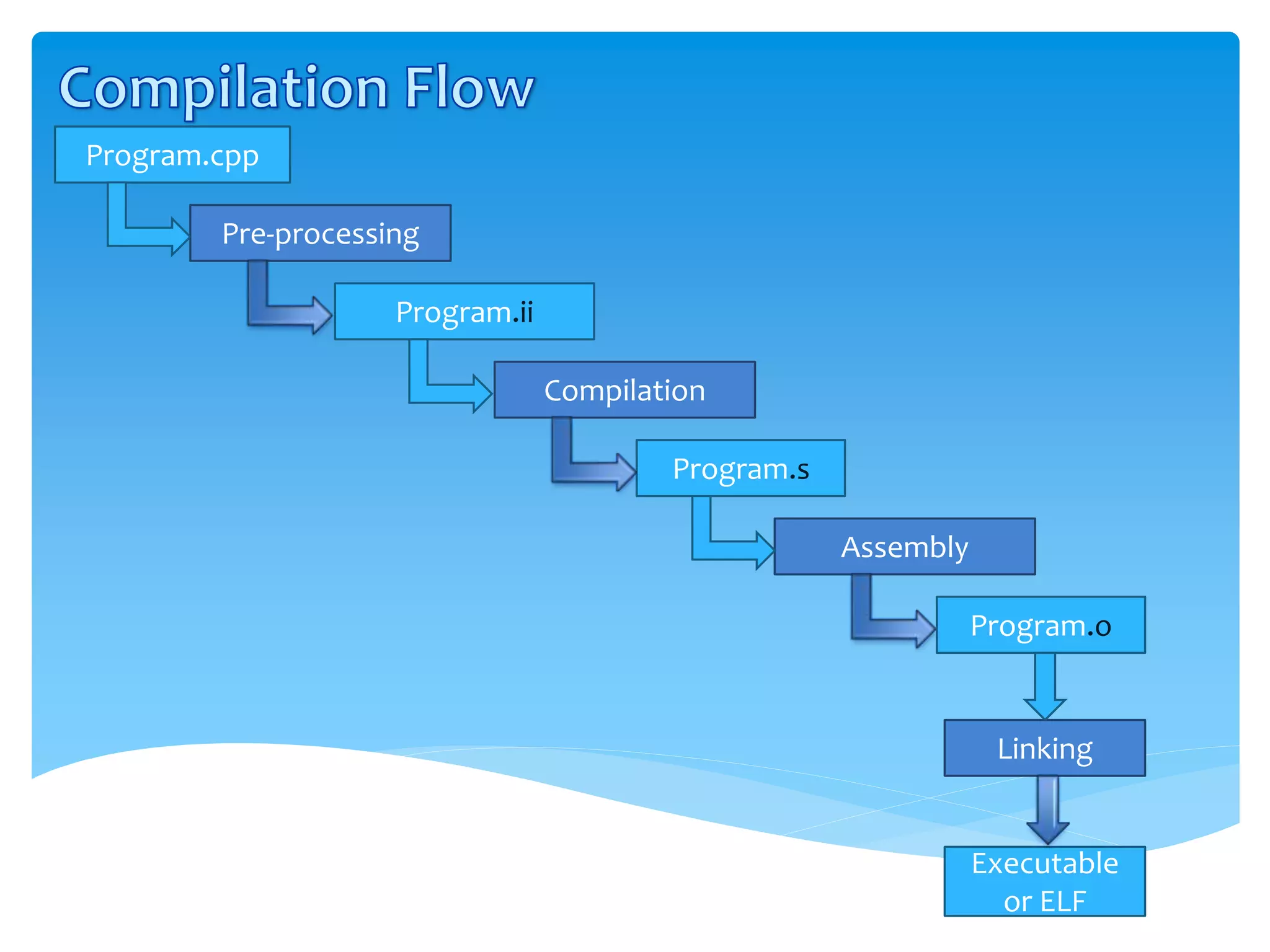
- Preprocessing: The preprocessor scans the source code for directives (lines starting with
#), such as#includeand#define, and transforms the source file into a single "translation unit." - Compilation: The compiler takes the preprocessed code and converts it into platform-specific assembly language. This is where the source code's logic is translated into low-level instructions.
- Assembly: The assembler converts the assembly code into machine code, producing an "object file" (
.o). This file contains the binary code for the compiled source file but isn't yet a runnable program. - Linking: The linker's job is to take one or more object files, resolve references between them (like function calls), and combine them with necessary libraries to create a single executable file.
Now, let's explore each stage in detail, focusing on the C++ perspective.
Stage 1: Preprocessing
This stage is functionally identical in both C and C++. The preprocessor is a text-manipulation tool. When it sees #include "my_header.h", it literally replaces that line with the entire content of my_header.h.
This simple copy-paste mechanism has a significant consequence: if a header file is included multiple times within the same translation unit (e.g., main.cpp includes A.h and B.h, and B.h also includes A.h), its contents will be pasted multiple times. This leads to redefinition errors. To prevent this, C and C++ programmers use header guards.
To see what the preprocessor does and understand its importance, let's watch a segment of the following video.
In 54 Minutes, Understand the whole C and C++ compilation process
Mike Shah provides a clear, hands-on demonstration of the compilation pipeline. We'll focus on his explanation of the preprocessor.
Watch the section from 10:52 to 20:13. Pay close attention to how he uses the -E flag to view the preprocessed output and how he explains the problem of multiple inclusions and the solution using header guards (#ifndef/#define).
As you saw, the preprocessor can expand a small source file into a massive one, and header guards are an essential pattern to manage this. This is a direct consequence of the preprocessor's simple text-replacement role.
Stage 2 & 3: Compilation and Assembly
Here's where the first major difference between C and C++ appears. The compiler's job is to generate assembly code. Since C++ has features that C lacks—most notably function overloading—the compiler needs a mechanism to differentiate between functions that have the same name but different parameters.
Consider this C++ code:
void print(int value);
void print(double value);
In C, this would be illegal. In C++, it's a core feature. But when the compiler generates assembly code, it can't have two functions with the same label print.
To solve this, C++ compilers use name mangling. The compiler encodes information about the function's parameters into the symbol name it generates for the linker.
So, void print(int) might become _Z5printi and void print(double) might become _Z5printd (the exact mangling scheme is compiler-dependent). C, by contrast, has a much simpler contract: the function name print simply corresponds to the symbol name print.
This contract between the source code and the binary output is part of the Application Binary Interface (ABI).
This article from ThePhD explains the concept of an ABI. We'll read a few short sections to formalize our understanding of this 'invisible contract' and see a direct comparison of C and C++ assembly.
Read from the beginning down to the end of the section 'The C ABI'. Focus on the definition of ABI and the assembly examples that show how changing a function's type signature changes the generated code. Note the introduction of 'name mangling' in the C++ example.
The key takeaway is that the C++ compiler alters function names to create unique symbols for the linker, a process that doesn't happen in C. This is the fundamental mechanism that enables function overloading.

Stage 4: Linking
The linking stage is where the consequences of name mangling truly come into play. The linker's job is to connect function calls (references) to function definitions across different object files.
- In C: If
main.ocallssum(), the linker looks for a symbol namedsumin other object files or libraries. If it finds more than one, it will issue a "multiple definition" error. - In C++: If
main.ocallssum(int, int), the linker looks for a mangled symbol like_Z3sumii. If another part of the code callssum(double, double), the linker looks for a different symbol,_Z3sumdd. The linker doesn't know about "overloading"; it just sees two different, unique function names.
To understand how the linker connects these pieces, it's helpful to understand the concept of relocations. When the compiler generates code for a call to a function in another file, it doesn't know the final memory address of that function. Instead, it puts a placeholder in the machine code and leaves a note for the linker—a relocation entry—telling it to "patch this address later."
What Happens After The Compiler in C++ (How Linking Works) - Anders Schau Knatten - C++ on Sea 2023
This presentation by Anders Schau Knatten gives a fantastic deep dive into how linking actually works. We will focus on the first part, which explains the core concepts of relocations and symbol resolution in the context of static linking.
Watch from the start (01:10) up to 18:22. The speaker does an excellent job explaining how a call to a function generates a 'relocation' entry in the object file, which the linker later resolves. This is the low-level mechanism that connects your code across files.
Bridging C and C++: extern "C"
So, if C++ mangles names and C doesn't, how can you call a C function from C++, or vice-versa?
This is where the extern "C" linkage specifier comes in. It instructs the C++ compiler to not mangle the name of a function declaration or definition.
// In a C++ file, telling the compiler that sumI is a C-style function
extern "C" {
    int sumI(int a, int b);
}

void my_cpp_function() {
    int result = sumI(1, 2); // The compiler generates a call to the unmangled symbol "sumI"
}
This creates a bridge, allowing the C++ linker to find the simple, unmangled symbol sumI defined in a C object file.
The following article provides a superb, practical walkthrough of this entire process, using nm to inspect symbols in object files. This is exactly the kind of "under the hood" exploration you're interested in.
How C++ Works: Understanding Compilation
This Toptal article provides a complete example of mixing C and C++ code, demonstrating name mangling and the use of extern "C" with command-line tools.
Read the sections 'The Build Pipeline: Preprocess, Compile, and Link' and 'How Source Files Import and Export Symbols'. The second section is crucial. Follow the author's use of gcc, g++, and nm to see the mangled and unmangled symbols and understand why extern "C" is necessary.
Test your understanding!
You have a C library with a header c_lib.h and a source file c_lib.c.c_lib.h:
int compute_value(int x);
You want to use this library in your C++ application app.cpp. When you try to compile and link everything with g++ app.cpp c_lib.c -o my_app, you get a linker error: undefined reference to 'compute_value'.
Based on what you've learned about name mangling, why does this happen, and what is the one-line change you need to make in app.cpp to fix it (assuming you cannot change the C library files)?
Show answer
The linker error occurs because the C++ compiler in app.cpp mangles the name for the call to compute_value. It's looking for a symbol like _Z13compute_valuei, but the C compiler that built c_lib.c produced an object file with a simple, unmangled symbol compute_value. The linker can't match the C++-style reference to the C-style definition.
To fix this, you need to tell the C++ compiler that compute_value has C linkage. You do this in app.cpp by wrapping the include directive with extern "C":
// In app.cpp
extern "C" {
#include "c_lib.h"
}

// ... rest of the C++ code that calls compute_value()
This instructs the C++ compiler to look for the unmangled symbol compute_value at link time, which will now match the symbol provided by c_lib.c.
Conclusion
You've now seen the complete build pipeline from a C++ perspective and how it builds upon the C model you're already familiar with.
Key Takeaways:
- The C++ build process follows the same four stages as C: preprocessing, compilation, assembly, and linking.
- The preprocessor stage is identical, making header guards a necessity in both languages to prevent multiple definition errors.
- The critical difference arises during compilation: C++ compilers perform name mangling to create unique linker symbols for overloaded functions and other C++ features. C does not.
- This difference in symbol naming is a key part of the Application Binary Interface (ABI).
- The linker resolves calls to these mangled names, which is what makes features like function overloading work across different source files.
- The
extern "C"linkage specifier is the essential tool for interoperability, telling the C++ compiler to use C's simple naming convention for a function, thus allowing C and C++ code to be linked together.
In our next lesson, we'll dive even deeper into the Application Binary Interface. We will analyze name mangling in more detail and explore its full impact on linking C and C++ code, looking at how different types and namespaces are encoded.