Hello! Welcome to the final lesson in our first module on the foundations of automated deployment.
In our last lesson, we established the role of Terraform as an Infrastructure as Code (IaC) tool. You learned that its primary responsibility is provisioning infrastructure—like building a house by defining its blueprint in code. Now that we have a house, how do we furnish it? How do we ensure the servers are correctly configured, the right software is installed, and our application is properly deployed?
Today, we will answer that question. The learning outcome for this lesson is to explain how configuration management tools like Ansible fit into an automated deployment pipeline. We'll explore how Ansible acts as the crucial link between your provisioned infrastructure and a fully functional, running application.
What is Configuration Management?
As an experienced web developer, you're familiar with the steps needed to set up a server for a Laravel application: install Nginx, PHP, and Composer; configure virtual hosts; set file permissions; and deploy your code. Doing this manually is not only tedious but also prone to inconsistencies between your development, staging, and production environments.
Configuration Management is the process of automating these tasks to ensure that a system and its software are maintained in a consistent, desired state. Ansible is a leading tool for this job.
To start, let's get a formal introduction to Ansible and its core philosophy.
Configuration Management in DevOps: The Role of Ansible
This article from the blog 'devops.dev' provides a concise introduction to Ansible. Focus on its definition and its key characteristic: being agentless.
Read the section 'What is Ansible?'. Pay attention to how it communicates with servers using SSH, a tool you're already very comfortable with.
Ansible's agentless architecture is a significant advantage. Unlike other tools that require special software (an "agent") to be installed on every server you want to manage, Ansible communicates directly over standard SSH. This simplifies setup and reduces the overhead on your servers.
Ansible's Role: The "Configurator"
In the last lesson, we drew an analogy: Terraform builds the house. Extending that, Ansible is the automated interior designer and mover that furnishes it. It takes the empty servers, networks, and databases provisioned by Terraform and configures them to run your application.
This short video clip clearly articulates Ansible's role in the automation toolchain, picking up right where infrastructure provisioning leaves off.
Home Lab Automation with Terraform, Ansible, and CI/CD pipelines!
This segment from the 'VirtualizationHowto' channel positions Ansible as the go-to tool for configuration management, taking over once infrastructure has been built.
Watch from 10:18 to 10:59. This clip perfectly describes the relationship between Terraform and Ansible.
How Ansible Works: Playbooks and Idempotency
Ansible works by executing Playbooks. A playbook is a YAML file where you declare the desired state of your system. You don't write how to install Nginx; you declare that Nginx should be installed and running.
Here are the core components you'll encounter:
- Inventory: A file that lists the servers (or "hosts") that Ansible will manage. This can be a static list of IP addresses or dynamically generated from your cloud provider.
- Modules: These are the building blocks of Ansible. Each module is a reusable script that performs a specific action, like
aptfor installing packages on Debian/Ubuntu,servicefor managing services, orgitfor pulling a repository. - Tasks: A single action in a playbook. Each task calls a module with specific parameters.
- Playbook: A file containing an ordered list of tasks to be executed on the hosts in your inventory.
A key principle of Ansible is idempotency. This means that running a playbook multiple times will have the same result as running it once. If Nginx is already installed and running, Ansible won't try to install it again. It will simply check the state and report "OK". This makes deployments safe and predictable.
To see what a playbook looks like in practice, check out this example from an article by Spacelift.
Using Ansible in CI/CD Workflows: Guide & Examples
This article provides excellent, practical examples of Ansible playbooks. Let's look at one that is highly relevant to deploying a web application.
Read the section 'Configuring application environments'. This playbook demonstrates two simple but powerful tasks: installing packages with apt and deploying code with git.
As you can see, the YAML syntax is straightforward and descriptive, making your server configuration easy to read, version control, and share.
Ansible's Place in the CI/CD Pipeline
Now for the central question: how does Ansible fit into a fully automated workflow?
In a modern CI/CD pipeline, Ansible typically operates in the Continuous Deployment (CD) stage, after the Continuous Integration (CI) stage has successfully built and tested the application.
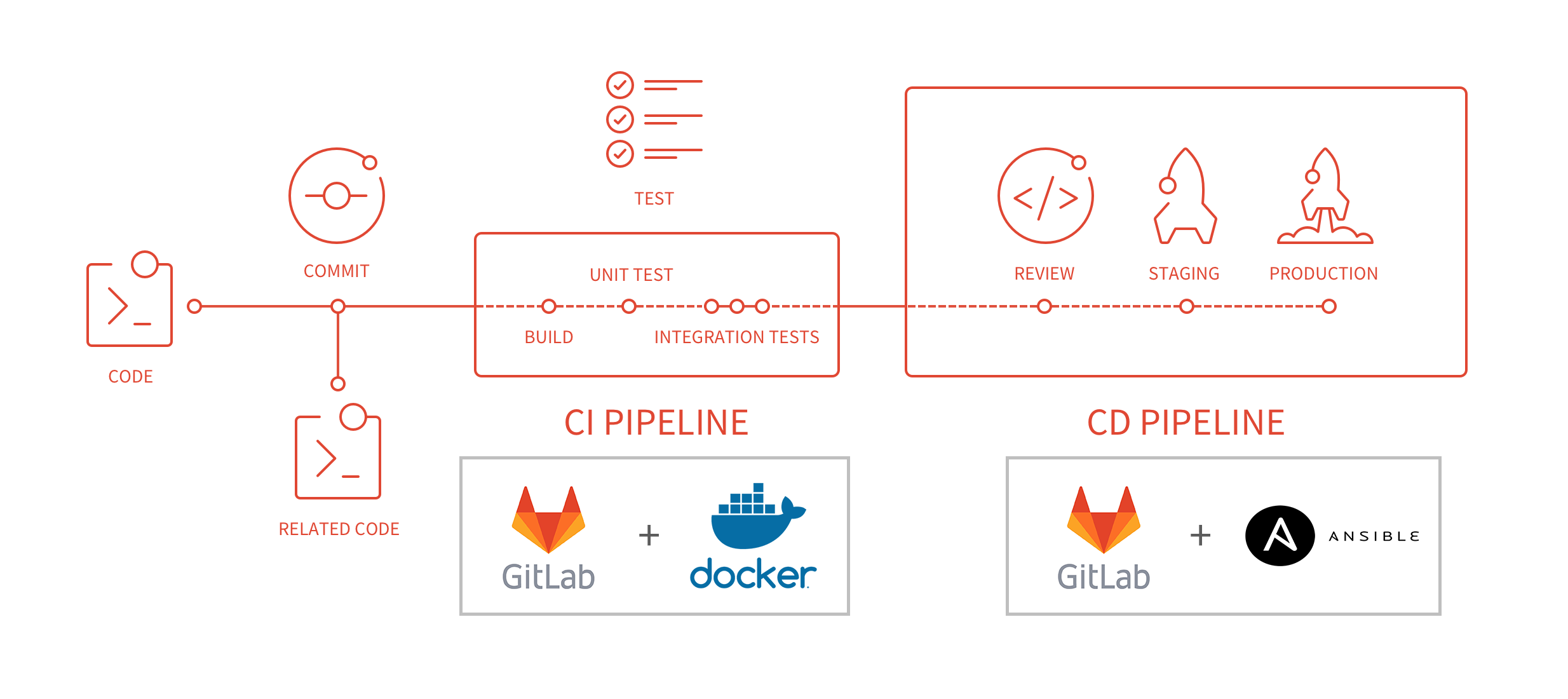
Here’s a typical sequence of events for a deployment:
- A developer pushes code to a Git repository (e.g., GitHub).
- The push triggers a CI/CD platform like GitHub Actions.
- Continuous Integration (CI): A job in the pipeline checks out the code, installs dependencies (e.g.,
composer install), and runs automated tests (e.g., PHPUnit). - Continuous Deployment (CD): If the tests pass, a subsequent job begins the deployment process.
- This CD job executes an Ansible playbook. Ansible connects to the target servers (defined in its inventory) via SSH.
- The playbook runs a series of tasks:
- Pulls the latest application code using the
gitmodule. - Installs or updates dependencies.
- Runs database migrations (
php artisan migrate). - Clears application caches.
- Restarts necessary services (like
php-fpm).
- Pulls the latest application code using the
The following reading and video demonstrate exactly how this works.
Using Ansible in CI/CD Workflows: Guide & Examples
Let's return to the Spacelift article, which perfectly describes Ansible's role in a CI/CD workflow.
Read the section 'Where does Ansible fit in CI/CD workflows?'. It clearly explains how Ansible bridges the gap between a built artifact and a running application.
Now, let's see a demonstration of a pipeline executing an Ansible playbook to automate server updates. This video uses GitLab CI, but the principles are identical for GitHub Actions.
Home Lab Automation with Terraform, Ansible, and CI/CD pipelines!
This video shows a CI/CD pipeline in action, acting as the 'glue' that automatically runs an Ansible playbook. This will help you visualize how the pieces connect.
Watch from 13:27 to 18:27. Focus on how the .gitlab-ci.yml file defines stages that first generate an inventory and then run an Ansible playbook. This is the core of integrating configuration management into a pipeline.
Terraform and Ansible: Better Together
It's vital to understand that Terraform and Ansible are not competing tools; they are complementary and designed to work together.
- Terraform creates the infrastructure.
- Ansible configures the infrastructure.

A typical workflow involves using Terraform to spin up the required servers, databases, and networks. Once that's done, the CI/CD pipeline hands off to Ansible to configure those newly created resources.
This final video segment from IBM Technology explains this synergy perfectly.
Ansible vs. Terraform: What's the difference?
This clip explains the two common patterns for using Ansible and Terraform together in an automated workflow.
Watch from 08:02 to 09:08. Pay attention to the two approaches described: Terraform provisioning first, then calling Ansible; or an Ansible playbook orchestrating the entire process, including calling Terraform.
Test your understanding!
A developer in your team has just pushed a code change that requires a new PHP extension to be installed on your web servers. Your entire infrastructure and deployment process is automated with Terraform and Ansible.
Which tool is responsible for which part of this update?
Show answer
Ansible would be responsible for installing the new PHP extension. You would add a new task to your Ansible playbook, likely using the apt or yum module, to ensure the extension is present on all web servers. The CI/CD pipeline would trigger this updated playbook.
Terraform would not be involved in this change, as its job is to manage the underlying infrastructure (the servers themselves), not the software installed on them.
Conclusion
This lesson concludes our foundational module. You now have a conceptual map of the key tools and principles for modern, automated deployments.
Key Takeaways:
- Ansible is a configuration management tool used to install software, manage services, and deploy applications.
- It is agentless, using standard SSH to communicate with managed servers.
- Automation is defined in human-readable YAML playbooks, which are idempotent.
- In a CI/CD pipeline, Ansible typically runs in the deployment (CD) stage after code has been successfully tested. It's the "last mile" that gets your application running on the server.
- Ansible and Terraform are complementary: Terraform provisions the infrastructure, and Ansible configures it.
With this foundation in place, you are ready to move from theory to practice. The next module marks the beginning of our hands-on work.
In the next lesson, we will start Module 2: Containerizing Applications with Docker. We'll begin by diving into the core concepts of Docker, including images, containers, and the cornerstone of building your own images: the Dockerfile.