Hello! Welcome to a new module focused on a powerful algorithmic technique: Recursion and Backtracking.
In the previous module, we focused on data structures like heaps that are designed to maintain order and priority. We now shift from what you use (data structures) to how you solve a problem (algorithmic patterns). Backtracking is one of the most important patterns for your interview toolkit, especially for problems that require exploring a space of possibilities.
Today's lesson is foundational. Our goal is to define a universal backtracking template that you can use to solve a wide range of problems. We will break this pattern down into three clear steps: a base case, a recursive step, and state reversal. Mastering this template is the key to confidently tackling problems involving permutations, combinations, and complex search scenarios.
1. What is Backtracking? A Guided Tour
At its core, backtracking is a methodical way to find solutions by trying out different options. When an option leads to a dead end, you "backtrack" to the last decision point and try a different path.
Think of solving a maze:
- You come to a fork in the road and choose a path.
- You follow it. If you hit a wall, you turn around and walk back to the fork.
- You then take the other path.
This process of exploring, hitting a dead end, and returning to try another option is the essence of backtracking. In algorithmic terms, we can visualize this exploration as traversing a decision tree.
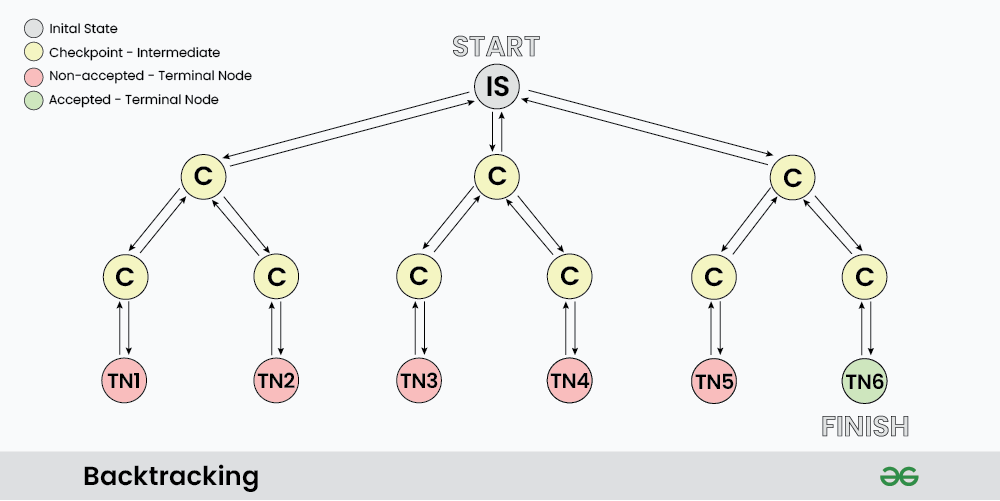
To get a dynamic feel for this concept, let's watch a short, intuitive explanation.
Solve ANY Backtracking Problem on Leetcode (Template + Explanation)
The video 'Solve ANY Backtracking Problem on Leetcode' from the Bitflip channel provides a great introduction to the core idea of backtracking, using the maze analogy and connecting it to the concept of a decision tree.
Watch from the beginning (00:18) to 01:15. Focus on how a series of choices can be visualized as a tree, where backtracking means moving back up a branch to explore another one.
2. The Universal Backtracking Template
Nearly every backtracking problem can be solved using a single, elegant recursive template. Since you have a strong background in DSA and recursion, you'll recognize the structure, but the key is the specific way state is managed.
The mantra to remember is "Choose, Explore, Unchoose."
Here is the generic pseudocode for this pattern:
function backtrack(current_state, other_params...):
    // 1. Base Case: Have we found a valid solution?
    if is_a_solution(current_state):
        add solution to results
        return

    // 2. Loop through all possible choices at this step
    for choice in available_choices:
        // A. Choose: Make a choice and modify the state
        add choice to current_state

        // B. Explore: Recurse with the updated state
        backtrack(current_state, ...)

        // C. Unchoose: Undo the choice to backtrack
        remove choice from current_state
Let's break down these components:
- Base Case: This is the condition that stops the recursion. It's triggered when you've either found a complete, valid solution or reached a point where no more choices can be made.
- Iterate Through Choices: At any given point in the problem, you have a set of options. The
forloop is crucial; it ensures you try every single available option from the current state. - Choose: You tentatively make a choice. This involves modifying the state of your solution (e.g., adding a number to a list, placing a queen on a chessboard).
- Explore: You make a recursive call, passing the modified state. This takes you one level deeper into the decision tree to see where this choice leads.
- Unchoose (State Reversal): This is the most critical step and what gives backtracking its name. After the recursive call returns (meaning you've fully explored that path), you must undo the choice you made. This cleans the slate, allowing you to try the next choice in the
forloop from the exact same decision point.
3. The Template in Action: Generating Subsets
The best way to understand the template is to see it applied. The "Subsets" problem is a classic introduction: Given a set of distinct integers, nums, return all possible subsets (the power set).
For an input like [1, 2, 3], we have a decision for each number: do we include it in our current subset or not? This binary choice creates a perfect decision tree.
Let's watch a walkthrough that applies our template to this exact problem.
Solve ANY Backtracking Problem on Leetcode (Template + Explanation)
Returning to the Bitflip video, this next segment walks through the Subsets problem, showing the decision tree and then mapping it directly to the 'choose, explore, unchoose' code structure.
Watch from 01:15 to 03:59. Pay close attention to how 'adding' a number is the 'choice', the recursive call is the 'exploration', and 'popping' the number is the 'un-choice' or backtracking step.
To reinforce this pattern, let's also look at it from a textual perspective. This article provides a very clear breakdown.
Backtracking Algorithm Explained: Master ... - Ojaswi Athghara
The article 'Backtracking Algorithm Explained' by Ojaswi Athghara offers a fantastic textual breakdown of the 'Choose, Explore, Unchoose' pattern, again using the subsets problem as an example.
Read the sections 'What Is Backtracking, Really?' and 'The Choose-Explore-Unchoose Pattern'. This will solidify the template and show you a slightly different but equivalent implementation for generating subsets.
Here's a Python implementation for generating subsets that mirrors the structure we've discussed. Note that there are two common ways to structure this problem; the video showed one, and the article shows another. Both are valid and follow the same core principles. The one below is similar to the one in the article.
def find_subsets(nums):
    result = []
    current_subset = []

    def backtrack(start_index):
        # Base Case: Add the current subset configuration as a solution.
        # In this pattern, every state is a valid subset.
        result.append(list(current_subset)) # Make a copy!

        # Loop through available choices (numbers from start_index onwards)
        for i in range(start_index, len(nums)):
            # 1. Choose: Add the number to our current subset
            current_subset.append(nums[i])

            # 2. Explore: Recurse, starting from the next index
            backtrack(i + 1)

            # 3. Unchoose: Remove the number to backtrack
            current_subset.pop()

    backtrack(0)
    return result

# Example:
print(find_subsets([1, 2, 3]))
# Output: [[], [1], [1, 2], [1, 2, 3], [1, 3], [2], [2, 3], [3]]
4. How to Spot a Backtracking Problem
In a technical interview, recognizing when to apply this pattern is half the battle. Your alarm bells should ring when you see problems asking you to:
- Generate all possible... (subsets, permutations, combinations)
- Find all solutions... (N-Queens, Sudoku)
- Find a path... (in a grid or maze)
These problems require exploring many possibilities, and backtracking provides the structured way to do it. When you encounter such a problem, a great way to frame your thinking is to ask these five questions:
Backtracking Algorithm Explained: Master ... - Ojaswi Athghara
The same article by Ojaswi Athghara has a great section summarizing how to approach any backtracking problem. These questions will help you define the parameters of your recursive function.
Read the section 'The Backtracking Decision Tree'. These five questions are your blueprint for building a backtracking solution.
Test your understanding!
Let's consider the problem: "Generate all permutations of [1, 2, 3]." A permutation is an arrangement of elements (e.g., [1, 3, 2] is a permutation of [1, 2, 3]).
Using the "Choose, Explore, Unchoose" template, how would you define the main components?
- Base Case: What condition tells you you've formed one complete permutation?
- Choices: At any step, what are your available choices for the next element in the permutation?
- Choose: How do you add an element to the current permutation?
- Unchoose: How do you undo that choice?
Show answer
- Base Case: The permutation is complete when its length equals the length of the original
numsarray. For[1, 2, 3], this is when our current permutation has 3 elements. - Choices: The available choices are any numbers from the original array that have not yet been used in the current permutation.
- Choose: Add an unused number to your
current_permutationlist and mark it as "used" (e.g., by adding it to a set). - Unchoose: Remove the number you just added from
current_permutationand un-mark it as "used" so it can be picked again in a different branch of the recursion.
This systematic process of picking only unused elements, exploring, and then un-picking ensures you generate all unique permutations without repetition.
Conclusion
In this lesson, we established the fundamental pattern for solving a vast category of interview problems. You now have a robust template to rely on, removing the guesswork from recursive exploration.
Key Takeaways:
- Backtracking is a recursive algorithm for systematically exploring a solution space, visualized as a decision tree.
- The core pattern can be memorized as "Choose, Explore, Unchoose."
- Every backtracking function needs three key components:
- A base case to stop and record a solution.
- A loop to iterate through all current choices.
- A recursive step involving choosing, exploring (the recursive call), and crucially, unchoosing (state reversal).
- Look for keywords like "generate all," "find all," or "find a path" to identify backtracking problems.
In our next lesson, we will put this template into practice by writing the full code for generating subsets, permutations, and combinations. You'll see just how versatile this single pattern is.