Hello and welcome back.
In our last lesson, we contrasted monolithic and microservices architectures, weighing the initial simplicity of a monolith against the scalability and flexibility of microservices. We concluded that while microservices offer powerful advantages for large systems, a monolith is often a practical starting point.
Today, we'll put that principle into practice. Before we can effectively break down an application into microservices, we must first have a solid, high-level blueprint of the application as a whole. The most common and logical way to structure this blueprint is using a three-tier architecture.
This lesson directly addresses the learning outcome: Sketch a basic three-tier architecture for a task manager application. By the end of our session, you will understand the roles of the presentation, application, and data tiers and be able to draw a diagram representing our task manager application using this model. This sketch will serve as our baseline "structured monolith" that we will analyze and decompose in the upcoming modules.
Understanding the Three Tiers
At its core, a three-tier architecture is a well-established software architecture pattern that separates an application into three logical and physical computing tiers. This separation of concerns makes the application more organized, scalable, and easier to maintain.
To start, let's get a clear definition of each tier.
Microservices vs Multi-Tier: A Guideline for Developers
The article 'Microservices vs Multi-Tier' from DensityLabs offers a concise breakdown of the components in a multi-tier architecture. It clearly defines the role of each layer.
Please read the section under the heading 'Components of Multi-Tier Architecture:'. Focus on the definitions of the Presentation Tier, Application Tier, and Data Tier.
To summarize and visualize what you've just read, the three tiers are:
-
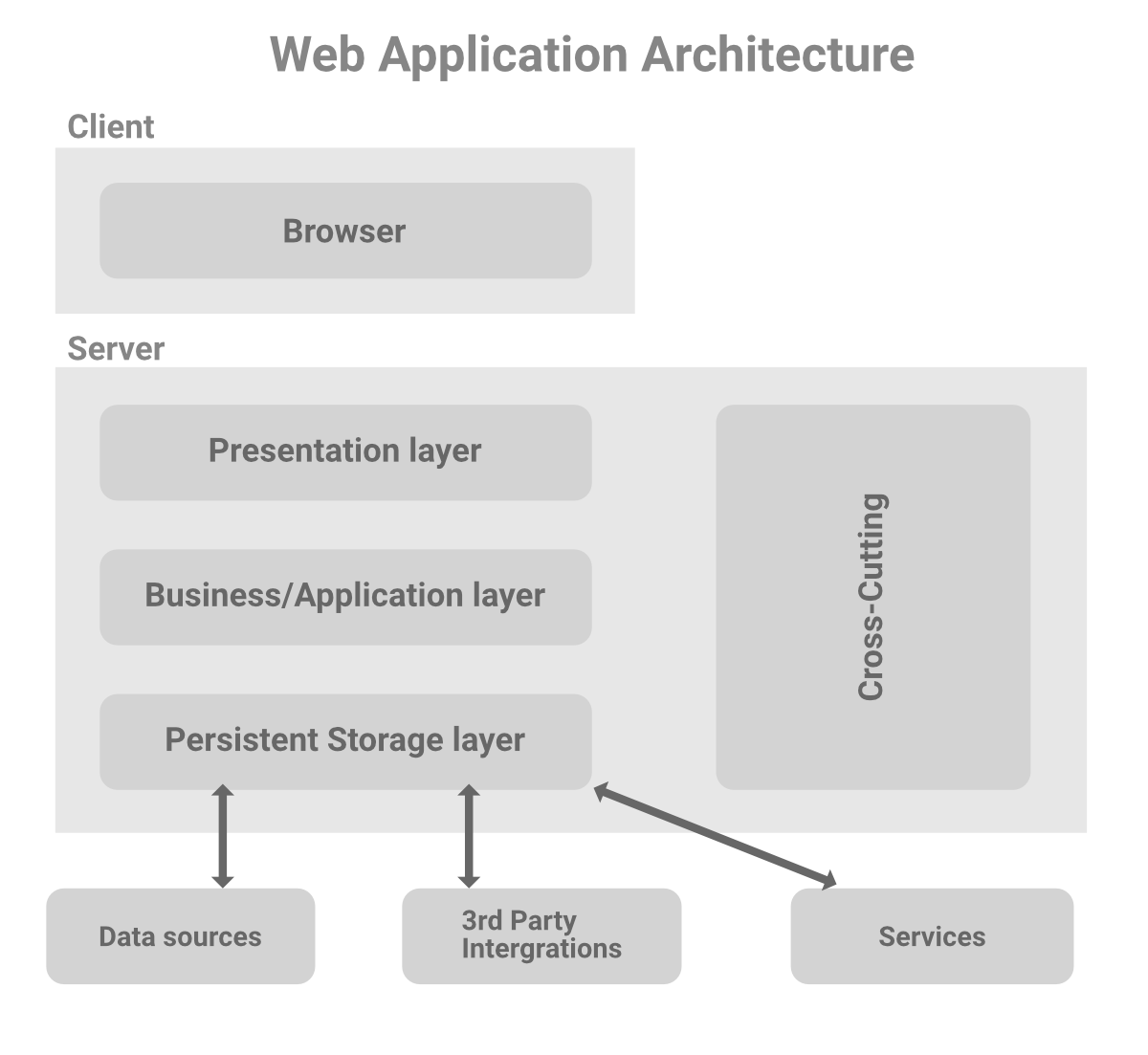
Presentation Tier (Frontend): This is what the user sees and interacts with. It's responsible for displaying data and sending user actions to the application tier. In a modern web application, this is typically a single-page application (SPA) running in the user's web browser, built with a framework like React, Angular, or Vue.js.
-
Application Tier (Backend/Business Logic): This is the "brain" of the application. It contains the business logic that processes user requests, makes decisions, and coordinates with the data tier. For our task manager, this tier would handle logic like creating tasks, checking deadlines, and managing user authentication. It exposes an API (Application Programming Interface) that the presentation tier communicates with.
-
Data Tier (Backend/Database): This tier is responsible for the persistent storage and retrieval of data. It consists of a database management system (e.g., PostgreSQL, MySQL, MongoDB) and the data itself. The application tier is the only tier that communicates directly with the data tier.
The following diagram provides a general overview of this structure.
Test your understanding!
For our task manager application, categorize each of the following functionalities into one of the three tiers (Presentation, Application, or Data):
- Displaying a list of tasks in a user's dashboard.
- The actual storage of a task's title and due date.
- Logic to determine if a user has permission to view a specific project.
- A button that allows a user to mark a task as "complete".
Show answer
- Presentation Tier: This involves rendering the UI based on data received from the backend.
- Data Tier: This is where the task information is persistently stored in the database.
- Application Tier: This is business logic. The backend server would check the user's identity against the project's access rules.
- Presentation Tier: The button itself is a UI element. When clicked, it triggers a request to the Application Tier.
The Request Flow in a Three-Tier System
Now that we understand the tiers, let's see how they interact. In the monolithic model we first considered, all these layers were bundled together. In a three-tier architecture, they are separated into distinct services, often running on different servers. This changes the request-response flow.
The following video explains this transition from a single-application model (like MVC) to a distributed three-tier system and clarifies the new request flow.
Introduction to System Design - MVC and Three-Tier Architecture
In 'Introduction to System Design' by Caleb Curry, this segment clearly explains how an application is physically separated into front-end, back-end, and database services, and traces how a user request flows through these tiers.
Please watch from 13:30 to 17:22. This section covers the three-tier architecture, the modified request flow, and how the components are split.
As the video highlighted, the key shift is that the client (browser) first loads the Presentation Tier application. This application then makes API calls to the Application Tier to fetch or modify data, which in turn communicates with the Data Tier.
Sketching the Architecture for Our Task Manager
Let's make this concrete by designing a three-tier architecture for our task manager. We don't have to start from a blank page. The resource below from Google Cloud describes a pre-built solution for a three-tier task-tracker app. It provides an excellent, professional reference for our sketch.
Jump Start Solution: Three-tier web app
This Google Cloud guide for a 'Three-tier web app' solution provides a perfect, real-world example of the architecture we are discussing, applied to a task-tracking application.
Please review the 'Architecture' section. Pay close attention to the architecture diagram and the numbered 'Request flow' description that follows it.
Now, let's synthesize this information into our own sketch. Grab a piece of paper or open a simple drawing tool. Your goal is to create a block diagram that represents the three-tier architecture for the task manager.
Your sketch should include:
- A block for the Client or Presentation Tier. Label it "Web Frontend" or "Client App (Browser)".
- A block for the Application Tier. Label it "Backend API Server". You can add a note that this contains the business logic for Users, Tasks, Projects, etc.
- A block for the Data Tier. Label it "Database" and specify a type, like "PostgreSQL DB".
- Draw arrows to show the primary communication paths. Remember the flow: the Client talks to the Backend API, and the Backend API talks to the Database.
Your resulting diagram should look something like the core components shown in the Google Cloud architecture, just simplified.
From Three-Tier Monolith to Microservices
The architecture you have just sketched represents a "structured monolith." While the tiers are separated, all of the business logic still resides within that single "Backend API Server." This is a great architecture for many applications, but as we discussed, it can become a bottleneck as the application and the team grow.
This three-tier diagram is our starting point for decomposition. The "Application Tier" is the component we will break apart into independent microservices in the upcoming lessons.
This image provides a powerful visualization of that transition:

Notice how the "App Server" from the three-tier design is replaced by multiple, smaller services (Microservice 1, Microservice 2, etc.) in the detailed microservice design. This is precisely the journey we will embark on for our task manager.
Conclusion
In this lesson, we have defined and applied the three-tier architecture, a foundational pattern in web development.
- Key Takeaways:
- A three-tier architecture separates an application into a Presentation Tier (UI), an Application Tier (business logic), and a Data Tier (database).
- This separation of concerns improves organization, scalability, and maintainability.
- The request flow typically starts at the Presentation Tier, which communicates with the Application Tier via APIs. The Application Tier is the only layer that interacts directly with the Data Tier.
- We have sketched a three-tier architecture for our task manager, which will serve as the "structured monolith" baseline for our microservices design.
Next Up: This lesson concludes our foundational module on web architecture. We are now ready to dive into the core topic of the course. In the next module, "Introduction to Microservices," we will begin by formally defining the characteristics of a microservices architecture and evaluating its suitability for our task manager project.