Good to see you again. In the previous lesson, you designed a minimum viable routine for days when classes, tests, fatigue, or unexpected work disrupt the plan. That routine prevents one difficult day from turning into an undefined backlog.
Now we add the system that makes recovery possible: a weekly review. Once each week, you will look at what actually happened, capture new information, decide what unfinished work still matters, and place the next concrete actions into a realistic plan. The aim is not to make a perfect schedule. It is to ensure that college deadlines, GATE preparation, and Python/DSA practice remain visible and manageable as your semester changes.
A weekly review is a reset, not a judgment
A weekly review has two directions:
- Backward: What did I finish? What stayed unfinished? What caused the difference?
- Forward: What is due soon? What needs an early start? Where will the actual work sessions go?
Without this reset, an unfinished task tends to become a vague mental burden: “I still need to do Control Systems,” “I am behind in coding,” or “That VHDL work is pending.” A weekly review turns each vague burden into one of four outcomes:
- Complete it — if it is genuinely done, mark it done.
- Schedule its next action — if it still matters and you know the next physical step.
- Decompose it — if it is too large to schedule as one task.
- Cancel or defer it deliberately — if it is no longer relevant this week.
The crucial idea is this:
Do not move an unfinished task into next week unchanged. Decide what it means now.
For example, “Work on DSD assignment” is not a schedulable task. A better next action is:
- “Draw the state diagram for the traffic-light controller.”
- “Write and simulate the VHDL testbench for input cases 00, 01, 10, and 11.”
- “Correct the three failed test cases in the Python program.”
Those are actions you can begin in a particular study block.
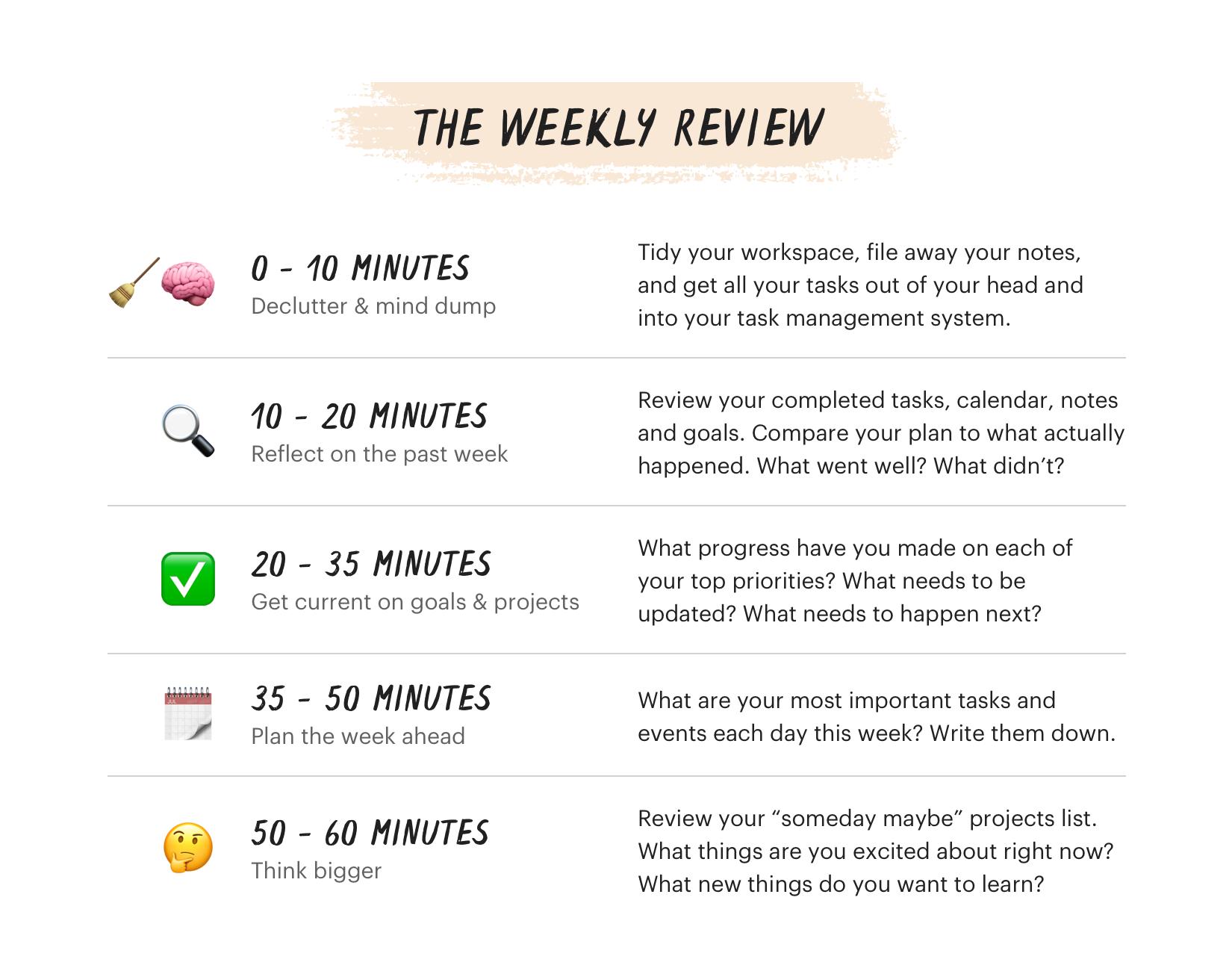
The image’s 60-minute process is a strong default for a busy semester. Once you build the habit, some quieter weeks may need only 25–30 minutes; deadline-heavy weeks may deserve the full hour.
Separate deadlines from the work that produces them
A deadline is a fixed point: “Digital Communications quiz on Thursday,” “VHDL assignment due Friday,” or “mid-semester exam in two weeks.” But a deadline by itself does not tell you what to do today.
The work must be represented as work sessions: smaller actions that occur before the deadline.
Task Management for Students: Deadlines, Projects, and Getting Through the Semester | Any.do blog
Read this Any.do blog article for the distinction between fixed deadlines and the study or project sessions that make those deadlines manageable. Its weekly-planning questions are especially useful when several ECE courses create overlapping demands.
In the opening section, before “Managing Long-Term Projects Across the Semester,” begin with the distinction between deadline tasks and work-session tasks. Read the deadline-to-session distinction. Then read the subsection “The Weekly Planning Session: Sunday Night or Monday Morning,” focusing on the four planning questions. In “Managing Long-Term Projects Across the Semester,” read the subsection “Break large projects into milestone tasks immediately,” especially the milestone method.
For your semester, the distinction might look like this:
| Fixed deadline or commitment | Work sessions to schedule before it |
|---|---|
| Digital Communications quiz, Thursday | Retrieve formulas on Monday; solve five selected questions on Tuesday; correct errors on Wednesday |
| VHDL assignment, Friday | Finish logic design; write the module; create a testbench; run simulation; submit |
| GATE 2027 preparation | One concept block, one practice block, and one short revision block |
| Python/DSA progress | Complete one lesson; implement one small program; review errors from one attempted problem |
A task such as “Prepare for GATE” is too broad to place on Tuesday at 7 p.m. Instead, schedule something like:
“Control Systems: solve four feedback-reduction questions; mark doubts — 60 minutes.”
That task has a topic, an action, an endpoint, and a time limit.
The early-start rule
During your review, look at least two to three weeks ahead. If an exam, lab report, group presentation, or substantial assignment is visible there, create at least one work session for the coming week.
This matters because college assessments tend to collide. A quiz may be manageable on its own, but a quiz combined with a lab submission and regular classes is not something to begin the night before. Starting early does not mean doing everything early; it means making the project or exam preparation visible and active before it becomes urgent.
Your 60-minute weekly review procedure
Choose a consistent time that usually works with your class schedule. Sunday evening is often practical because it allows planning before Monday, but Friday afternoon or Monday morning can work just as well. The day matters less than doing the review reliably.
Keep one place for the review: a notebook, a calendar plus notes app, or a task-management tool. You do not need a complex productivity application. You need a system you will actually reopen next week.
Minutes 0–10: Get clear
Start by collecting loose information. Your task is to eliminate “hidden commitments.”
Check:
- college announcements, LMS notices, and class group messages;
- your calendar for new tests, labs, submissions, and meetings;
- notes taken during lectures;
- your phone notes, paper scraps, screenshots, and unfinished to-do lists;
- anything you are waiting to hear from a teammate, faculty member, or lab partner.
Then do a short mind dump: write every task or concern currently occupying mental space. Do not prioritize it yet.
For example:
- Ask lab partner for simulation file.
- Find the Antenna assignment question sheet.
- Revise sampling theorem notes.
- Finish Python input/output practice.
- Check whether the Control Systems tutorial is this week.
- Buy a notebook for formula revision.
The point is capture, not immediate action. Your mind should not have to act as the storage system.
My weekly planning routine (college student edition)
In “My weekly planning routine (college student edition),” The Bliss Bean demonstrates a practical capture stage: gathering scattered notes, messages, calendar items, and pending project actions before trying to schedule them.
Watch the capture stage, where she builds a single brain-dump list from messages, calendar entries, and stray thoughts. Then watch project review; focus on the idea of extracting a project’s immediate next action rather than merely keeping the project in mind. Her specific apps and personal categories are optional—the capture-and-convert process is what matters.
Minutes 10–20: Reflect on the week honestly
Open last week’s plan and compare it with reality. Mark tasks as:
- Done
- Partially done
- Not started
- No longer needed
Do not merely count unfinished tasks. Ask why they did not happen. The explanation determines what should change next week.
Useful reflection questions:
- Which study blocks worked well, and why?
- Which tasks repeatedly moved forward without starting?
- Was the obstacle time, low energy, unclear next actions, difficulty, distraction, or an unexpected college demand?
- Did I protect any recovery time, or did I repeatedly schedule work when I was unlikely to have energy?
- Did I make progress on both the urgent college workload and long-term priorities such as GATE and coding?
Keep the reflection brief: one or two observations are enough.
For example:
“I completed GATE practice on weekend mornings but skipped it after evening labs. Next week, I will reserve difficult GATE numericals for Saturday morning and use weekday evenings for revision or college consolidation.”
That is much more useful than “I need to be more disciplined.”
A simple metric can help you notice patterns without becoming obsessed with numbers:
If you planned eight substantial blocks and completed six, your rate was . That is not a grade. It is evidence. If the rate is repeatedly low, reduce the number of scheduled blocks, improve task clarity, or protect more buffer time.
Minutes 20–35: Convert unfinished work into decisions
This is the core of the review. Go through every incomplete task and make one decision rather than letting it drift.
| What happened? | Weekly-review decision | Example |
|---|---|---|
| The task is genuinely finished | Mark it complete | “Submitted Networks assignment” |
| It matters, but the task was too large | Break it into smaller actions | Replace “Study Control Systems” with “derive transfer function from two solved examples” |
| It was displaced by an urgent deadline | Reschedule a defined next action | “Solve three Control Systems questions, Saturday 10 a.m.” |
| You are blocked by another person or missing information | Create a follow-up action | “Message project teammate for module interface by Monday” |
| It is not important now | Move it to a later list or cancel it | “Explore Java course” goes to later; it does not occupy this week |
| It has been avoided repeatedly | Diagnose the cause before rescheduling | Is it unclear, too hard, poorly timed, or unnecessary? |
A worked example
Suppose your prior week included:
- Two GATE Control Systems practice sessions
- Three Python foundations sessions
- A VHDL assignment
- Regular lecture revision
Then a VHDL lab issue takes longer than expected and a Digital Communications quiz is announced for Thursday. At review time, you find:
- One GATE practice block was missed.
- Python practice was completed once, not three times.
- The VHDL assignment is only partly completed.
- The quiz now needs preparation.
A poor plan for the next week would be:
“Do all missed GATE and Python work, finish VHDL, prepare quiz, and follow the normal schedule.”
That is an unbounded catch-up plan.
A better conversion is:
| Item | Decision for next week |
|---|---|
| Missed GATE block | Schedule one 60-minute GATE practice block on the weekend; do not try to recreate every missed block |
| Python sessions | Keep two short sessions: “trace variables through input/output program” and “write one conditional program” |
| VHDL assignment | Define the next action: “finish testbench, run simulation, record results” |
| Digital Communications quiz | Schedule two preparation sessions before Thursday: active recall, then problem practice |
| Remaining unscheduled work | Leave it in the backlog rather than pretending it fits |
The principle is controlled trade-offs. A college deadline may temporarily receive more time this week. That is not abandoning GATE or coding; it is responding to the academic calendar while preserving at least a small connection to long-term priorities.
Minutes 35–50: Build next week from capacity, not wishful thinking
You have already learned to estimate weekly capacity from your changing timetable and to retain a buffer. Use that calculation here.
First, enter the non-negotiables:
- classes, labs, travel, and fixed college commitments;
- submission dates and tests;
- meals, sleep, exercise, and recovery time;
- personal commitments that matter.
Then reserve your buffer blocks before filling every open period. A buffer is not wasted time. It is where a delayed lab, an unexpected assignment question, or a missed study block can go without collapsing the whole week.
A deadline-heavy week might have a plan like this:
| Stream | Planned work for the week | Purpose |
|---|---|---|
| College: VHDL and quiz | 4–5 specific blocks | Meet the immediate academic demands |
| GATE | 2 focused blocks plus 1 short revision | Maintain meaningful continuity |
| Python/DSA | 2 smaller blocks | Continue beginner coding without overload |
| Buffer | 2 blocks | Absorb disruption or recover |
| Weekly review | 1 block | Keep the system current |
Notice that this is not necessarily the same allocation every week. During normal weeks, GATE may receive the largest share. During a week with a mid-semester exam or major lab deadline, college work may temporarily take priority. The review makes that choice visible rather than accidental.
Rules for placing work sessions
When assigning tasks to actual days:
- Put demanding work—new GATE concepts, difficult numericals, unfamiliar programming—into your better-energy periods.
- Do not schedule several cognitively intense tasks back-to-back.
- Keep each block connected to a concrete outcome.
- Schedule one meaningful task before adding optional tasks.
- Use the minimum viable routine as the fallback if a planned block is disrupted.
- Protect one recovery period each weekend; catching up indefinitely is not a sustainable strategy.
Your calendar should show actions, not only goals. Compare:
| Too vague | Schedulable |
|---|---|
| GATE study | Digital Communications: solve six PCM bit-rate questions, 60 min |
| Coding | Python: implement a program with if/else cases, test three inputs, 45 min |
| Revise college | Control Systems: create and answer five active-recall prompts from this week’s lecture, 30 min |
| Work on assignment | VHDL: simulate testbench and record output table, 75 min |
At the end of this phase, you should be able to look at Monday through Sunday and answer: What are the most important actions each day, and when will they happen?
Minutes 50–60: Keep the long term visible—without overloading the week
The final part of the review is brief. It prevents urgent work from completely hiding your longer direction.
Check these questions:
- Did this week include at least some progress toward GATE 2027?
- Did I maintain a small coding habit that supports placements?
- Is there a larger college project, exam, or semester topic that needs an early work session next week?
- Is there something on my “later” list that has become timely—or should it remain later?
For now, your “later” list might include Java, a larger coding project, advanced DSA topics, or extra GATE subjects beyond the immediate semester overlap. It is useful to record those interests, but do not turn all of them into commitments this week.
A good weekly review often ends with only three written priorities:
- Urgent academic priority: for example, finish the VHDL assignment and prepare for the Digital Communications quiz.
- GATE priority: for example, complete two planned practice sessions and one formula-review session.
- Coding priority: for example, complete two Python foundation blocks.
Everything else is secondary unless your schedule changes.
Your reusable weekly-review checklist
Copy this into your planner or notes app and use it at the same time each week.
1. Clear — 0 to 10 minutes
- Check announcements, messages, course portals, notes, and calendar.
- Capture new deadlines, tests, lab work, and group-work obligations.
- Do a mind dump.
- Record anything I am waiting for from another person.
2. Reflect — 10 to 20 minutes
- Mark last week’s tasks: done, partial, not started, or no longer needed.
- Note one success and one obstacle.
- Check whether my planned workload matched my real capacity.
- Identify one adjustment for next week.
3. Get current — 20 to 35 minutes
- Look two to three weeks ahead for exams, submissions, and major projects.
- Convert each unfinished task into complete, next action, smaller steps, follow-up, defer, or cancel.
- Give each large project or exam at least one early work session.
4. Plan — 35 to 50 minutes
- Enter fixed commitments and recovery time.
- Reserve buffer blocks.
- Schedule college tasks, GATE, and Python/DSA using concrete actions.
- Avoid stacking demanding work back-to-back.
- Identify the week’s top three priorities.
5. Look ahead — 50 to 60 minutes
- Confirm that the week still supports GATE 2027 and placement coding.
- Move attractive but non-urgent ideas to a later list.
- Choose the next weekly-review time.
Key takeaways
A weekly review is the bridge between a disrupted week and a realistic next week.
- Treat it as a reset and decision process, not a judgment about productivity.
- Track both fixed deadlines and the smaller work sessions needed before those deadlines.
- Never carry an unfinished task forward automatically; complete, schedule, decompose, defer, cancel, or unblock it.
- Look two to three weeks ahead so exams, assignments, and projects begin before they become emergencies.
- Plan from real capacity, preserve buffer and recovery time, and schedule specific actions rather than vague goals.
- Let college deadlines temporarily receive more attention when needed, while retaining a deliberate connection to GATE and coding.
This completes the sustainable weekly-system module. Next, you will begin Python foundations by setting up a local environment and running your first programs—turning the coding blocks in your new weekly plan into concrete placement-oriented practice.