Welcome to the final lesson in our first module on data exploration and cleaning. In our previous session, we developed a toolkit for handling outliers through trimming, capping, and transformation. Now, with our data largely free of missing values and extreme points, we turn our attention to the last crucial cleaning step: ensuring the integrity and consistency of the records themselves.
This lesson focuses on identifying and resolving duplicate records and common data inconsistencies. These issues, while sometimes subtle, can significantly bias your analysis and corrupt your machine learning models. We will cover:
- Finding and removing identical or partially identical rows.
- Correcting structural errors, such as incorrect data types.
- Standardizing text and categorical data to ensure uniformity.
By the end of this lesson, you will be equipped to perform a comprehensive data cleaning pass, transforming a messy, raw dataset into a reliable foundation for the feature engineering and modeling work to come.
Identifying and Handling Duplicate Records
Duplicate records are rows in your dataset that are identical. They can arise from various sources, such as data entry errors, bugs in data collection pipelines, or incorrect table joins. If left unaddressed, they give undue weight to certain observations, which can skew statistical summaries and bias the training of a machine learning model.
Pandas provides a straightforward and powerful way to manage duplicates. The process involves two main methods: duplicated() for identification and drop_duplicates() for removal.

The video below from the Data School channel offers a concise and thorough explanation of these methods. It is an excellent resource for mastering the fundamentals of duplicate handling.
How do I find and remove duplicate rows in pandas?
This video covers the essential pandas methods for working with duplicate data.
Please watch the entire video. Pay close attention to these key concepts: Identifying Duplicates: How users.duplicated() works and how to use it to view the duplicate rows. The keep Parameter: The difference between keep='first', keep='last', and keep=False. This is a crucial detail for controlling which records are flagged or removed. Dropping Duplicates: Using users.drop_duplicates() to remove the identified rows. The subset Parameter: A powerful option for defining duplicates based on a specific set of columns rather than the entire row.
As the video demonstrates, defining a duplicate isn't always about the entire row being identical. Often, you'll define a duplicate based on a key set of columns. For instance, in a dataset of user events, you might consider a record a duplicate if it has the same user_id and timestamp, even if other columns (like session_id) differ. The subset parameter is your tool for handling these more nuanced scenarios.
Let's look at a quick practical example.
import pandas as pd

data = {
    'user_id': [101, 102, 103, 101, 104, 102],
    'product': ['A', 'B', 'A', 'A', 'C', 'B'],
    'timestamp': ['2023-01-01', '2023-01-01', '2023-01-02', '2023-01-01', '2023-01-03', '2023-01-01']
}
df = pd.DataFrame(data)

print("--- Original DataFrame ---")
print(df)


# Count full duplicates
full_duplicates = df.duplicated().sum()
print(f"\nNumber of full duplicate rows: {full_duplicates}")
print("Viewing the full duplicate row(s):")
print(df[df.duplicated(keep=False)]) # keep=False shows all occurrences of duplicates


# Count duplicates based on a subset of columns
subset_duplicates = df.duplicated(subset=['user_id', 'timestamp']).sum()
print(f"\nNumber of duplicates based on user_id and timestamp: {subset_duplicates}")


# Drop full duplicates, keeping the first instance
df_cleaned = df.drop_duplicates()
print("\n--- DataFrame after dropping full duplicates ---")
print(df_cleaned)


# Drop duplicates based on subset
df_cleaned_subset = df.drop_duplicates(subset=['user_id', 'timestamp'], keep='first')
print("\n--- DataFrame after dropping duplicates based on user_id and timestamp ---")
print(df_cleaned_subset)
Resolving Common Data Inconsistencies
Beyond complete row duplication, datasets are often plagued by more subtle inconsistencies within columns. These can take many forms:
- Formatting issues: Unwanted characters, leading/trailing whitespace, inconsistent capitalization.
- Structural problems: A column of numbers being read as text, or a column of identifiers (like phone numbers) being misinterpreted as numeric.
- Inconsistent representation: "USA" vs "U.S.A.", or "Y" vs "Yes".
- Compound information: A single "Address" column containing street, city, state, and zip code.
Cleaning these inconsistencies is a methodical process of standardization. The following video from Alex The Analyst provides a fantastic, step-by-step walkthrough of cleaning a messy dataset using pandas. It covers many of the most common scenarios you will encounter.
Data Cleaning in Pandas | Python Pandas Tutorials
This video is a practical demonstration of a full data cleaning workflow in pandas, tackling duplicates, string formatting, column splitting, and more.
As you watch, focus on the techniques being applied, as they are broadly applicable to many different datasets. Dropping Duplicates: Reinforces what we just learned. Cleaning Text with strip(): See how .str.strip() is used to remove unwanted characters from the beginning or end of strings. Standardizing Phone Numbers: This is a masterclass in a multi-step cleaning process. Notice the use of .str.replace() with a regular expression to remove non-numeric characters, followed by .apply() with a lambda function to reformat the numbers into a consistent pattern. Your experience with scripting and functional programming concepts will make the logic here very clear. Splitting Columns: Watch how .str.split(expand=True) is used to break a single address column into multiple, more useful columns. Standardizing Categorical Values: A simple but essential use of .str.replace() to make "Yes/No" values uniform. Filtering and Final Touches: Using .fillna() to handle empty values consistently and iterating through the index to drop rows based on a condition. Resetting the Index: A crucial final step after removing rows to ensure a clean, continuous index.
To supplement the video, the following article provides a well-structured written guide to a similar cleaning process. It highlights some key initial inspection steps and reinforces the techniques for fixing data types and cleaning string values.
I Cleaned a Messy CSV File Using Pandas . Here's ...
This Towards Data Science article walks through a methodical data cleaning process, providing code and clear explanations for each step.
Read through the article, focusing on these parts which complement the video's techniques: Data Integrity Check: In section 3, notice the use of df.duplicated().sum() and df.nunique() as initial diagnostic tools. Fixing Data Types: The example in section "Fixing Data Types and Corruption" of the Phone column being incorrectly inferred as a number is a classic problem. See how .astype(str) is used to correct this structural error. Cleaning with Regex: The section "Cleaning Corrupted String Data" provides another clear example of using str.replace(r'\D', '', regex=True) to strip non-digit characters. Separating Columns: The "Separating and Standardizing Categorical Data" section shows another example of splitting a compound column (department_region) into two, similar to the video's address example. Converting Dates: The article concludes its cleaning phase by demonstrating the use of pd.to_datetime(), an essential function for ensuring date columns are in the correct format for time-series analysis.
Advanced Inconsistencies: Record Linkage and Fuzzy Matching
So far, we have dealt with inconsistencies that can be solved with exact rules. But what about cases like "John O'neel" vs. "John Oneel", or "16 M. Street" vs. "Raleigh, 16M St."? These are different string values that refer to the same real-world entity. This is a very common and challenging problem, especially when trying to merge datasets that lack a clean, unique identifier.
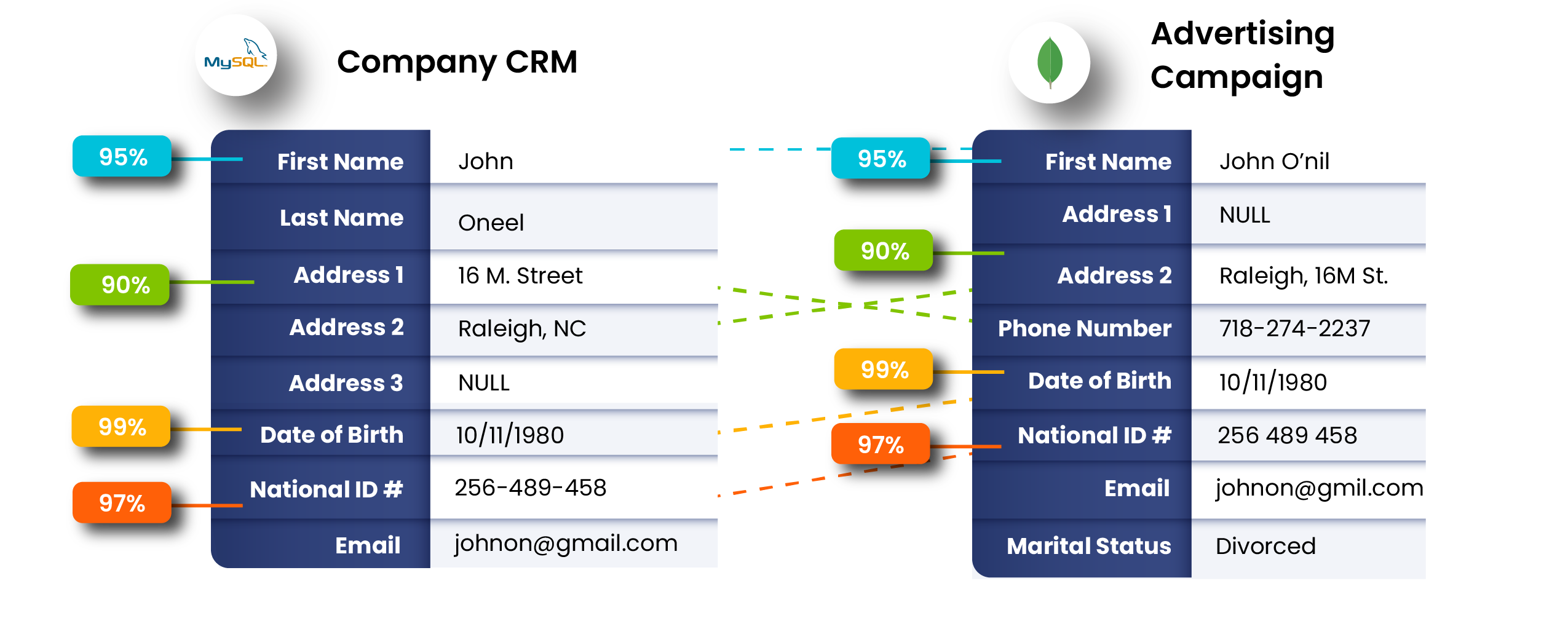
This problem is known as record linkage or fuzzy matching. Solving it requires more advanced techniques that calculate the "distance" or "similarity" between strings, rather than relying on exact equality. While a full tutorial is beyond this lesson's scope, it is important for you to be aware of this class of problem and the tools available to solve it. Your background in algorithms will help you appreciate the computational complexity involved in these string-matching algorithms.
The following article provides an excellent introduction to this topic.
Python Tools for Record Linking and Fuzzy Matching
This article from pbpython.com introduces the concept of record linkage and discusses two popular Python libraries for tackling it: fuzzymatcher and recordlinkage.
Read through the article to gain a high-level understanding of the problem and the general approach to solving it. Focus on: The definition of record linking. The core challenge illustrated with a simple example. Approach 1 - fuzzymatcher: Skim this section to see how a library can simplify the process into a fuzzy_left_join function. Approach 2 - Python Record Linkage Toolkit: Skim this section to see a more configurable, multi-step approach involving indexing, comparing, and scoring potential matches. Notice the concept of "blocking" on a column like State to reduce the number of pairs that need to be compared—a critical optimization strategy. Deduplicating data: See how the same tools can be used to find fuzzy duplicates within a single dataset.
Understanding record linkage is a key differentiator for a data scientist. While you won't need to implement it for our course's practicals, knowing that these tools exist is vital for tackling complex, real-world data integration projects.
Conclusion
This lesson concludes our foundational module on data exploration and cleaning. You are now equipped with the essential skills to take a raw dataset and systematically prepare it for analysis.
Here are the key takeaways from this lesson:
- Duplicate Records: Use
df.duplicated()anddf.drop_duplicates(), along with thesubsetandkeepparameters, to manage identical or partially identical rows. - Data Inconsistencies: Employ a combination of
astype()to fix types, string methods (.str.strip(),.str.replace(),.str.split()) for formatting, and.apply()with lambda functions for complex transformations. - Methodical Approach: Data cleaning is a step-by-step process of inspection, diagnosis, and treatment.
- Advanced Problems: For complex inconsistencies like fuzzy name and address matching, be aware of specialized tools like the
recordlinkagelibrary.
With our data now clean and consistent, we are ready to move from fixing problems to creating value. The next module, Feature Engineering and Preprocessing, will build directly on this foundation. Our first lesson will cover the crucial step of creating a train-test split, a fundamental practice for preventing data leakage and building models that generalize well to new, unseen data.