Hello and welcome back!
In our last lesson, we built a comprehensive business plan, creating the detailed substance and strategic roadmap for your startup idea. That plan answers the "what" and "how" of your venture. Today, we'll focus on translating that substance into a compelling story.
This lesson addresses the learning outcome: Use AI to create a compelling narrative and design for a startup pitch deck. A great pitch deck is your venture's calling card. For a solo founder, its primary purpose isn't just to secure investment; it's a powerful tool to clarify your vision, communicate your value proposition concisely, and align your own strategic thinking.
1. Distilling Your Business Plan into a Narrative
A business plan is a detailed report; a pitch deck is a persuasive story. Your goal with a deck is not to convey every detail but to generate excitement and secure the next conversation. The first step is to distill the core message from your business plan.
A powerful technique is to craft a "one-minute pitch." This forces you to be ruthlessly concise.

Using the business plan components you developed in the last lesson, you can use Gemini to populate this structure.
Actionable Prompt:
"I'm creating a one-minute pitch for my startup. Using the following information from my business plan [paste key summaries of your business idea, target audience, and core value proposition], fill out this template:
- Company: We are [Company Name], a [Defined Offering] for [Defined Audience]. Our secret sauce is [Secret Sauce].
- Product: We operate in the [Defined Market] and provide [Value].
- Competitors: Our competitors are [Competitors], but we are different because [Key Differentiator].
- Status: We have [Current Status of Product/Team].
- Ask: We are looking for [What You Are Looking For] to [How You Will Use It]."
This exercise helps you extract the absolute essence of your venture, which will become the narrative backbone of your pitch deck.
2. Structuring the Story: From Narrative to Slides
With your core story defined, the next step is to structure it into a classic pitch deck format. Instead of starting from scratch, you can ask AI to generate a proven slide structure.
For a startup, especially one in the tech space, certain elements are critical to include.
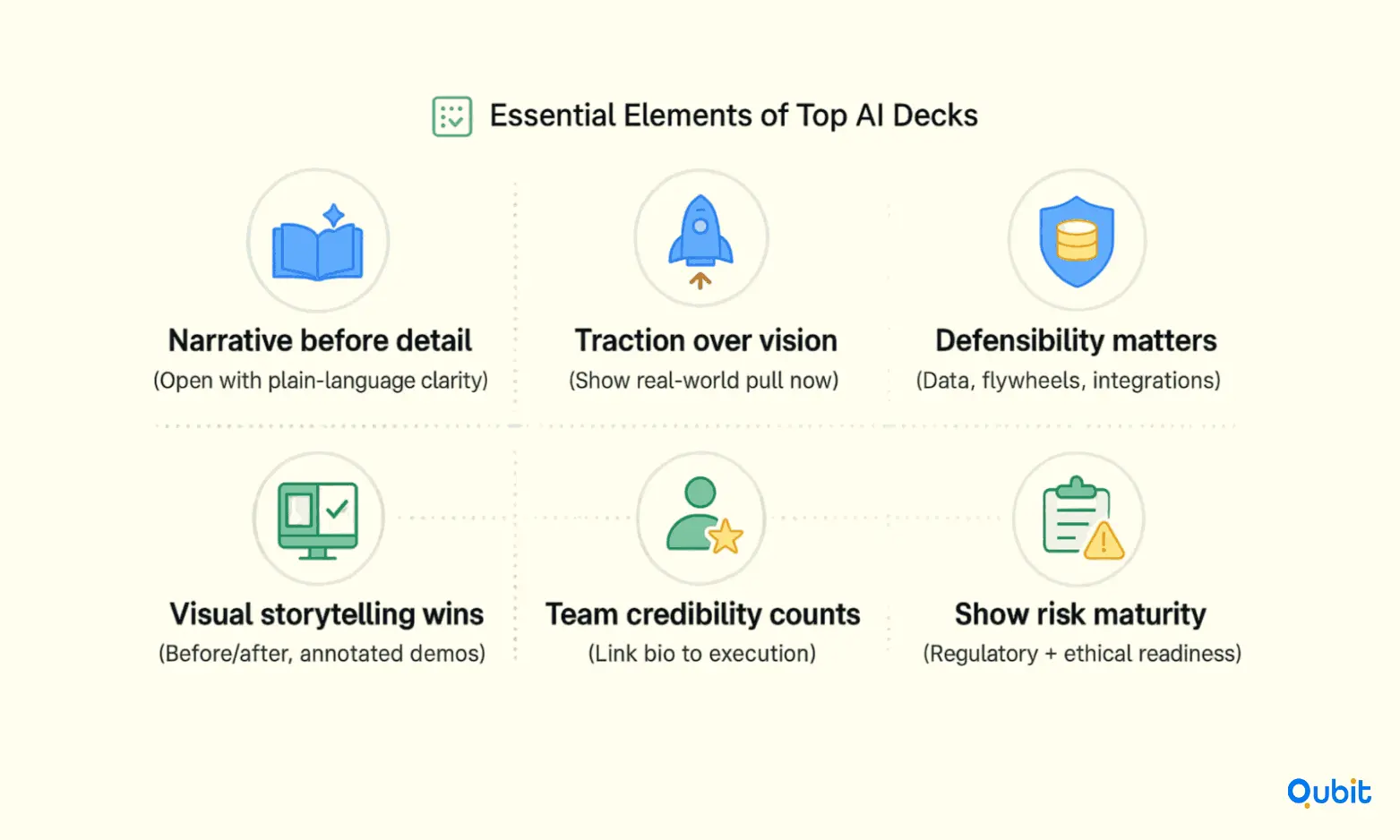
We can use these elements as a guide to prompt Gemini for a complete slide-by-slide outline.
105+ Practical AI Presentation Prompts + Tools - Visme
To craft effective prompts for this, it's helpful to understand the 'anatomy' of a good prompt. Please read this section from Visme's guide on AI presentation prompts.
Focus on the four layers of a good prompt: Context, Specificity, Structure, and Output. Pay close attention to the stacked example for the 'MediSync' healthtech startup. This is the model we will use.
Now, let's apply that model to generate your pitch deck structure.
Actionable Prompt:
"Act as an expert pitch deck coach. Create a 12-slide investor pitch deck outline for my startup, [Your Startup Name], which is building [your one-minute pitch product description].
Audience: Early-stage VCs.
Tone: Professional, engaging, and data-driven. Avoid excessive jargon.
Structure: Use a classic 12-slide pitch deck format (e.g., Title, Problem, Solution, Market Size, Product, Business Model, Team, etc.).
Output: For each slide, generate a compelling headline, 2-3 supporting bullet points summarizing the key information, and one recommended visual or chart idea."
This prompt will give you a complete, well-structured text-based draft of your entire presentation.
3. Workflow 1: The Integrated Approach with Gemini and Google Slides
Since you're invested in the Google ecosystem, the most direct path from text to slides is using Gemini's native presentation generator. This feature, part of Canvas mode, is designed for exactly this purpose.
The following video provides a complete walkthrough of this process.
Gemini Can NOW Create Google Slides! (Full Walkthrough)
This video by Paul O'Malley demonstrates the end-to-end workflow of generating a presentation directly within Gemini and exporting it to Google Slides.
Watch the following segments: Initiating the Process (1:09 - 3:29): See how to enter Canvas mode and use a 'create a presentation' prompt. Initial Review (4:58 - 7:15): Observe how Gemini creates a themed deck with layouts and stock images. Generating Speaker Notes (7:15 - 8:07): A key step for creating the narrative. Exporting and Polishing (8:07 - 11:02): This is the most critical part, showing how to export to Google Slides and apply the 'human touch'—editing text, replacing images, and finalizing notes.
To complement the video, here is a quick read that further details Gemini's capabilities within Google Slides, including generating custom images and referencing your Google Drive files.
Can Gemini Create and Assist with Google Slides Presentations?
This article from AI Rank Checker provides a concise summary of how Gemini integrates with Google Slides, reinforcing what you saw in the video.
Quickly review the sections on 'What Gemini Can Do', the 'Practical Examples' (note the Startup Pitch Deck example), and the 'Accessing Gemini' requirements, which you meet with your Google One AI Premium plan.
The key takeaway from this workflow is that AI does the heavy lifting of initial creation and formatting, freeing you up to focus on refinement and storytelling.
4. Workflow 2: The Specialized Tool Approach with Gamma
While the integrated Gemini-to-Slides workflow is convenient, specialized AI presentation tools like Gamma often offer more advanced design capabilities and a different user experience. Understanding this alternative is valuable.
This workflow involves three steps:
- Research (You've done this with your business plan).
- Structure (Use Gemini to generate the slide-by-slide text, as we did in section 2).
- Design (Paste the structured text into a tool like Gamma).
The following video from Jeff Su demonstrates this process perfectly.
Why 90% of AI Presentations Fail (do this instead)
In this video, Jeff Su demonstrates a powerful workflow combining a large language model (like Gemini) for structuring the story and a specialized tool (Gamma) for designing the presentation.
Watch these two key parts: The Structure Phase (2:58 - 4:48): Pay attention to how he uses a prompt to transform research into a structured, story-driven outline. The Design Phase (4:48 - 11:48): Observe how he pastes this outline into Gamma (which has a generous free plan) to generate the slides, and then crucially, spends time on human-led refinement—editing text with AI, changing layouts, adding specific images, and even inserting new data-driven slides. This emphasizes the collaborative nature of working with AI.
This workflow is powerful because it decouples the content generation from the visual design, allowing you to use the best tool for each job.
5. Advanced Prompts for High-Impact Slides
Regardless of the tool you use, the quality of your output depends on the quality of your input. Here are some copy-and-paste ready prompts for creating specific, high-impact slides common in pitch decks.
105+ Practical AI Presentation Prompts + Tools - Visme
This section of the Visme article you viewed earlier provides a library of prompts for creating both full presentations and individual slides. These are excellent recipes for success.
Scan the 'Prompts for Full Presentation Creation' section and note prompt #21 for an investor pitch deck. Then, focus on the 'Prompts for Individual Slide Creation' section. Pay particular attention to prompts for a 'comparison slide' (#51), a 'problem vs solution slide' (#63), and a 'closing slide' for fundraising (#59).
Using these specific prompts for individual slides can often yield better results than generating the entire deck in one go, especially for slides that need to be particularly clear and persuasive.
Conclusion
You now have two distinct, powerful workflows for transforming your detailed business plan into a compelling, visually appealing pitch deck. You've learned how to first distill your narrative, then structure it for a presentation, and finally, use AI tools to rapidly generate the design, all while understanding the critical importance of human refinement.
Key Takeaways:
- Narrative First: A pitch deck is a story. Use AI to distill your business plan into a concise one-minute pitch to form the core of your narrative.
- Structure is King: Prompt your AI to generate a classic slide-by-slide outline to ensure your story flows logically and hits all the key points investors expect.
- Choose Your Workflow: You can use an integrated workflow like Gemini-to-Google Slides for convenience or a specialized workflow with tools like Gamma for advanced design.
- AI is Your Co-pilot, Not Autopilot: The best results come from a partnership. Use AI for the initial 80% of creation, then apply your unique expertise and judgment for the final 20% of polishing and personalization.
Practice Exercise
- Take the business plan concept you've been developing and use the prompt from Section 2 to generate a full, text-based outline for a 12-slide pitch deck in Gemini.
- Choose one of the two workflows you learned about today (either Gemini-to-Slides or pasting your outline into Gamma's free tool).
- Generate a 5-7 slide "mini-deck" that includes at a minimum: a Title slide, a Problem slide, a Solution slide, a Market Size slide, and a Closing/Ask slide.
This exercise will give you a tangible feel for the entire process, from pure text to a polished visual presentation.
Next Up:
One of the most scrutinized slides in any pitch deck is the "Financials" slide. In our next lesson, we'll dive deep into how you can leverage AI, combined with your finance background, to build and critique financial projection models for your new venture.