Welcome to your first lesson! We're kicking off your journey into AI and machine learning by building a solid foundation in Python. Since you already have a good handle on JavaScript, we'll focus on translating the core programming concepts you know—variables, control flow, and functions—into their Python equivalents. This approach will help you get up to speed quickly by leveraging your existing knowledge.
By the end of this lesson, you'll be able to read and write simple Python scripts, recognizing the parallels and differences with JavaScript. This will prepare you for the next steps in our first module, where we'll explore Python's powerful tools for data science.
Variables and Data Types: From let and const to... Nothing?
Let's start with the basics. In JavaScript, you're used to declaring variables with let, const, or var. Python simplifies this. You don't use any special keyword; you just name your variable and assign it a value.
# In Python, you just assign a value to a name.
message = "Hello, Python!"
count = 10
pi = 3.14159
is_learning = True
One key difference is the concept of "constants." While JavaScript has const to enforce that a variable cannot be reassigned, Python doesn't have a strict equivalent. Instead, developers follow a convention: variable names written in all capital letters should be treated as constants and not be changed.
# By convention, this is a constant.
MAX_CONNECTIONS = 100
Primitive Data Types: Similar but Different
Python and JavaScript share similar data types, but with a few important distinctions. The article "From JavaScript to Python: A Syntax Guide for Developers" has a great table summarizing this.
From JavaScript to Python: A Syntax Guide for Developers
Please read the introduction and the first two sections of this article from dev.to. They provide a concise, side-by-side comparison of variable declaration and data types.
Focus on Section 1 and the Data Types table. Pay close attention to the notes about Python's int/float, True/False capitalization, and None.
As you saw, the main differences are:
- Numbers: JavaScript uses a single
numbertype. Python distinguishes between integers (int) and floating-point numbers (float). - Booleans: In Python, they are capitalized:
TrueandFalse. - Null/Undefined: JavaScript has both
nullandundefined. Python simplifies this with a single object for "no value":None.
Another critical difference is Python's strictness with types. JavaScript often performs type coercion, which can lead to unexpected behavior (like "5" == 5 being true). Python will raise an error in such cases, forcing you to be explicit about type conversions.
Control Flow: The Zen of Indentation
This is probably the biggest syntactic change you'll encounter. JavaScript uses curly braces {} to define code blocks for if statements, loops, and functions. Python uses indentation.
This isn't just a stylistic choice; it's a syntax rule. Every line of code within a block must be indented by the same amount (typically four spaces). This forces code to be readable and cleanly structured.
Conditional Statements
Let's compare if/else statements.
JavaScript:
let age = 20;
if (age < 18) {
    console.log("Minor");
} else if (age >= 18 && age < 65) {
    console.log("Adult");
} else {
    console.log("Senior");
}
Python:
age = 20
if age < 18:
    print("Minor")
elif age >= 18 and age < 65: # Note 'elif' instead of 'else if'
    print("Adult")
else:
    print("Senior")
Key things to notice:
- No parentheses around the condition are required.
- A colon (
:) ends the line that starts a block (if,elif,else). else ifbecomeselif.- Logical operators are words (
and,or,not) instead of symbols (&&,||,!).
Loops
Python's loops are also more streamlined. The C-style for loop common in JavaScript doesn't exist in Python. Instead, Python's for loop iterates directly over a sequence of items, much like JavaScript's for...of loop.
Iterating a fixed number of times:
JavaScript:
for (let i = 0; i < 5; i++) {
    console.log(i);
}
Python:
# The range(5) function generates numbers from 0 up to (but not including) 5.
for i in range(5):
    print(i)
Iterating over an array/list:
JavaScript:
const fruits = ["apple", "banana", "cherry"];
for (const fruit of fruits) {
    console.log(fruit);
}
Python:
fruits = ["apple", "banana", "cherry"]
for fruit in fruits:
    print(fruit)
while loops are nearly identical syntactically, aside from the indentation and colon.
For a more in-depth look with code examples, please read the following sections from the freeCodeCamp handbook.
How to Learn Python for JavaScript Developers [Full Handbook]
This article is a great guide for making the switch. We'll focus on the section that compares control structures.
Read the section on Control Structures. It provides excellent side-by-side comparisons of if statements and for/while loops that directly map to your JavaScript experience.
Functions: Building Reusable Blocks
Defining functions in Python also follows the "colon and indentation" pattern. You use the def keyword instead of function.
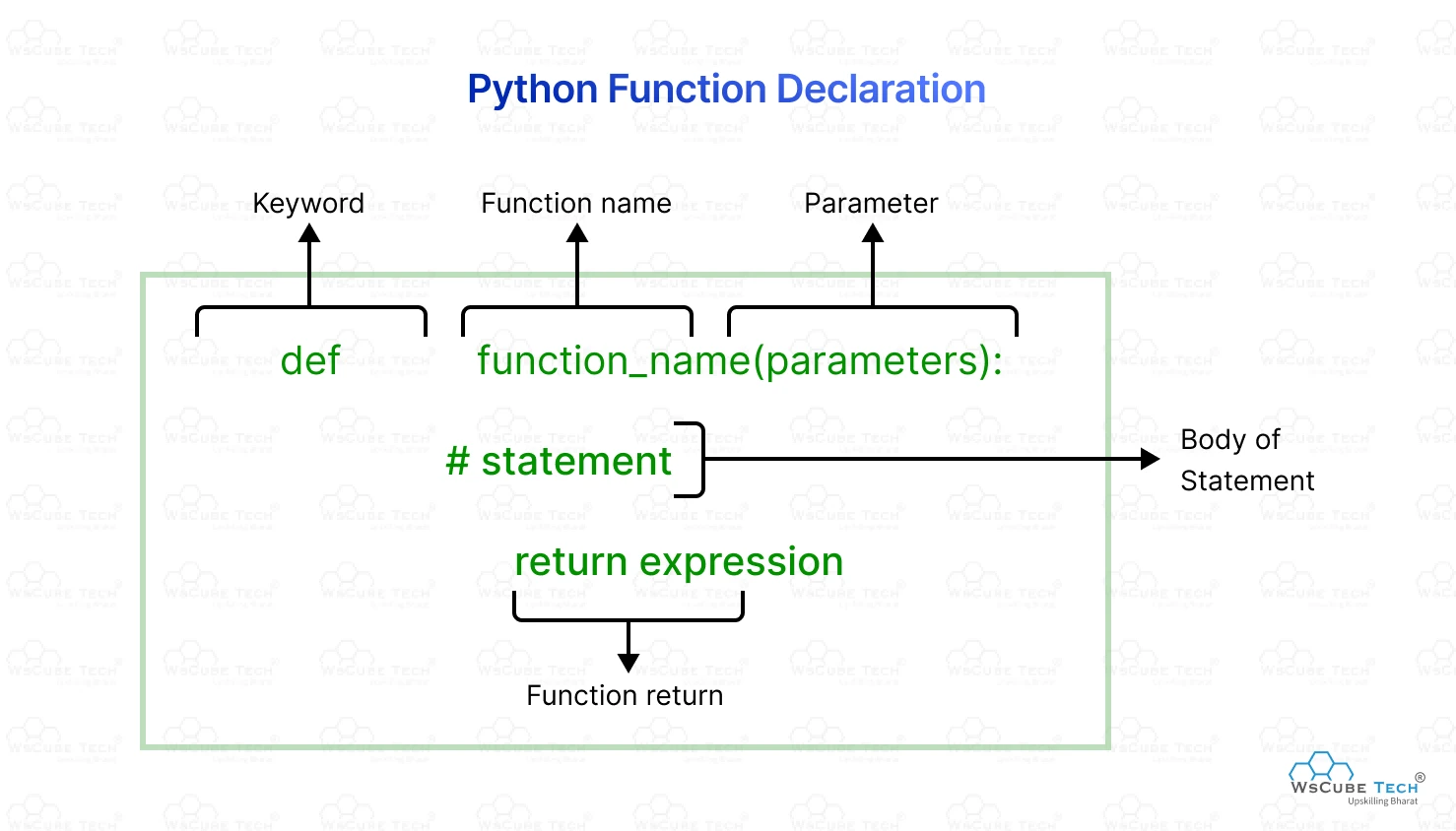
Let's compare a simple function.
JavaScript:
function add(a, b) {
    return a + b;
}

// or as an arrow function
const add = (a, b) => a + b;
Python:
def add(a, b):
    return a + b


# Python's equivalent to a simple arrow function is a 'lambda'
add_lambda = lambda a, b: a + b
Python's lambda functions are more limited than JavaScript's arrow functions; they can only contain a single expression. For anything more complex, you'll use a def function.
The freeCodeCamp article you looked at earlier also has an excellent section on functions. It covers definition, scope rules (which differ significantly from JavaScript's closures), and parameters.
How to Learn Python for JavaScript Developers [Full Handbook]
Let's return to the same article to explore how functions work in Python.
Please read the entire section 5. Functions and Scope. Focus on the syntax for defining functions, the comparison between Python's lambda and JavaScript's arrow functions, and the different ways of handling parameters.
Your Turn: A Small Translation Challenge
Let's put this into practice. Here is a simple JavaScript function. Your task is to rewrite it in Python.
JavaScript:
function filterEvens(numbers) {
    const results = [];
    for (const num of numbers) {
        if (num % 2 === 0) {
            results.push(num);
        }
    }
    return results;
}

const myNumbers = [1, 2, 3, 4, 5, 6, 7, 8, 9, 10];
console.log(filterEvens(myNumbers)); // Expected output: [2, 4, 6, 8, 10]
Try to write the Python equivalent. Think about:
- How do you define the
filter_evensfunction? (def) - How do you create an empty list? (
results = []) - How do you loop through the list of numbers? (
for...in) - How do you write the
ifcondition? (if ... :) - How do you add an item to a list in Python? (Hint: The method is called
append.)
Take a moment to try it out. Once you have a solution, you can compare it to the one below.
Click to see the Python solution
def filter_evens(numbers):
    results = []
    for num in numbers:
        if num % 2 == 0:
            results.append(num)
    return results

my_numbers = [1, 2, 3, 4, 5, 6, 7, 8, 9, 10]
print(filter_evens(my_numbers))
Conclusion
In this lesson, we've mapped your existing JavaScript knowledge to Python's core syntax. You've learned that while the underlying logic is the same, Python has its own way of doing things, emphasizing readability and simplicity.
Here are the key takeaways:
- Variables: Declared by simple assignment, with no
letorconst. - Syntax: Python uses indentation and colons (
:) to define code blocks, not curly braces. This is a fundamental rule. - Conditionals:
if,elif, andelseare used for branching. - Loops: The
forloop iterates over sequences, similar to JavaScript'sfor...of. - Functions: Defined with the
defkeyword. Simple anonymous functions are created withlambda.
You're now equipped with the basic syntax needed to read and write Python code. The muscle memory will come with practice, and soon the colons and indentation will feel just as natural as curly braces and semicolons.
In our next lesson, we will dive deeper into Python's built-in data structures. We'll explore lists and dictionaries in more detail, comparing them to JavaScript arrays and objects, and introduce a powerful Python feature called list comprehensions.