Introduction
In our last lesson, we explored the crucial difference between functions and special forms. We established that quote is a special form that allows us to prevent evaluation, effectively turning a piece of code into a simple data structure—a list. This is the first half of Lisp's famous "code is data" philosophy.
Today, we complete the circle. This lesson focuses on the eval function, the counterpart to quote. Your learning outcome is to use eval to explicitly evaluate a quoted list as code. We will take the very data structures we created with quote and instruct the Lisp interpreter to execute them. Understanding this mechanism is the key to unlocking dynamic code generation, which is a cornerstone of advanced Emacs customization.
1. From Data Back to Code
Let's start in your *scratch* buffer. In the previous lesson, you saw that evaluating the following expression results in a list:
'(+ 10 20)
When you evaluate this (using C-x C-e), Emacs simply returns the list (+ 10 20) in the minibuffer. The quote ' has done its job: it has prevented the evaluation of the + function.
Now, what if we have this list and we want to perform the addition? This is where eval comes in. eval is a function that takes one argument and evaluates it as a Lisp expression.
Try this:
(eval '(+ 10 20))
Evaluating this expression yields 30.
Let's break down what happened:
- The
evalfunction is called. - Its argument is the quoted list
'(+ 10 20), which evaluates to the literal list(+ 10 20). evaltakes this list and passes it to the Lisp interpreter, which executes it as a function call.- The interpreter sees
+as the function and10and20as the arguments, performs the addition, and returns30.
You have just successfully treated code as data ('(+ 10 20)) and then explicitly instructed Emacs to treat that data as code.
ElispCheatSheet | Quick reference to the core language of Emacs
The ElispCheatSheet provides a very direct and clear explanation of this relationship between quoting and evaluating.
Read the section titled 'Quotes, Quasi-Quotes, and Unquotes'. Focus on the paragraphs that describe how quote forbids evaluation and how eval 'executes code that is in data form; i.e., is quoted.' The examples provided there are excellent summaries.
2. The Evaluator and the 'eval' Function
To really understand eval, it's helpful to formalize what "evaluation" is. The program inside Emacs that computes the value of an expression is called the Lisp interpreter, or simply the evaluator. When you press C-x C-e, you are invoking this evaluator on the S-expression before your cursor.
The eval function is our direct, programmatic access to this evaluator. However, there's a crucial detail to remember: eval is itself a function. And like all functions (but unlike special forms), it evaluates its arguments before its own logic is executed. This can sometimes feel like a "double evaluation."
Let's study the official documentation to see this in action.
GNU Emacs Lisp Reference Manual - Evaluation
The GNU Emacs Lisp Reference Manual provides the definitive explanation of eval and its behavior.
Read the section titled 'Eval'. Pay close attention to the example involving the variables foo and bar. It perfectly illustrates the 'double evaluation' I mentioned.
Let's walk through that manual's example carefully. It's a classic demonstration of how evaluation works.
First, set up the variables in your *scratch* buffer and evaluate each line:
(setq foo 'bar)  ; The variable foo now holds the symbol bar
(setq bar 'baz)  ; The variable bar now holds the symbol baz
Now, consider the two calls to eval:
-
(eval 'foo)
- The Lisp evaluator sees the expression
(eval 'foo). - It's a function call, so it first evaluates the argument
'foo. The result of evaluating'foois the symbolfoo. - Now it calls
evalwith the symbolfoo:(eval foo). - Inside
eval, the symbolfoois evaluated again. The value of the variablefoois the symbolbar. - The final result is
bar.
- The Lisp evaluator sees the expression
-
(eval foo)
- The evaluator sees
(eval foo). - It evaluates the argument
foo. The value of the variablefoois the symbolbar. - Now it calls
evalwith the symbolbar:(eval bar). - Inside
eval, the symbolbaris evaluated. The value of the variablebaris the symbolbaz. - The final result is
baz.
- The evaluator sees
This distinction is fundamental. Most of the time, you will be passing a quoted expression to eval to ensure you are evaluating exactly the data structure you wrote.
3. Code as a Tree
You have a background in writing and creative work. Think of an S-expression as the script for a performance. The quoted form, like '(+ (* 2 3) 5), is the sheet music or script itself—a static data object. The eval function is the conductor or director who brings it to life, telling the performers (the functions like + and *) what to do and in what order.
From a computer science perspective, every S-expression can be visualized as a tree. The expression '(+ (* 2 3) 5) isn't just a flat list; it's a data structure representing a hierarchy of operations.
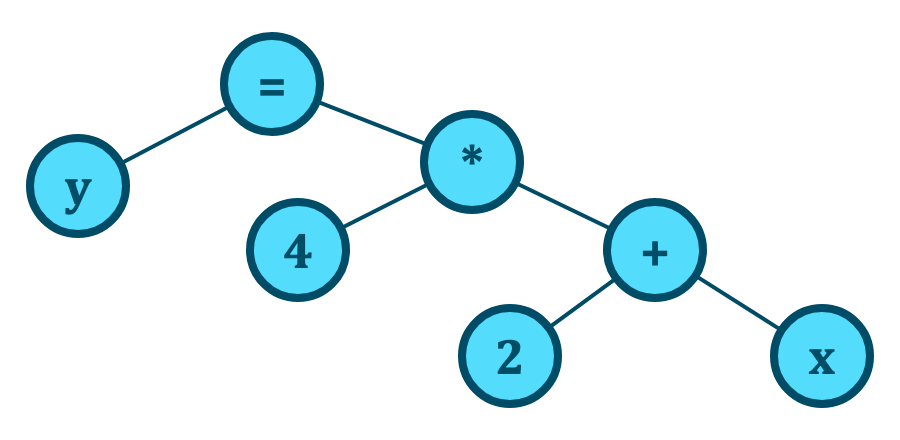
When we write '(+ 5 (* 2 3)), we are creating the data structure that represents this tree. When we call eval on it, we are telling the Lisp interpreter to walk the tree and compute the result.
4. A Classic Application: The REPL
Why is this eval function so important? It forms the core of one of programming's most powerful tools: the REPL (Read-Eval-Print Loop). The *ielm* (Interactive Elisp Mode) buffer you've used is a REPL. It:
- Reads the expression you type.
- Evaluates it using the
evalfunction. - Prints the result.
- Loops back to the beginning.
The elegance of Lisp is that you can write a basic REPL in a single line of code. This is a powerful demonstration of eval's role.
ElispCheatSheet | Quick reference to the core language of Emacs
The ElispCheatSheet again provides a beautiful, concise example showing eval at the heart of a REPL.
Look at the section 'read and print'. You don't need to understand everything, but focus on the line (loop (print (eval (read)))) and the accompanying explanation. It perfectly encapsulates the role of eval.
This tiny program (loop (print (eval (read)))) is a complete, working (though simplified) Lisp interpreter. It shows that eval is the engine that drives all execution. It's the bridge between data read from a user (or a file) and the actions the computer takes.
Conclusion
You have now closed the loop on Lisp's "code is data" paradigm, or homoiconicity. You can stop evaluation with quote to treat code as a list, and you can force evaluation of a list with eval to treat it as code. This ability to manipulate code as if it were any other data is what gives Lisp its unique power and extensibility.
Key Takeaways:
evalis a function that takes a Lisp object and evaluates it as code. It is the programmatic interface to the Lisp interpreter.evalis the functional inverse ofquote.(eval (quote form))is the same asform.- Since
evalis a function, its arguments are evaluated beforeevalis called. To evaluate a literal list like(+ 1 2), you must quote it:(eval '(+ 1 2)). - The REPL (Read-Eval-Print Loop) is a core programming concept, and
evalis the "Eval" step, making it a fundamental part of interactive development in Lisp.
Preview of the Next Lesson:
So far, we have used eval on static, quoted lists that we wrote by hand. But the true power comes from building these lists dynamically. In the next lesson, we will learn how to construct a list piece by piece—perhaps combining fixed elements with the values of variables—and then use eval to execute our dynamically created command. This is the first step toward writing truly adaptive and intelligent Emacs extensions.