Introduction
Welcome to your next lesson on Elisp! In our previous session, you learned how to use defvar and defcustom to formally declare and document global variables. This brought structure and clarity to managing data in your configurations. Today, we'll apply that same principle of structured design to behavior by learning how to create your own functions.
This lesson addresses the learning outcome: Define functions with arguments and docstrings using 'defun'. Functions are the fundamental building blocks of any program, including the extensions you'll write for Emacs. They allow you to package a sequence of operations into a reusable unit. Your background as a writer and editor who builds complex narratives and structured content will serve you well here; think of a function as a well-defined chapter or section that performs a specific role within a larger work.
By the end of this lesson, you will be able to create your own named functions that accept inputs and are properly documented—a crucial step toward your goal of crafting custom Emacs functionality.
1. What is a Function?
Before we dive into the syntax, let's establish a clear concept of what a function is in programming. At its core, a function is a named, reusable piece of code that performs a specific task. Key characteristics include:
- Reusability: You define it once and can execute it many times from different parts of your code.
- Inputs (Arguments): It can accept values, called arguments, that influence its behavior.
- A Body: It contains the set of instructions to be executed.
- An Output (Return Value): It typically produces a result that can be used by other code.
To get a concise overview of these concepts, let's watch a short segment from a video by System Crafters.
Defining Functions and Commands - Learning Emacs Lisp #3
This clip from the video "Defining Functions and Commands" provides a solid conceptual foundation of what functions are in programming, which aligns with your preference for building up from first principles.
Watch from 02:04 to 04:39. Focus on the core ideas of reusability, parameters (inputs), and return values.
2. The Anatomy of a Function Definition
In Emacs Lisp, we define a named function using the defun macro. The term is short for "define function". Its structure is a classic example of a Lisp S-expression.
The general syntax is:
(defun function-name (argument-list)
  "Documentation string (docstring)."
  (function-body-expressions...))
Let's break this down:
defun: A symbol that tells Emacs you are defining a function.defunis a special form, meaning it doesn't evaluate its arguments in the usual way. For instance, it knows thatfunction-nameis the name you're assigning, not a variable to be evaluated.function-name: A symbol that will be the name of your function. By convention, function names in Elisp usekebab-case.(argument-list): An empty or non-empty list of symbols that will serve as parameters (or arguments) for your function. These are placeholders for the values you'll provide when you call the function."Documentation string...": An optional, but highly recommended, string that describes what the function does. We'll cover this in detail shortly.(function-body-expressions...): One or more Elisp expressions that make up the body of the function. When the function is called, these expressions are evaluated in order. The value of the last expression evaluated is the function's return value.
Now, let's see this syntax in action.
Defining Functions and Commands - Learning Emacs Lisp #3
The following segment from the same System Crafters video walks through the creation of a basic function using defun, showing you how to define it and then call it.
Watch from 04:39 to 08:03. Notice how the function is defined as an S-expression and then called using another S-expression. The process of evaluating the definition with C-x C-e makes the function available for use.
3. Documenting Your Work: The Docstring
Your experience as a professional writer has shown that clear communication is paramount. In programming, docstrings are the primary form of such communication. They explain the "what" and "how" of a function to other programmers and, just as importantly, to your future self. Emacs has a strong culture of documentation, and its built-in help system is powered by these docstrings.
A docstring is simply a string literal that appears immediately after the argument list in a defun.

There are a few important conventions for writing good docstrings:
- The first line should be a complete sentence that summarizes the function's purpose.
- Write in the imperative voice (e.g., "Return the value..." instead of "Returns the value...").
- When referring to an argument from the argument list, capitalize its name. For example,
(defun greet (NAME) "Print a greeting for NAME.").
You can view any function's docstring using the command C-h f (describe-function). This is an invaluable tool for exploring Emacs.
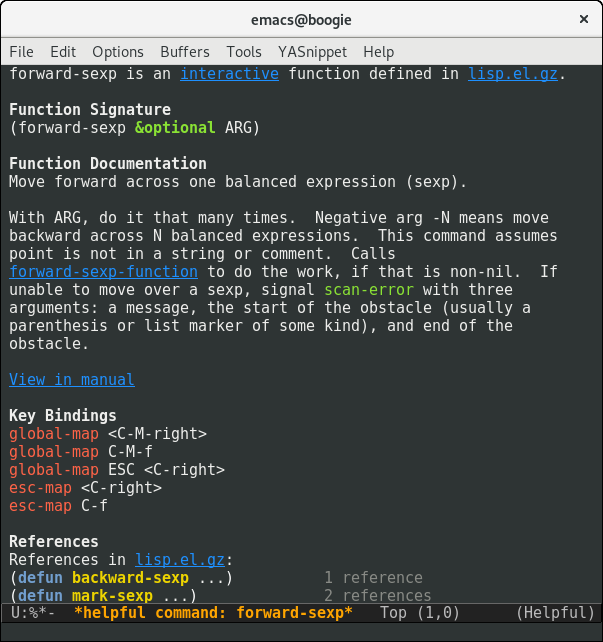
The next video clip provides a practical guide to writing and formatting docstrings, including how Emacs can help you wrap long lines.
Defining Functions and Commands - Learning Emacs Lisp #3
This final video segment focuses on the art of writing effective docstrings. It covers formatting conventions and shows you how to access the documentation you write.
Watch from 17:54 to 24:13. Pay close attention to the formatting of multi-line docstrings and the demonstration of describe-function (C-h f). The tip about not indenting the subsequent lines of a docstring is a common pitfall.
4. Practical Application: A Helper for Writers
Now it's time to write your first function. Open your *scratch* buffer in Emacs. We'll create a simple function that takes a string (a word or phrase) and wraps it in asterisks, as one might do for emphasis in Markdown.
Type the following code into your *scratch* buffer:
(defun emphasize (text)
  "Wrap TEXT in asterisks for emphasis."
  (concat "*" text "*"))
Let's analyze this:
- We're defining a function named
emphasize. - It takes one argument,
text. - It has a concise docstring explaining its purpose and referencing the
TEXTargument. - Its body consists of a single expression: a call to the
concatfunction, which joins strings together.
Now, let's bring it to life:
- Place your cursor just after the final closing parenthesis of the
defunexpression. - Press
C-x C-e. You should seeemphasizeappear in the echo area at the bottom of your screen. This confirms that Emacs has evaluated the definition and now knows about your new function.
To use it, type the following expression into your *scratch* buffer and evaluate it with C-x C-e:
(emphasize "very important")
The result, "*very important*", should appear in the echo area. This result is the return value of the function. Because the concat expression was the last (and only) expression in the function's body, its result became the function's result.
5. Solidifying Your Understanding
To reinforce these concepts, let's turn to the official "An Introduction to Programming in Emacs Lisp". It provides a definitive and formal explanation of function definitions.
An Introduction to Programming in Emacs Lisp
This chapter from the GNU manual, titled "How To Write Function Definitions", is the canonical reference for defun. Reading this will solidify your understanding of the syntax and components we've discussed.
Please read Chapter 3, "How To Write Function Definitions", focusing on section 3.1, "The defun Macro". Pay attention to the breakdown of the function template and how the example function uses arguments and a docstring.
Conclusion
In this lesson, you've taken a significant step from using Elisp to actively creating with it. You now have the tools to encapsulate logic and behavior into reusable, documented units.
Key Takeaways:
- Functions are defined using the
defunmacro. - A function definition consists of a name, an argument list, an optional docstring, and a body of expressions.
- The value of the last expression in the body becomes the function's return value.
- Docstrings are critical for creating understandable and maintainable code. They power Emacs's built-in help system.
- You can view a function's documentation with
C-h f(describe-function).
Preview of the Next Lesson
We have successfully defined a function and called it from our *scratch* buffer. In the next lesson, "Call functions and pass arguments to them," we will explore this process in more depth. Following that, we will learn how to make your functions truly part of Emacs by turning them into interactive commands that you can run with M-x and eventually bind to your own custom keybindings. This will bring you even closer to your goal of tailoring Emacs to your unique workflow.