Introduction
Welcome to Module 9. In our previous module, we focused entirely on manipulating strings—linear sequences of characters. You learned to search, extract, and even transform text using regular expressions and replacement functions. This is a powerful skill set, especially for someone with your background in writing and editing.
However, data isn't always a simple, linear stream. Often, we need to manage structured information where individual pieces of data are linked to specific identifiers. Think of a glossary (a term linked to its definition), a contact list (a name linked to a phone number), or even the metadata of a document (a field like "Author" linked to a value like "Miran").
This lesson begins our exploration of key-value data structures. We will focus on the most fundamental of these in Lisp: the association list, or alist. You will learn what an alist is, how to create one, and how to retrieve a value associated with a specific key using the assoc function. This is the first step toward managing configurations, metadata, and other structured data in your custom Emacs functions.
1. The Structure of an Association List
In Lisp, one of the simplest ways to store key-value pairs is in an association list. At its core, an alist is just a special kind of list. You'll recall from our lessons on list manipulation that lists are built from cons cells. An alist leverages this structure directly.
An alist is a list where each element is a cons cell, and within that cell:
- The
caris the key. - The
cdris the value.
This structure is often called an association. So, an alist is simply a list of associations.
To get a formal definition and see some examples, please read the introductory section on alists from the GNU Emacs Lisp Reference Manual.
GNU Emacs Lisp Reference Manual - Lists
This section of the manual defines an association list and illustrates its structure using dotted pair notation.
In the webpage, find the section titled 'Association Lists'. Read from the beginning down to just before the 'Function: assoc' subsection. Pay attention to the examples showing different ways to structure the key-value pairs.
As the manual shows, an alist associating fruits with colors would look like this in dotted pair notation:
'((apple . red) (banana . yellow) (grape . purple))
Here, apple is a key and red is its associated value. Both keys and values can be any Lisp object: symbols, strings, numbers, or even other lists.
2. Creating an Alist
Since an alist is just a list, you can create one using the tools you already know, primarily the quote special form. This is the most common way to define a static alist that won't change.
Let's define a simple alist in your *scratch* buffer to represent some metadata for a piece of writing.
(setq my-story-metadata
      '(("title" . "The Last Question")
        (author . "Isaac Asimov")
        (word-count . 3100)
        (published . 1956)))
Here, we've used a string ("title") and symbols (author, word-count, published) as keys. The values are a mix of strings and numbers. This flexibility is one of the strengths of alists.
The following image provides another clear, visual example of building an alist. It uses a function acons which is a handy shortcut for adding a new key-value pair to the front of an existing alist. (acons key value alist) is equivalent to (cons (cons key value) alist).
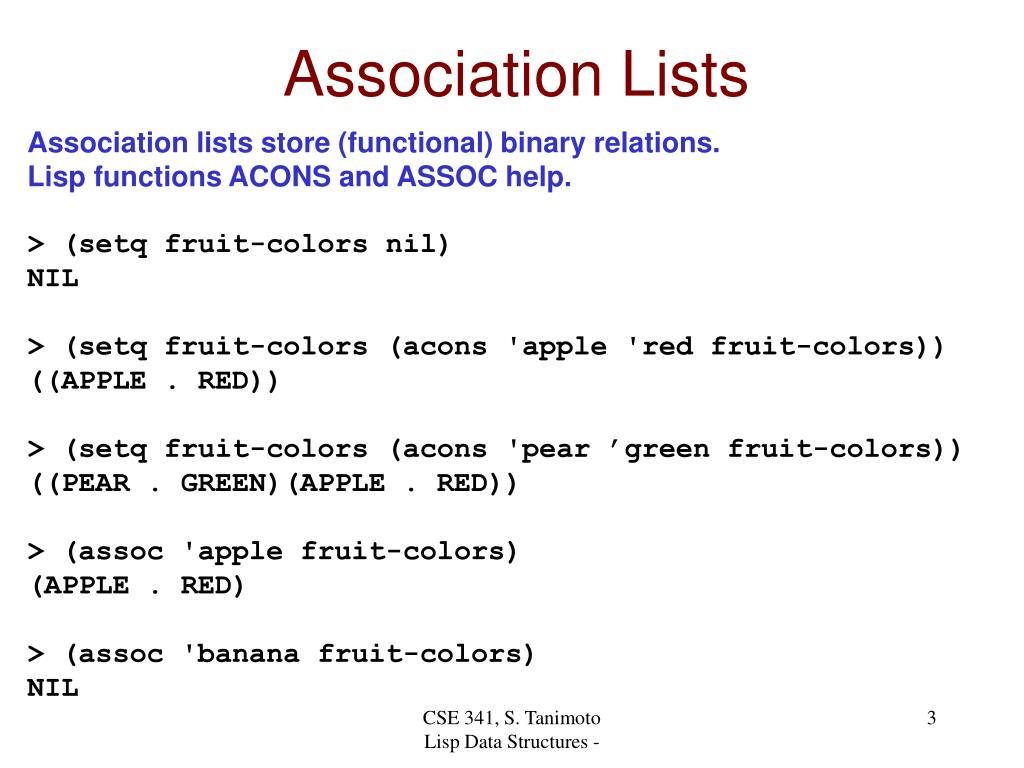
3. Retrieving Values with assoc
Creating a data structure is only useful if you can get data out of it. The primary function for retrieving data from an alist is assoc.
The function signature is (assoc KEY ALIST).
It searches the ALIST for the first association whose key is equal to KEY. There are two crucial things to understand about what assoc returns:
- If a match is found,
assocreturns the entire association (theconscell(key . value)), not just the value. - If no match is found, it returns
nil.
Let's watch a short video that demonstrates this.
scimax - data structures in emacs-lisp
In this clip from his video on data structures, John Kitchin provides a concise demonstration of creating an alist and using assoc to retrieve data.
Watch from 12:54 to 16:15. Pay close attention to how assoc is used and what it returns. Note his emphasis that you must use cdr to extract the value from the returned cons cell.
As the video highlighted, because assoc returns the full (key . value) pair, you must use cdr to isolate the value.
Let's try this with our my-story-metadata alist. Evaluate these expressions in your *scratch* buffer:
;; Define the alist again if needed
(setq my-story-metadata
      '(("title" . "The Last Question")
        (author . "Isaac Asimov")
        (word-count . 3100)
        (published . 1956)))

;; 1. Look for the author
(assoc 'author my-story-metadata)
;; => (author . "Isaac Asimov")  -- This is the full association

;; 2. Get just the author's name
(cdr (assoc 'author my-story-metadata))
;; => "Isaac Asimov"

;; 3. Look for the title (the key is a string)
(assoc "title" my-story-metadata)
;; => ("title" . "The Last Question")

;; 4. Get just the title string
(cdr (assoc "title" my-story-metadata))
;; => "The Last Question"

;; 5. Look for a key that doesn't exist
(assoc 'editor my-story-metadata)
;; => nil
This (cdr (assoc ...)) pattern is extremely common in Elisp.
For a comprehensive reference, please read the documentation for assoc.
GNU Emacs Lisp Reference Manual - Lists
The GNU Manual provides a formal description of assoc and its variant assq.
Find the subsection 'Function: assoc'. Read the descriptions for both assoc and assq. Notice the key difference: assoc uses equal for comparison, while assq uses eq. This makes assq faster but only suitable for keys that are symbols.
A Note on Duplicate Keys
An alist can have multiple entries with the same key. assoc will always find and return the first one it encounters, searching from the beginning of the list. This behavior is sometimes used intentionally to "override" old values by adding new ones to the front, without modifying the original list.
(setq my-alist '((color . blue) (shape . square) (color . red)))

(assoc 'color my-alist)
;; => (color . blue)
4. Practical Application: A Tool for Writers
Let's connect this to a practical use case. In your creative writing, you might have a "story bible" that tracks characters, locations, or special terms to ensure consistency. An alist is a perfect way to store this information.
Imagine you're writing a sci-fi story and want to quickly look up the homeworld of a character.
(setq character-db
      '((kaelen . "Xylos")
        (riva . "Cygnus X-1")
        (jax . "Earth")))

(defun get-homeworld (character-name)
  "Return the homeworld for a given CHARACTER-NAME.
Looks up the name in the `character-db` alist."
  (interactive "sEnter character name: ")
  (let* ((name-symbol (intern character-name))
         (entry (assoc name-symbol character-db)))
    (if entry
        (message "%s's homeworld is %s."
                 (car entry)
                 (cdr entry))
      (message "Character '%s' not found in database." character-name))))

;; Try it! M-x get-homeworld, then enter "riva"
This simple function does a few things:
- It prompts the user for a character name (a string).
internconverts the input string into a symbol so it can be matched against the keys in our alist.assocperforms the lookup.- An
ifstatement checks ifassocreturned an entry ornil, and prints an appropriate message.
This example from a blog post about counting word frequency shows another common use: checking for the existence of a key before deciding what to do next.
Getting Started With Emacs Lisp
This blog post by Aaron Bieber uses an alist to count word frequencies. We will look at the specific part of the code where assoc is used to check if a word has already been counted.
Skim the section 'A Contrived Example' to understand the goal (counting word frequency). Then, in the section 'Building the Association List', find the final block of code. Look for the line containing (assoc word words). This is the key part: it's being used to test if the current word is already a key in the words alist.
The expression (assoc word words) is used as a test. If it returns a value (a cons cell), the test is true, and the code would proceed to increment the count. If it returns nil, the test is false, and the code would add the new word to the alist. This is a fundamental pattern for dynamically building and updating alists.
Conclusion
In this lesson, you've been introduced to one of the most common data structures in the Lisp world. You've moved beyond simple, flat lists to structured key-value pairs, a critical step for building more complex programs.
Key Takeaways:
- Association Lists (alists) store key-value pairs as a list of
conscells, in the form(key . value). - They are easily created using
quote, like any other literal list. - The function
assocsearches an alist for a given key and returns the first matching association (conscell) it finds. - To get the value, you must use
cdron the result ofassoc. - If a key is not found,
assocreturnsnil, which makes it useful in conditional logic.
Preview of the Next Lesson
You now know how to create an alist and read data from it. But what about changing it? In the next lesson, we will cover how to add and update entries in an alist. You will learn functions to add new pairs and techniques to create "new" alists with updated values, building on the concepts of destructive versus non-destructive operations that are central to Lisp programming.