Introduction
Welcome back. In our last lesson, we mastered the art of finding text within a buffer using search-forward. We saw how to create a while loop to iterate through all matches of a word, a fundamental pattern for many text-processing tasks. This brought us one step closer to your goal of building tools that interact with your creative writing and code.
Now that we can find things, the next logical step is to remove them. This lesson focuses on the learning outcome: Delete text within a buffer using delete-region. We will explore how to programmatically erase sections of a buffer, a capability that unlocks a new class of editing commands, from simple cleanup scripts to more complex refactoring tools.
1. Understanding Deletion with delete-region
In Emacs Lisp, the primary function for removing a block of text is delete-region. It's important to understand a couple of key points about how it works.
First, "deletion" in this context is distinct from "killing". When you delete text with delete-region, it is not added to the kill ring. This means you cannot yank it back with C-y. The action can, however, be undone with Emacs's standard undo commands.
Second, the function takes two arguments: a start position and an end position. These are integers representing character positions in the buffer. The text between these two points constitutes the "region" to be deleted.
Let's look at the official definition.
Deletion (GNU Emacs Lisp Reference Manual)
The GNU Emacs Lisp Reference Manual provides the definitive explanation for delete-region. This short section clearly defines its arguments and behavior.
Read the subsection that begins with Command: delete-region start end. Pay attention to what the function returns and what happens to the point if it was inside the deleted region.
As the manual states, (delete-region start end) removes the text and returns nil. Now, let's put this into practice.
Hands-on Practice:
Open your *scratch* buffer and follow along.
-
First, insert some text to work with:
(insert "The quick brown fox jumps over the lazy dog.")Evaluate this with
C-x C-e. -
Now, let's delete the word "quick". It starts after character 4 ("The ") and is 5 characters long. So, the region is from position 5 to 10. Note that in Elisp, buffer positions are 1-based.
(delete-region 5 10)Evaluate this. You'll see "quick " disappear.
-
We can also use functions to define the region. Let's delete everything from the beginning of the buffer up to the word "jumps". We'll need to find where "jumps" begins first.
;; Let's reset the buffer text first
(erase-buffer)
(insert "The quick brown fox jumps over the lazy dog.")
(goto-char (point-min)) ;; Move to the beginning

;; Now find the start of "jumps" and delete up to it
(search-forward "jumps")
(delete-region (point-min) (point)) ;; Delete from start to current point
Evaluating this last expression will leave you with " over the lazy dog.". The
search-forwardmoved the point to the end of "jumps", and then we deleted from the beginning of the buffer to that new point.
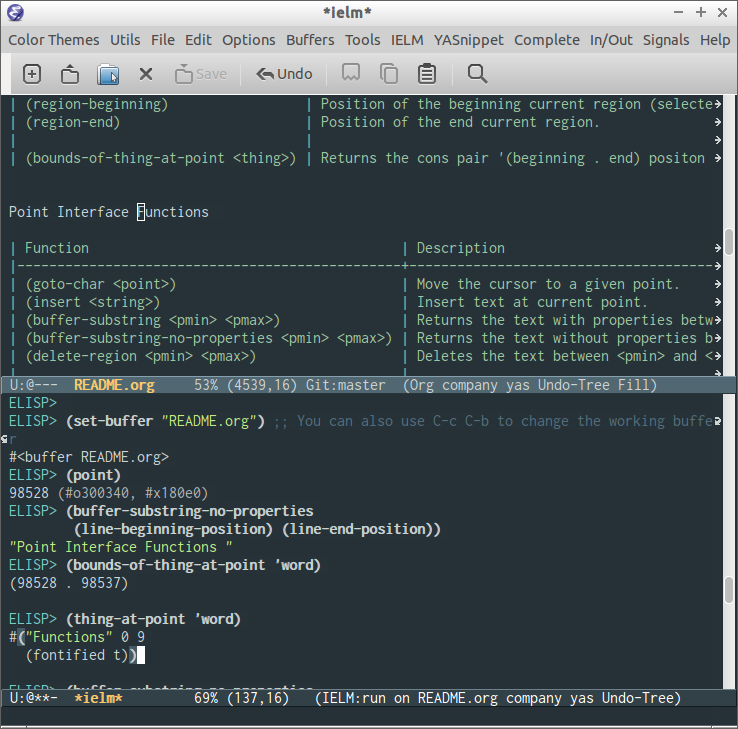
The function delete-region is a core part of a family of functions that let you interact with buffer content programmatically.
2. A Practical Problem: Cleaning Up Generated Content
Let's look at a scenario where delete-region becomes essential. Imagine you have a script that automatically updates a file—for instance, a .gitignore file that needs a list of files to ignore. In our last session, we saw how to append content, but what happens if you run the script multiple times? You get duplicates.
The correct approach is to first delete the old, auto-generated section before inserting the new one.
This video from System Crafters demonstrates this exact problem and then presents the solution using delete-region.
Reading and Writing Buffers in Practice - Learning Emacs Lisp #5
In this segment from the 'Learning Emacs Lisp' series, you'll first see a function that creates duplicate entries in a file. This sets the stage for why deletion is necessary.
Watch from 00:51:25 to 00:57:22. The narrator builds a function to update a .gitignore file. Notice what happens around 00:56:40 when the function is run a second time—the list of files is duplicated. This is the problem we're about to solve.
Now that you've seen the problem, let's see the elegant solution. The key is to:
- Move the point to the beginning of the section that needs to be replaced.
- Delete everything from that point to the end of the buffer.
- Insert the new, updated content.
Watch how this is implemented.
Reading and Writing Buffers in Practice - Learning Emacs Lisp #5
This clip shows the fix. It's a short but crucial demonstration of using delete-region with point and point-max to clear out a section of a buffer.
Watch from 00:57:22 to 00:58:24. The core of the solution is the expression (delete-region (point) (point-max)). Understand how this simple line of code solves the duplication problem we just saw.
The combination of moving the point to a strategic location and then deleting from that point to the buffer's end (point-max) is a powerful and common pattern for managing generated content within files.
3. Your Turn: Create a "Delete to Character" Command
Now it's time to combine what you've learned. Your task is to build an interactive command, ar-delete-to-char, that mimics the behavior of Zsh's zap-to-char or Vim's df command. It should prompt the user for a single character and then delete everything from the current cursor position up to and including the first occurrence of that character.
This exercise will require you to:
- Get the current position of the
point. - Use
search-forward(from our last lesson) to find the target character. - Use
delete-regionto remove the text between the starting point and the point after the search.
Here's a skeleton to guide you. Try to fill in the logic yourself before looking at the solution.
(defun ar-delete-to-char (char)
  "Delete from point up to and including the first occurrence of CHAR.
This is similar to Vim's `df` command."
  (interactive "cDelete up to char: ")

  ;; TODO: Implement the logic here.
  ;; 1. Save the starting position in a variable.
  ;; 2. Search forward for the character. Remember that `search-forward` needs a string.
  ;; 3. If the search is successful, delete the region from the start position to the new point.
  )
Hints:
- You can convert a character to a string with
(string char). search-forwardreturnsnilif it fails (when using thenoerrorargument). You can use anifstatement to check if the search was successful before attempting to delete.- You'll need a place to store the starting
pointbefore you callsearch-forward. Aletblock is a good way to create a temporary variable for this.
Once you've given it a try, you can check your implementation against the solution below.
Click here for a detailed solution and explanation
(defun ar-delete-to-char (char)
  "Delete from point up to and including the first occurrence of CHAR.
This is similar to Vim's `df` command."
  (interactive "cDelete up to char: ")
  ;; Create a local variable 'start' and set it to the current point position.
  (let ((start (point)))
    ;; Search for the character, converted to a string. The `t` argument
    ;; ensures that if the character is not found, the function returns nil
    ;; instead of signaling an error.
    (if (search-forward (string char) nil t)
        ;; If the search was successful, `search-forward` returns a non-nil
        ;; value and moves the point. We then delete the region from our
        ;; saved start position to the new position of the point.
        (delete-region start (point))
      ;; If the search failed, we inform the user.
      (message "Character '%c' not found." char))))
How to use it:
- Evaluate the function definition in your
*scratch*buffer. - Type some text, like "This is a test sentence for deletion."
- Place your cursor at the beginning of the line.
- Run
M-x ar-delete-to-char. - When prompted, type
s. - The text "This is a tes" should be deleted, leaving you with "t sentence for deletion."
Conclusion
You have now added a powerful tool to your Elisp arsenal. By mastering delete-region, you've moved from simply observing and adding to a buffer to actively shaping and modifying its content. This is a crucial step toward writing sophisticated extensions that automate your editing and writing workflows.
Key Takeaways:
- The
delete-regionfunction is the primary way to programmatically remove text, takingstartandendbuffer positions as arguments. - Deletion is distinct from killing: deleted text is not saved to the kill ring.
- A common and powerful pattern is to combine
search-forwardto locate a position withdelete-regionto act upon the text found. - Functions like
point,point-min, andpoint-maxare essential for defining the boundaries of the region you want to delete.
Preview of the Next Lesson
So far, all our buffer manipulations have happened on buffers we've created or that were already open in Emacs. But much of the power of Elisp comes from interacting with the file system. In our next lesson, "Read the contents of a file into a buffer and write a buffer's content to a file", we will learn how to bridge the gap between Emacs's internal world of buffers and the external world of files on your disk.