Welcome to the next step in our exploration of dependency management. In our last lesson, we contrasted tight and loose coupling, establishing that creating dependencies directly with new leads to rigid and hard-to-test code. This naturally raises the question: if we don't create dependencies inside the classes that need them, where and how do we create them?
This lesson provides the answer by introducing the foundational vocabulary of Dependency Injection. We will formally define three critical terms you requested: Service, Dependency Graph (also known as an Object Graph), and the Composition Root. Mastering this terminology is essential for moving beyond "making it work" and toward a principled understanding of how to structure modern, maintainable applications.
What is a "Service"?
In the context of DI, the word "service" has a specific meaning. It doesn't refer to a web service or a background process. Instead, it's a more general term for any component that provides some useful functionality to other components.
The official Microsoft documentation gives a concise definition.
Dependency injection in ASP.NET Core
This Microsoft Learn article, while focused on ASP.NET Core, provides definitions that are universally applicable to DI in .NET.
In the "Overview of dependency injection" section, read from the start down to the definition of a service. Focus on the final two bullet points that explicitly define the term.
As you read, the key idea is that a Service is a class that performs an operation for a consumer. An OrderRepository that saves orders is a service. A TaxCalculator that calculates tax is a service. The consumer of the service is its dependency. So, if OrderViewModel uses IOrderRepository, then IOrderRepository is the dependency, and the concrete implementation, SqlOrderRepository, is the service that will be provided at runtime.
The Dependency Graph (or Object Graph)
In a loosely coupled application, classes rarely have only one dependency. A top-level component, like a ViewModel or a Controller, might depend on several services. Each of those services might, in turn, have its own dependencies, and so on. This creates a chain of interconnected objects that must be constructed.
For example, a UserViewModel might need an IUserService. The UserService implementation might need an IUserRepository and an IEmailSender. The UserRepository implementation might need a DatabaseConnectionFactory.
This network of relationships is called a Dependency Graph or Object Graph. It is the complete tree of objects that must be created to satisfy the requirements of a top-level component.
The Microsoft article you just reviewed also defines this term.
Dependency injection in ASP.NET Core
Let's return to the same article to see how this concept is introduced.
Find the paragraph that begins "It's not unusual to use dependency injection in a chained fashion." This paragraph provides a clear definition of the dependency graph.
Visualizing this graph can make the concept much clearer. Below is a concrete example from a real application, showing the dependencies between various C# classes and interfaces.
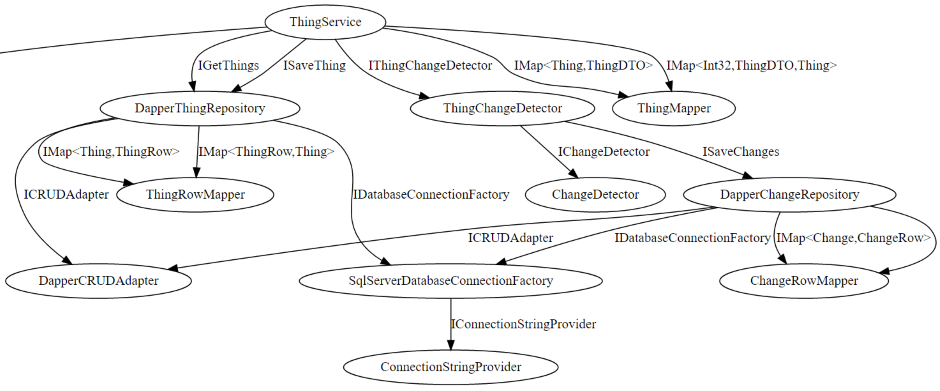
Notice how a request for ThingService triggers a cascade of requirements. To build ThingService, we first need concrete implementations of IThingChangeDetector, ThingMapper, and others. To build the DapperThingRepository, we need an ICRUDAdapter and so on. The entire structure is the object graph.
The Composition Root
We have now established that our application is composed of services that form an object graph. This brings us back to our central question: where is this graph constructed?
The answer is a single, well-defined location in your application called the Composition Root.
The Composition Root is a pattern that designates a unique place, as close to the application's entry point as possible, where all the application's components are wired together.
This concept is best explained by its originator, Mark Seemann. His blog post on the topic is a foundational text for understanding DI.
This blog post by Mark Seemann provides the canonical definition of the Composition Root pattern. It's a short but dense read that lays out the core principles.
Please read the entire post. Pay special attention to these key ideas: The formal definition of a Composition Root. The list of appropriate entry points, especially the one for WPF applications, which is directly relevant to your work. The rule stating that only applications have Composition Roots. The crucial rule about DI Containers: they belong only in the Composition Root.
The Composition Root is the only part of your application that deals with the messy details of object creation. The rest of your application—your ViewModels, services, repositories—should be completely unaware of how their dependencies are created. They simply state what they need via their constructors.
This creates a powerful separation of concerns, as this video explains.
Dependency Injection Ep. 2 | The Composition Root
This video from the channel Konstantinos Reppas gives a great conceptual overview of the Composition Root.
Watch the first few minutes, from the beginning to this point. The speaker does a great job explaining how the Composition Root separates the "functional part" of the application from the "compositional part".
The diagram below illustrates this concept at a high level. The "Composition Root" is the single entry point that constructs the entire graph of objects that the application will use.
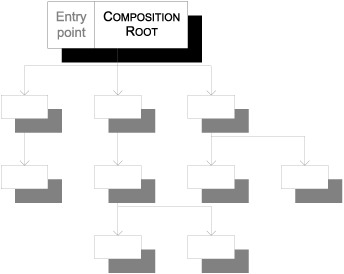
By confining all this construction logic to one place, you gain a single, central "control panel" for your application's architecture. Need to swap your SqlServerRepository for a PostgresRepository? You only need to change one line of code in one place: the Composition Root.
Conclusion
In this lesson, we have defined the essential vocabulary that underpins the Dependency Injection pattern. This formal terminology allows us to discuss the architecture of our applications with precision.
Here are the key takeaways:
- Service: In DI, a service is any object that provides functionality to another object (its consumer).
- Dependency Graph (Object Graph): The entire network of services and their dependencies that must be constructed to run a piece of application functionality.
- Composition Root: A single, unique location near the application's entry point (e.g.,
Application.OnStartupin WPF) where the entire object graph is composed. All other modules in the application should be unaware of this process.
We now know the "what" (Service), the "how they're connected" (Dependency Graph), and the "where it happens" (Composition Root). In our next lesson, we will explore the "how it's done." We will look at Pure DI—wiring up dependencies manually—and then see what problems a DI Container solves by automating this process.