Hello! Welcome back to your capstone module.
In our last lesson, we tackled a requirements-focused case study, moving from a high-level business problem to detailed, documented requirements in the form of user stories. We focused on defining what a solution needs to do.
Today, we pivot to another critical Business Analyst skill: understanding and improving how work gets done. Your learning outcome is to solve a process-focused case study by modeling 'as-is' and 'to-be' processes. This is a frequent and important type of case study in BA interviews, as it demonstrates your ability to think systematically, identify inefficiencies, and design effective solutions.
We will work through a scenario grounded in your AdTech domain experience, learning how to visually map a current workflow, diagnose its problems, and design a streamlined future state.
1. Setting the Scene: A Process-Focused Case Study in AdTech
Let's begin with our case study problem statement:
You are a Business Analyst hired by AdStream Inc., a digital media agency. AdStream is struggling to manage the setup and launch of advertising campaigns for its clients. Campaigns are frequently delayed, contain errors (like incorrect ad creatives or targeting), and lead to billing disputes. This is causing client dissatisfaction and threatening revenue. Your task is to analyze the current campaign setup process and propose a more efficient and reliable workflow.
This scenario is common in the AdTech world, which involves a complex ecosystem of players.

To solve this, we will use a structured methodology called Business Process Analysis (BPA).
2. The Framework: Business Process Analysis (BPA)
BPA provides a formal approach to analyzing and improving business processes. At its heart is the concept of modeling the 'As-Is' state (the current process) to understand its flaws, and then designing a 'To-Be' state (the improved future process).
Let's get familiar with the high-level methodology.
How to: Business Process Analysis - Methods & Tools
To ground our work in a formal framework, we'll consult the 'How to: Business Process Analysis' guide from SumatoSoft. This will provide the structured steps that a BA follows in a real-world process improvement project.
Please read the following three sections: 'Process Analysis Methodology [5 Core Steps]': This provides the high-level roadmap for our work today. 'Step #1: Organizing a Team and Defining the Scope of Work': This explains the setup for a BPA initiative, which frames our case study. 'Step #4: Development of an AS IS – TO BE Processes': This is the core of our lesson, explaining the purpose of modeling the current and future states. Focus on understanding why we model both the 'AS IS' and 'TO BE' states.
3. Step 1: Modeling the 'As-Is' Process
Our first task is to map out AdStream's current campaign setup process. It's crucial that this map reflects reality—including all the messy handoffs and workarounds—not how the process is supposed to work. This discovery process is key to identifying root causes.
In a real project, you would gather this information through interviews, workshops, and observation. For our case, we'll use an industry best-practice document to define a typical, albeit complex, workflow that AdStream likely follows.
Interactive Advertising Workflow Best Practices
The IAB's 'Interactive Advertising Workflow Best Practices' document is an excellent source for understanding the typical steps in launching a digital ad campaign. We will use the 'Agency Workflow' described within it as the foundation for AdStream's 'As-Is' process.
Focus on Appendix B: Campaign Setup Process Workflow, specifically the 'Agency Workflow' section. This provides a step-by-step description of the tasks and departments involved at a media agency like AdStream. This is the raw material for our 'As-Is' model.
Visualizing the Process with BPMN
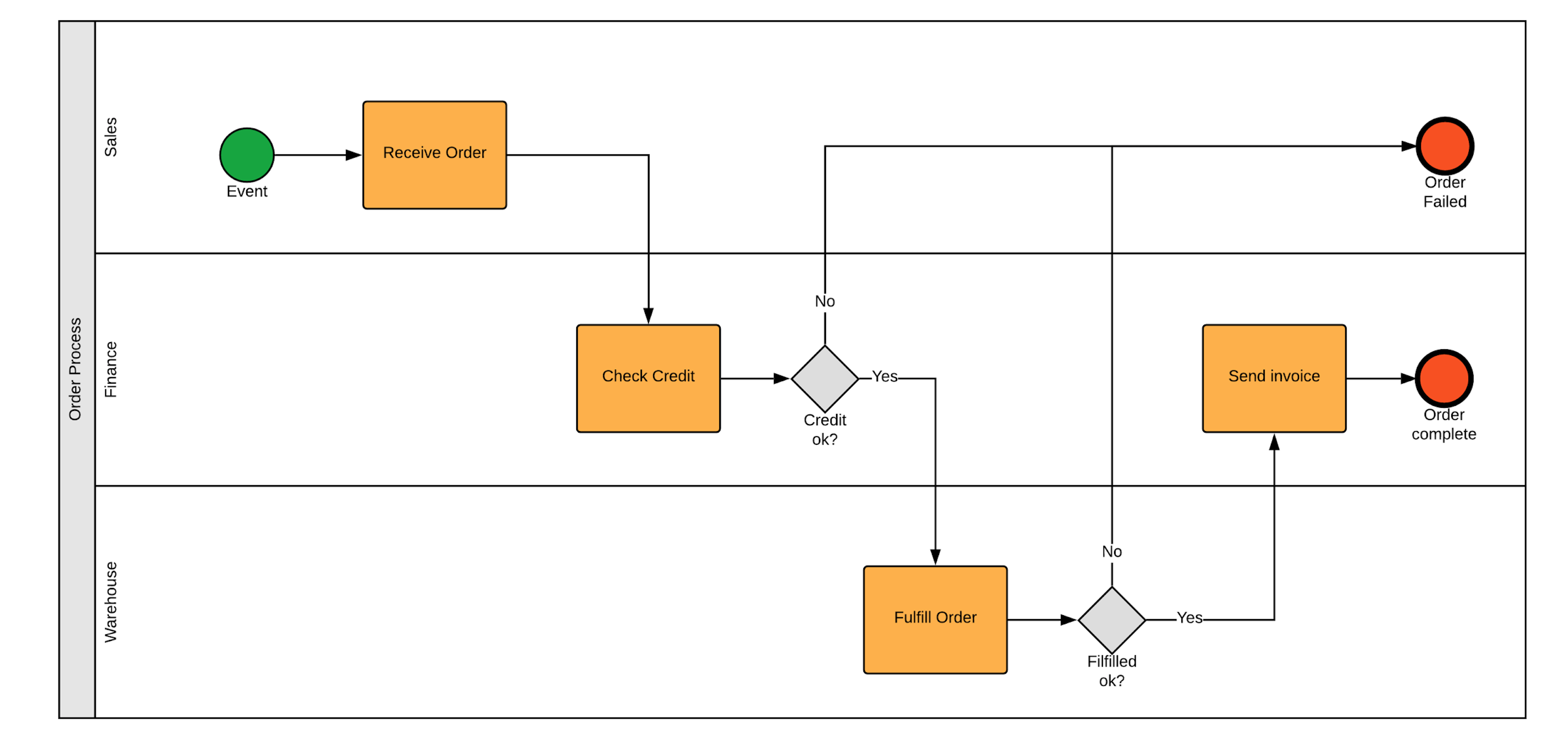
To model the process, we'll use Business Process Model and Notation (BPMN). BPMN is the global standard for process mapping, and proficiency in it is a core BA competency. It provides a shared visual language for technical and business stakeholders.
Here are the basic building blocks of a BPMN diagram:
Constructing AdStream's 'As-Is' BPMN Model
Based on the IAB Agency Workflow, let's outline AdStream's 'as-is' process. Imagine a BPMN diagram with a pool named "AdStream Campaign Setup" and three swimlanes for the departments involved: Media Planning, Ad Ops, and Finance.
The process flow would look something like this:
- Start Event (in Media Planning): The process begins when a "Client Brief is Received."
- Task (Media Planning): "Translate Brief into RFP."
- Task (Media Planning): "Send RFP to Publishers."
- Task (Media Planning): "Evaluate Publisher Proposals & Compile Media Plan."
- Task (Media Planning): "Get Client Approval for Media Plan."
- Parallel Gateway: After client approval, three streams of work begin simultaneously:
- Path 1 (Media Planning): "Create Insertion Order (IO) & Send to Publisher."
- Path 2 (External, but initiated by planning): "Develop Creative Assets." (This is often done by a creative team or agency based on the plan).
- Path 3 (Ad Ops): "Prepare for Trafficking."
- Task (Ad Ops): Once creative assets are ready, "Traffic Assets to Publishers."
- Task (Ad Ops): After the campaign launches, "Verify Screenshots & Confirm Live."
- Task (Ad Ops): "Monitor Delivery & Performance."
- Task (Ad Ops): At the end of the campaign, "Pull Final Campaign Data."
- Handoff to Finance: The final data is sent to the Finance department.
- Task (Finance): "Receive Publisher Invoices."
- Task (Finance): "Reconcile Invoices against Final Data."
- Decision Gateway (Finance): "Invoice Matches Report?"
- Yes: The process moves to the "Confirm Payment" task and then the End Event.
- No: The process follows a path for "Discrepancy Resolution," which involves a messy, undefined loop of communication back with Ad Ops and the publisher before payment can be confirmed. This loop is a major pain point.
4. Step 2: Analyzing the 'As-Is' Process to Find Pain Points
With the current process mapped, we can now analyze it to identify the sources of the problems described in the case study (delays, errors, billing disputes).
Where do you see potential bottlenecks, risks, or inefficiencies in the flow we just mapped?
Here are some critical pain points a BA would identify:
- Information Silos: The process is a series of handoffs between Media Planning, Ad Ops, and Finance. A change made in the media plan might not be communicated effectively to Ad Ops or Finance, leading to trafficking errors or billing mismatches.
- Manual Handoffs: Key documents (briefs, IOs, creative assets, reports) are likely passed around via email. This is slow, untraceable, and prone to using outdated versions.
- Late Discrepancy Detection: The reconciliation of delivery numbers and invoices happens at the very end of the process. Any discrepancies found at this stage require significant rework and delay payments.
- Undefined Resolution Process: The "Discrepancy Resolution" loop is a black box. It lacks clear steps, owners, and timelines, causing significant delays and frustration.
- Lack of a Central "Source of Truth": Each department might have its own spreadsheet or folder for the campaign, with no single, authoritative place to see the latest media plan, IOs, and performance data.
5. Step 3: Designing and Modeling the 'To-Be' Process
Now for the creative part: designing a better process. The goal of the 'To-Be' model is to address the pain points identified in the 'As-Is' analysis. We want to design a process that is faster, more reliable, and more transparent.
A common solution for these types of problems is to introduce a centralized system and automate key handoffs. Let's imagine AdStream decides to implement a Campaign Management Platform.
Building the 'To-Be' BPMN Model
To see how we can translate these ideas into a formal BPMN diagram, let's watch a practical demonstration.
REAL-LIFE Business Analyst Case Study (I Build a COMPLETE Application in 15 mins)
This video, 'REAL-LIFE Business Analyst Case Study' from Stefano - The Agile Business Analyst, provides an excellent, hands-on demonstration of building a 'to-be' process in a BPMN tool based on a set of requirements. While the case study is different (access management), the techniques are directly applicable.
Watch from 02:12 to 14:12. You don't need to memorize the specifics of the tool (Flowable), but focus on how the BA translates requirements into BPMN elements: User Tasks for actions that people perform (e.g., 'Request Access'). Forms to capture data within a task. Gateways to model decision logic (e.g., Approve/Reject/Rework). Sequence Flows to connect the elements in the correct order.
Inspired by that demonstration, here is how we could design AdStream's 'To-Be' process using the new Campaign Management Platform. The swimlanes might remain the same (Media Planning, Ad Ops, Finance), but the flow and tasks change significantly.
- Start Event (in Media Planning): "Client Brief is Received."
- Task (Media Planning): "Create Campaign in Platform." All campaign details (client, budget, dates, KPIs) are entered here. This becomes the central source of truth.
- Task (Media Planning): "Build Media Plan in Platform." The platform could have integrations to check real-time publisher inventory.
- Task (Media Planning): "Submit Plan for Client Approval via Platform." The client gets a notification and can approve directly in the system.
- Automated Notification: Upon approval, the platform automatically notifies Ad Ops that the campaign is ready for trafficking.
- Task (Ad Ops): "Link Creative Assets in Platform." Ad Ops uploads or links creatives directly to the campaign.
- Task (Ad Ops): "Generate & Traffic Tags via Platform." The platform generates tracking tags based on the media plan and may even integrate with publisher ad servers to push them automatically.
- Automated Monitoring (System Task): The platform automatically pulls delivery data from publishers daily.
- Automated Task (System Task): "Daily Discrepancy Check." The system compares publisher delivery data against the media plan and flags any campaign that is off-pace or has tracking issues.
- Decision Gateway (System): "Discrepancy Found?"
- No: The process continues.
- Yes: An automated "Alert Ad Ops" task is triggered for immediate investigation.
- Automated Handoff to Finance: The platform has all the approved IOs and final, reconciled delivery numbers.
- Task (Finance): When a publisher invoice arrives, "Match Invoice in Platform." Finance simply enters the invoice number, and the platform matches it against the reconciled delivery data.
- Decision Gateway (Finance): "Invoice Matches?"
- Yes: The process moves to a "Schedule Payment" task and the End Event.
- No: A formal "Dispute Invoice" task is created in the platform, with all the data needed for the dispute automatically attached.
Test your understanding!
Compare the 'As-Is' and 'To-Be' models. What is the single biggest change in the 'To-Be' process that addresses the pain point of "Late Discrepancy Detection"?
Show answer
The biggest change is the shift from a manual, end-of-campaign reconciliation process to an automated, daily discrepancy check. In the 'To-Be' model, the system proactively monitors delivery data and alerts Ad Ops to any issues within 24 hours of launch, rather than waiting for an invoice weeks later. This allows for immediate correction, preventing small errors from becoming large billing disputes.
Conclusion
Excellent work! You have successfully walked through a process-focused case study, a core task for any Business Analyst. You've applied a structured methodology to analyze a real-world business problem, diagnose its root causes, and design a robust solution.
Key Takeaways:
- 'As-Is' First, Then 'To-Be': Always start by understanding and mapping the current state. You cannot fix a process you do not fully understand.
- BPMN is Your Language: BPMN is the industry standard for visualizing processes. It allows you to communicate complex workflows clearly to both business and technical teams.
- Analysis Connects the Models: The 'To-Be' model should directly address the specific pain points and inefficiencies discovered during the analysis of the 'As-Is' model.
- Think in Systems and Automation: Modern process improvement often involves leveraging technology to automate manual handoffs, create a central source of truth, and provide proactive monitoring.
Preview of the Next Lesson:
We have now covered requirements-focused and process-focused case studies. In the next lesson, we will dive into a data analysis case study using SQL and Python to derive business insights. This will bring together the analytical and technical skills you've developed, preparing you for another common type of BA interview challenge.