Hello! Welcome to our next lesson.
In our last session, we focused on bringing order to a long list of requirements by applying prioritization techniques like MoSCoW and the Kano Model. You learned how to decide what to build next based on business value, customer satisfaction, and project constraints.
Now that we have a prioritized list, our job as a Business Analyst shifts to ensuring these requirements are not lost or misinterpreted as the project progresses. How do we track a business need from its initial conception in a Business Requirements Document (BRD) all the way to its final testing and release? This is where traceability comes in.
This lesson directly addresses the learning outcome: Create a requirements traceability matrix to track the requirement lifecycle. The Requirements Traceability Matrix (RTM) is a cornerstone of formal IT documentation and a key tool in a BA's work management toolkit. Mastering it is crucial for ensuring project success and a common topic in BA job interviews.
The Purpose of a Requirements Traceability Matrix (RTM)
Imagine you're managing a complex project, like rolling out a new campaign management tool in your AdTech company. The business wants a feature to automatically optimize ad spend. The developers write code for it, and the QA team runs tests. How do you guarantee that the final feature actually does what the business originally asked for? How do you prove it?
The RTM is the document that provides this link. It maps and traces the life of a requirement from its origin to its fulfillment.
Requirements Traceability Matrix - Jama Software
To start, let's get a formal definition. The article 'Requirements Traceability Matrix' from Jama Software clearly defines what an RTM is and why it's so critical for product teams.
Please read the first two sections: 'What is a Requirements Traceability Matrix?' and 'The Purpose of Using a Requirements Traceability Matrix'. Focus on understanding its role in demonstrating that requirements have been satisfied.
As the article states, the core purpose is to ensure you're building the right thing and to provide evidence that all requirements have been met. For you, coming from a project management background, you can think of it as a highly detailed and structured deliverable tracking system, but one that focuses specifically on the integrity of the requirements throughout the development lifecycle.
The Three Directions of Traceability
Traceability isn't just a single link; it can be viewed from different directions, each answering a critical project question. The best practice is to combine them into what's known as bidirectional traceability.
Requirements Traceability Matrix - Jama Software
The Jama Software article we just looked at also has an excellent section explaining the different types of traceability. Understanding these will help you see the full power of an RTM.
Please read the section 'Different Types of RTMs – With Examples'. Pay close attention to the distinction between forward, backward, and bidirectional traceability and the questions each type helps you answer.
Let's summarize those key concepts:
- Forward Traceability: This traces from the requirement to the deliverable (e.g., design document, test case). It helps answer, "Is every requirement being implemented and tested?" This ensures you are building the product right.
- Backward Traceability: This traces from the deliverable back to the requirement. It helps answer, "Why does this feature or test case exist?" This is crucial for preventing "scope creep"—building features that weren't originally requested. It ensures you are building the right product.
- Bidirectional Traceability: The gold standard. It combines both forward and backward tracing, giving you a complete, end-to-end view of the requirement's lifecycle.
The Anatomy of a Requirements Traceability Matrix
So, what does an RTM actually look like? At its heart, it's a table or spreadsheet. While the exact columns can vary by organization and project complexity, they follow a common pattern.
This video provides a great walkthrough of the essential columns you'll need to create a practical RTM.
How to Make a Requirements Traceability Matrix Template in Excel (with example headings)
The video 'How to Make a Requirements Traceability Matrix Template in Excel' by David McLachlan clearly explains the typical headers you'll find in an RTM.
Watch the segment from 01:55 to 03:53. The presenter walks through creating the columns for an RTM, explaining the purpose of each one, such as Requirement ID, Requester, Test Case ID, and Status.
As the video shows, the goal is to create a chain of unique IDs that connects everything:
Business Need -> Requirement ID -> Design ID -> Code Module -> Test Case ID
Now, let's look at a more detailed, real-world example. This is what an RTM might look like mid-project, once testing is underway.
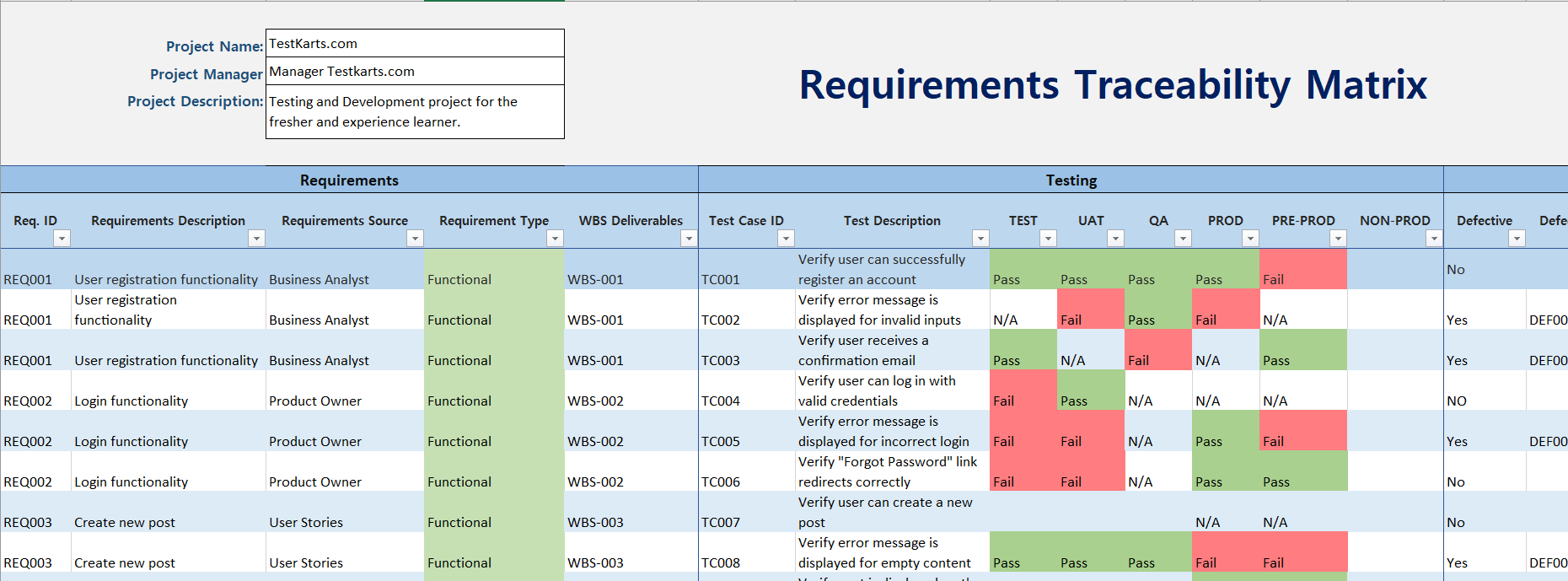
Notice how this example includes:
- A unique ID for each requirement (e.g., REQ_001).
- Links to Work Breakdown Structure (WBS) deliverables.
- Specific Test Case IDs for each requirement.
- Status columns for different testing phases (TEST, UAT, QA). This is where you track the actual verification of the requirement. A "Pass" in UAT is often the final sign-off that the requirement has been met to the stakeholder's satisfaction.
How to Create an RTM
Creating and maintaining an RTM is a core BA activity. It's a "living document" that you establish early and update continuously throughout the project.
What Is a Requirements Traceability Matrix (RTM) ...
The article 'What Is a Requirements Traceability Matrix (RTM)' from project-management.com provides a straightforward, step-by-step guide to building your own RTM. It also includes a link to a free template, which is perfect for getting hands-on practice.
First, read the section 'How to create a requirements traceability matrix'. Then, check out the 'Free requirements traceability matrix template' section and click the 'Download Google Sheet' link to see a practical template you can use.
The process can be summarized as:
- Gather Sources: Collect your requirements from the BRD, FSD, stakeholder interviews, etc.
- Assign IDs: Give every single requirement a unique, permanent ID.
- Set up the Matrix: Create a spreadsheet with columns for the ID, description, source, and placeholders for future artifacts (Design ID, Test Case ID, etc.).
- Populate Requirements: Fill the matrix with the initial list of prioritized requirements.
- Trace and Update: As the project moves into design, development, and testing, work with those teams to get the IDs for their artifacts and link them in the RTM. Continuously update the status columns as testing progresses.
Test your understanding!
Let's revisit the AdTech A/B testing feature from our last lesson. You have the following three Must-Have requirements:
- REQ01: As an advertiser, I want to upload two different ad creatives to set up an A/B test.
- REQ02: As an advertiser, I want to see the number of clicks for each creative.
- REQ03: As an advertiser, I want to see the number of impressions for each creative.
The design team has created a wireframe for the upload screen (Design ID: DSN-045) and another for the results dashboard (Design ID: DSN-046). The QA team has written test cases to verify the functionality (Test Case IDs: TC-091, TC-092, TC-093).
How would you start filling out a bidirectional RTM to trace these artifacts? Sketch out a simple table.
Show answer
Your RTM table would start to look something like this. The key is linking the IDs together.
| Requirement ID | Requirement Description | Design ID | Test Case ID | Test Status |
|---|---|---|---|---|
| REQ01 | Upload two different ad creatives | DSN-045 | TC-091 | Not Started |
| REQ02 | See clicks for each creative | DSN-046 | TC-092 | Not Started |
| REQ03 | See impressions for each creative | DSN-046 | TC-093 | Not Started |
Notice that REQ02 and REQ03 both trace to the same design artifact (DSN-046, the results dashboard), but they have separate test cases to verify each specific metric. This is a common and perfectly normal scenario.
Conclusion
You've now learned how to create and use one of the most important documents in a BA's arsenal. The RTM is not just administrative overhead; it's a powerful tool for quality control, scope management, and communication. It provides the undeniable link between the business problem and the final solution.
Key Takeaways:
- A Requirements Traceability Matrix (RTM) is a living document that tracks a requirement's lifecycle, from its source to its verification.
- It ensures every requirement is addressed, prevents scope creep, and simplifies impact analysis for changes.
- Bidirectional traceability (both forward and backward) provides the most complete view.
- An RTM is built by assigning unique IDs to requirements and then linking them to the IDs of other project artifacts like designs, tasks, and test cases.
Preview of the Next Lesson:
Projects are rarely static. Stakeholders change their minds, market conditions shift, and new priorities emerge. But how do you handle these changes without causing chaos? The RTM is your best friend in this process. In our next lesson, we will focus on how to execute a requirements change control process, including impact analysis, where you'll see firsthand how the traceability you've established makes this a manageable task.