Welcome to your second lesson. In our first session, we established a solid understanding of what a computer network is and why we use them: to share resources and to communicate. You now have the foundational "what" and "why."
Today, we will build on that by exploring how networks are categorized based on their geographical scale. This lesson directly addresses the learning outcome of identifying and comparing Local Area Networks (LANs) and Wide Area Networks (WANs), while also introducing you to Personal Area Networks (PANs) and Metropolitan Area Networks (MANs). Understanding these classifications is crucial because the technologies, costs, speeds, and security considerations are vastly different for a network in your home versus one that spans the globe.
Let's begin by getting a quick, animated overview of the main network types.
Network Types: LAN, WAN, PAN, CAN, MAN, SAN, WLAN
The video "Network Types" by PowerCert Animated Videos provides a clear and concise introduction to the different network classifications based on their size. It's a great way to visualize the hierarchy.
Please watch the following segments. For each one, focus on the geographical scope and the primary examples given. Personal Area Network (PAN) Local Area Network (LAN) and WLAN Metropolitan Area Network (MAN) Wide Area Network (WAN)
That video gave you a rapid tour from the smallest scale to the largest. Now, let's dive deeper into each one, focusing on the two most important types for your career goals: LANs and WANs.
The Network Hierarchy: From Personal to Global
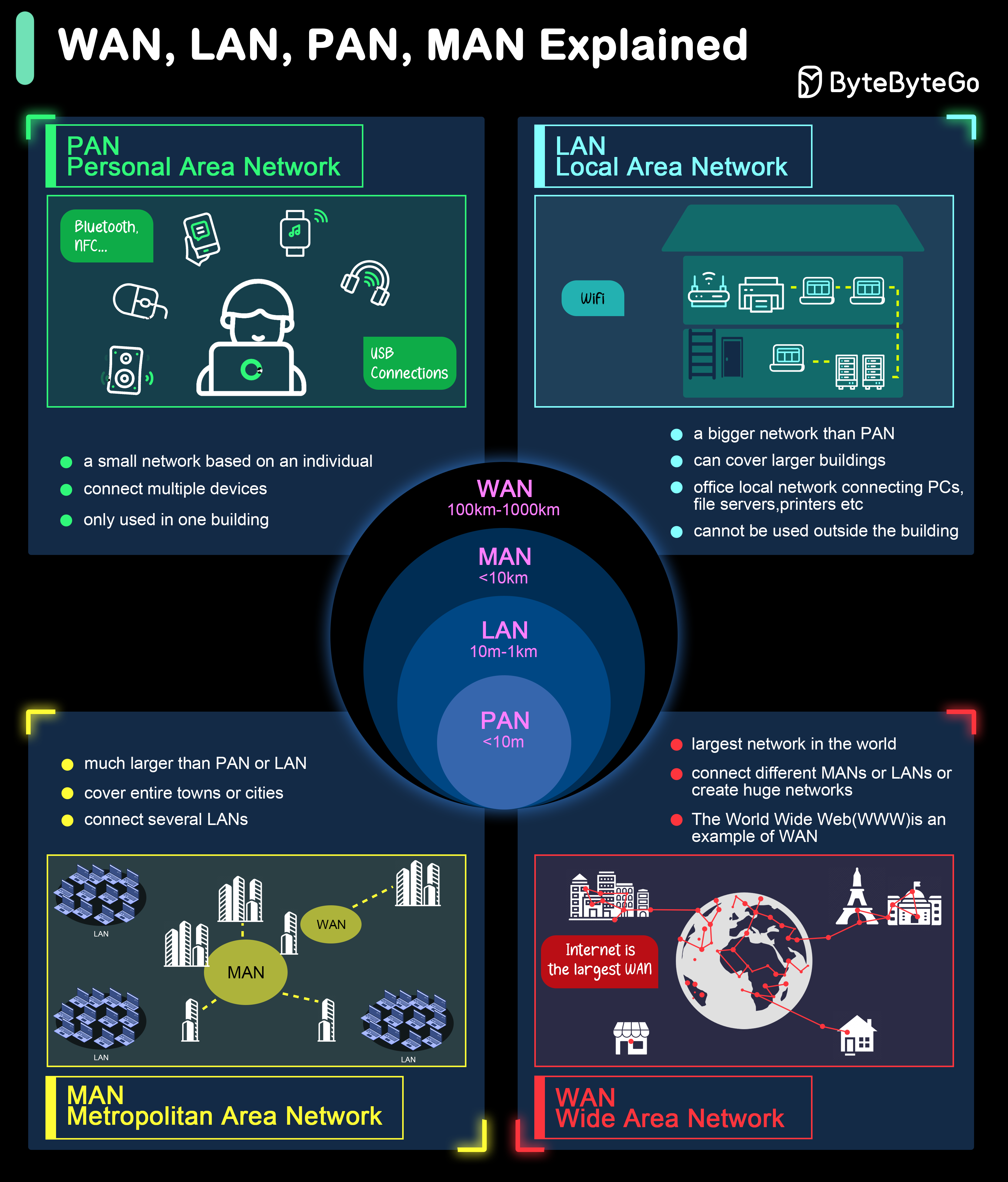
Computer networks are best understood as a hierarchy of scale. Think of them as nested circles, with each type encompassing a larger geographical area.

Let's break down this hierarchy, starting with the one closest to you.
1. Personal Area Network (PAN)
As the name implies, a PAN is a network centered around an individual person. It's designed for interconnecting devices within immediate reach.
- Scope: A few meters.
- Purpose: Connecting personal peripherals like headphones, keyboards, smartwatches, and fitness trackers to a central device like a smartphone or laptop.
- Technologies: Primarily wireless technologies like Bluetooth and Near Field Communication (NFC), but can also be wired, such as a USB connection.
Think of pairing your wireless earbuds with your phone—you've just created a simple PAN. Its purpose is convenience and short-range data transfer, not high-performance, multi-user communication.
2. Local Area Network (LAN)
This is one of the most fundamental concepts in networking. A LAN connects devices within a limited, well-defined area.
- Scope: A single room, an office floor, a building, or a small campus (up to a few kilometers).
- Key Characteristic: A LAN is typically privately owned and managed. The organization that uses it (a company, a school, or you at home) controls the hardware, wiring, and access policies. This gives it a high degree of control over performance and security.
- Technologies: Most commonly, Ethernet (wired) and Wi-Fi (wireless, creating a WLAN).
- Example: Your home network, where your laptop, phone, and smart TV connect to a single router, is a perfect example of a LAN. An office where all employees can access a shared printer and file server is another.
Because of their small scale and private ownership, LANs typically offer very high speeds and low latency (delay). Let's explore this further.
11 Types of Networks: Understanding the Differences
The article "11 Types of Networks" from Auvik gives a practical overview of when and why you would use a LAN.
Please read the section on Local Area Network (LAN). Pay close attention to the characteristics described and the "When to use a LAN" section, as it highlights the core purpose of this network type.
For your goals in cloud engineering, this is critical. A massive Amazon, Google, or Microsoft data center is, at its heart, a collection of incredibly large and complex LANs, connecting tens of thousands of servers with high-speed fiber optic cables.
3. Metropolitan Area Network (MAN)
A MAN bridges the gap between a LAN and a WAN. It's larger than a LAN but confined to a specific geographical region.
- Scope: A city or a large town (typically 5 to 50 km).
- Purpose: To interconnect multiple LANs that are geographically separate but still within the same metropolis.
- Technologies: Often uses high-speed backbone connections like fiber optic cables.
- Example: A university with campuses spread across a city might use a MAN to connect the LAN of each campus. A cable TV or internet service provider's network within a city is also a MAN. It connects all its customers (each with their own LAN) to its central office.
You can think of a MAN as a public utility for networking, often operated by a single provider that leases access to various organizations.
4. Wide Area Network (WAN)
A WAN connects computers and networks over vast distances.
- Scope: Across cities, states, countries, or even continents.
- Key Characteristic: A WAN is rarely owned by a single private organization. Instead, it is a network of networks that relies on infrastructure provided by telecommunications companies (like AT&T, Verizon, or British Telecom). Organizations lease lines or use public services to connect their geographically dispersed LANs.
- Technologies: A mix of high-speed fiber optics, satellite links, and microwave relays.
- Example: The internet is the largest WAN in the world. A multinational corporation that connects its New York office LAN to its London office LAN over a private, leased line has also created a WAN.
When you access a website, your request travels from your local LAN, through your Internet Service Provider's MAN, and then across the global WAN (the internet) to reach the server hosting the website, which sits on another LAN.
Comparing LAN and WAN
The distinction between a LAN and a WAN is fundamental. While both connect computers, they do so with different goals, technologies, and trade-offs.
Let's watch a short video that digs into the specific features and pros/cons of LAN, MAN, and WAN.
Computer Network | Types of Networks | LAN MAN WAN | Difference Between LAN MAN WAN | Simplilearn
This video from Simplilearn goes into more detail about the characteristics and trade-offs of LANs and WANs.
Please watch these two sections: First, review the details on LANs. Notice the emphasis on high speed and private addresses. Next, watch the details on WANs. Pay attention to the discussion of lower data rates and the use of satellite or wireless media.
The key differences highlighted in the video can be summarized in a table. This is a crucial takeaway for this lesson.
| Feature | Local Area Network (LAN) | Wide Area Network (WAN) |
|---|---|---|
| Scope | Small area (room, building, campus) | Large geographical area (city, country, globe) |
| Ownership | Privately owned and managed | Managed by multiple service providers; lines are often leased |
| Speed | Very high (e.g., 1-10 Gbps) | Lower than LANs; variable (e.g., 10 Mbps - 1 Gbps) |
| Cost | Low setup cost (Ethernet cables, switches are inexpensive) | High setup and maintenance cost (leasing lines, complex routers) |
| Error Rate | Very low | Higher, due to the complexity and distance of the connections |
| Security | Easier to secure due to private control | More complex to secure, as data travels over public infrastructure |
This visual summary provides a great overview of all four network types, their common use cases, and how they relate in scale.
Conclusion
In this lesson, we've classified networks based on their size and scope, moving from your personal devices to the global internet.
Here are the key takeaways:
- Networks are categorized by scale: PAN < LAN < MAN < WAN.
- LANs are fast, privately owned networks confined to a small area like a home or office. This is where servers in a cloud data center live.
- WANs are large, publicly-managed or leased networks that connect LANs over vast distances. The internet is the ultimate WAN, and it's what you use to access cloud services.
- PANs are for your personal gadgets (Bluetooth), and MANs connect networks across a city.
You now understand not just what a network is, but also the fundamental ways they are organized by geography. This distinction influences everything from speed and cost to security design—concepts that are central to cloud engineering and cybersecurity.
In our next lesson, we will shift our focus from scale to structure. We'll explore network topologies, which describe the different ways devices can be physically or logically arranged within a network, such as in a star, bus, or mesh formation.