Hello! Welcome to your next lesson.
In our previous session, we examined the critical bug of returning a pointer to a local variable. We saw how the variable's lifetime is tied to its function's stack frame, and that accessing it after the function returns leads to undefined behavior.
Today, we shift our focus from the lifetime of data to its layout in memory. We'll begin our module on arrays by exploring how C organizes 1D and 2D arrays. Understanding this memory map is fundamental to mastering pointers, memory access patterns, and performance optimization in C—all frequent topics in technical interviews for roles like yours.
Your learning outcome for this lesson is to explain the memory layout of 1D and 2D arrays and how elements are accessed via row-major indexing.
1D Arrays: The Contiguous Block
Let's start with the simplest case: a one-dimensional array. When you declare an array like int arr[5];, the compiler allocates a single, unbroken block of memory large enough to hold all its elements.
The total size of this block is number_of_elements * sizeof(element_type). For int arr[5]; on a system where sizeof(int) is 4, this would be 5 * 4 = 20 bytes.
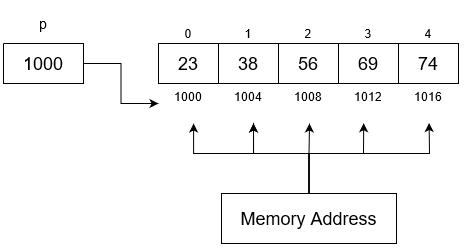
This contiguous layout is what allows for efficient element access. The C expression arr[i] is essentially syntactic sugar for pointer arithmetic: *(arr + i). It's crucial to remember how this arithmetic works: the compiler automatically scales the index i by the size of the element type.
So, the address of arr[i] is calculated as:
For our int arr[5]; example, the address of arr[3] is not base_address + 3, but base_address + 3 * sizeof(int). This scaling is what makes pointer arithmetic type-safe and powerful.
The following resource provides a concise overview of this concept. It confirms that arrays allocate consecutive memory spaces and explains how pointer arithmetic is scaled by the size of the pointed-to type.
Please review slides 29-31 ('Arrays: Memory layout') and slide 35 ('Pointer Arithmetic'). These sections reinforce the concepts of contiguous allocation and scaled pointer arithmetic.
2D Arrays: Flattening the Grid
Now, how does C store a two-dimensional structure like a matrix in linear memory? There are two primary strategies: row-major order and column-major order.
- Row-major order: Lays out the first complete row, then the second complete row, and so on.
- Column-major order: Lays out the first complete column, then the second complete column, and so on.
The choice between them has significant implications for performance, especially concerning CPU caching.
Memory layout of multi-dimensional arrays
The following article, 'Memory layout of multi-dimensional arrays' by Eli Bendersky, gives an excellent and detailed explanation of these two layouts. It includes clear diagrams and the formulas for calculating an element's offset in memory.
Please read the sections '2D row-major', '2D column-major', and 'History: Fortran vs. C'. Focus on the diagrams, the offset calculation formulas, and the key fact about which layout C uses and why.
As you just read, C guarantees that arrays are stored in row-major order. This is a direct consequence of C's indexing rules. A declaration like int matrix[3][4]; is interpreted as "an array of 3 elements, where each element is an array of 4 integers." The memory layout reflects this: three consecutive arrays of four integers each.

Calculating Element Addresses in 2D Arrays
Given the row-major layout, we can derive the formula to find the memory address of any element matrix[i][j] in an array declared as T matrix[ROWS][COLS];
To get to the i-th row, we must skip over i full rows. Each row has COLS elements.
So, the starting address of row i is:
To get to the j-th element within that row, we add j more element sizes:
The term (i * COLS + j) is the linear offset of the element from the beginning of the array.
Let's verify this with a code example. The following program prints the addresses of each element in a 2D array.
#include <stdio.h>


#define ROWS 3
#define COLS 4

int main(void) {
    int matrix[ROWS][COLS];

    printf("sizeof(int) = %zu bytes\n\n", sizeof(int));
    printf("Array Element Addresses:\n");

    for (int i = 0; i < ROWS; i++) {
        for (int j = 0; j < COLS; j++) {
            printf("&matrix[%d][%d] = %p\n", i, j, (void*)&matrix[i][j]);
        }
        printf("\n"); // Newline after each row
    }

    // Manual calculation for matrix[1][2]
    long base_addr = (long)&matrix[0][0];
    long expected_addr = base_addr + (1 * COLS + 2) * sizeof(int);

    printf("Base address of matrix: %p\n", (void*)&matrix[0][0]);
    printf("Address of matrix[1][2]: %p\n", (void*)&matrix[1][2]);
    printf("Manually calculated address for matrix[1][2]: %p\n", (void*)expected_addr);

    return 0;
}
When you run this code, you'll observe that the memory addresses are contiguous and increase by sizeof(int) for each element along a row. The jump between the end of one row (e.g., matrix[0][3]) and the start of the next (matrix[1][0]) is also just sizeof(int), proving it's one continuous block. Your manual calculation should match the actual address reported by the & operator.
Why This Matters in Your Work
Understanding memory layout isn't just academic; it has direct practical consequences in automotive and embedded C programming:
- Performance and Cache Locality: Modern CPUs fetch memory in chunks called cache lines. When you iterate through an array in the order it's stored in memory (e.g., iterating through a C 2D array row by row), you maximize cache hits, which is significantly faster than jumping around memory (e.g., iterating column by column). This is a common source of performance bugs.
- Interfacing with Other Systems: You might interface with modules written in other languages (like MATLAB or Fortran for control algorithms) that use column-major layout. If you pass a 2D array from C to such a module without handling the layout difference (e.g., by transposing the matrix), you will process the data incorrectly.
- Hardware Register Mapping: When you map a hardware device's registers to a
structor array in C, you must know exactly how the compiler will lay out your data structure to ensure you're reading from and writing to the correct physical addresses.
Conclusion
In this lesson, we established the precise memory model for C arrays. This knowledge is the bedrock for many advanced topics we'll cover soon.
Key Takeaways:
- 1D and 2D arrays in C are stored as a single, contiguous block of memory.
- Element access
arr[i]is equivalent to*(arr + i), where the addition is scaled by the element's size. - C stores multi-dimensional arrays in row-major order, meaning rows are laid out sequentially.
- The address of
arr[i][j]in an arrayarr[ROWS][COLS]is calculated asbase_address + (i * COLS + j) * sizeof(element). - This layout has critical implications for performance (cache locality) and interoperability with other systems.
In our next lesson, we will dive deeper into the relationship between arrays and pointers. We'll answer the classic interview questions: "Is an array just a pointer?" and explore the subtle but important differences between an array name and a pointer variable, especially in the context of operators like sizeof and &.