Hello! In our previous lesson, we established that a Vulnerability Assessment (VA) is a process for finding security weaknesses, and we learned about the OWASP Top 10, a standard used to prioritize those findings. You now understand the "why" and the "what" of web security.
Today, we will connect those pieces and map out the entire journey from start to finish. This lesson describes the typical workflow that security teams and developers follow to identify, report, and ultimately fix vulnerabilities. This process is exactly what leads to a developer, like yourself, receiving a task to fix an issue like the Cross-Site Scripting (XSS) vulnerability you're focused on.
By the end of this lesson, you will be able to describe a typical workflow for identifying, reporting, and remediating security vulnerabilities.
The Vulnerability Management Lifecycle
Security isn't a one-time task; it's a continuous, cyclical process often called the Vulnerability Management Lifecycle. The goal is to systematically find and fix weaknesses to reduce the overall risk to the application.
This lifecycle provides the structure for everything we'll discuss. To get a high-level overview of what this process looks like, please watch the following short video.
The Five Stages of Vulnerability Management
This video from Ascend Technologies concisely explains the five core stages of a typical vulnerability management process. It will give you a solid mental model for the entire workflow.
Watch the entire video (approximately 4 minutes). Pay attention to the five stages presented: Discover, Assess, Report, Remediate, and Verify.
As the video shows, the process moves through distinct stages. The following diagram illustrates a very similar workflow, reinforcing these key steps.
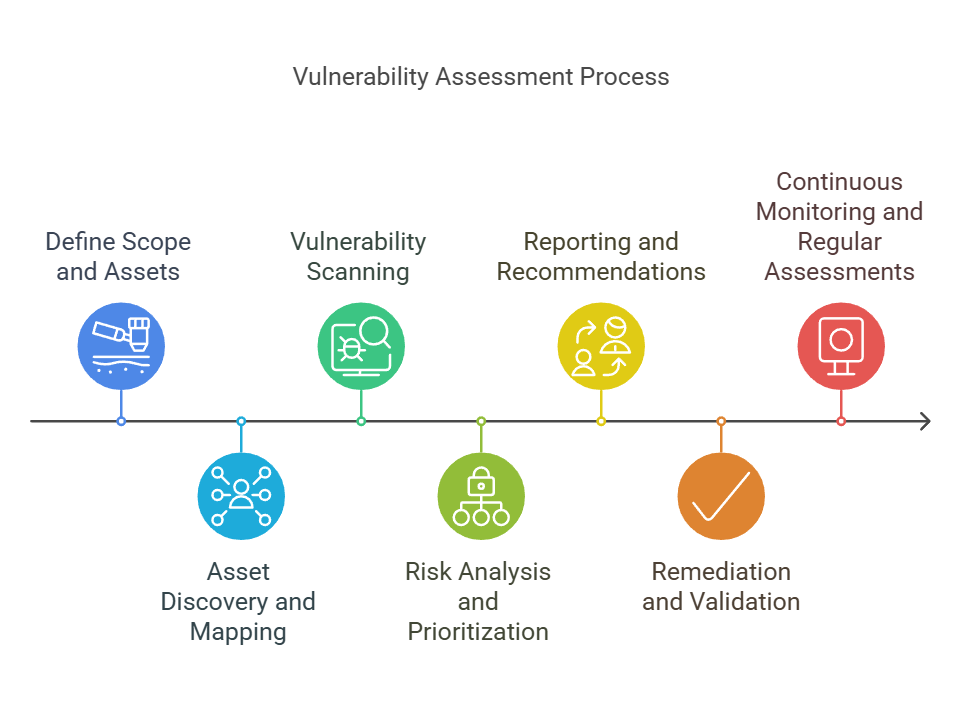
Combining the video and the diagram, we can define the lifecycle as follows:
- Discover / Scan: The process of actively searching for potential vulnerabilities. This can involve automated scanners that crawl a web application or manual inspection of the source code.
- Assess / Analyze: Once a potential vulnerability is found, it's analyzed to determine its severity. Is it a critical risk or a minor issue? This is where frameworks like the OWASP Top 10 and scoring systems like CVSS (Common Vulnerability Scoring System) come into play.
- Report: The findings are compiled into a report for the development team. A good report details what the issue is, the potential impact, and how to reproduce it.
- Remediate: This is the "fix" stage where developers take the report and implement a solution to eliminate or reduce the risk.
- Verify / Validate: After a fix is deployed, the system is re-tested to ensure the vulnerability is gone and that the fix didn't introduce any new problems (a "regression").
- Monitor: Security is an ongoing effort. The application is continuously monitored for new threats and the cycle repeats.
Now, let's zoom in on the stages that most directly involve you as a developer: identification and remediation.
Phase 1: Identifying Vulnerabilities
How are vulnerabilities actually found in the first place? It's a combination of automated tools and human expertise.
Automated tools, known as Static Application Security Testing (SAST) tools, scan your source code for known insecure patterns. Dynamic Application Security Testing (DAST) tools test the running application by sending it malicious-looking inputs. These tools are fast but have limitations. They can produce "false positives" (flagging safe code as vulnerable) and miss complex, logic-based flaws.
This is why manual code review is essential. A security professional—or a security-conscious developer—manually inspects the code, using their knowledge of the application's business logic to find subtle flaws that tools would miss.
To understand the mindset behind a manual code review, let's watch an expert explain her process.
How to Analyze Code for Vulnerabilities
In this clip from an OWASP presentation, developer and hacker Vicki Li explains why manual review is crucial and introduces a fundamental concept for finding vulnerabilities: tracing data flow from a 'source' to a 'sink'.
Please watch two segments: From 07:19 to 10:04 to understand why manual review is necessary alongside automated tools. From 24:26 to 25:28 to learn about the 'source-to-sink' data flow concept. Focus on the idea that many vulnerabilities occur when untrusted user input (a source) flows into a dangerous function (a sink) without being properly cleaned.
The "source-to-sink" model is powerful. In an ASP.NET MVC application:
- A source could be user input from
Request.QueryString, a form field bound to a model property, or a URL parameter. - A sink could be a method that executes a database query (like
context.Database.ExecuteSqlCommand), a Razor function that renders raw HTML (@Html.Raw(...)), or a jQuery method that modifies the page (.html()or.append()).
A security review often involves searching the codebase for dangerous sinks and then tracing backward to see if any untrusted data from a source can reach them.
Phase 2: Reporting and Remediation
After vulnerabilities are identified and prioritized, a report is generated and assigned to the development team. This is where you come in. Let's explore what happens next.
Web Application Security Testing: The Ultimate Guide
This article provides excellent insights into the reporting and remediation phases. We will focus on the sections that describe what makes a good report and how to approach fixing the issues.
Please read the section titled "Reporting and Remediation: Turning Security Findings into Action." Focus on the first part, "1. Writing Effective Security Reports." This describes the kind of document you would receive. Pay attention to the need for clear impact, evidence, and actionable steps.
When you receive a security report, your task is to turn its findings into action. The flowchart below illustrates a typical decision-making process for a developer handling a vulnerability ticket.

As the flowchart shows, fixing a vulnerability isn't always straightforward. You might have several options:
- Remediation: This is the ideal solution. It means fixing the root cause of the problem. For example, if a vulnerable third-party library (like an old version of jQuery or Newtonsoft.Json) is the issue, remediation is updating that library to a patched version. For your XSS goal, replacing
.append()with.text()is a remediation because it eliminates the vulnerability completely. - Mitigation: Sometimes, a full fix isn't immediately possible. Perhaps updating a library would break other parts of the application. In this case, you can apply a mitigation—a control that reduces the likelihood or impact of an attack without fixing the underlying flaw. An example would be adding a new rule to a Web Application Firewall (WAF) to block malicious inputs while the development team works on a permanent fix.
The following resource clearly defines this important distinction.
What is Remediation? Definition & Explanation of Security ...
This article from Kusari provides a clear, professional definition of remediation and how it differs from mitigation. Understanding this difference is key in professional security discussions.
Please read the short section titled "Definition of Vulnerability Remediation vs. Mitigation." It will only take a moment but solidifies this key concept.
Test your understanding!
A security scan finds a Reflected XSS vulnerability in a search field. Your team is on a tight deadline for a major release. Which of the following is a mitigation, and which is a remediation?
- Your team modifies the Razor view to ensure the search term is always HTML-encoded before it is displayed back to the user.
- The infrastructure team configures the Web Application Firewall (WAF) to inspect incoming requests for common XSS patterns and block them before they reach the application.
Show answer
- This is remediation. By properly encoding the output, you have fixed the root cause of the vulnerability within the application's code.
- This is mitigation. The vulnerability still exists in the code, but an external control (the WAF) is in place to reduce the risk of it being exploited. The team should still plan to remediate the code later as part of a defense-in-depth strategy.
Phase 3: Verification and Monitoring
Once you've pushed your fix, the job isn't quite done. The final steps of the cycle are to verify and monitor.
- Verification: The security team (or an automated scanner) will re-run their tests against the patched application. They will try the original attack to confirm it is now blocked. They will also perform regression testing to ensure your fix didn't accidentally break other functionality.
- Continuous Monitoring: The application is put back into the continuous monitoring system, and the entire cycle begins again, ready to catch the next vulnerability that emerges from new code, new dependencies, or new attack techniques.
Conclusion
In this lesson, we have traced the complete lifecycle of a security vulnerability, from its discovery to its resolution. You now have a mental map of the end-to-end process.
Here are the key takeaways:
- Vulnerability management is a continuous cycle: Discover -> Assess -> Report -> Remediate -> Verify -> Monitor.
- Vulnerabilities are identified through a mix of automated scanning (SAST/DAST) and manual code review.
- As a developer, your primary role is in the remediation phase, where you receive a report and implement a fix.
- A remediation eliminates the root cause of a vulnerability, while a mitigation reduces its risk without a full fix.
- The process is complete only after the fix is verified to be effective and doesn't cause regressions.
You now understand the context in which a security task lands on your desk. The vulnerability report for your project has pointed to an issue in the client-side code, specifically involving jQuery. To address this, we first need to get comfortable working with jQuery in your ASP.NET MVC environment.
In the next lesson, we will dive into the code. You will learn how to locate and identify jQuery code within an ASP.NET MVC project, setting the stage for analyzing and fixing the XSS vulnerability.