Hello! Welcome to the first lesson of our course on resolving common security vulnerabilities in ASP.NET applications.
Your goal is to become proficient at identifying and fixing issues found during Vulnerability Assessments (VAs), starting with the specific Cross-Site Scripting (XSS) problem that brought you here. Before we dive into writing secure code to fix specific bugs, it's essential to understand the bigger picture: the process that finds these vulnerabilities in the first place.
This lesson addresses exactly that. We will explore the purpose of a Vulnerability Assessment within the Software Development Lifecycle (SDLC). You'll learn what a VA is, how it fits into a broader vulnerability management strategy, and why modern development teams are shifting security practices earlier into the development process. Understanding this context will make the reports you receive and the fixes you implement much more meaningful.
What is a Vulnerability Assessment?
At its core, a Vulnerability Assessment is a systematic process used to identify, quantify, and prioritize security weaknesses in an organization's IT systems, including the very web applications you build.
Think of it as a health check-up for your software. A doctor runs tests to find potential health issues before they become serious problems; a VA scans your application to find security flaws before they can be exploited by attackers.
To get a concise overview of what a VA entails and why it's so critical, please watch the first couple of minutes of the following video.
What is a Vulnerability Assessment?
This video from Hitachi Systems Security provides a clear definition of a Vulnerability Assessment and the reasons for its importance in today's threat landscape.
Please watch from the beginning until 02:03. Focus on how a VA is defined and what its main output is for an organization.
As the video highlights, two key points stand out:
- Most cyber attacks exploit known vulnerabilities. This is a crucial fact. Attackers often aren't using secret, ultra-sophisticated techniques; they are simply taking advantage of security holes that have already been discovered but not yet fixed.
- The output of a VA is a prioritized report of weaknesses. This isn't just a raw list of every possible issue. It's a "to-do list" for development and security teams, with vulnerabilities ranked by severity. This helps organizations focus their efforts on fixing the most critical issues first. The request you received to fix an XSS issue by replacing
.append()with.text()was very likely the result of such a report.
The Vulnerability Management Lifecycle
A one-time assessment is useful, but security is a continuous process, not a single event. A VA is just one piece of a larger, ongoing cycle known as Vulnerability Management. This is the overarching strategy for dealing with vulnerabilities in a systematic and continuous way.
The following article from SonarSource provides an excellent breakdown of this lifecycle.
Vulnerability management in software development
This guide, titled "Vulnerability management in software development," defines the broader process and outlines its key phases.
Please read the sections "What is vulnerability management?" and "The lifecycle of vulnerability management". Pay close attention to the five phases described: Discovery, Assessment, Remediation, Verification, and Monitoring.
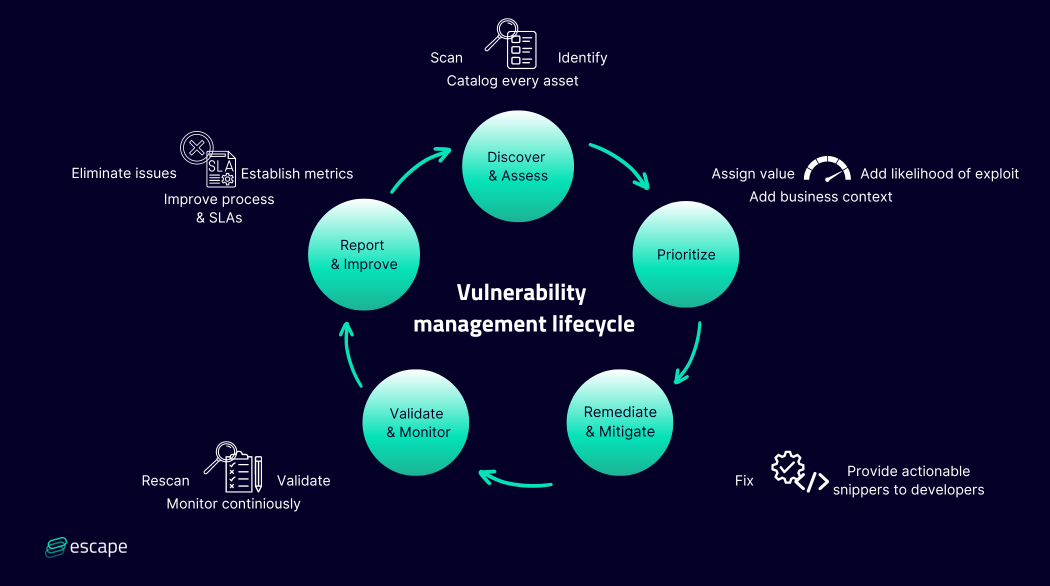
The five phases you just read about form a continuous loop:
- Discovery & Identification: Finding potential vulnerabilities. This is where automated scanning tools (like the ones that perform VAs) and manual tests happen.
- Assessment & Prioritization: Analyzing the discovered vulnerabilities to determine their severity and potential impact on the business. This is how an issue gets labeled "Critical," "High," "Medium," or "Low."
- Remediation & Mitigation: This is where you, the developer, come in. Remediation means fixing the underlying problem (e.g., writing secure code). Mitigation means applying a temporary measure to reduce risk until a permanent fix is ready.
- Verification: Confirming that the fix has actually solved the vulnerability and hasn't introduced any new problems. This often involves re-scanning the application.
- Monitoring & Improvement: Continuously watching the system for new threats and refining the process over time.
This entire cycle can be visualized clearly.
Test your understanding!
Imagine your team has just fixed a critical vulnerability flagged in a recent VA report. According to the vulnerability management lifecycle, what is the immediate next step, and why is it important?
Show answer
The immediate next step is Verification. It's crucial to verify that the fix has successfully eliminated the vulnerability and hasn't unintentionally created a new one. This is typically done by re-running the security scan or performing a targeted test to confirm the original vulnerability is no longer exploitable. Skipping this step means you are only assuming the fix worked, which can leave the application exposed.
Integrating Security into the SDLC: "Shifting Left"
Now, let's connect this process directly to your work in software development. Traditionally, security testing was often a final step performed just before an application was released. This created a bottleneck, where a long list of problems could be discovered at the last minute, causing release delays and stressful "fire drills."
The modern approach is called building a Secure Software Development Lifecycle (SSDLC). A core principle of the SSDLC is to "shift left," which simply means moving security-related activities earlier (to the left) in the development timeline.
This next video explains the concept of an SSDLC and the "shift left" mindset.
What makes a secure SDLC? | AppSec 101
This video from OpenText Application Security Unplugged discusses what makes a software development lifecycle 'secure' and the importance of integrating security from the very beginning.
Please watch the segment from 01:27 to 06:37. Focus on understanding what 'shift left' means and the examples of security activities that can be done in the early phases like planning, design, and development.
Finding and fixing a security bug during the development phase is significantly cheaper and faster than finding it in a production application.
So, what does this look like in practice for a C# and ASP.NET MVC developer? The following article breaks down how vulnerability remediation fits into each stage of the SDLC.
Vulnerability Remediation: Why It's Essential To SDLC
This article, "Vulnerability Remediation: Why It's Essential To SDLC," provides a practical walkthrough of integrating security into each phase of the development process.
Read the section "Understanding the Vulnerability Remediation Process," which covers the phases from "Planning and Requirements Gathering" through to "Deployment." As you read, think about how these activities relate to your own team's development process.
As you can see, a secure SDLC isn't about adding a single "security phase." It's about embedding security thinking and automated tools into the daily work of developers.
- During Development, this means using static analysis tools (SAST) that can scan your C# code for potential vulnerabilities right inside Visual Studio.
- During Testing, it means running dynamic analysis tools (DAST) against your running web application in a test environment to find issues like XSS.
By doing this, many vulnerabilities are caught and fixed long before they would ever show up in a formal, pre-release Vulnerability Assessment report.
Conclusion
In this lesson, we established the foundational "why" behind application security work. Let's summarize the key takeaways:
- A Vulnerability Assessment (VA) is a formal process to identify, classify, and prioritize security weaknesses in software and systems. It produces a "to-do list" for remediation.
- VA is one part of a continuous, cyclical process called Vulnerability Management, which involves discovering, prioritizing, fixing, and verifying vulnerabilities.
- The modern Secure SDLC approach involves "shifting left"—integrating security activities into every phase of development, from planning to deployment.
- This proactive approach is far more effective and efficient than treating security as an afterthought, as it helps catch issues early and reduces last-minute crises.
Now that you understand the process that identifies security risks, we are ready to start looking at the risks themselves. In the next lesson, we will introduce the OWASP Top 10, a standard awareness document for developers representing a broad consensus about the most critical security risks to web applications. This will serve as our high-level guide for the rest of the course.