Introduction
In our previous lesson, we established a crucial foundation for building reliable agentic systems: enforcing structured output from an LLM using constrained decoding. You learned how to define a JSON schema, and how, through mechanisms like Finite State Machines and Context-Free Grammars, we can guarantee that the model's output is syntactically valid. This moves us from hoping for correct JSON to ensuring it.
Now, we'll build directly on that principle to give our agent the ability to act. If an LLM can generate a structured JSON object representing data, can it generate one representing a request to do something? This is the core idea behind function calling. In this lesson, we will implement this capability from first principles. You will learn how to define tools using schemas, understand the complete request-execute-respond loop, and parse the LLM's tool-call requests to trigger actions in your application.
From Structured Data to Actionable Requests
Function calling is a specialized, high-impact application of the structured output techniques you've already learned. Instead of defining a schema for arbitrary data like a user profile, we define a schema that precisely mirrors the signature of a function in our code. The LLM's task then becomes to populate this schema with the correct arguments based on the user's query.
Think of it as creating a machine-readable API contract for the LLM. Just as an OpenAPI specification documents an HTTP endpoint for a developer, a function schema documents a Python function for a language model.
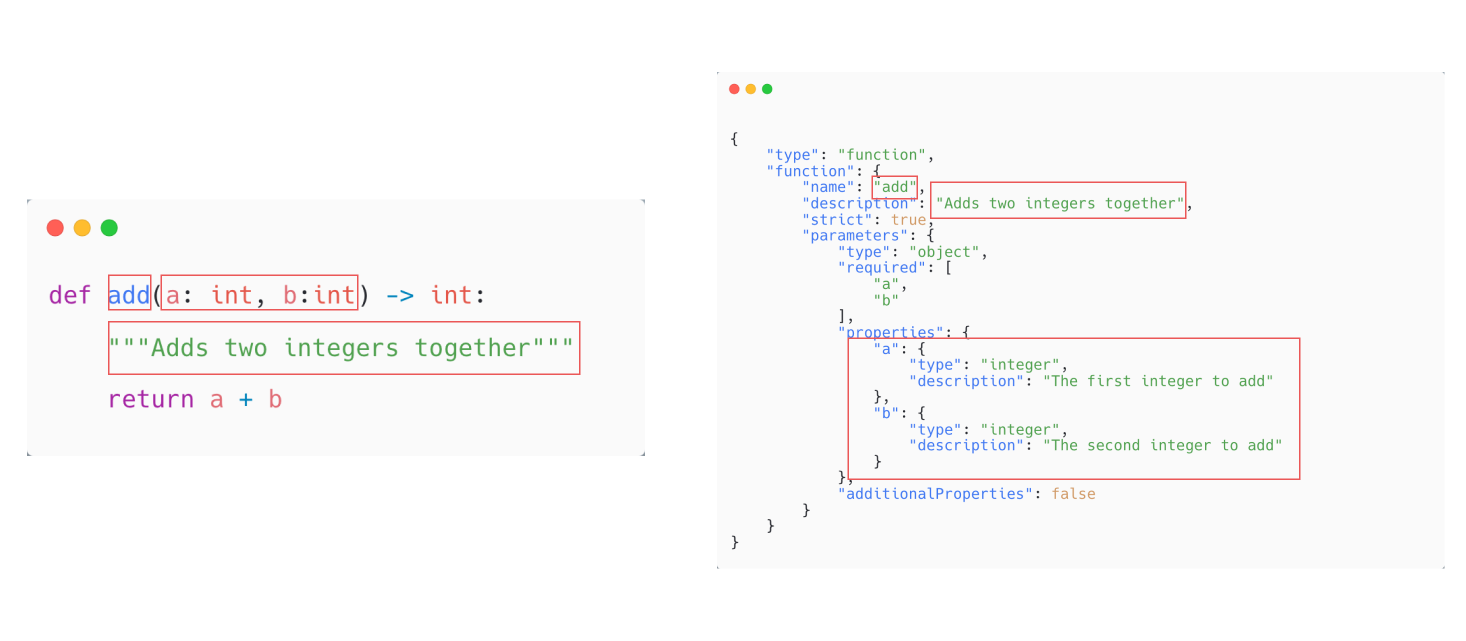
This structured request, or intent, is the bridge between the LLM's linguistic reasoning and the concrete capabilities of your external tools.
The Function Calling Loop
The interaction between a user, your application, and an LLM to execute a tool follows a well-defined, multi-step process. Your experience with event-driven architectures and request-response patterns will make this sequence intuitive.

Let's break down this flow, referencing the steps in the diagram:
- Prompt Construction (Steps 1 & 2): The user sends a query (e.g., "What's the weather in Boston?"). Your application receives this query, bundles it with the pre-defined schemas of all available tools, and sends the entire package to the LLM.
- Model Decision & Generation (Step 3): The LLM analyzes the user's intent and the tool descriptions. It decides that the
get_weatherfunction is relevant. It then generates a structured response, not as an answer, but as a request to call that function with the extracted parameters (e.g.,location="Boston"). - Parsing & Execution (Steps 4 & 5): Your application receives this structured response. It parses the tool call, identifies the function name (
get_weather), and extracts the arguments. It then executes the corresponding Python function, which might involve making an actual API call to a weather service. - Feedback Loop (Step 6): The result from the tool execution (e.g.,
{"temperature": "15C", "conditions": "Cloudy"}) is captured. Your application formats this result into a special "tool observation" message. - Final Synthesis (Steps 7 & 8): The application sends a new request to the LLM, which now includes the original query, the model's own tool call request, and the tool's observation. Armed with this new information, the LLM generates a final, natural-language response to the user (e.g., "The weather in Boston is 15°C and cloudy.").
Defining Effective Tool Schemas
The quality of the tool schemas you provide to the LLM is the single most important factor in the success of function calling. A well-designed schema makes it easy for the model to select the correct tool and provide the right arguments. A poor one leads to confusion, incorrect tool usage, or failure to use a tool when needed.
The following article provides an excellent deep dive into the components of a function schema and the best practices for designing them.
Function Calling: Structured Tool Use for Large Language Models
This article explains how to define function schemas using JSON Schema, detailing the key components and offering best practices for creating clear, effective descriptions that guide the LLM's decision-making process.
Please read the sections titled Function Schema Definition and Schema Design Best Practices. Pay close attention to the role of the description field—it's not just documentation, but a critical semantic guide for the model.
As the article highlights, designing a schema is analogous to designing a good API endpoint. Your descriptions should be imperative and specific. If there's ambiguity between two tools, use the description to explicitly state when to use one versus the other. This clarity minimizes the "cognitive load" on the model and directly improves the reliability of your agent.
The Engine Room: Grammars and Constrained Decoding
How does the LLM guarantee that its tool call output is a syntactically perfect JSON object that matches your schema? The answer lies in the constrained decoding principles we covered in the last lesson, but applied specifically to function schemas.
When you provide a tool schema, the LLM's backend infrastructure performs a critical pre-processing step: it compiles your JSON schema into a Context-Free Grammar (CFG). This grammar is a formal set of rules that describes every possible valid string conforming to your schema.
Function Calling Internals: Grammars and Constrained Sampling | Salman Quazi
This article provides a superb first-principles explanation of the pipeline that translates a JSON tool schema into a valid tool call, connecting the concepts of formal grammars and constrained decoding.
Start by reading the sections that define formal grammars (Formal Grammar) and how a schema is mechanically converted into one (Schema to Grammar). Then, study how this grammar is used during generation in the section on Constrained Decoding. Finally, see how it all fits together by reviewing The Full Pipeline.
As you've just read, the process is deterministic and robust. Once the model decides to invoke a tool, the grammar engine activates. At each step of token generation, it masks out any token that would violate the grammar, forcing the model down a path that inevitably results in a valid tool-call object. This eliminates an entire class of errors and is fundamental to building production-grade agents.
Implementation: Parsing and Dispatching Tool Calls
Now let's translate this theory into a practical Python implementation. We will build a simple agent that can use a calculator tool. The logic involves parsing the LLM's response, executing the correct function, and feeding the result back into the conversation.
The video below offers a step-by-step guide to implementing this loop. We will focus on the core mechanics of parsing the response and dispatching the call.
How to Build LLM Agents with Function Calling in Python | Step-by-Step Guide
This video from DataTalksClub walks through the Python code for a function calling loop, demonstrating how to handle the LLM's response, extract arguments, invoke the function, and format the results.
First, watch how the LLM's response indicates a tool call from this point. Then, focus on the implementation logic starting at the invocation. The presenter shows how to: Parse the arguments from a JSON string. Dynamically get the function object from its name. Invoke the function using **kwargs syntax with the parsed arguments. Format the output as a string and append it to the chat history.
While the video uses globals() for dynamic function lookup, a more robust and scalable pattern, especially for systems with many tools, is to use a Tool Registry. This is a class that encapsulates tool management, holding a mapping from tool names to their schemas and their actual Python function implementations.
Let's examine a clean implementation of this pattern.
Function Calling: Structured Tool Use for Large Language Models
This article provides a complete, from-scratch implementation of a function calling system in Python, demonstrating a robust architecture with a ToolRegistry and an FunctionCallingAgent that orchestrates the loop.
First, read the Worked Example to see a narrative walkthrough of the entire loop. Then, study the full code implementation starting from the section Code Implementation. Pay particular attention to the design of the ToolRegistry class, which separates schema management from execution, and the FunctionCallingAgent class, which manages the conversational state and control flow. This separation of concerns is a key principle for building maintainable systems.
The ToolRegistry pattern is highly extensible. You can add new tools without touching the core agent logic. The agent's run method simply retrieves schemas from the registry, passes them to the LLM, and uses the registry's execute method to dispatch calls. This modular design is precisely what's needed for the production-grade workflows you aim to build.
Another critical detail from the implementation is argument validation. While constrained decoding ensures the structure is correct, the LLM could still generate values of the wrong type if the schema is not sufficiently constrained (e.g., sending a string where a number is expected). A robust tool executor should validate argument types before execution, as demonstrated in the "Tool Agent" video.
Tool Calling Agent From Scratch | Agentic Patterns Series
This video on building a tool agent from scratch highlights the importance of argument validation.
Watch the segment from this timestamp, where the presenter explains the validate_arguments step. This ensures that the types of the arguments provided by the LLM match what the Python function expects, preventing runtime errors.
Conclusion
In this lesson, you have learned the fundamental mechanism that allows an LLM to interact with external systems: function calling. We have seen that this is not a black box, but a logical extension of the constrained decoding principles we have already covered.
Here are the key takeaways:
- Function Calling is Structured Intent: It allows an LLM to express its intent to use a tool in an unambiguous, machine-readable format.
- The Schema is the Contract: A well-designed tool schema, with clear descriptions and parameter definitions, is essential for the LLM to reliably select and use your tools.
- The Process is a Loop: The agent prompts the LLM with tool schemas, parses the resulting tool-call request, executes the tool, and feeds the observation back to the LLM to synthesize a final answer.
- Grammars Guarantee Validity: The LLM system converts your JSON tool schema into a formal grammar, which is then used to constrain the model's output, guaranteeing a syntactically valid tool call every time.
- Robust Implementation Patterns: Using a
ToolRegistryto manage tool schemas and implementations provides a clean, scalable architecture for your agent.
You are now equipped to build an agent that can do more than just talk—it can act. In our next lesson, we will extend this capability by learning how to process and dispatch multiple tool calls that the LLM may return in a single turn, enabling more complex and efficient task execution.