Introduction
In our previous lessons, we built the core components of a retrieval system, culminating in a function that can efficiently search a vector store for documents relevant to a given query. We've constructed the machinery to find knowledge, but we haven't yet used it to generate an answer. This lesson closes that loop, focusing on the "Augmented Generation" part of RAG.
Today, we will implement the crucial step of taking the document snippets returned by our retrieval function, injecting them into an LLM's context, and prompting the model to generate a final, knowledge-grounded response. We will start with a direct, from-scratch implementation and then examine how to structure these prompts for more reliable, production-grade outputs. Finally, we'll see how this entire RAG pipeline can be integrated as a powerful tool within the agentic architecture we've been developing.
The Core of RAG: Prompt Augmentation
At its heart, Retrieval-Augmented Generation is a sophisticated form of prompt engineering. Instead of just asking the LLM a question directly, we first retrieve relevant information and then present it to the LLM as context, instructing it to base its answer on the provided facts.
The process is straightforward:
- Retrieve: Use the retrieval function we built previously to get the top-k most relevant document chunks for a user's query.
- Augment: Construct a new prompt that includes both the retrieved chunks (the context) and the original user query.
- Generate: Send this augmented prompt to an LLM to produce the final answer.
The Hugging Face blog post "Code a simple RAG from scratch" provides a very clear, hands-on implementation of this process. It aligns perfectly with your preference for building from first principles and uses ollama, a tool you're already familiar with.
Code a simple RAG from scratch
This article provides a complete, minimal implementation of a RAG pipeline in Python. We will focus on the final two steps: retrieval and generation.
First, review the "Retrieval phrase" section to see how the user query is used to find relevant chunks. This should be a familiar concept from our last lesson. Next, carefully study the Python code in the section Generation phrase. This is the core of today's lesson. Notice how the retrieved_knowledge is formatted and inserted into the instruction_prompt. The final step shows how this augmented prompt is passed to the LLM using ollama.chat. Pay close attention to the use of a system prompt to guide the model's behavior.
The code you just examined demonstrates the fundamental pattern of RAG. A prompt template is populated with the retrieved context and the user's original query. A simple Python f-string is often all you need:
# Assuming 'retrieved_chunks' is a list of strings from your retrieval function
context_str = "\n- ".join(retrieved_chunks)

prompt = f"""
Use the following context to answer the question. If you don't know the answer, say you don't know.
Context:
- {context_str}

Question: {user_query}
Answer:
"""
This augmented prompt is then sent to the LLM. The crucial instruction is to ground the answer in the provided Context, which effectively mitigates hallucinations and allows the model to answer questions about data it was not trained on.
Advanced Prompting for RAG
While the basic pattern is effective, production systems often require more sophisticated prompt engineering to ensure the LLM's output is reliable, correctly formatted, and adheres to business rules. Simply providing context isn't always enough; we need to guide the model's reasoning and output style.
The article "The Complete Guide to Implementing RAG Locally" provides an excellent example of a more advanced prompt structure within its Create_prompt class.
The Complete Guide to Implementing RAG Locally
This article demonstrates a more robust RAG implementation. We will focus on its approach to prompt construction.
Please read the section Step 5: Augmentation. Analyze the base_prompt defined in the __init__ method of the Create_prompt class. Note how it goes beyond a simple instruction by including: A "chain-of-thought" style suggestion: "Give yourself room to think by extracting relevant passages..." A negative constraint: "Don't return the thinking, only return the answer." Multiple few-shot examples (Example 1, Example 2, etc.) that demonstrate the desired answer style and level of detail.
This advanced prompt template acts as a much stronger "guardrail" for the LLM. The few-shot examples are particularly powerful; they show the model exactly what a good answer looks like, making it more likely to produce output that matches your desired format without extensive post-processing. As a system architect, designing robust prompt templates like this is a key lever for controlling system behavior and reliability.
RAG as an Agentic Tool
So far, we have viewed RAG as a linear pipeline: query -> retrieve -> augment -> generate. This is the "Standard RAG" model. However, in the context of the agentic systems we are building, this entire pipeline can be encapsulated and exposed as a tool that an agent can choose to use. This elevates RAG from a simple chain to a dynamic capability within a reasoning loop.
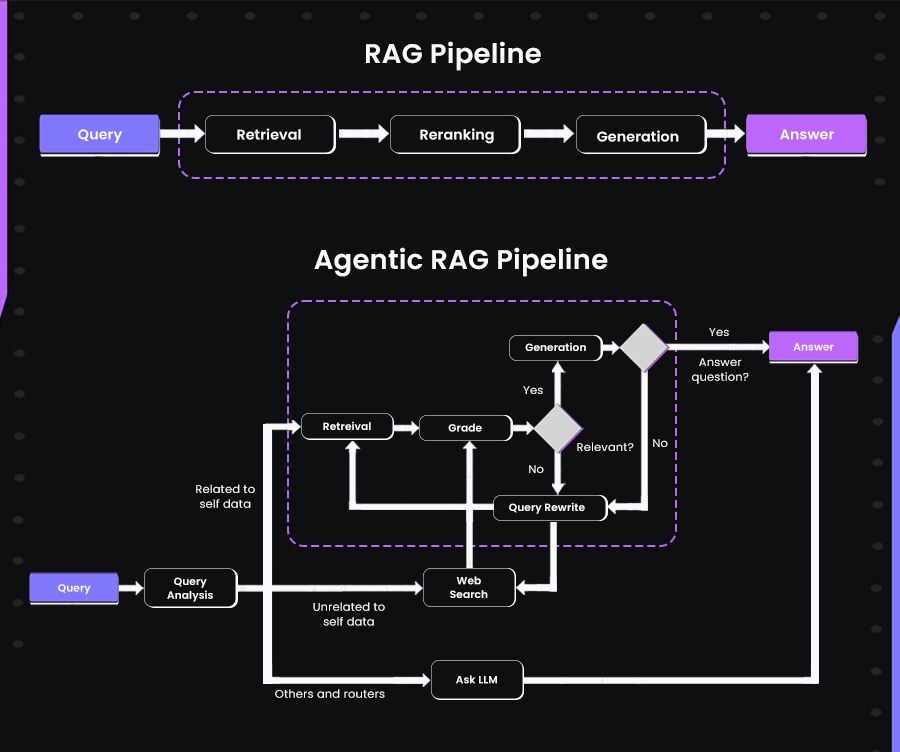
The video "Build a RAG Agent from Scratch" provides an excellent walkthrough of building this agentic RAG system without relying on frameworks. It demonstrates how to wrap the RAG functionality into a tool that an agent can call.
Build a RAG Agent from Scratch (No LangChain, No Framework)
This video shows how to build a RAG agent from scratch, focusing on the agent loop and tool definition.
First, watch the section on defining agent tools. Pay close attention to how the search_knowledge_base function is described in a JSON schema. The detailed description is critical for the agent to understand when and how to use this tool. This connects back to our earlier lessons on function calling. Next, watch the implementation of the RAG agent itself. The run_rag_agent function orchestrates the entire process. Notice the for loop for iterations and the logic that handles tool_use. The agent doesn't just execute RAG once; it thinks, decides to call the tool, observes the results, and then decides if it has enough information to formulate the final answer.
This agentic approach unlocks a more powerful and flexible system. The agent is no longer blindly following a static RAG pipeline. Instead, it can:
- Decide if a search is needed at all. For a simple question like "Hello, how are you?", the agent can choose not to invoke the RAG tool.
- Iterate and re-plan. If the initial search results are poor, the agent could decide to rephrase the query and call the
search_knowledge_basetool again. - Synthesize from multiple sources. The agent can call the tool multiple times with different queries and then synthesize a final answer from all the retrieved context.
- Cite its sources. As shown in the video, the system prompt explicitly instructs the agent to cite the documents it used, which is crucial for building trust and allowing for verification. The tool's metadata (like document source) provides the necessary information for this.
By wrapping RAG in a tool, you transform it from a fixed data processing chain into a dynamic capability that a reasoning engine can deploy intelligently.
Conclusion
In this lesson, we completed the Retrieval-Augmented Generation loop. You have now implemented the full end-to-end process of grounding an LLM's response in an external knowledge base.
Here are the key takeaways:
- Augmentation is Prompt Engineering: The core of RAG's "generation" step is constructing a prompt that provides the LLM with retrieved context and clear instructions to use it.
- Prompt Structure Matters: While a simple f-string can work, production-grade systems benefit from advanced prompt templates that include few-shot examples, negative constraints, and formatting guides to improve output reliability.
- RAG is a Foundational Agentic Tool: In a sophisticated agent, the RAG pipeline is not a static workflow but a dynamic tool. The agent's reasoning loop decides when to search for knowledge, what to search for, and how to use the results to fulfill a user's request.
We have assumed throughout this module that our retrieval function returns high-quality, relevant documents. But what if it doesn't? In our next and final lesson for this module, we will address this critical question by implementing a relevance evaluation step, allowing our agent to assess the quality of retrieved documents and decide whether to use them in its final response.