Introduction
In our last lesson, we built the final guardrails for our agent, implementing configurable stopping conditions to prevent infinite loops and ensure predictable termination. Our agent's core engine is now robust: it can observe, think, act, handle errors, and stop. However, from a user's perspective, it's still a "black box." A request goes in, and after a potentially long wait, a final answer comes out. This is insufficient for production systems where both user experience and developer observability are paramount.
This lesson completes our work on the core engine by transforming it into a "glass box." We will integrate real-time streaming for the agent's complete execution trace. You will learn to design and implement an event-driven streaming architecture that broadcasts not only the LLM's token-by-token thoughts but also the initiation and results of every tool it uses. Given your background in event-driven architectures and async programming, we will construct this from first principles using async generators and Server-Sent Events (SSE), providing a transparent, real-time window into the agent's work.
The Need for a Real-Time Execution Trace
An agent performing a multi-step task might take anywhere from a few seconds to several minutes. Leaving the user staring at a loading spinner during this time creates a poor experience and erodes trust. By streaming the agent's internal monologue and actions, we can:
- Enhance User Experience: The user sees progress, understands what the agent is doing, and perceives the system as faster and more interactive.
- Enable Rich UI: A frontend can listen to these events and build a dynamic, step-by-step visualization of the agent's process, much like a live log.
- Simplify Debugging: Developers can observe the agent's reasoning and tool interactions in real-time, making it drastically easier to diagnose errors or unexpected behavior.
We will model the agent's execution as a stream of discrete, typed events. This is a classic event-driven systems pattern applied to the domain of agentic workflows.
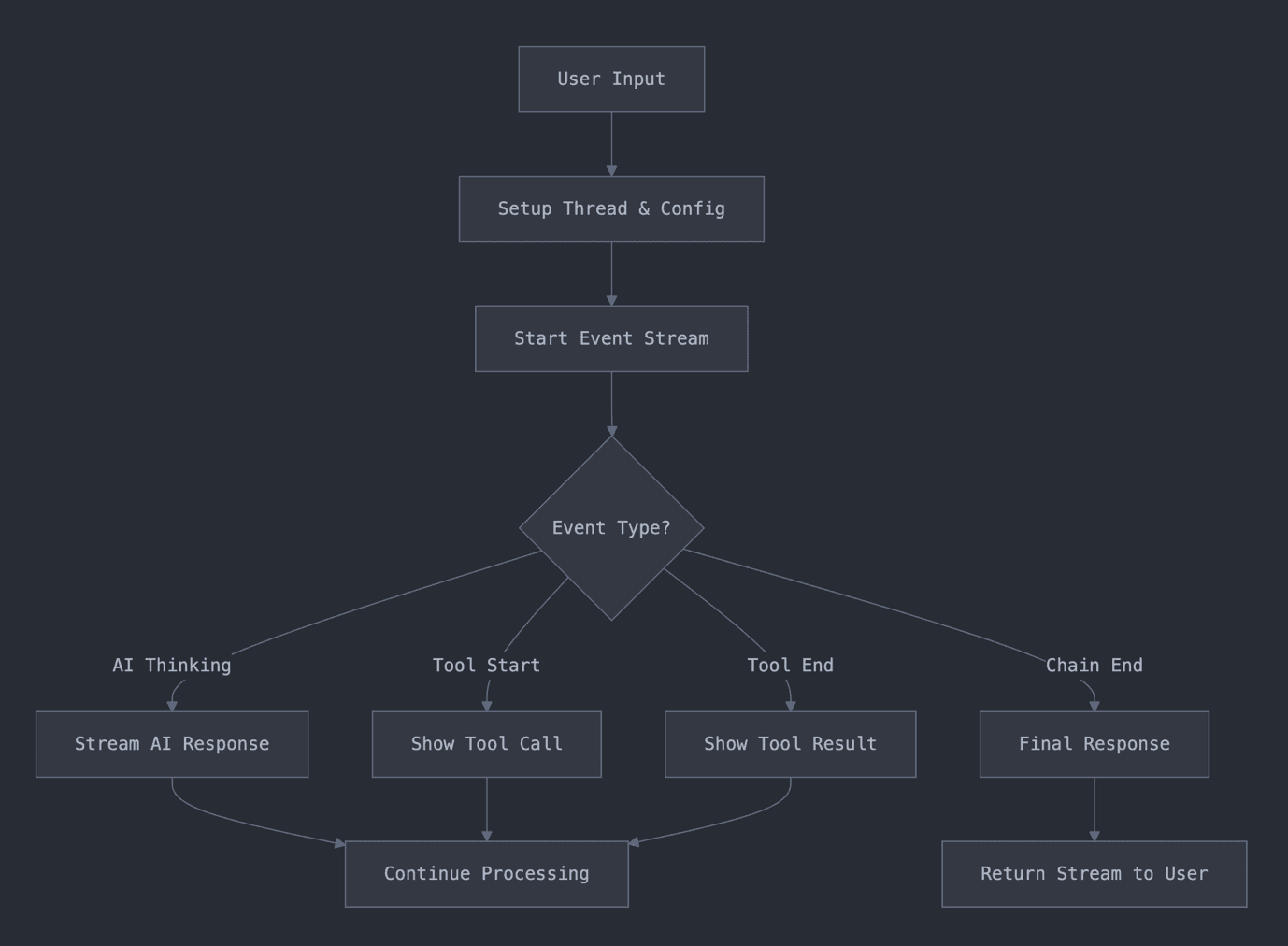
This flowchart shows the process we'll be implementing. User input triggers a process that generates a stream of events. We'll handle different event types—like AI thinking, tool start, and tool end—to provide a continuous, real-time feed back to the user.
Designing the Streaming Protocol and Transport
To stream a complex process, we need a well-defined protocol. Each step of the agent's loop—a thought, a tool call, a tool result—will be a specific event type in our stream.
A robust pattern for this is the Start → Data → End lifecycle for each distinct operation. For example, streaming an LLM's thought process would involve:
- A
THOUGHT_STARTevent. - A series of
THOUGHT_DATAevents, each containing a token or chunk of text. - A
THOUGHT_ENDevent.
This structure allows a user interface to prepare for content, render it incrementally, and then finalize the display.
This article from DataDrivenInvestor introduces the AG-UI protocol, which formalizes this event-driven streaming concept. It provides an excellent foundation for the system we're about to build.
Read the introductory sections, "What is AG-UI?" and "The Event Lifecycle Pattern". This will ground you in the core concepts of granular events and the Start → Data → End lifecycle.
Now, how do we transport these events? While WebSockets offer bidirectional communication, our use case is primarily one-directional: the server streams data to the client. This makes Server-Sent Events (SSE) an ideal choice due to its simplicity and reliance on standard HTTP.
The same article explains the rationale for choosing SSE.
Please read the section Why SSE? to understand the advantages of this technology for our purpose.
Implementing the Stream with Async Generators
The most natural way to implement an SSE stream in Python is with an async generator. Your agent's main execution method will no longer be a standard async def function that returns a final result. Instead, it will become an async generator that yields each event as it occurs. This is a perfect fit for your async programming expertise.
The yield keyword pauses the function, sends a piece of data to the caller, and waits for the caller to request the next piece, all without blocking the event loop.
Demystifying Python's Async and Await Keywords
As a refresher on the mechanics, this JetBrains video on Python's async features has a great segment explaining how generators work, which provides the conceptual basis for an async stream.
Watch the segment from generators and yield. The key takeaway is how yield breaks a long-running computation into discrete, pausable chunks—this is exactly what we will do with our agent's execution loop.
A web framework like FastAPI can then take this async generator and stream its yielded values directly to the client as an HTTP response.
This article provides a complete, practical guide to wiring this up.
Read the sections titled "Part 2: FastAPI StreamingResponse Integration". Pay close attention to the async def stream_events() example, which shows the yield pattern, and the @app.post("/api/v1/chat") endpoint, which shows how to use FastAPI's StreamingResponse. Note the crucial X-Accel-Buffering: no header, which is a common stumbling block in production deployments behind a reverse proxy like Nginx.
The Core Challenge: Streaming Tool Calls
While streaming simple text is straightforward, the ReAct pattern introduces a significant complexity. When we set stream=True in an API call to a modern LLM, the response for a tool call is not a single, clean JSON object. Instead, the details of the tool call (its ID, name, and arguments) are themselves streamed in chunks. Your code must be able to parse these delta chunks and correctly reassemble one or more complete tool calls.
This is a non-trivial engineering problem and is often poorly documented. Getting this right is a hallmark of a production-grade implementation.
Has anyone managed to get a tool_call working when stream=True? - API - OpenAI Developer Community
This OpenAI developer community thread is a fantastic real-world resource. It contains a collection of solutions discovered by engineers tackling this exact problem. This is a look "under the hood" at how to solve this from first principles.
You don't need to read the entire thread, but focus on the code snippets provided by the users. First, review the initial successful snippet. This shows the basic logic of iterating through chunks, checking for delta.tool_calls, and appending partial data to a list of tool_calls. Next, examine the more robust implementation using defaultdict. This is a cleaner pattern for accumulating the argument strings, which are often broken across many chunks. Finally, look at the dictionary-based approach. This demonstrates reconstructing the full message structure that the OpenAI API expects when you send tool results back. The key insight from these examples is that you must initialize a data structure (like a list of dictionaries) and progressively populate it as you process each chunk from the stream. The index property on the tool call chunk tells you which tool you're building.
Integrating Streaming into the Agent Loop
Now, let's bring these concepts together into our agent's main execution loop. The run method of your agent class will be refactored into an async generator.
Here's a conceptual model of the new run method:
from typing import AsyncGenerator, Dict, Any

# ... inside your Agent class ...

async def run(self, user_input: str) -> AsyncGenerator[Dict[str, Any], None]:
    # 1. Initialize state, message history, etc.
    # ...

    # 2. Start the main execution loop (e.g., while not done and within iteration limits)
    while not self.is_done:
        # 3. YIELD a "thinking" event
        yield {"event": "thought_start"}

        # 4. Call the LLM with stream=True and begin re-assembly
        tool_calls_to_execute = []
        full_thought = ""

        # This is the tricky part from the OpenAI forum resource
        async for chunk in await llm.chat.completions.create(..., stream=True):
            # Process delta, re-assemble tool_calls and thought string
            # For each token in the thought, YIELD a "thought_chunk" event
            if thought_token := get_thought_token(chunk):
                full_thought += thought_token
                yield {"event": "thought_chunk", "token": thought_token}

            # Accumulate tool call data
            accumulate_tool_calls(chunk, tool_calls_to_execute)

        yield {"event": "thought_end", "thought": full_thought}

        # 5. If tool calls were generated, execute them
        if tool_calls_to_execute:
            for tool_call in tool_calls_to_execute:
                # 6. YIELD a "tool_start" event
                yield {"event": "tool_start", "name": tool_call['function']['name'], "args": tool_call['function']['arguments']}

                # Execute the tool
                result = self.execute_tool(tool_call)

                # 7. YIELD a "tool_end" event with the result
                yield {"event": "tool_end", "result": result}

                # Add the tool result to message history for the next loop iteration
                self.add_observation(tool_call['id'], result)

        # Check stopping conditions, etc.
        # ...

    # 8. YIELD the final answer
    yield {"event": "final_answer", "content": self.get_final_answer()}
The video demonstration below, while using simple print statements, visually represents the execution trace we are now building as a structured stream of events.
ReAct Agent From Scratch | Agentic Patterns Series
This video on building a ReAct agent from scratch concludes with a demonstration of the final, automated agent.
Watch the final run from this timestamp. Notice the colored output showing the sequence of "Thought", "Tool Call", and "Observation". Our streaming implementation is a production-grade, event-driven version of this exact trace.
From User Experience to System Observability
This real-time event stream is more than just a UX enhancement. It's the foundational data source for true system observability. In a complex, distributed agent system, these events can be ingested by an observability platform to generate traces.
Each event we yield—thought_start, tool_start, tool_end—can be mapped to a "span" in a distributed trace. This allows you to visualize the entire workflow, measure latency for each step, and diagnose bottlenecks across service boundaries.

This diagram illustrates how context propagation allows for the creation of a single, unified trace across multiple services. The event stream we've designed is the raw data needed to build such traces for our agent, where each step of the agent's loop becomes a span in the overall trace.
By building a structured event stream, you are not only creating a better user interface but also laying the groundwork for the robust monitoring and debugging required for production systems, a topic we will explore in-depth in Module 11.
Conclusion
This lesson concludes our deep dive into the core agent engine. By integrating a real-time event stream, we've made our agent's operations transparent, responsive, and observable. This is a critical step in moving from a functional prototype to a production-ready system.
Your key takeaways from this lesson are:
- Real-time tracing is crucial: It dramatically improves both user experience and developer observability.
- Structure the stream with an event protocol: A consistent event schema (e.g.,
event_type,data) and lifecycle patterns (Start/Data/End) make the stream easy to consume. - Use the right tools for the job: Server-Sent Events (SSE) and
async generatorsin Python provide an elegant and efficient way to implement server-to-client streaming. - Streaming tool calls requires careful parsing: You must be prepared to reassemble tool call objects from a stream of partial chunks, a key piece of low-level engineering.
- Event streams are the foundation of observability: The same events that power a real-time UI can be used to generate detailed performance traces for monitoring and debugging.
With a complete, observable, and robust agent loop now built, we are ready to move beyond the core mechanics. In the next module, "Advanced Reasoning and Planning," we will shift our focus to making the agent smarter. You will learn to implement techniques like Chain-of-Thought and plan-then-execute patterns, enabling your agent to tackle more complex, multi-step problems with greater intelligence and foresight.