Introduction
In our previous lesson, we established a rigorous versioning strategy for every component of an AI agent—its logic, prompts, model, and tools. This allows us to package an agent's "intelligence" into a deterministic, deployable artifact. We now have a reliable unit of work, but the question remains: what is the factory that runs these units at scale? A single script on a server won't suffice for a production system that needs to be reliable, scalable, and observable.
This brings us to the core of our capstone module. In this lesson, we will synthesize concepts from across this course to design the end-to-end architecture for a scalable, asynchronous agent system using a message queue for task ingestion. This is a system design challenge, and your background in distributed systems and event-driven architectures will be central to our discussion. We will move beyond the agent loop itself and architect the surrounding infrastructure that allows a fleet of agents to operate as a cohesive, production-grade service.
From Monolithic Agent to an Agentic Microservices Ecosystem
Many agent tutorials culminate in a single, monolithic script that runs an observe-think-act loop. While excellent for learning, this model has the same limitations as any monolithic application: it's a single point of failure, difficult to scale horizontally, and tightly couples task reception with execution. If the script crashes, all in-progress tasks are lost. If you want to process ten tasks concurrently, you might run ten processes, but this approach lacks coordination, load balancing, and resilience.
The solution, common in modern distributed systems, is to break the monolith into a set of cooperating microservices that communicate asynchronously. An agentic system is no different. Each component—task ingestion, planning, tool execution, result aggregation—can be a specialized service.
Why build Event-Driven AI systems?
To frame this transition, the video "Why build Event-Driven AI systems?" by Confluent Developer makes a compelling case for treating AI agents as microservices from the outset.
Please watch the initial segment that discusses the challenges of a monolithic agent system, using the "Badflix" example from the beginning. As you watch, note the parallels between the dependencies described (planner, SQL handler, alert system) and the components of our own agent systems (reasoning engine, tools, state).
The video clearly illustrates that as functionality grows, the monolithic approach leads to deployment dependencies and resource contention. The path forward is decoupling, and the most robust way to achieve that is through an event-driven architecture.
The Architectural Blueprint: An Event-Driven Agent Service
An event-driven architecture decouples components by having them communicate through messages (events) placed on a central bus, rather than calling each other directly. This makes the system resilient, as services can fail and recover independently, and scalable, as you can add more instances of any service to handle increased load.
For our agent system, the central bus will be a message queue like RabbitMQ or a data streaming platform like Kafka. Task requests will be events that trigger our agent workflows.
Let's lay out the high-level architectural components.
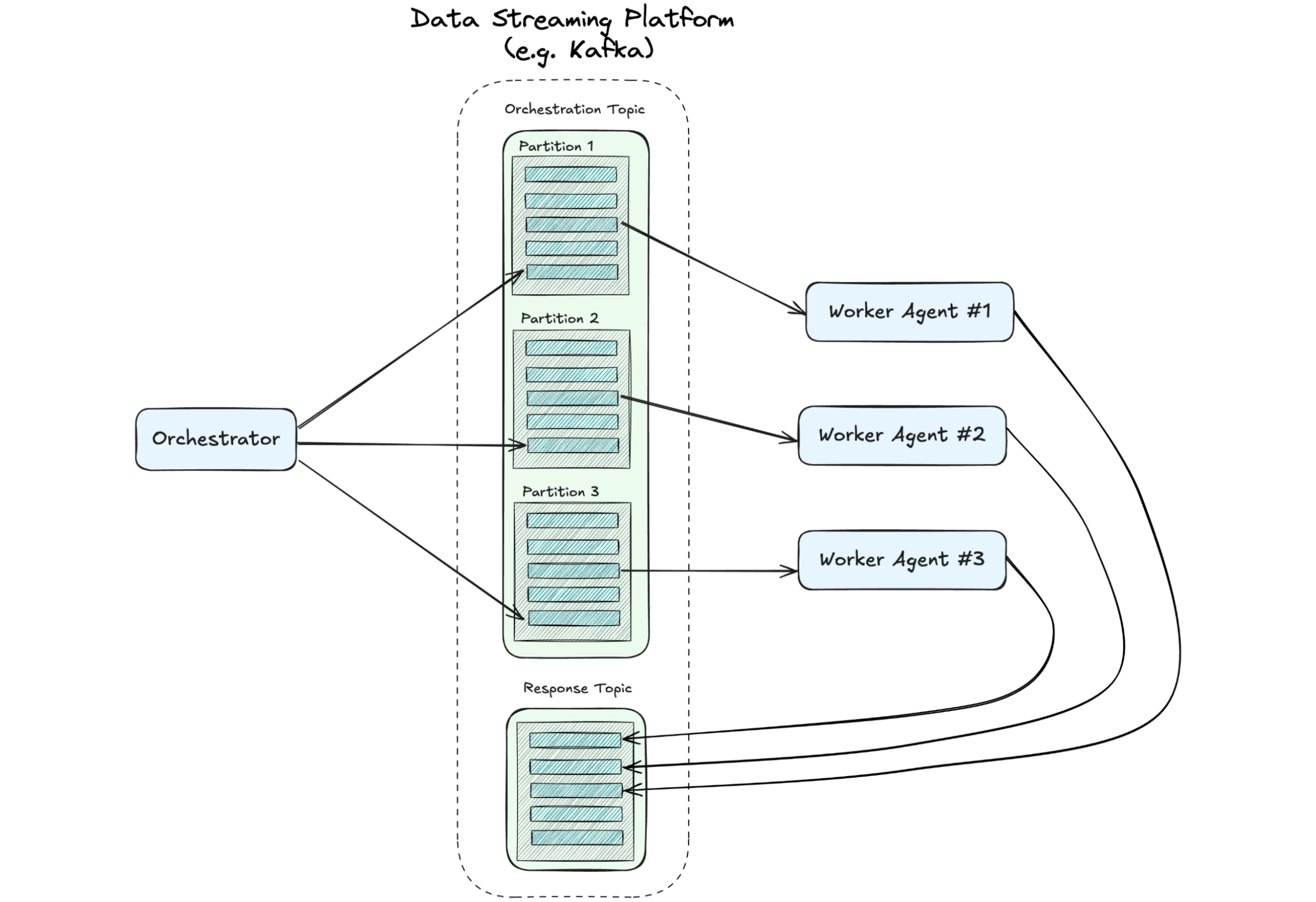
This simple diagram captures the essence of our design. Now let's flesh it out with the specific services required for a production-grade system.
Orchestrating AI Agents in Production: The Patterns That Actually Work
The article "Orchestrating AI Agents in Production" provides an excellent reference blueprint for an enterprise-friendly system. This model clearly separates concerns and aligns with established distributed system design principles.
Please study the ASCII diagram under the heading "Reference Blueprint." We will use this as the foundation for our design discussion.
Drawing from that blueprint and our previous lessons, we can define the key components of our architecture:
-
API Gateway: The public-facing entry point for all incoming tasks. It handles authentication, request validation, and rate limiting. Its primary job is to accept a task request and transform it into a canonical
task.receivedevent. -
Task Ingestion Queue: The message queue (e.g., a Kafka topic or RabbitMQ queue) where the API Gateway publishes
task.receivedevents. This queue acts as a durable buffer, ensuring that no tasks are lost even if the downstream processing services are temporarily unavailable. -
Orchestrator Service: This is the "control plane" of our system. It's a consumer that reads from the Task Ingestion Queue. Its responsibilities are:
- Routing: Determining which agent (and which version) should handle the task.
- Context Assembly: Loading the appropriate versioned prompt (PPV), tool schemas (TAV), and workflow logic (ALV) from our
agent-library(as designed in the previous lesson). - State Initialization: Creating an initial state record for the task in a durable state store.
- Dispatching: Publishing a
task.ready_for_executionevent, containing the full agent context, to a dedicated worker queue.
-
Agent Worker Pool & Worker Queue: This is the "data plane." The pool consists of one or more identical, stateless worker services. They consume from the worker queue. Each worker is essentially a barebones execution engine for the agent loop (
observe-think-act,ReAct, etc.). It receives a task, executes the agent logic defined in the event payload, interacts with the state store and tools, and ultimately brings the task to completion. Because the workers are stateless, we can easily scale them horizontally to handle more concurrent tasks. -
State Store: A persistent database (like Redis, PostgreSQL, or DynamoDB) where the agent's working memory, intermediate results, and checkpoints are stored (as we discussed in Module 4). This allows tasks to be long-running and resumable.
-
Tool Execution Service(s): Secure, sandboxed services responsible for executing tool calls. An Agent Worker doesn't run tool code directly; it sends a request to the appropriate tool service. This isolates risky operations (like code execution or external API calls) and manages credentials securely.
-
Observability Stack: A suite of tools for logging, tracing, and metrics. Every event flowing through the system should carry a
correlation_idto enable end-to-end tracing of a task's lifecycle. Structured logs are sent to a centralized logging system (e.g., ELK Stack), and metrics are sent to a monitoring system (e.g., Prometheus/Grafana), as designed in Module 11.

The Lifecycle of an Asynchronous Task
To solidify our understanding, let's trace a request through the system:
- A user sends a
POST /tasksrequest to the API Gateway. The payload is{"prompt": "Summarize today's financial news.", "agent_id": "news-summarizer:v1.2.0"}. - The Gateway validates the request and publishes an event to the
task_ingestionKafka topic. The event payload includes the user's prompt, the requested agent composite version, and a newly generatedcorrelation_id. - The Orchestrator Service consumes the event. It parses the agent version, queries the
agent-library(our Git repo) to fetchnews-summarizer:ALV-1.2_PPV-1.0_..., and creates a new task record in the State Store withstatus: PENDING. - The Orchestrator then publishes a new event to the
agent_worker_queuewith a payload containing thecorrelation_id, a pointer to the state record, the system prompt, and the available tool schemas. - An available Agent Worker consumes the task. It loads the context into memory and begins the
observe-think-actloop. - The agent decides to use the
search_newstool. The worker sends a secure request to the Tool Execution Service for search. All logs generated by the worker and tool service are tagged with thecorrelation_id. - The worker receives the tool output, updates the task's state in the State Store (e.g., adding the tool results to the message history), and continues the loop.
- After a few turns, the agent generates the final summary. The worker performs a final write to the State Store, updating the status to
COMPLETEDand storing the final answer. - Finally, the worker publishes a
task.completedevent to aresultstopic. A notification service might be listening to this topic to inform the original user that their task is done.
Event-Driven Patterns and Implementation
This architecture is powerful because it allows us to leverage established event-driven patterns. Your experience with message queues will be directly applicable here.
Event-Driven AI Agents: Patterns That Scale - DEV Community
This article provides runnable Python code and clear explanations for the core patterns in an event-driven agent system. It's a practical guide to implementing the architecture we've been discussing.
First, read Pattern 1: Event Queue with Worker Agents. This is the fundamental pattern of our design, and the Redis Streams example provides a concrete implementation. Next, read the section on "Production Hardening." This covers critical reliability concepts like retries with exponential backoff, dead-letter queues (DLQs) for failed tasks, and structured logging with correlation IDs. Finally, review the table under "Choosing the Right Pattern," which provides a concise summary of when to apply different patterns.
For a concrete implementation of a task queue system in Python, the Celery framework is a mature and widely used choice. It works with brokers like RabbitMQ and can use Redis as a results backend, fitting our architecture perfectly.
Professional Task Queues in Python with Celery, RabbitMQ & Redis
The video "Professional Task Queues in Python with Celery, RabbitMQ & Redis" gives a fantastic practical overview of setting up a distributed task queue system.
To understand the components, watch the theoretical introduction from the beginning. This explains the roles of the client, worker, broker (RabbitMQ), and results backend (Redis). Then, skim the section on the Docker Compose setup here to see how these services are containerized and networked. Finally, watch the simple worker/client example here. This demonstrates the core mechanic of submitting a task asynchronously (.delay()) and polling for its result, which is exactly how our Orchestrator would dispatch tasks to Agent Workers.
The Celery example shows how the Orchestrator (the client in the video) can offload a task to an Agent Worker (the Celery worker) via a message broker. The worker runs the task (e.g., an LLM call) in the background, and the result is stored in the backend for later retrieval. This pattern is the engine of our scalable system.
Conclusion
In this lesson, we designed a complete, production-grade architecture for running agentic workflows. We moved from a simple script to a robust, distributed system by applying established principles of event-driven architecture and microservices.
Key Takeaways:
- Treat Agents as Microservices: To achieve scalability and reliability, agent systems should be decoupled into specialized services that communicate asynchronously.
- Message Queues are the Backbone: A message queue like Kafka or RabbitMQ serves as the central nervous system, providing a durable and scalable communication layer for task ingestion and dispatching.
- Separate Control and Data Planes: The Orchestrator acts as the "control plane," handling task routing and context assembly. The Agent Workers are the stateless "data plane," responsible for pure execution. This separation is key to scalability and maintainability.
- The System is Event-Driven: The entire workflow, from task reception to completion, is a sequence of events. This enables resilience, real-time observability via correlation IDs, and the ability to plug in new services that react to system events.
Preview of the Next Lesson:
We have now designed the internal engine of our agent service. The next logical step is to define how external clients will interact with it. In our next lesson, we will design the API interfaces (e.g., request-response, streaming, webhook) for exposing our agent's capabilities to the outside world. We'll consider different interaction patterns and design the API contracts that will make our powerful agentic system usable.