Introduction
In our previous lesson, we transformed our static workflow graphs into dynamic state machines by implementing conditional routing. You learned how to direct the flow of execution down a single, chosen path based on LLM decisions or business rules. This gave our agents the ability to adapt. Now, we will take the next logical step: instead of choosing one path, we will learn to execute multiple paths simultaneously.
This lesson introduces the fan-out/fan-in pattern, a cornerstone of high-performance system design, and applies it to agentic workflows. "Fan-out" refers to the process of splitting a task into multiple, independent subtasks that can be run concurrently. "Fan-in" is the subsequent process of collecting and aggregating the results from these parallel tasks. By mastering this pattern, you will be able to build agents that are not just intelligent, but also highly efficient, capable of tackling complex problems by dividing and conquering them. Given your background in asynchronous programming and distributed systems, the underlying concepts of concurrency will be familiar, and we will build upon them from first principles using Python's asyncio library.
Part 1: The Fan-Out/Fan-In Pattern
At its core, the fan-out/fan-in pattern is an application of parallelism to improve throughput and reduce latency. Instead of executing a series of long-running tasks one after another, we identify those that are independent and run them at the same time.
Imagine an agent tasked with writing a market analysis report. A sequential approach might look like this:
- Research competitor A's pricing.
- Research competitor B's pricing.
- Analyze recent market trends.
- Synthesize all findings into a report.
Steps 1, 2, and 3 are independent. There is no reason to wait for the research on competitor A to finish before starting the research on competitor B. The fan-out/fan-in pattern optimizes this:
- Fan-Out: The main task ("create market analysis") is split into three parallel subtasks:
research(A),research(B), andanalyze_trends(). These are all initiated concurrently. - Execution: The system executes these three subtasks in parallel. The total time taken is determined by the longest subtask, not the sum of all three.
- Fan-In: The system waits for all three subtasks to complete. Their individual results are then collected and passed to a final
synthesize()step.
This is a fundamental pattern for improving efficiency. Let's look at a "from scratch" implementation to understand the mechanics.
Agentic workflows from scratch with (and without) LangGraph
This article by Dylan Castillo provides a clear, framework-free implementation of a parallel workflow. We will focus on the "Vanilla" Python version, as it perfectly aligns with our first-principles approach.
Start by reading the brief introduction to the Parallelization pattern. The flowchart visually captures the essence of fan-out/fan-in. Next, study the Vanilla (+LangChain) section carefully. Focus on these key elements in the code: The run_workflow function is the orchestrator. The line evaluation_tasks = [evaluate_text(state) for _ in range(3)] is the fan-out step. It creates a list of awaitable coroutine objects, but does not run them yet. The line state.evaluations = await asyncio.gather(*evaluation_tasks) is the fan-in and execution step. asyncio.gather takes the list of tasks, schedules them on the event loop to run concurrently, and waits until all of them have completed, collecting their results into a list. The aggregate_results function is the final synthesis step.
The use of asyncio.gather is the key mechanical piece for implementing this pattern for I/O-bound tasks like LLM calls. Your experience with async programming makes this a natural fit.
Part 2: Dynamic Parallelism with the Orchestrator-Worker Model
The previous example demonstrated static parallelism, where the number of parallel tasks (three evaluations) was hardcoded. A more powerful and flexible approach is dynamic parallelism, where the subtasks themselves are determined at runtime. This is known as the Orchestrator-Worker pattern.
This pattern consists of three main stages:
- Orchestrator: A central LLM call that analyzes a complex request and decomposes it into a structured list of smaller, independent subtasks. This is a planning step.
- Workers (Fan-Out): A set of functions or agents that execute the subtasks generated by the orchestrator in parallel. Each worker focuses on one specific piece of the problem.
- Synthesizer (Fan-In): A final LLM call that receives the collected results from all workers and synthesizes them into a single, coherent final response.
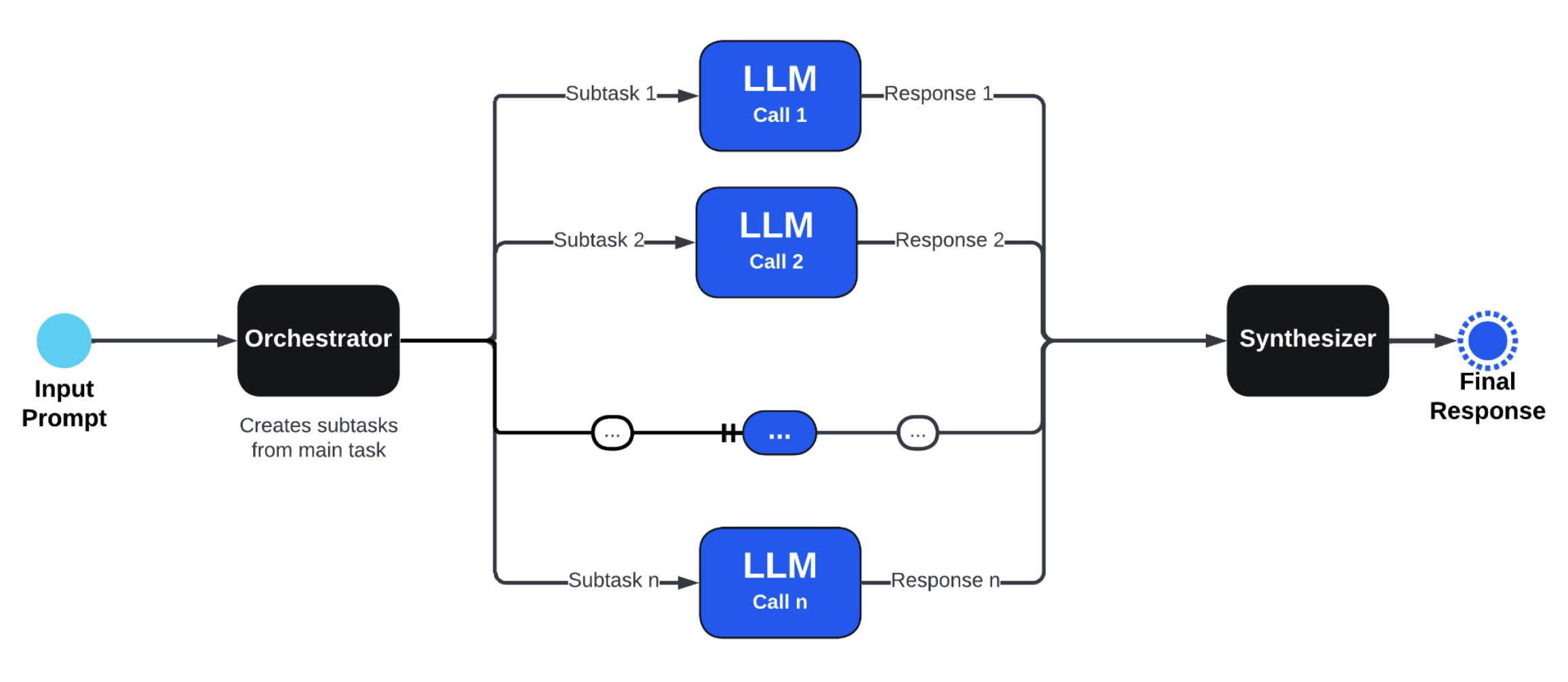
This pattern directly leverages our work from Module 1 on multi-tool calling. The orchestrator's output is essentially a list of tool calls to be executed. Instead of executing them sequentially, we execute them in parallel.
Stop Building AI Agents. Use These 5 Patterns Instead.
This article from "Decoding AI" provides an excellent conceptual overview and a code skeleton for the Orchestrator-Worker pattern.
Read the section Dynamic Task Decomposition. It clearly explains how this pattern differs from simple routing and static parallelization. The analogy to MapReduce from data engineering is particularly apt. Then, examine the Python code example in the following section. Although it uses ThreadPoolExecutor (which we'll discuss later), the logic is what's important: The orchestrator function (a mocked LLM call) generates a list of tool_calls. This is the dynamic decomposition step. The main orchestrator_worker_workflow function takes this list and uses an executor to map each tool_call to a worker function. This is the fan-out. The list(executor.map(...)) call implicitly waits for all workers to finish and collects their results. This is the fan-in.
Part 3: A Deeper Dive into asyncio for Parallel Execution
To implement this robustly from scratch, a solid grasp of the asyncio tools is essential. Your background provides the foundation; this video will serve as a detailed technical guide for the specific mechanisms we'll use.
Python Tutorial: AsyncIO - Complete Guide to Asynchronous Programming with Animations
This comprehensive guide to asyncio by Corey Schafer provides animated, step-by-step explanations of how concurrency works. We'll focus on the core mechanisms for creating and managing parallel tasks.
First, watch the segment on creating tasks from tasks. The key concept is that asyncio.create_task() schedules a coroutine to run on the event loop without immediately blocking. This is how you prepare multiple operations to run concurrently. Next, watch the animation that shows the correct way to achieve concurrency from see this in an animation. This visualizes how scheduling multiple tasks first, and then awaiting them, allows the event loop to switch between them during I/O waits, achieving true parallelism. Finally, focus on the section explaining asyncio.gather from other ways that we can schedule and await tasks. This is the primary tool for our fan-in step. It simplifies the process of running a collection of awaitables concurrently and collecting their results. Pay attention to the distinction made between gather and TaskGroup, especially regarding error handling.
With these asyncio primitives, we have all the components to build a dynamic, parallel workflow orchestrator. The orchestrator LLM call returns a list of sub-prompts, we wrap each sub-prompt's execution in a coroutine, and then we use asyncio.gather to execute them all and collect the results for the synthesizer.
Part 4: Production-Grade Parallelism
Building for production requires moving beyond basic patterns and considering real-world constraints like resource limits and diverse task types. Your systems engineering experience is directly applicable here.
Concurrency Limiting with Semaphores
Running an unbounded number of parallel tasks is a recipe for disaster. It can quickly exhaust system resources or, more commonly, trigger API rate limits from LLM providers, leading to a cascade of errors.
The solution is to use a semaphore, a synchronization primitive that limits the number of concurrent accesses to a resource. In our case, we can use an asyncio.Semaphore to ensure that no more than, say, 5 LLM calls are in-flight at any given time.
Python Tutorial: AsyncIO - Complete Guide to Asynchronous Programming with Animations
Let's return to Corey Schafer's asyncio guide to see a practical implementation of a semaphore.
Watch the final segment of the video from last thing. It demonstrates how to wrap a task within an async with semaphore: block to control concurrency. This is a critical and straightforward pattern for making your parallel agents robust and well-behaved.
Handling Heterogeneous Tasks: Blocking I/O and CPU-Bound Work
Our workflows won't always consist solely of non-blocking, async-native LLM calls. An agent might need to call a synchronous third-party library, perform a blocking file I/O operation, or run a CPU-intensive data transformation. Running such blocking code directly in an async function would freeze the entire event loop, defeating the purpose of asyncio.
The asyncio library provides mechanisms to delegate this blocking work to a separate thread or process, allowing the event loop to remain responsive.
asyncio.to_thread(): The modern, preferred way to run a blocking I/O-bound function in a separate thread andawaitits result.loop.run_in_executor(): A more general method that can run tasks in aThreadPoolExecutor(for I/O-bound work) or aProcessPoolExecutor(for CPU-bound work).
Python Tutorial: AsyncIO - Complete Guide to Asynchronous Programming with Animations
The asyncio guide also covers exactly how to handle these mixed workloads.
Watch the section from what we're going to see in the next example. It explains how to integrate synchronous blocking functions into an async application using asyncio.to_thread and run_in_executor. Understanding this is crucial for building versatile agents that can use any tool, regardless of whether its library is async-native.
By combining these techniques, you can build a highly sophisticated fan-out executor capable of running a dynamic mix of LLM calls, blocking I/O tasks, and CPU-bound computations in parallel, all with proper concurrency control.
Conclusion
In this lesson, we have significantly enhanced the performance and capability of our workflow orchestrator. By moving from the sequential and single-path routing of previous lessons to parallel execution, we can now tackle more complex problems more efficiently.
Key Takeaways:
- The fan-out/fan-in pattern involves splitting work into parallel streams and then aggregating the results.
- For I/O-bound tasks like LLM calls,
asyncio.gatheris the primary mechanism for implementing this pattern in Python. - The Orchestrator-Worker model enables dynamic parallelism, where an LLM first decomposes a task into subtasks, which are then executed concurrently by workers.
- In production systems, it is critical to control concurrency to avoid hitting API rate limits or exhausting resources.
asyncio.Semaphoreis the standard tool for this. - To integrate blocking synchronous code or CPU-bound work into an async workflow, use
asyncio.to_threador aProcessPoolExecutorto avoid stalling the event loop.
You now have the tools to define workflows that not only make intelligent decisions about their path but can also execute many steps at once.
Preview of the Next Lesson:
So far, we have been defining our workflow graphs manually in code. While powerful, this is static. The next frontier is to have the agent construct its own execution plan. In the next lesson, "Design a prompt and schema for an LLM to generate a structured execution graph," we will explore how to prompt an LLM to output a full DAG definition based on a high-level task description. This will enable our system to dynamically assemble and execute entirely new workflows on the fly.