Welcome to the first lesson of our new module, "Project Part 1: User Authentication." In the previous modules, we equipped you with advanced React tools like useReducer, useContext, useMemo, and useCallback. Now, it's time to put that knowledge into practice by building a core feature of any modern web application: a secure login system.
Today, we'll lay the theoretical groundwork for our project. Your goal for this lesson is to explain token-based authentication (JWT) and how it's used in Single-Page Applications (SPAs) like the one we're building with React. Understanding this is fundamental to connecting your React frontend to a backend like Laravel, allowing you to securely manage user sessions in a stateless way.
1. From Stateful Sessions to Stateless Tokens
As a Laravel developer, you're likely familiar with traditional server-side sessions. In that model, the server creates a session for a user upon login, stores that session data (e.g., in a file or a Redis cache), and gives the browser a cookie with a session ID. On every subsequent request, the browser sends the cookie, the server looks up the session data using the ID, and verifies the user.
This works well, but can become a bottleneck in modern, large-scale applications. If you have multiple backend servers (a "distributed system"), you need to make sure all servers can access the session data, which adds complexity and cost.
This is the problem that JSON Web Tokens (JWT) were designed to solve. They enable a stateless authentication model. The server doesn't need to store any information about the user's session. Instead, all the necessary information is contained within a "token" that the client holds.
2. What is a JSON Web Token (JWT)?
A JWT is a compact, self-contained JSON object that is used to securely transmit information between parties. The key is that it's "signed" by the server, so you can trust that the information within it is authentic and hasn't been tampered with.
Let's start with a short animated video that gives an excellent high-level overview of JWTs.
This video from ByteByteGo explains what a JSON Web Token (JWT) is, its structure, and why it has become so popular for modern applications.
Watch the first three sections of the video (from 00:29 to 02:55). Pay close attention to: The three parts of a JWT: Header, Payload, and Signature. The concept of signing and the different algorithm types. The important fact that the payload is encoded, but not encrypted by default.
As the video explained, a JWT consists of three parts separated by dots: xxxxx.yyyyy.zzzzz.
Let's dig a little deeper into that structure using the official documentation from jwt.io.
JSON Web Token Introduction - jwt.io
The video gave a great overview. Now, let's solidify your understanding of the JWT structure with this reference from jwt.io, a go-to resource for all things JWT.
Read the section titled 'What is the JSON Web Token structure?'. This will reinforce your knowledge of the Header, Payload, and Signature, and explain how they are created and encoded. Note the mention of 'registered claims' like exp (expiration time) and sub (subject), which are standard fields you'll often see.
The most crucial part is the signature. It's created by the server using the header, the payload, and a secret key that only the server knows. When the client sends the token back to the server, the server can regenerate the signature with its secret key. If the regenerated signature matches the one on the token, the server knows two things:
- The token was issued by this server (authenticity).
- The payload has not been changed since it was issued (integrity).
3. The Authentication Flow in an SPA
Now let's map this theory to the application we're building. How does a React SPA use JWTs to talk to a Laravel API?
The flow is as follows:
- Login: The user enters their email and password into a form in our React app.
- Token Request: The React app sends these credentials in a
POSTrequest to a/loginendpoint on the Laravel backend. - Validation & Token Creation: The Laravel server validates the credentials against the database. If they are correct, it creates a JWT. The payload contains user information (like user ID, role, etc.), and the token is signed with a secret key stored securely on the server.
- Token Response: The server sends the signed JWT back to the React app in the response body.
- Token Storage: The React app receives the token and stores it somewhere in the browser (we'll discuss where and the security implications shortly).
- Authenticated Requests: For any subsequent request to a protected API endpoint (e.g., to get user profile data), the React app includes the JWT in the
Authorizationheader. The standard format isAuthorization: Bearer <token>. - Server Verification: The Laravel server receives the request, extracts the token from the header, and verifies its signature. If the signature is valid and the token hasn't expired, the server trusts the claims in the payload and processes the request.
This diagram provides a great visual of this entire process.
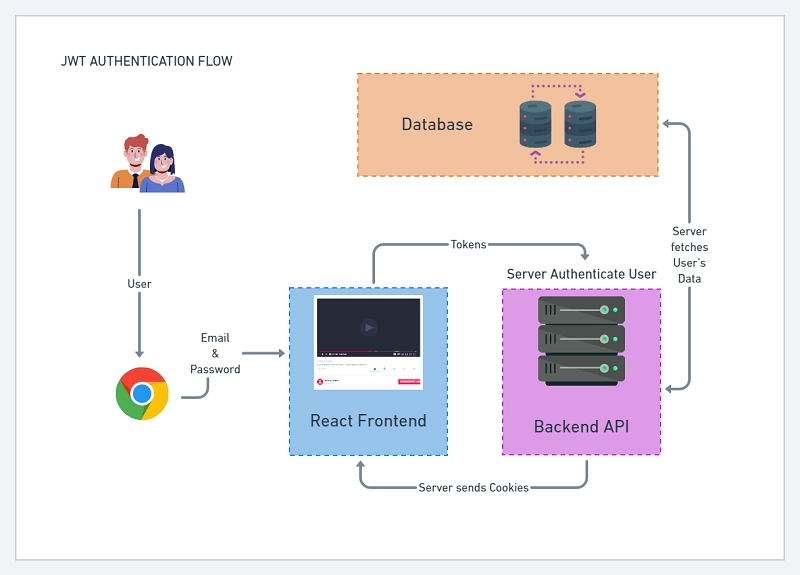
To reinforce this, let's read the section from jwt.io that describes this exact flow.
JSON Web Token Introduction - jwt.io
This section describes the standard procedure for using a JWT to access protected resources.
Read the section 'How do JSON Web Tokens work?'. Focus on the description of how the token is sent in the Authorization header using the Bearer schema. This is the standard practice we will implement.
4. Security in SPAs: Where to Store the Token?
This all sounds great, but there's a critical question: where does the React app store the token? The most common and simplest place is the browser's localStorage.
However, this approach has a significant security vulnerability: Cross-Site Scripting (XSS). If an attacker can inject a malicious script onto your page (perhaps through a compromised third-party library), that script can read anything in localStorage, steal the JWT, and use it to impersonate your user.
There are more secure alternatives. Let's watch a video that explains the risk of localStorage and introduces a more robust architectural pattern called Backend-for-Frontend (BFF).
Your SPA Auth Is Probably Insecure. Here's what I use instead!
Now for a critical topic: security. Storing JWTs in the browser's localStorage is common, but it comes with risks. This video explains the primary vulnerability (XSS) and introduces a more secure pattern.
Please watch from 01:52 to 07:02. The first part (until 04:10) explains the 'traditional' approach of storing the token in the browser and its vulnerability to XSS attacks. The second part introduces the 'Backend-for-Frontend' (BFF) pattern, where the JWT is managed by a server and a secure cookie is used for communication. This is highly relevant as it's the strategy used by Laravel Sanctum's SPA authentication.
To summarize the trade-offs:
| Approach | How it Works | Pros | Cons |
|---|---|---|---|
Token in localStorage |
Server sends JWT, client stores it in localStorage and attaches it to headers. |
Simple, truly stateless. | Vulnerable to XSS token theft. |
BFF with HttpOnly Cookie |
Server handles the token and sets a secure, HttpOnly session cookie in the browser. |
More secure against XSS (JS can't read the cookie). | More complex setup; introduces a stateful session between browser and BFF. |
For our project, we will start by using the localStorage method. It is crucial to learn this pattern as it's widely used, and it allows us to focus on the React-specific logic of handling authentication state. Later, when we integrate deeply with Laravel, we'll be perfectly positioned to implement the more secure BFF pattern, which aligns with Laravel Sanctum.
Conclusion
In this lesson, you've learned the fundamental theory behind modern web authentication. This knowledge is not just abstract; it's the blueprint for the features we are about to build.
Key Takeaways:
- JWTs provide a stateless way to handle authentication, which is ideal for modern SPAs and distributed systems.
- A JWT consists of a Header, a Payload (containing claims like user ID and expiration), and a Signature (which guarantees authenticity and integrity).
- The standard flow involves the client logging in to get a token, storing it, and sending it with every API request in the
Authorization: Bearerheader. - Storing JWTs in browser
localStorageis a simple but common pattern that is vulnerable to XSS attacks. More secure patterns like BFF exist and are important to be aware of.
Preview of the Next Lesson:
Now that we understand the theory, it's time to get our hands dirty. In the next lesson, you will begin the practical work by building the UI for our registration form using React, setting the stage to capture user data and send it to a backend.