Hello! Welcome to your first lesson in our journey to master modern JavaScript.
In this course, we'll bridge the gap between your backend experience with Laravel and building modern, full-stack JavaScript applications. We'll start by mastering the essential tools of modern JavaScript, which will be the foundation for everything that follows, including building e-commerce features and integrating with a React frontend.
This first module is all about getting you comfortable with the powerful array methods that are central to writing clean, efficient, and modern JS.
Today, we'll focus on a fundamental shift in thinking: moving from imperative to declarative programming. You'll learn to contrast traditional for loops with the more expressive array methods: forEach, map, and filter. Understanding this difference is the first major step toward writing code like a seasoned JavaScript developer.
1. Imperative vs. Declarative: A Shift in Mindset
Before we dive into code, let's establish the core concept. Imperative programming is about describing how to do something, step by step. Declarative programming is about describing what you want to achieve, without specifying the exact steps.
To get a clear understanding of this distinction, please read the introductory section of the following article. The grocery store analogy is a simple but powerful way to grasp this concept.
Understand Declarative vs. Imperative Code using Array Functions
This article, 'Understand Declarative vs. Imperative Code using Array Functions' from Bitovi, introduces the core difference between these two programming styles with a great real-world analogy.
Read the first part of the article, down to (but not including) the section 'Never Use “For” Loops to Iterate Arrays Again'. Focus on the 'I bought groceries' analogy.
2. The Imperative Way: The for loop
As a developer, you're already familiar with for loops. They are the classic example of the imperative style. Let's say we have an array of numbers and we want to create a new array where each number is doubled.
Here's how you'd do it with a for loop:
const numbers = [1, 2, 3, 4, 5];
const doubledNumbers = []; // 1. Initialize an empty array

for (let i = 0; i < numbers.length; i++) { // 2. Manually handle the loop setup
  const currentNumber = numbers[i]; // 3. Access the element
  const doubled = currentNumber * 2; // 4. Perform the operation
  doubledNumbers.push(doubled); // 5. Push the result to the new array
}

console.log(doubledNumbers); // Output: [2, 4, 6, 8, 10]
Notice how we have to manage every step: creating a new array, managing the loop counter (i), accessing the element at each index, and manually pushing the result. We are telling the computer exactly how to perform the task.
3. The Declarative Way: map, filter, and forEach
Modern JavaScript offers a more expressive, declarative way to handle array operations. Instead of writing out the loop mechanics every time, you use methods that describe your intent.
map(): Transforming an Array
The map() method is used when you want to transform each element of an array and create a new array from the results. It's the perfect declarative solution for our "doubling" task.
const numbers = [1, 2, 3, 4, 5];

const doubledNumbers = numbers.map(function(currentNumber) {
  return currentNumber * 2;
});

console.log(doubledNumbers); // Output: [2, 4, 6, 8, 10]
Using a more modern ES6 arrow function, it becomes even more concise:
const doubledNumbers = numbers.map(num => num * 2);
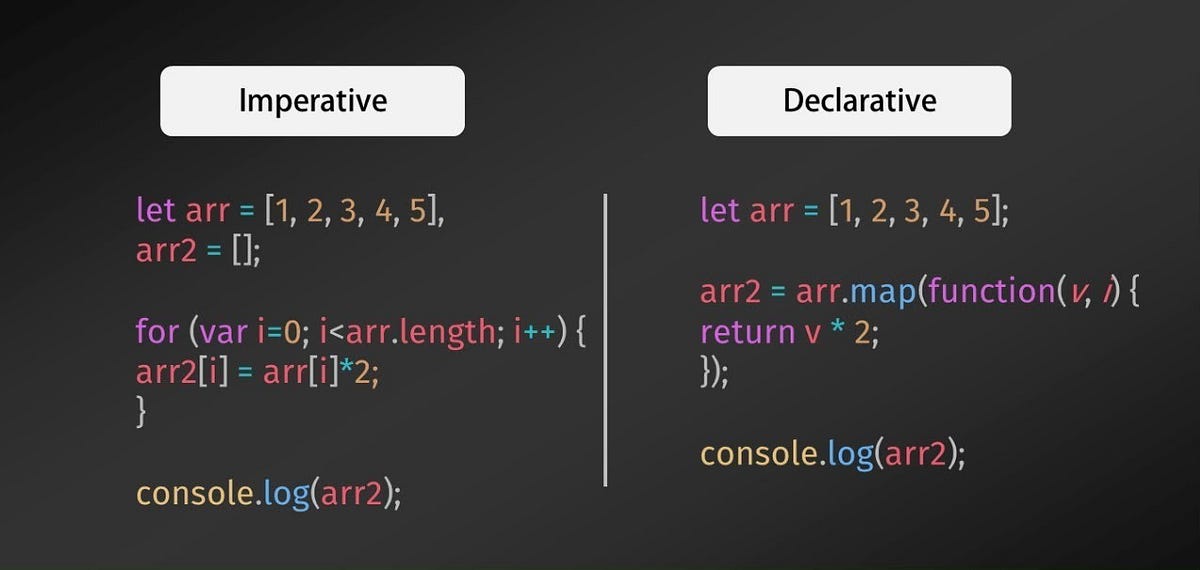
Look at the difference! We are no longer managing a loop counter or manually pushing to a new array. We simply declare that we want to "map" the numbers array to a new one, where each element is the result of our function. The map method handles the "how" for us.
This image provides a great visual summary of the contrast:
filter(): Selecting from an Array
What if we want to create a new array containing only the even numbers from our original array?
Imperative way with a for loop:
const numbers = [1, 2, 3, 4, 5];
const evenNumbers = [];

for (let i = 0; i < numbers.length; i++) {
  if (numbers[i] % 2 === 0) { // Check a condition
    evenNumbers.push(numbers[i]);
  }
}

console.log(evenNumbers); // Output: [2, 4]
Declarative way with filter():
The filter() method creates a new array with all elements that pass the test implemented by the provided function.
const numbers = [1, 2, 3, 4, 5];

const evenNumbers = numbers.filter(num => num % 2 === 0);

console.log(evenNumbers); // Output: [2, 4]
Again, the code is much cleaner. We declare our intent: "filter the numbers array and give me only the ones where the number is even."
forEach(): Iterating for Side Effects
The forEach() method executes a function once for each array element. Its main difference from map and filter is that it always returns undefined. It does not create a new array.
forEach is best used when you want to perform an action for each element, a "side effect," like logging to the console or updating something in the DOM.
const names = ['Alice', 'Bob', 'Charlie'];

names.forEach(name => {
  console.log(`Hello, ${name}!`);
});

// Output:
// Hello, Alice!
// Hello, Bob!
// Hello, Charlie!
While you could use forEach to build a new array like we did with the for loop, it's generally better to use map for transformations and filter for selections, as it makes your code's purpose clearer.
4. Deep Dive: Choosing the Right Tool
Now that you have the basic idea, let's solidify your understanding. The following video gives a fantastic walkthrough of map and filter, showing how they are used to transform and filter data in practical scenarios.
map, filter & reduce 🙏 Namaste JavaScript Ep. 19 🔥
The 'Namaste JavaScript' series by Akshay Saini is highly regarded. This video provides excellent, clear examples of how map and filter work.
Watch the sections explaining the map function (from 00:41 to 06:36) and the filter function (from 06:36 to 11:20). Pay attention to the different ways he writes the functions (named, anonymous, arrow).
A common point of confusion is when to use forEach versus map or filter. The next reading provides direct comparisons that make the choice clear.
This article, 'The Dark Side of 'Foreach()'', highlights the practical differences between these methods. The section we'll focus on shows why map and filter are often better choices than forEach for array manipulation.
Read section 4, 'Better Options for Arrays'. It provides side-by-side code examples contrasting forEach with map, reduce (which we'll cover soon), and filter for common tasks. This will help you understand the right tool for the job.
5. Your Turn: Practice Exercise
Let's apply what you've learned. Given the following array of user objects:
const users = [
  { id: 1, name: 'Alice', age: 25, role: 'developer' },
  { id: 2, name: 'Bob', age: 32, role: 'manager' },
  { id: 3, name: 'Charlie', age: 28, role: 'developer' },
  { id: 4, name: 'Diana', age: 45, role: 'ceo' }
];
Task: Create an array containing only the names of users who are older than 30.
- First, solve this using the imperative approach (a
forloop with anifstatement). - Then, solve it again using the declarative approach. You will need to combine
filter()andmap().
Try to solve this on your own. If you get stuck, the Namaste JavaScript video you watched earlier contains a great example of chaining methods like filter and map together (around the 30:40 mark).
Click to see the solution
Imperative Solution:
const seniorUserNamesImperative = [];
for (let i = 0; i < users.length; i++) {
  if (users[i].age > 30) {
    seniorUserNamesImperative.push(users[i].name);
  }
}
console.log(seniorUserNamesImperative); // ['Bob', 'Diana']
Declarative Solution:
const seniorUserNamesDeclarative = users
  .filter(user => user.age > 30) // First, filter to get only users older than 30
  .map(user => user.name);       // Then, map the result to get just their names

console.log(seniorUserNamesDeclarative); // ['Bob', 'Diana']
Key Takeaways
- Imperative code (
forloops) focuses on how to do things, requiring you to manage every step of the iteration. - Declarative code (array methods) focuses on what you want to achieve, abstracting away the iteration logic.
map()transforms each element into something new, returning a new array of the same length.filter()selects a subset of elements based on a condition, returning a new, often smaller, array.forEach()executes a function for each element, primarily for side effects, and returnsundefined.
This declarative style is not just a preference; it leads to more readable, maintainable, and less error-prone code, which is crucial for the complex applications you aim to build.
Next Up
In the next lesson, we'll dive deeper into map() and filter(). You'll work through more complex transformations and build your confidence in using these two essential methods.