Hello! Welcome back to our journey through asynchronous JavaScript.
Introduction
In our last lesson, you learned how to use the fetch API with async/await to make single GET and POST requests. You now have a solid pattern for communicating with a server and handling potential errors.
However, modern web applications often need to fetch multiple pieces of data to render a single page. For example, a user dashboard might need to load the user's profile, their recent activity, and a list of notifications simultaneously. Making these requests one after another would be slow and lead to a poor user experience.
Today's lesson addresses exactly that scenario. Our goal is to learn how to use Promise.all() to handle multiple concurrent asynchronous operations efficiently. This technique is a cornerstone of building fast, responsive applications.
The Problem: The Inefficiency of Sequential Requests
Imagine you need to fetch data from three different API endpoints. Using the async/await pattern you've learned so far, you might write code like this:
async function fetchAllData() {
  console.log('Starting to fetch...');
  const startTime = Date.now();

  const result1 = await fetch('https://api.example.com/data1');
  const result2 = await fetch('https://api.example.com/data2');
  const result3 = await fetch('https://api.example.com/data3');

  const endTime = Date.now();
  console.log(`Finished in ${(endTime - startTime) / 1000} seconds.`);
}
While this code is clean and readable, it's inefficient. The await keyword pauses the function's execution. This means the request for data2 doesn't even start until the request for data1 has completely finished. If each request takes 1 second, the total time will be at least 3 seconds.
This is like going to a coffee shop and ordering your coffee, waiting for it to be made, and only then ordering a pastry. It's much more efficient to order both at the same time. In JavaScript, Promise.all() lets us do just that.
The Solution: Promise.all() for Concurrent Operations
Promise.all() is a static method on the Promise object that takes an array of promises and returns a single new promise. This new promise resolves only when all of the promises in the array have resolved.
This allows us to kick off multiple asynchronous operations (like fetch requests) concurrently, rather than sequentially.

Let's see a practical demonstration of the performance difference.
JavaScript Promise.all() and the Event Loop Explained - Let's Clarify a Previous Video
This video from James Q Quick provides an excellent explanation of why Promise.all() is so much faster than sequential await calls and clarifies the concept of concurrency in single-threaded JavaScript.
Watch from 02:24 to 06:33. The first part (until 04:01) briefly explains how JavaScript can handle things concurrently using the event loop. The second part (from 04:01) demonstrates a code example comparing the execution time of 100 requests made sequentially versus with Promise.all().
As the video demonstrates, the performance gain is significant. The total time taken with Promise.all() is roughly the time of the single longest operation, not the sum of all of them.
Capturing Results and Code Structure
When the promise returned by Promise.all() resolves, its value is an array containing the results of all the input promises.
A crucial feature is that the results in the output array are in the same order as the promises you passed in, even if the promises resolve in a different order.
Let's refactor our earlier example to use Promise.all():
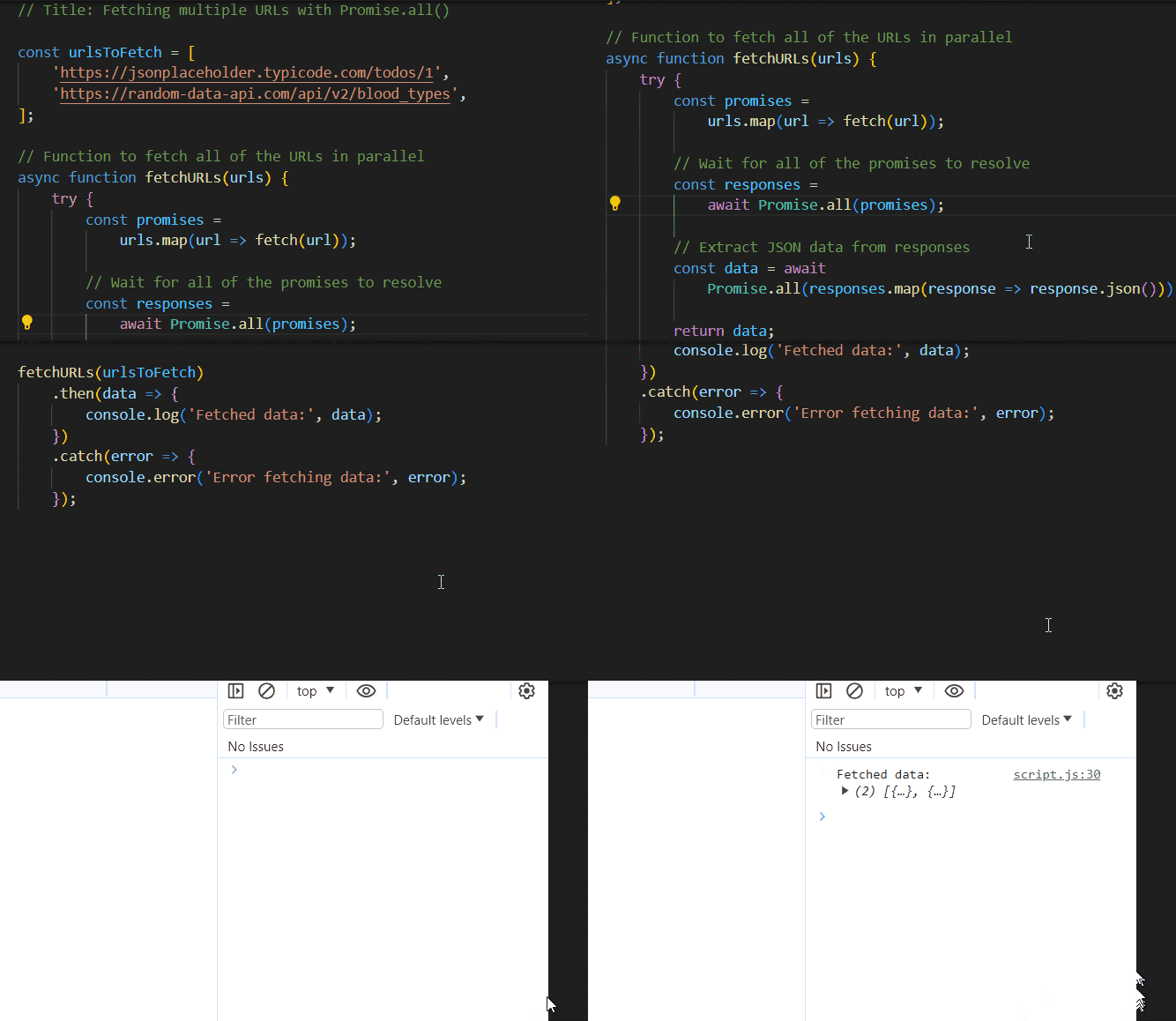
Here's how we'd write it out, including capturing the results:
async function fetchAllDataConcurrently() {
  const urls = [
    'https://api.example.com/data1',
    'https://api.example.com/data2',
    'https://api.example.com/data3'
  ];

  try {
    // 1. Create an array of promises. Note: the fetch calls start immediately!
    const promises = urls.map(url => fetch(url));

    // 2. Wait for ALL promises to resolve
    const responses = await Promise.all(promises);

    // responses is an array of Response objects, in the original order.
    // We still need to parse the JSON body of each response.
    // We can use Promise.all() for that too!
    const jsonPromises = responses.map(response => response.json());
    const results = await Promise.all(jsonPromises);

    console.log('Results:', results); // [result1, result2, result3]

  } catch (error) {
    console.error('One of the fetches failed:', error);
  }
}
This pattern of mapping an array of data into an array of promises is extremely common and powerful.
To solidify your understanding of how results are captured, the following article provides another clear explanation and example.
Speed up your code with Promise.all
This article from dev.to provides another excellent comparison of sequential vs. parallel execution and reinforces how the results are captured in order.
Read the section titled Capturing the responses. It includes a great example with random delays to prove that the results array always maintains the original order.
"All or Nothing": Error Handling with Promise.all()
Promise.all() has an important "all or nothing" behavior. If any one of the promises in the input array is rejected, the entire Promise.all() immediately rejects with the error from that single failed promise. You will not get any of the results from the promises that did succeed.
This is often called "fail-fast" behavior. It's useful for situations where you need all the data to proceed. For example, if you need a template file, a CSS file, and a data file to render a page, it makes no sense to continue if any one of them fails to load.
Promise API - The Modern JavaScript Tutorial
The Modern JavaScript Tutorial provides a definitive guide to the Promise API. Let's read its section on how Promise.all handles rejections.
In the section about Promise.all, find the part that starts with the bolded text If any of the promises is rejected.... Read this subsection to see a code example of the fail-fast behavior.
A Real-World Nuance: Combining Sequential and Concurrent Calls
As a Laravel developer, you know that not all operations can run in parallel. Sometimes, you need the result from one API call to make the next one (e.g., fetch a user, then use their ID to fetch their posts).
You can easily combine await and Promise.all() to create efficient and logical data-fetching flows.
async function getPostsForUser(userId) {
  // 1. First, a sequential call to get the user data
  const userResponse = await fetch(`https://api.example.com/users/${userId}`);
  const user = await userResponse.json();

  // Now we have the user's post IDs
  const postIds = user.postIds; // e.g., [101, 102, 105]

  // 2. Next, make concurrent calls to fetch all posts
  const postPromises = postIds.map(id =>
    fetch(`https://api.example.com/posts/${id}`)
  );

  const postResponses = await Promise.all(postPromises);

  // 3. Process all post responses concurrently
  const postsJsonPromises = postResponses.map(res => res.json());
  const posts = await Promise.all(postsJsonPromises);

  console.log(`Posts for ${user.name}:`, posts);
  return posts;
}
This hybrid approach is extremely practical and is a pattern you will use frequently when connecting your front-end to a back-end API.
Conclusion
You've now added a critical tool to your asynchronous JavaScript toolkit. By understanding when and how to use Promise.all(), you can write code that is not only clean but also significantly more performant.
Key Takeaways:
- Use
Promise.all()to run multiple independent asynchronous operations concurrently. - It takes an array of promises and returns a single promise that resolves with an array of results.
- The results are returned in the same order as the input promises, regardless of their completion order.
Promise.all()follows an "all or nothing" principle: it rejects immediately if any of its input promises reject.- You can combine sequential
awaitcalls withPromise.all()to handle data dependencies efficiently.
Preview of Next Lesson:
In our next and final lesson for this module, we will put everything together. You will build a simple app to fetch data from a public API and render it on a page, applying your knowledge of async/await, fetch, error handling, and Promise.all().