Hello! Welcome to your next lesson on asynchronous JavaScript.
Introduction
In our last session, we explored the "engine room" of asynchronous JavaScript: the call stack, Web APIs, the event loop, and the microtask/macrotask queues. We established that while this model allows JavaScript to handle long-running tasks without freezing the user interface, the traditional way of managing them with callbacks can lead to deeply nested, hard-to-read code, often called "callback hell."
Today, we'll learn about the modern solution to this problem: Promises. A Promise is a JavaScript object that represents the eventual completion (or failure) of an asynchronous operation and its resulting value. Mastering Promises is a crucial step towards writing clean, robust, asynchronous code and is the foundation for the async/await syntax you'll learn later.
By the end of this lesson, you will be able to create and consume Promises using .then(), .catch(), and .finally().
What is a Promise?
At its core, a Promise is a placeholder for a future value. When you start an asynchronous operation, instead of getting the final result immediately, you get a Promise object. This object promises to give you the result at some point in thefuture.
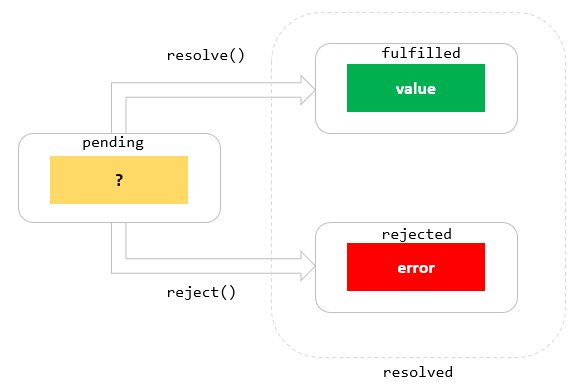
A Promise can be in one of three states:
- Pending: The initial state; the operation has not completed yet.
- Fulfilled: The operation completed successfully, and the Promise now has a resolved value.
- Rejected: The operation failed, and the Promise has a reason for the failure (an error).
Once a Promise is either fulfilled or rejected, it is considered settled, and its state cannot change again.
Let's start with a short reading that introduces Promises using a helpful real-life analogy.
Promise - The Modern JavaScript Tutorial
The article 'Promise' from The Modern JavaScript Tutorial provides a great introduction to the core concept of a Promise, using a singer-and-fan analogy to explain the relationship between the code that produces a value and the code that consumes it.
Read the introductory section, up to (but not including) the part detailing the constructor syntax. Focus on understanding the roles of 'producing code', 'consuming code', and the Promise object that links them.
Creating and Consuming a Promise
Now that you have a conceptual understanding, let's look at the mechanics. A Promise is created using the new Promise() constructor. This constructor takes a single argument: a function called the executor.
The executor function, in turn, receives two arguments: resolve and reject. These are functions that you call to change the state of the Promise from pending to either fulfilled or rejected.
- Call
resolve(value)when the asynchronous task is successful. - Call
reject(error)when the task fails.
Once you have a Promise, you can attach handlers to it to react to its eventual settlement. This is the "consuming" part. You use these methods:
.then(onFulfilled): Runs when the promise is fulfilled. It receives the value passed toresolve..catch(onRejected): Runs when the promise is rejected. It receives the error passed toreject..finally(onSettled): Runs when the promise is settled, regardless of whether it was fulfilled or rejected. This is ideal for cleanup tasks, like hiding a loading spinner.
The following video provides a concise and clear walkthrough of this entire process.
JavaScript Promises in 8 Minutes
This video, 'JavaScript Promises in 8 Minutes', quickly covers all the essential mechanics of creating and consuming promises. It's a great way to see the syntax in action.
Watch the following segments: How to create a promise (00:53 - 01:45): Focus on the new Promise syntax and the resolve/reject functions. Using .then and .catch (01:45 - 02:46): Observe how to handle success and failure. Using .finally (05:12 - 05:48): Understand its role in cleanup.
A Deeper Look at the Syntax
To solidify what you just saw, let's review the syntax with some code examples.
Creating a Promise
Here we create a promise that simulates a network request. It will fulfill successfully after 2 seconds.
const myPromise = new Promise((resolve, reject) => {
  // Simulate an asynchronous operation
  setTimeout(() => {
    const data = { userId: 1, name: "John Doe" };
    // Let's assume the operation was successful
    resolve(data);
  }, 2000);
});
If something went wrong, we would call reject:
const failedPromise = new Promise((resolve, reject) => {
  setTimeout(() => {
    // Simulate a network error
    reject(new Error("Network connection lost."));
  }, 2000);
});
It's a best practice to reject with an Error object, as it provides a stack trace that is very helpful for debugging.
Consuming the Promise
Now we can use our promise and define what should happen when it settles.
console.log("Fetching data..."); // This runs immediately

myPromise
  .then(data => {
    // This runs after 2 seconds if the promise is fulfilled
    console.log("Success! Data received:", data);
  })
  .catch(error => {
    // This runs if the promise is rejected
    console.error("Failure!", error.message);
  })
  .finally(() => {
    // This runs after 2 seconds, regardless of the outcome
    console.log("Operation finished.");
  });
For a detailed textual breakdown, the resource from javascript.info is an excellent reference.
Promise - The Modern JavaScript Tutorial
Let's revisit the 'Promise' article to get a detailed textual explanation of the constructor and the consumer methods .then, .catch, and .finally.
Read the sections titled 'Promise', 'Consumers: then, catch', and 'Cleanup: finally'. This will reinforce the syntax and behavior of each part we've discussed.
A Practical Example: Fetching Data
The examples with setTimeout are great for understanding the mechanics, but the most common use case for Promises is handling network requests. Your goal is to connect a front-end to a Laravel back-end, which will involve making API calls. The modern way to do this in the browser is with the fetch API, which is Promise-based.
When you call fetch(), it immediately returns a Promise that will resolve with a Response object. Let's revisit the video to see this in practice.
JavaScript Promises in 8 Minutes
The 'JavaScript Promises in 8 Minutes' video demonstrates how to use fetch to get data from a real API. This is a perfect example of consuming a promise in a real-world scenario.
Watch the segment from 02:46 to 05:12. Pay close attention to how .then() is used to handle the response from the API call. You'll notice a .then() followed by another .then()—this is called 'chaining', which is the topic of our next lesson!
Practice: Build Your Own Promise
Now it's your turn to write some code. Let's create a Promise-based utility function.
Task: Create a function called delay(ms) that returns a promise. This promise should resolve after the specified number of milliseconds (ms).
You should be able to use it like this:
console.log("Starting delay...");

delay(3000).then(() => {
  console.log("Runs after 3 seconds");
});
Think about how you would use new Promise and setTimeout together to achieve this.
Click to see the solution
function delay(ms) {
  return new Promise(resolve => {
    // We only need resolve, because this function can't fail.
    // We call resolve after the specified time, without passing any value.
    setTimeout(resolve, ms);
  });
}

// How to use it:
console.log("Starting delay...");
delay(3000).then(() => {
  console.log("Runs after 3 seconds");
});
This is a very common utility function in asynchronous programming. It's great for simulating network latency during development or for adding a pause between steps in an automated sequence.
Conclusion
Great work! You've taken a significant step in mastering modern asynchronous JavaScript. Promises are a fundamental concept that makes handling async operations much cleaner and more manageable than old-school callbacks.
Key Takeaways:
- A Promise is an object representing a future value, with three states:
pending,fulfilled, orrejected. - You create a promise with
new Promise((resolve, reject) => { ... }), callingresolve(value)on success andreject(error)on failure. - You consume a promise using method chaining:
.then(callback)to handle a fulfilled promise..catch(callback)to handle a rejected promise..finally(callback)to run cleanup code after the promise is settled.
- Promise-based APIs like
fetchare central to modern web development, especially for communicating with back-end services.
Preview of Next Lesson:
In the fetch example, you saw a glimpse of .then() being used one after another. This is called Promise Chaining, and it's how we manage sequences of asynchronous operations. In the next lesson, we will dive deep into how to chain multiple Promises to handle sequential asynchronous operations, which will bring us one step closer to writing complex, real-world application logic.