Welcome back! In our last lesson, we established the conceptual foundation of text embeddings, exploring how they represent the rich meaning of language as numerical vectors in a high-dimensional semantic space. You learned what embeddings are and why they are a massive leap beyond simple keyword matching.
Now, it's time to bridge the gap from theory to practice. This lesson is all about the "how": you will learn to generate these powerful vector representations for any text snippet you want. As a software engineer, you'll find the process familiar, as it centers on making API calls to pre-trained models. We will cover how to use both a leading proprietary service, the OpenAI API, and a gateway to the world of open-source models, the Hugging Face Hub. This will give you the practical skills to turn raw text into the machine-readable vectors that power retrieval systems.
Generating Embeddings with the OpenAI API
The most direct way to start generating high-quality embeddings is by using a specialized, pre-trained model through an API. OpenAI provides industry-standard models that are easy to access and highly performant. The overall process is simple: you send a string of text to an API endpoint, and the model returns its vector representation.
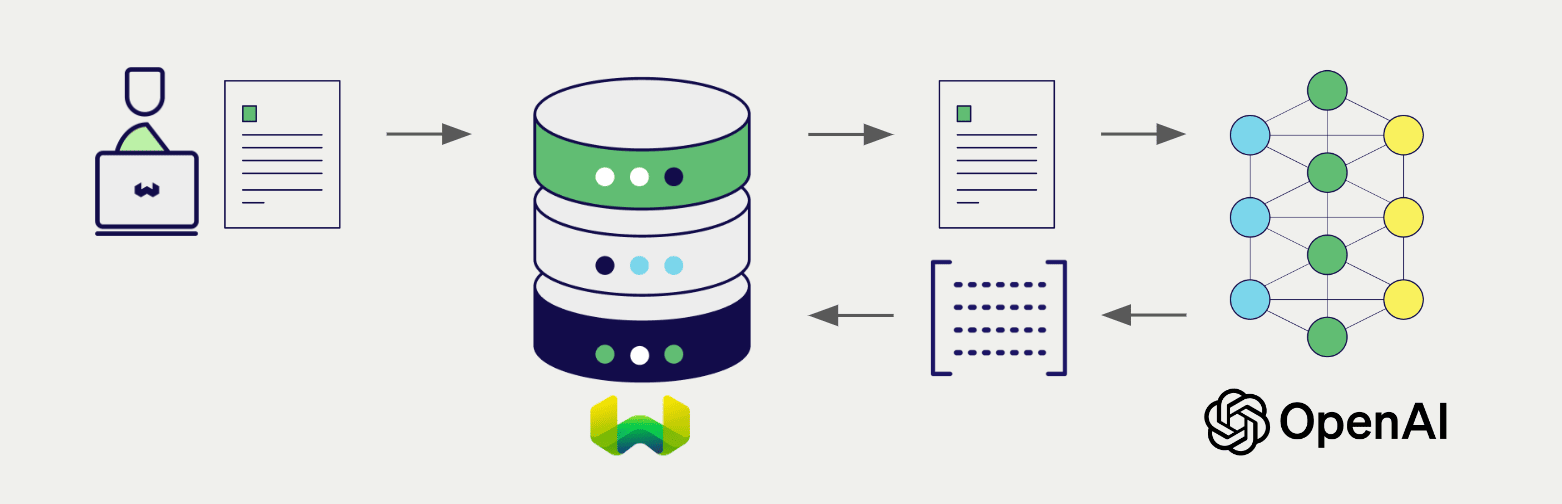
To accomplish this in Python, we'll use the openai library. The interaction follows a standard client-server pattern you're likely familiar with.
The Core API Call
Let's look at the specifics of the API call. You'll need to instantiate a client, then call the embeddings.create method, providing the text you want to embed and specifying which model to use.
Vector embeddings | OpenAI API
The official OpenAI documentation is the best source for understanding how to use their embeddings API. It provides the exact code patterns, model details, and response structures.
First, review the section "How to get embeddings". Pay close attention to the Python example; this is the fundamental code block we'll be building on. Notice the key parameters: input and model. Also, examine the sample JSON response to see what you get back. Next, read the section on "Embedding models". This table is crucial for making practical decisions. It compares the available models on cost, performance, and maximum input size.
As you saw in the documentation, the primary models you'll encounter are from the text-embedding-3 family. For many RAG applications, text-embedding-3-small offers a fantastic balance of high performance and low cost. The API response is an object that contains the embedding vector itself within response.data[0].embedding.
A Practical Walkthrough
Let's consolidate this into a reusable Python function and see it in action. The following video provides a clear, step-by-step demonstration of setting up the client, creating a function to generate an embedding, and then applying that function to a real dataset.
OpenAI ChatGPT Embeddings API 🧠 Beginners' EASY Step-by-Step Tutorial 🤯
This tutorial by Mervin Praison provides a great, practical walkthrough of using the OpenAI embeddings API from start to finish.
First, watch the segment demonstrating a basic embedding call. This covers initializing the client and making a request for a single string. Then, watch the more advanced example from embedding a dataset, where the function is applied to each row of a CSV file loaded into a pandas DataFrame. This is a very common workflow.
Here is a summary of the coding pattern, updated to use the latest text-embedding-3-small model. Note that you must have your OpenAI API key set as an environment variable (OPENAI_API_KEY) for this code to run.
# First, ensure you have the library installed:
# pip install openai pandas

import os
import openai
import pandas as pd


# The client will automatically pick up the OPENAI_API_KEY environment variable.
client = openai.OpenAI()

def get_embedding(text: str, model: str = "text-embedding-3-small") -> list[float]:
    """
    Generates an embedding for a given text using a specified OpenAI model.
    """


    # Defensive programming: ensure text is not empty and is a string
    if not text or not isinstance(text, str):
        return None

    text = text.replace("\n", " ") # Models are sensitive to newlines

    try:
        response = client.embeddings.create(input=[text], model=model)
        return response.data[0].embedding
    except Exception as e:
        print(f"An error occurred: {e}")
        return None


# Example 1: Embedding a single sentence
sentence = "The quick brown fox jumps over the lazy dog."
embedding_vector = get_embedding(sentence)
if embedding_vector:
    print(f"Embedding vector for the sentence (first 5 dimensions): {embedding_vector[:5]}")
    print(f"Vector dimensionality: {len(embedding_vector)}")


# Example 2: Applying the function to a pandas DataFrame
data = {'text': ["What is the capital of France?", "A delicious recipe for pasta carbonara.", "The principles of quantum mechanics."]}
df = pd.DataFrame(data)

df['embedding'] = df['text'].apply(get_embedding)

print("\nDataFrame with embeddings:")
print(df)
This pattern is a cornerstone of preparing data for a RAG system. You now have a robust way to convert any collection of text documents into a list of corresponding embedding vectors.
Beyond OpenAI: Using Open-Source Models with Hugging Face
While OpenAI provides excellent models, the field of AI is vast and includes a thriving open-source community. Hugging Face is the leading platform for this community, hosting tens of thousands of models. Their Inference API allows you to use many of these models, including powerful embedding models, through a unified interface.
Exploring this ecosystem is key to gaining a deeper understanding and avoiding vendor lock-in. The core idea is the same—an API call that returns a vector—but you have a much wider selection of models to choose from.
This video from Hugging Face provides a perfect introduction to their Inference Providers and demonstrates how to generate embeddings with an open-source model.
Inference Providers: Best Way to Build with Open Source Models
This official Hugging Face tutorial explains how to use their Inference API to run various open-source models, including for "feature extraction" (their term for embeddings).
To understand the process, please watch the following segments: Introduction: This explains the value proposition of a single API for many models. Finding Models: Learn how to browse the Hugging Face Hub and filter for "feature extraction" tasks to find embedding models. Getting a Token: This walks you through creating the necessary API token from your Hugging Face account settings. Embedding Code Example: This is the most important part. It shows the Python code for generating embeddings using the huggingface_hub library.
As you saw, the workflow is remarkably similar to using the OpenAI API. You install a library (huggingface_hub), get an API key, instantiate a client, and call a method. Here's the key code snippet from the video for easy reference:
# First, ensure you have the library installed:
# pip install huggingface_hub

from huggingface_hub import InferenceClient


# You'll need to set your HF_TOKEN environment variable
client = InferenceClient()


# Example using a popular open-source model
# You can find model IDs on the Hugging Face Hub
model_id = "sentence-transformers/all-MiniLM-L6-v2"
text = "Today is a sunny day and I will get some ice cream."

embedding_vector_hf = client.feature_extraction(model=model_id, text=text)


# The structure of the response might differ slightly by model/task.
# For feature_extraction, the result is often the list of floats directly.
print(f"Hugging Face embedding (first 5 dimensions): {embedding_vector_hf[0][:5]}")
print(f"Vector dimensionality: {len(embedding_vector_hf[0])}")
The main differences are the method name (feature_extraction instead of embeddings.create) and the way you specify the model (using its public Hugging Face ID). The underlying engineering pattern, however, is identical. This flexibility allows you to experiment with different models that may be better suited or more cost-effective for specific tasks.
Practical Considerations: Cost and Dimensionality
When generating embeddings at scale, two factors become very important: cost and performance.
-
Cost and Tokenization: APIs charge based on the number of tokens in your input text. A token is a common sequence of characters; for English, one token is roughly 4 characters or 0.75 words. Before sending large batches of text to be embedded, it's wise to estimate the token count to manage costs. The OpenAI
tiktokenlibrary is the standard tool for this. -
Embedding Dimensionality: An embedding's "size" or "dimensionality" is the number of floating-point numbers in its vector. For
text-embedding-3-small, this is 1536. Larger dimensions can capture more nuance but increase storage costs, memory usage, and the computational cost of similarity searches. OpenAI's newer models allow you to reduce the dimensionality via thedimensionsparameter in the API call, offering a direct trade-off between performance and cost.
For a deeper look at these practical details, the OpenAI documentation provides excellent guidance.
Vector embeddings | OpenAI API
This part of the OpenAI documentation covers important optimization topics.
Please read the section on "Reducing embedding dimensions" to understand how and why you might want to use smaller vectors. Then, look at the FAQ entry for counting tokens, which provides the Python code using tiktoken.
Conclusion
In this lesson, you have taken the crucial step from concept to code. You can now programmatically convert text into meaningful numerical vectors, the essential raw material for any RAG system.
Here are your key takeaways:
- API-based Generation: Embeddings are generated by sending text to pre-trained models via API calls.
- OpenAI Workflow: Using the
openailibrary, you can call models liketext-embedding-3-smallto get high-quality embeddings. The core pattern isclient.embeddings.create(). - Open-Source with Hugging Face: The
huggingface_hublibrary and Inference API provide a unified way to access a vast ecosystem of open-source embedding models using theclient.feature_extraction()method. - Practical Trade-offs: Real-world application requires balancing model choice, cost (managed by monitoring token counts), and performance (which can be tuned via dimensionality).
You've successfully turned text into vectors. But what makes these vectors so useful is our ability to compare them. In our next lesson, we will explore the mathematical operations, like cosine similarity and dot product, that allow us to quantify the "distance" between these vectors and, by extension, the semantic similarity between the original texts. This is the mechanism that powers semantic search.