Welcome back. In our last lesson, we explored the mathematical core of semantic comparison, learning how to use metrics like cosine similarity and dot product to quantify the "closeness" of embedding vectors. You now understand the mechanism for measuring similarity between pieces of text.
Today, we put that mechanism to work. This lesson focuses on differentiating between two fundamental approaches to information retrieval: the semantic search that these vector operations enable, and the traditional keyword-based search you're likely more familiar with from classic search engines and databases. By understanding their core differences, strengths, and weaknesses, you'll grasp why semantic search is the cornerstone of modern RAG systems and how it fundamentally changes our ability to find relevant information.
Search Paradigms: Words vs. Meaning
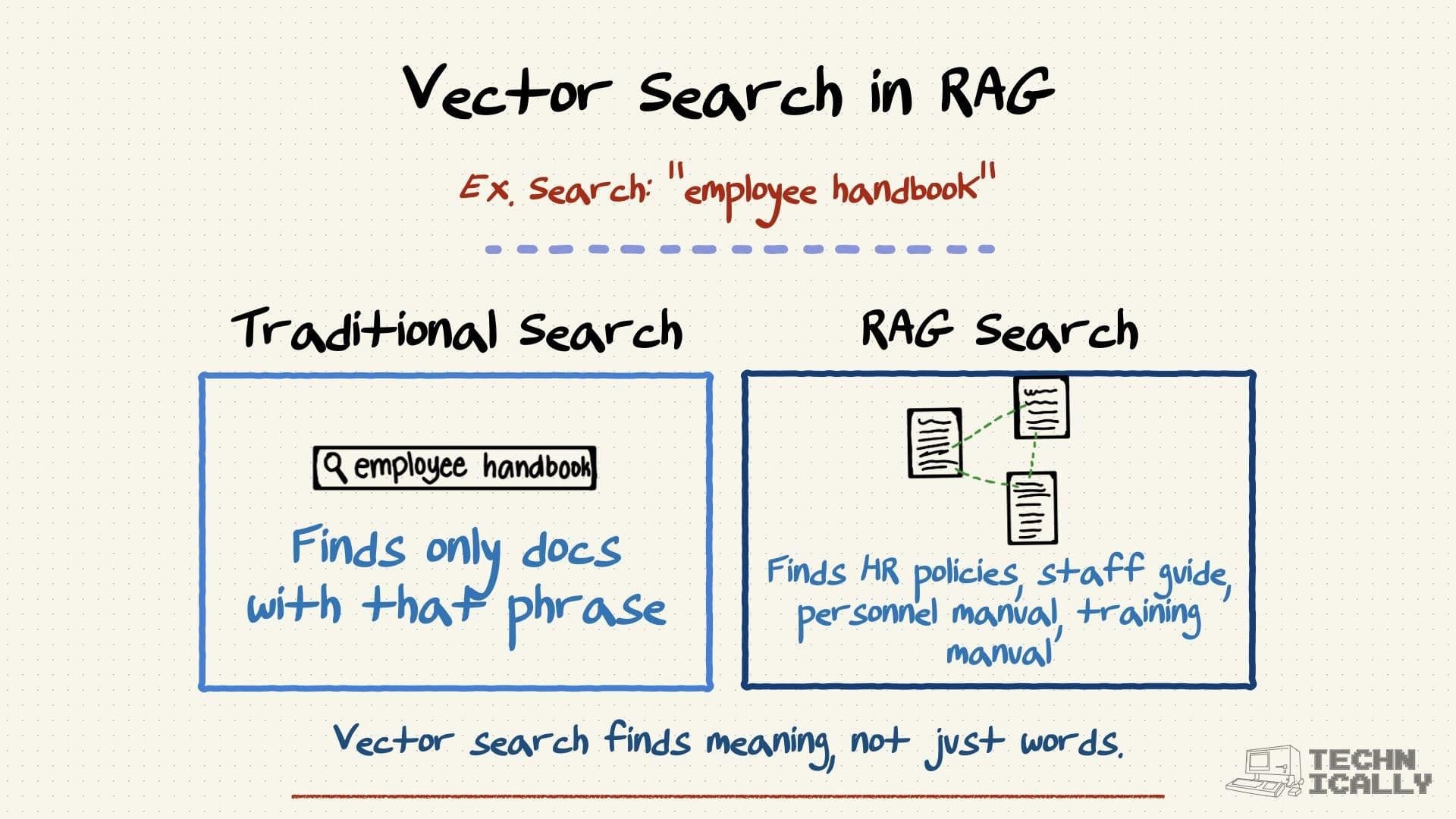
At its heart, the difference between these two search methods is simple:
- Keyword search finds documents that contain the literal words in your query.
- Semantic search finds documents that are conceptually related to your query, regardless of the exact words used.
This image provides a clear, high-level illustration of this distinction.
Let's break down the mechanics behind each approach.
Traditional Keyword Search: The Lexical Approach
Keyword search, also known as lexical or full-text search, is a mature and powerful technology. Its goal is to find exact or near-exact matches of query terms within a collection of documents. As a software engineer, you can think of its core component, the inverted index, as a specialized hash map. It maps each word (or "term") to a list of all documents that contain it.
"algorithm" -> [doc_3, doc_17, doc_101]"data" -> [doc_3, doc_22, doc_99]
When you search for "data algorithm", the system can quickly find documents that contain both terms by intersecting these lists. To refine this process, keyword systems employ several techniques.
The article "Vector Search vs. Keyword Search" from Saigon Digital provides an excellent breakdown of these mechanics.
Vector Search vs. Keyword Search: What’s the Difference | Saigon Digital
This article offers a detailed look into the mechanics of traditional keyword search.
Please read the section titled "What Is Keyword Search?". As you read, focus on understanding these key techniques: Inverted Index: The fundamental data structure for fast lookups. Stemming and Lemmatisation: Normalizing words to their root form (e.g., "running" -> "run"). Synonym Dictionaries: Manually mapping different words with the same meaning. Boolean Logic: Using operators like AND, OR, NOT for precise control.
Strengths of Keyword Search:
- Speed and Efficiency: Inverted indexes make lookups extremely fast.
- Precision and Control: Excellent for finding specific identifiers like product SKUs, error codes, or function names. Boolean logic gives you surgical control over the results.
- Determinism: The same query will always return the same results, which is crucial for compliance and debugging.
Limitations of Keyword Search:
- The Synonym Problem: It fails if the user's query uses different words than the document (e.g., searching "car repair" might miss a document about "automotive maintenance").
- Context Blindness: It struggles with ambiguity. A search for "java" could return results about the programming language, the island, or coffee.
- Brittleness: It is sensitive to typos and phrasing variations that aren't handled by stemming or fuzzy matching.
Semantic Search: The Conceptual Approach
Semantic search, also called vector search, operates on the principles you learned in the previous lessons. Instead of matching words, it matches meaning.
The process, as you know, is:
- Both the documents in your knowledge base and the user's query are converted into numerical vectors (embeddings) using a pre-trained model.
- The system then calculates the similarity (e.g., using cosine similarity or dot product) between the query vector and all the document vectors.
- The documents with the highest similarity scores—the "nearest neighbors" in the vector space—are returned as the most relevant results.
This approach inherently overcomes the main limitations of keyword search. Because embeddings capture the semantic meaning of the text, synonyms and different phrasings are handled naturally. The vector for "How do I fix my car?" will be very close to the vector for "automobile repair guide" because they represent the same underlying concept.
For a fast-paced, developer-centric overview of these concepts, the following video is excellent.
Your RAG Won’t Work Without This: Vector vs Keyword vs Hybrid Search
This video by Lena Hall provides a clear mental model for each search type and uses practical scenarios to illustrate their differences.
Watch from the beginning up to the end of the litmus test. Pay close attention to: The initial mental model distinguishing literal (keyword) from semantic (vector) search. The three practical scenarios (product catalog, support inbox, e-commerce) that highlight where each approach wins. The three-question litmus test, which provides a systematic way to decide which search type to use.
A Direct Comparison: Trade-offs and Failure Modes
No single search method is universally superior. They represent different tools with different trade-offs in performance, cost, and accuracy. The choice depends entirely on the use case.
The article "Semantic search vs. keyword search" by Redis provides a superb, in-depth comparison from a practical, systems-building perspective.
Semantic search vs. keyword search: when to use each
This article clearly lays out the architectural differences and complementary failure modes of each search type.
First, read the section What's the difference between keyword and semantic search?. The comparison table here is a key resource that summarizes the trade-offs in memory, latency, and failure modes. Next, read the sections on when to use each type. This will ground your understanding in concrete applications, including RAG implementations, and show why keyword search remains essential for tasks like finding exact error codes.
As you've just read, the failure modes are complementary:
- Semantic search fails when exact wording is critical (e.g., searching for the error code
OOM-2024-047). The embedding for this string may not have a strong semantic relationship to documents containing it. - Keyword search fails when user intent is expressed in natural language (e.g., "my app keeps crashing from memory issues").
The Best of Both Worlds: Hybrid Search
Given that both approaches have unique strengths, it's logical that modern, production-grade search systems don't choose one over the other. Instead, they combine them in a hybrid search architecture.
A common hybrid strategy is to:
- Filter (Keyword): Use keyword search to rapidly narrow down the search space with hard constraints (e.g.,
category: "electronics",date > 2023,author: "John Doe"). This is a highly efficient first pass. - Rank (Semantic): Run a semantic search on the smaller, filtered set of candidates to rank them by conceptual relevance to the query.
- Fuse: Combine the scores from both search methods using a fusion algorithm (like Reciprocal Rank Fusion, or RRF) to produce a single, unified list of results that benefits from both lexical precision and semantic understanding.
We will explore hybrid search and other advanced techniques later in the course. For now, it's important to recognize that this combined approach is typically the most robust solution.
Conclusion
You can now clearly differentiate between the two primary modes of information retrieval. This understanding is critical for building and debugging RAG systems, as the quality of your retrieval step directly dictates the quality of your final generated response.
Here are your key takeaways:
- Keyword Search is about lexical matching. It uses inverted indexes for high-speed, precise retrieval of literal terms. It excels at finding exact identifiers but struggles with synonyms and context.
- Semantic Search is about conceptual matching. It uses vector embeddings and similarity metrics to find information that is semantically related to a query, making it robust to variations in phrasing and vocabulary. It is the powerhouse behind modern RAG.
- They are complementary. Neither is a silver bullet. Keyword search is for precision and control; semantic search is for understanding and intent.
- Hybrid Search combines both, using keyword filtering for efficiency and semantic ranking for relevance, offering the most robust solution for many real-world applications.
In the next module, we will shift our focus from how we search to what we search. Now that you understand the principles of retrieval, we need to prepare our knowledge base for it. Our next lesson will dive into the practicalities of loading, parsing, and splitting source documents into the manageable chunks required for effective embedding and retrieval.