Welcome to the final lesson in our foundational module on programmatic LLM interaction. So far, you have learned to make API calls, structure prompts with different roles, and fine-tune the creative and structural properties of the generated text using parameters like temperature and max_tokens. You can now reliably get a response object from the model.
This lesson tackles the crucial next step: parsing and processing LLM API responses programmatically. The raw text from an LLM, while often impressive, is fundamentally unpredictable. For a software application to use this output, it needs to be in a consistent, structured format. Simply treating the output as a string and using manual parsing is a recipe for brittle code. We will explore how to move from unreliable text to dependable, validated data structures using modern API features and a powerful Python library, Pydantic. This skill is the final piece of the puzzle for turning an LLM into a reliable component of any application, including the RAG systems you aim to build.
The Challenge of Unstructured Output
When you make an API call, you receive a JSON response object. As you've seen, the model's generated text is nested within this object. Let's start with a quick review of how to access this content.
The OpenAI (Python) API | Introduction & Example Code
This video by Shaw Talebi provides a clear, practical walkthrough of making a basic OpenAI API call and accessing the response.
Please watch the segment from the beginning of the coding section. Focus on how the code drills down into the response object (chat_completion.choices[0].message.content) to extract the final string generated by the model.
As you just saw, getting the string content is straightforward. The problem arises when you need to extract specific pieces of information from that string. Imagine you ask the model: "Extract the name and email from this text: 'Contact John Doe at john.doe@example.com'."
The model might return:
{"name": "John Doe", "email": "john.doe@example.com"}Name: John Doe, Email: john.doe@example.comSure, here is the contact information: {"name": "John Doe", "email": "john.doe@example.com"}
If your code expects a perfect JSON string, the second and third responses will cause it to fail. You could try to clean the output using regular expressions, but this approach is fragile and difficult to maintain.
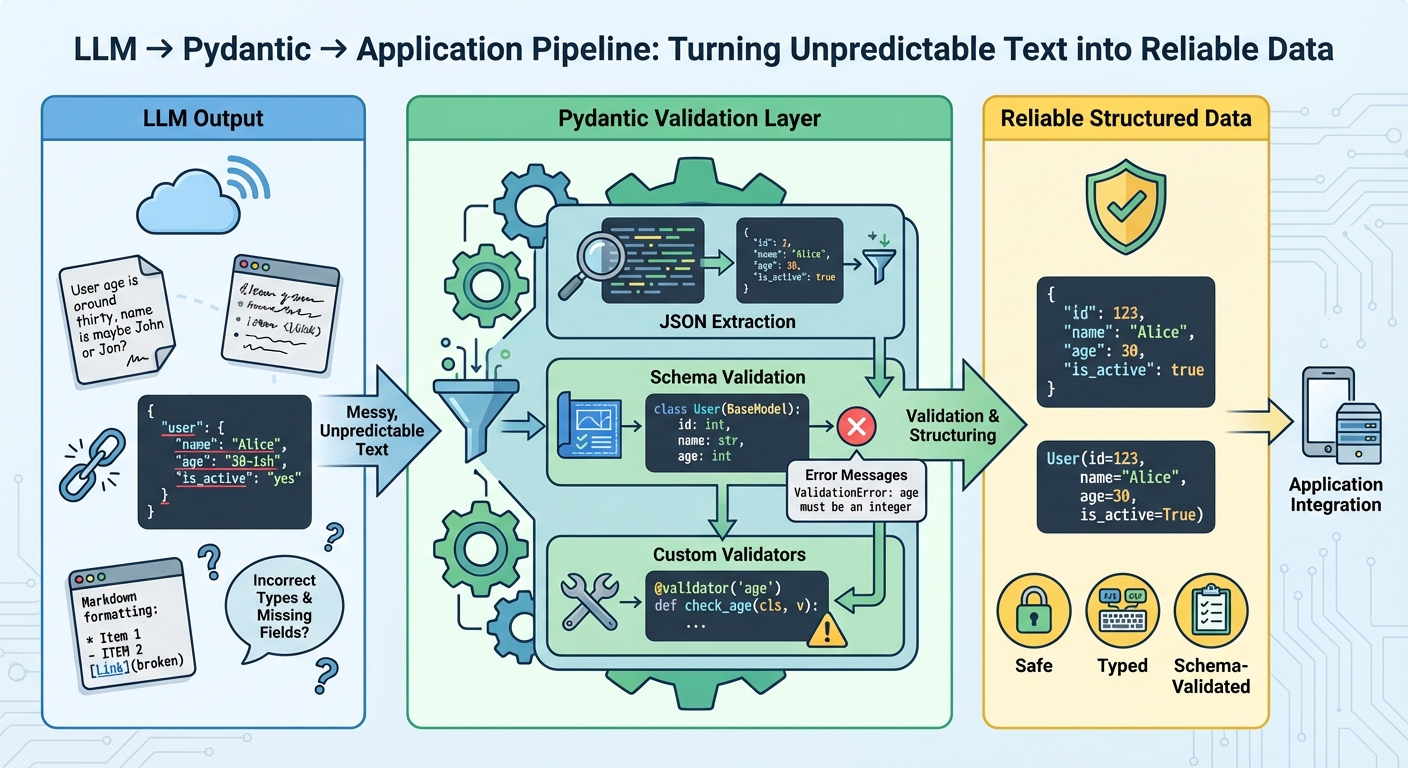
This diagram shows the ideal workflow: transforming unpredictable text from an LLM through a validation layer to produce reliable, structured data that an application can safely consume.
A Better Way: Enforcing Structure at the API Level
Instead of trying to clean up messy output, we can instruct the model to generate output that adheres to a specific structure from the start. Modern LLM APIs offer features to enforce this.
The OpenAI API, for instance, provides two main ways to do this:
- JSON Mode: You can set
response_format={"type": "json_object"}. This forces the model to output a string that is guaranteed to be valid JSON. However, it does not guarantee that the JSON contains the right fields or data types. The model could return{"user_name": "John"}instead of{"name": "John"}or{"age": "thirty"}instead of{"age": 30}. - Structured Outputs: This is a more recent and powerful feature. It guarantees not only that the output is valid JSON but also that it adheres to a specific JSON Schema you provide. This means you can enforce field names, data types (string, integer, boolean), and even formats (like email).
This evolution from a simple string to a schema-validated object is key to building robust AI systems.
OpenAI Structured Output - All You Need to Know
In this video, Dave Ebbelaar provides an excellent overview of the new Structured Outputs feature.
Watch the first two sections to understand the conceptual leap from basic JSON mode to true structured, schema-adherent output. Pay attention to the explanation of the benefits, such as reliable type-safety and simpler prompting, and the discussion on when to use this feature versus function calling.
The Ultimate Solution: Pydantic for Schema Definition and Validation
While you can define a JSON Schema manually as a dictionary, this is verbose and not very Python-friendly. A much cleaner and more powerful approach is to use Pydantic, a library that leverages Python's type hints to define data models. Given your background in software engineering, you'll find this approach natural and highly effective.
With Pydantic, you define your desired data structure as a Python class inheriting from BaseModel.
from pydantic import BaseModel, EmailStr
from typing import Optional

class User(BaseModel):
    name: str
    age: int
    email: Optional[EmailStr] = None # Optional field with email format validation
This class is not just a data container; it's a validation schema. It specifies that a User must have a name (string) and age (integer), and may optionally have an email that must be a valid email format.
The OpenAI Python SDK integrates beautifully with Pydantic. Instead of manually creating a JSON schema, you can pass your Pydantic model directly to the API call.
Structured model outputs | OpenAI API
The official OpenAI documentation provides the definitive guide to using Structured Outputs, with a focus on the modern Pydantic-based approach.
First, read the introduction to understand the core benefits. Then, jump to the section "How to use Structured Outputs with response_format" and focus on the SDK objects tab. Read Steps 1 and 2, which show how to define a Pydantic model and use the client.chat.completions.parse() method. The provided code snippets are key.
Let's look at a complete example that ties everything together. We'll define a Pydantic model and use the .parse() method to extract structured data from a piece of text.
import os
from openai import OpenAI
from pydantic import BaseModel, Field
from typing import list

# Ensure you have your OpenAI API key set as an environment variable
# client = OpenAI(api_key=os.environ.get("OPENAI_API_KEY"))
client = OpenAI()

# 1. Define the Pydantic Model (our schema)
class UserProfile(BaseModel):
    """A model to hold extracted user profile information."""
    name: str = Field(description="The full name of the user.")
    age: int = Field(description="The age of the user.", gt=0) # gt=0 ensures age is positive
    interests: list[str] = Field(description="A list of the user's interests.")

unstructured_text = """
Meet Alice, a 30-year-old software developer from New York.
She loves hiking, reading science fiction, and playing the piano.
"""

try:
    # 2. Call the API using the .parse() method
    completion = client.chat.completions.parse(
        model="gpt-4o-mini",
        messages=[
            {"role": "system", "content": "You are an expert at extracting information and structuring it into JSON."},
            {"role": "user", "content": f"Extract the user profile from the following text:\n\n{unstructured_text}"}
        ],
        response_format=UserProfile, # Pass the Pydantic class directly!
    )

    # 3. Access the parsed and validated data
    extracted_user = completion.choices[0].message.parsed

    print("Successfully extracted and validated user profile:")
    # The .model_dump_json() method is a handy Pydantic feature
    print(extracted_user.model_dump_json(indent=2))

    # You can now use this as a normal Python object
    print(f"\nName: {extracted_user.name}")
    print(f"Is an adult: {extracted_user.age >= 18}")

except Exception as e:
    print(f"An error occurred: {e}")
When you run this code, the response_format=UserProfile argument tells the SDK to automatically convert your UserProfile class into the required JSON Schema and send it to the API. The API is then constrained to produce an output that matches this schema.
The most powerful part is completion.choices[0].message.parsed. The SDK automatically takes the JSON response, validates it against your UserProfile model, and gives you a fully-formed, type-safe UserProfile object. There's no need for json.loads() or manual validation; it's all handled for you.
Handling Errors and Building Robust Systems
What happens if the model fails to produce a valid response, or if the data doesn't match the schema? Pydantic raises a ValidationError with a descriptive message. This allows you to build robust error-handling and retry logic.
A common and powerful pattern is to catch the validation error, feed the error message back to the LLM in a subsequent call, and ask it to correct its output.
The Complete Guide to Using Pydantic for Validating LLM ...
This article from Machine Learning Mastery provides a great practical example of a retry mechanism.
Please read the section Retrying LLM Calls with Better Prompts. The key idea is to use the ValidationError from Pydantic as feedback to guide the LLM's next attempt.
This self-correcting loop, where validation errors from Pydantic are used to refine prompts, is a cornerstone of building reliable applications on top of LLMs.
Conclusion
In this lesson, you've bridged the final gap in programmatic LLM interaction, moving from simply receiving text to demanding and receiving reliable, structured data. This capability transforms the LLM from a creative but sometimes flaky partner into a dependable programmatic component.
Here are your key takeaways:
- Relying on raw string output from LLMs is brittle. For application development, you need structured data.
- The OpenAI API's Structured Outputs feature, combined with a Pydantic model, is the state-of-the-art method for enforcing a specific output schema.
- Using the
client.chat.completions.parse()method with a Pydantic class in theresponse_formatargument automates schema creation, API calls, and response validation. - The
.parsedattribute on the response message gives you a ready-to-use, type-safe Pydantic object. - Pydantic's
ValidationErrorexceptions are crucial for implementing robust error handling and self-correction loops.
With the completion of this module, you now possess the core skills to interact with an LLM programmatically: you can craft precise prompts, control the generation process, and parse the output into usable data structures.
We are now ready to pivot to the "Retrieval" aspect of RAG. In the next module, The Language of Vectors: Embeddings and Similarity, we will explore how we can represent the semantic meaning of text as numerical vectors, a foundational concept for building the search component of our RAG system.