Hello! Welcome back to our course on Retrieval-Augmented Generation.
In our last lesson, we focused on intelligently splitting documents using recursive character-based chunking. You now have the skills to break down large texts into semantically coherent chunks, which is a fundamental step in preparing a knowledge base. However, having a collection of well-formed chunks is only half the battle. To build a truly effective RAG system, we need to be able to navigate this collection with precision.
This lesson addresses the next crucial step: attaching metadata to document chunks. We'll explore how adding structured information to our text chunks allows us to perform powerful, filtered searches. This technique moves us beyond relying solely on semantic similarity, enabling us to combine the strengths of vector search with the precision of structured database queries. By the end of this lesson, you will be able to programmatically enrich your document chunks with metadata, setting the stage for more advanced and accurate retrieval strategies.
Why Semantic Search Isn't Enough
Semantic search is brilliant at finding documents that are conceptually related to a query. If you search for "impact of interest rates on tech stocks," it will find chunks that discuss this topic, even if they don't use those exact words. But what if your query is "tell me what our 2023 annual report said about the tech sector"?
A pure semantic search would look for conceptual matches across your entire knowledge base. It might find blog posts from 2021, internal memos, or reports from other years that are also about the tech sector. This creates noise and can lead to inaccurate answers. The core of the problem is that semantic search struggles with filtering on concrete, factual attributes like dates, document types, or sources.
As a software engineer, you can think of this as trying to query a database without a WHERE clause. You wouldn't fetch every user from a database to find those named 'Alex'; you would use WHERE name = 'Alex'. Metadata allows us to bring that same filtering power to our RAG system.
This video from Sam Witteveen provides an excellent explanation of this exact problem and introduces the concept of using metadata to solve it.
Advanced RAG 01 - Self Querying Retrieval
The presenter clearly articulates why relying only on semantic search is a common pitfall and how combining it with metadata filtering leads to a more robust system.
Watch the first two minutes of the video, up to the explanation of self-querying retrieval. Focus on the distinction he makes between searching for semantic meaning versus searching for structured data like a movie's release year.
The Solution: Metadata and Filtered Retrieval
Metadata is simply structured information—key-value pairs—that we attach to each document chunk. This data isn't typically part of the text that gets semantically searched, but it's indexed alongside the chunk and can be used for filtering.
The retrieval process then becomes a two-step operation:
- Filter: First, the system narrows down the search space by selecting only the chunks that match the metadata criteria (e.g.,
document_type = 'annual_report'ANDyear = 2023). - Search: Then, it performs the semantic similarity search only on this pre-filtered subset of chunks.
This hybrid approach is incredibly powerful. It combines the structured, exact-match filtering of traditional databases with the nuanced, conceptual matching of vector search.
The diagram below illustrates this flow. A user's query is interpreted to extract both the semantic search query and the necessary metadata filters. The vector database then uses these filters to narrow down the candidates before finding the most semantically relevant chunks.
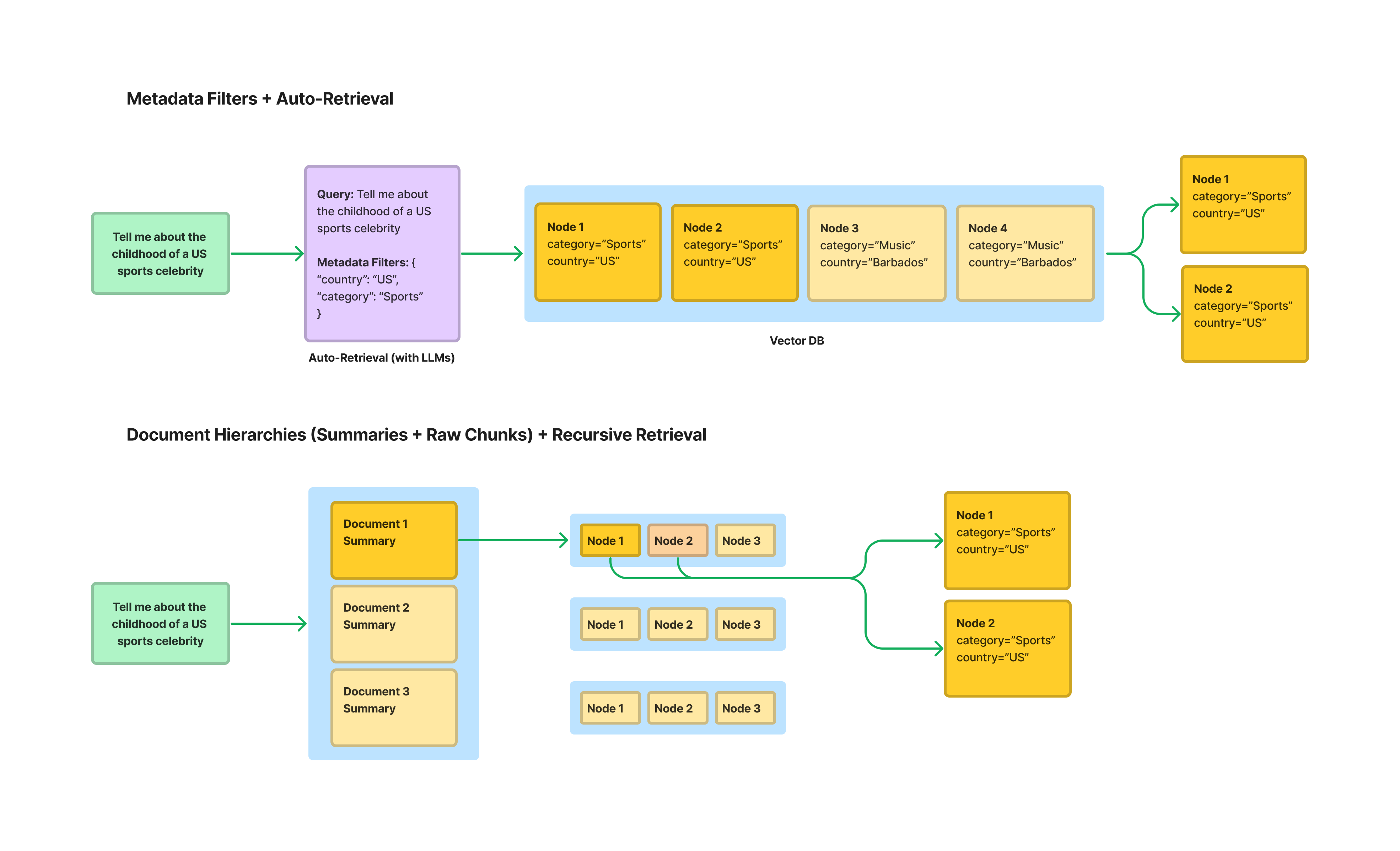
This diagram shows two advanced retrieval methods. The top flow, "Metadata Filters + Auto-Retrieval," visualizes how a user's natural language query is broken down into a semantic query and a set of metadata filters that are applied to the vector database to retrieve relevant nodes.
Types of Metadata
What kind of metadata is useful? It can come from various sources, and a good strategy often involves a combination.
- File-level Metadata: Information about the source file itself. This is often the easiest to get. Examples include
file_name,file_path,file_type(e.g., '.pdf', '.txt'),creation_date, andlast_modified_date. - Document-level Metadata: Information about the document's content that might be explicitly stated or extracted from a cover page. Examples:
title,author,document_category(e.g., 'Financial Report', 'Legal Contract', 'Marketing Material'). - Inferred Metadata: Information derived by analyzing the content of the chunk. This can be as simple as
languageorword_count, or more complex, like a list oftopicsor namedentities(people, organizations, locations) found in the text. - LLM-Generated Metadata: A more advanced technique where you use an LLM to generate rich metadata for each chunk. This could include a short
summaryof the chunk, a generatedtitle, or even a list ofhypothetical_questionsthat the chunk could answer.
The following article from OneUptime provides an excellent code-based example of a MetadataExtractor class that demonstrates how to gather many of these types.
How to Implement Document Ingestion
This resource offers a robust, code-first look at how different types of metadata can be systematically extracted and structured.
Focus on the Python code block that starts right after the initial sentence. Examine the @dataclass class EnrichedMetadata to see a well-structured representation of potential metadata fields. You don't need to dive into the implementation of the _extract_ methods, but rather appreciate the types of data being collected: source info, content hashes, timestamps, document properties, and extracted entities.
Implementation: Attaching Metadata in LangChain
Now for the practical part. In our previous lesson, we used LangChain's Document objects and a RecursiveCharacterTextSplitter. The Document object is central to this process. It consists of two main parts:
page_content: The actual text string of the document or chunk.metadata: A Python dictionary where you can store any key-value pairs you want.
When you split a Document that has metadata, LangChain's text splitters are smart enough to propagate that metadata to all the smaller chunks they create. This is incredibly convenient. It means we only need to assign the metadata once, at the parent document level.
Let's see a concrete example. The following code demonstrates enriching documents with metadata and then splitting them, verifying that the metadata is attached to the resulting chunks. This example is inspired by the practical walkthrough in the Medium article by Roberto G. Infante.
Advanced RAG techniques with LangChain — Part 7
This article provides a clear, end-to-end example of ingesting documents while enriching them with metadata, using a dataset of UK tourist destinations.
Read the section Ingestion: Metadata Enrichment. Pay close attention to the code in the subsection "Ingest Content with Metadata." Notice how a new Document object is created with a metadata dictionary containing source, destination, and region. This is the key step.
Here is a self-contained script that puts these concepts into practice:
from langchain_core.documents import Document
from langchain_text_splitters import RecursiveCharacterTextSplitter

# 1. Define our source documents with their metadata
# This could come from loading files, a database, an API, etc.
raw_docs = [
    {
        "content": "In the first quarter of 2023, our revenue grew by 15% year-over-year, driven by strong performance in the North American market. The launch of our new flagship product, 'Project Phoenix', was a key contributor.",
        "meta": {"source": "Q1_2023_Earnings_Call_Transcript.txt", "year": 2023, "quarter": 1, "doc_type": "transcript"}
    },
    {
        "content": "The 2022 Annual Shareholder Report highlights a 5% overall growth. We expanded our operations into the European market, which presented both challenges and opportunities. 'Project Phoenix' was still in early R&D phase.",
        "meta": {"source": "Annual_Report_2022.pdf", "year": 2022, "quarter": None, "doc_type": "report"}
    }
]

# 2. Create LangChain Document objects
langchain_docs = []
for doc in raw_docs:
    # The Document object takes page_content and an optional metadata dictionary
    new_doc = Document(
        page_content=doc["content"],
        metadata=doc["meta"]
    )
    langchain_docs.append(new_doc)

print("--- Original Documents with Metadata ---")
for doc in langchain_docs:
    print(doc)
print("\n" + "="*50 + "\n")

# 3. Initialize our text splitter
text_splitter = RecursiveCharacterTextSplitter(
    chunk_size=200,
    chunk_overlap=20
)

# 4. Split the documents into chunks
chunks = text_splitter.split_documents(langchain_docs)

print(f"--- Split into {len(chunks)} Chunks ---")
for i, chunk in enumerate(chunks):
    print(f"Chunk {i+1}:")
    print(f"Content: '{chunk.page_content}'")
    # Crucially, inspect the metadata of each chunk
    print(f"Metadata: {chunk.metadata}\n")
When you run this code, you will see that each chunk, no matter how small, carries a copy of the metadata from its parent document. For example, a chunk containing "driven by strong performance" will have the metadata {'source': 'Q1_2023_Earnings_Call_Transcript.txt', 'year': 2023, 'quarter': 1, 'doc_type': 'transcript'}. This is exactly what we need to enable filtered retrieval.
Conclusion
In this lesson, we've bridged the gap between unstructured text and structured data. You've learned how to enrich your document chunks with metadata, transforming them from simple blocks of text into powerful, searchable objects.
Here are the key takeaways:
- Metadata enables precision: It allows you to filter your search space based on factual criteria (like date, source, or category) before applying semantic search.
- Hybrid search is powerful: Combining metadata filtering with semantic search gives you the best of both worlds—the precision of database queries and the conceptual understanding of vector search.
- Implementation is straightforward: In LangChain, you attach metadata by populating the
metadatadictionary of aDocumentobject. The text splitters handle the propagation of this metadata to the child chunks. - Metadata can be diverse: You can add metadata from file properties, document content, or even generate it using other models.
We now have our documents loaded, chunked, and enriched. They are ready to be indexed. In our next lesson, we will dive into Module 4: Indexing and Retrieval, where we will finally introduce the central component of a RAG system: the vector store. You'll learn what a vector store is, how to populate it with our newly prepared chunks, and, most importantly, how to perform similarity searches using the metadata we've just learned to attach.