Hello! Welcome to the next lesson in our "CI/CD & System Design Interview Practice" module.
In our last lesson, we built a solid foundation for testing by covering unit tests with JUnit/Mockito, integration tests, and high-fidelity testing with Testcontainers. We saw how a robust testing strategy builds confidence in your code, which is essential for smooth deployments.
Today, we'll zoom in on a critical part of the testing pyramid: the API layer. This lesson directly addresses the learning outcome: Implement REST API tests using MockMvc or REST Assured. For a senior engineer, being able to write clean, comprehensive, and maintainable API tests is a fundamental expectation. In interviews, questions about this topic are used to gauge your practical, hands-on ability to ensure API contracts are reliable and bug-free.
We will explore two leading frameworks for this purpose:
- MockMvc: Spring's built-in framework for testing controllers without a running server.
- REST Assured: A popular third-party library with a fluent, BDD-style DSL that simplifies REST API testing.
By the end of this lesson, you'll understand the trade-offs between them and be able to choose the right tool for the job.
1. Web Layer Testing with MockMvc
In the previous lesson, we briefly touched on test slices with @WebMvcTest. This annotation is the key to testing your controller layer in isolation. When you use @WebMvcTest, Spring Boot only configures the web layer (controllers, ControllerAdvice, JSON converters, etc.) and does not load your service or repository beans. This makes for a fast and focused test.
To interact with this mock web environment, we use MockMvc. It allows you to perform HTTP requests and assert responses without needing to start a full HTTP server.
Testing Spring Boot RESTful APIs using MockMvc/Mockito ...
To start, let's review the core concepts of testing the web layer with MockMvc and Mockito. The following article provides a concise explanation and a practical code example.
Please read the section titled 'Web Layer Tests (What? Why? How?)'. Focus on understanding why @WebMvcTest does not load the entire application context and how MockMvc is used to send requests in this controlled environment. The code example at the end of the section is what we will analyze next.
As you saw, the process involves a few key components:
@WebMvcTest(VehicleController.class): Tells Spring to only configure theVehicleControllerand related web infrastructure.@Autowired private MockMvc mockMvc;: Injects the main entry point for server-side Spring MVC test support.@MockBean private VehicleServiceImpl vehicleService;: Since@WebMvcTestdoesn't load@Servicebeans, we must provide a mock implementation for any dependencies the controller has.
Let's look at a typical test using MockMvc's fluent API:
@WebMvcTest(VehicleController.class)
public class VehicleControllerTest {

    @Autowired
    private MockMvc mockMvc;

    @MockBean
    private VehicleService vehicleService;

    @Autowired
    private ObjectMapper objectMapper; // For converting objects to JSON strings

    @Test
    void whenPostVehicle_thenCreateVehicle() throws Exception {
        // Arrange
        Vehicle vehicle = new Vehicle("VIN123", "Toyota");
        // Mock the service layer's behavior
        when(vehicleService.createVehicle(any(Vehicle.class))).thenReturn(vehicle);

        // Act & Assert
        mockMvc.perform(post("/api/vehicles")
                .contentType(MediaType.APPLICATION_JSON)
                .content(objectMapper.writeValueAsString(vehicle)))
                .andExpect(status().isCreated())
                .andExpect(jsonPath("$.vin", is("VIN123")))
                .andExpect(jsonPath("$.make", is("Toyota")));

        // Verify that the service method was called
        verify(vehicleService).createVehicle(any(Vehicle.class));
    }
}
In this test, mockMvc.perform(...) sends the request. The andExpect(...) methods then assert the response status and content using JsonPath expressions (e.g., $.vin) to inspect the JSON body. This is a powerful way to verify API contracts.
2. Simplified API Testing with REST Assured
While MockMvc is powerful and built-in, its syntax can be verbose. REST Assured is a popular alternative that offers a highly readable, BDD-style (Behavior-Driven Development) fluent API. Its given-when-then structure makes tests easier to read and write.
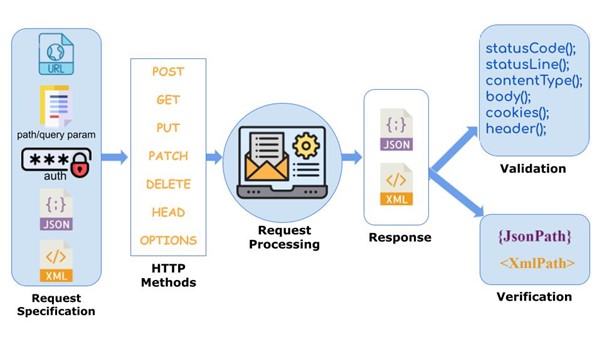
The great thing about REST Assured is that it can be used in two ways:
- As a more readable wrapper around
MockMvcfor fast slice tests. - As a client to test a fully running application for true integration tests.
Let's explore both, using a more detailed guide.
Testing Spring Boot Applications With REST Assured - rieckpil
The article 'Testing Spring Boot Applications With REST Assured' by Philip Rieck is an excellent, in-depth guide. It covers setup, testing unsecured and secured endpoints, and the different ways to integrate REST Assured.
First, please read the introductory sections: 'Testing Spring Boot Applications With REST Assured', 'Spring Boot and REST Assured Project Setup', and 'The Spring MVC RestController Under Test'. This will set the stage by introducing REST Assured and the example controller we'll be testing.
Approach A: REST Assured with MockMvc
You can combine the readability of REST Assured with the speed of MockMvc. This is often the sweet spot for controller testing.
Testing Spring Boot Applications With REST Assured - rieckpil
Now, let's see how to use REST Assured as a client for MockMvc. This section demonstrates how to set up the test and write assertions using the given-when-then style.
Read the section 'REST Assured Powered MockMvc Test'. Pay close attention to how RestAssuredMockMvc.mockMvc(mockMvc) is used in the setUp method to bind REST Assured to your MockMvc instance. Compare the test code with the native MockMvc example we saw earlier.
Here is the equivalent of our previous test, now using RestAssuredMockMvc:
@WebMvcTest(BookController.class)
public class BookControllerRestAssuredTest {

    @Autowired
    private MockMvc mockMvc;

    @MockBean
    private BookService bookService;

    @BeforeEach
    void setUp() {
        // Bind REST Assured to the MockMvc instance
        RestAssuredMockMvc.mockMvc(mockMvc);
    }

    @Test
    void shouldCreateNewBook() {
        // Arrange
        when(bookService.createNewBook(any(BookRequest.class))).thenReturn(42L);
        BookRequest bookRequest = new BookRequest("Effective Java", "978-0134685991", "Joshua Bloch");

        // Act & Assert
        given()
            .contentType("application/json")
            .body(bookRequest)
        .when()
            .post("/api/books")
        .then()
            .statusCode(201)
            .header("Location", containsString("/api/books/42"));
    }
}
Notice how the given() block sets up the request, when() executes it, and then() makes assertions. Many developers find this syntax more natural and readable than the MockMvc builder chain.
Approach B: REST Assured with a Live Server
For a full integration test, you can use REST Assured to make real HTTP calls to your application running on a random port. This validates the entire stack, from the HTTP server down to the database (which could be a real one managed by Testcontainers!).
Testing Spring Boot Applications With REST Assured - rieckpil
Let's look at how to perform a true integration test against a running server.
Read the code snippet under the subsection titled 'We can also use REST Assured when writing integration tests...'. Note the use of @SpringBootTest(webEnvironment = WebEnvironment.RANDOM_PORT), @LocalServerPort, and most importantly, RestAssured.given() instead of RestAssuredMockMvc.given().
This approach provides the highest level of confidence but is also the slowest, as it requires starting the full application context.
Test your understanding!
You are writing API tests for a new microservice. One team member argues for using @WebMvcTest with RestAssuredMockMvc. Another argues for using @SpringBootTest(webEnvironment=RANDOM_PORT) with the standard RestAssured. What is the primary trade-off between these two approaches?
Show answer
The primary trade-off is speed vs. testing scope.
-
@WebMvcTestwithRestAssuredMockMvcis fast. It only loads the web layer and mocks other dependencies. It's excellent for validating controller logic, serialization/deserialization, and request mappings in isolation. However, it does not test the integration with services, repositories, or the full HTTP server stack. -
@SpringBootTest(webEnvironment=RANDOM_PORT)withRestAssuredis slower but more comprehensive. It tests the entire application stack, from the server receiving the HTTP request through the service and data layers. It provides higher confidence that all components work together correctly but at the cost of longer test execution times.
Testing Secured Endpoints
In a real-world application, many endpoints are secured. A key skill for a senior engineer is knowing how to test these. Spring Security's test support integrates seamlessly with both MockMvc and REST Assured.
Testing Spring Boot Applications With REST Assured - rieckpil
Finally, let's cover the crucial topic of testing secured endpoints. This is a common requirement and a great topic to bring up in an interview.
Read the section 'Testing a Protected Endpoint'. It shows two powerful ways to simulate an authenticated user: programmatically with SecurityMockMvcRequestPostProcessors and declaratively with the @WithMockUser annotation.
Using @WithMockUser is particularly clean for setting up the security context for a test method:
@Test
@WithMockUser(username = "duke", roles = {"ADMIN"})
void shouldAllowBookCreationForAdminUsers() {
    given()
        // ... request setup
    .when()
        .post("/api/books")
    .then()
        .statusCode(201);
}

@Test
@WithMockUser(username = "charlie", roles = {"USER"})
void shouldBlockBookCreationForNonAdminUsers() {
    given()
        // ... request setup
    .when()
        .post("/api/books")
    .then()
        .statusCode(403); // Forbidden
}
Conclusion
You now have a solid understanding of two primary approaches for testing REST APIs in Spring Boot. Knowing the strengths and weaknesses of both MockMvc and REST Assured allows you to write effective, readable, and maintainable tests, a hallmark of a senior developer.
Key Takeaways:
MockMvcis Spring's native solution for testing the web layer in isolation (@WebMvcTest) without a running server. It's fast and requires no extra dependencies.REST Assuredoffers a highly readablegiven-when-thenDSL for API testing. It improves test clarity and can be used for both mock-based and live-server tests.RestAssuredMockMvcprovides the best of both worlds: the readable syntax of REST Assured combined with the speed ofMockMvc.- Testing secured endpoints is straightforward using annotations like
@WithMockUser, which integrates with Spring Security's test support.
Preview of the Next Lesson:
We've now completed our deep dive into the practical aspects of building and testing a Spring Boot application. We've covered testing from the unit level all the way to the API contract. In our next lesson, we will shift gears from implementation details to high-level architecture. We'll tackle our first system design challenge: "Outline a high-level architecture for a system design prompt (e.g., TinyURL), defining service boundaries and core components." This will prepare you for the system design portion of your interviews.