Hello! Welcome to the next lesson in our "CI/CD & System Design Interview Practice" module.
In our last session, we successfully automated the process of building a Docker image for our Spring Boot application and pushing it to a secure container registry like Amazon ECR. Our CI pipeline now produces a versioned, portable artifact ready for deployment.
Today, we will complete our automation journey by building the Continuous Deployment (CD) part of the pipeline. We'll configure GitHub Actions to automatically take the new Docker image from the registry and deploy it to your Kubernetes cluster. This lesson directly addresses the learning outcome: Implement an automated deployment to a Kubernetes cluster as part of a CD pipeline.
Mastering this full "code-to-cluster" workflow is a non-negotiable skill for senior engineering roles, as it forms the backbone of modern software delivery in cloud-native environments.
1. From an Image in a Registry to a Running Application
Our CI pipeline ends with a tagged Docker image sitting in Amazon ECR. The goal of Continuous Deployment is to automatically get this new version running in our Kubernetes cluster with no manual intervention.
The process looks like this:
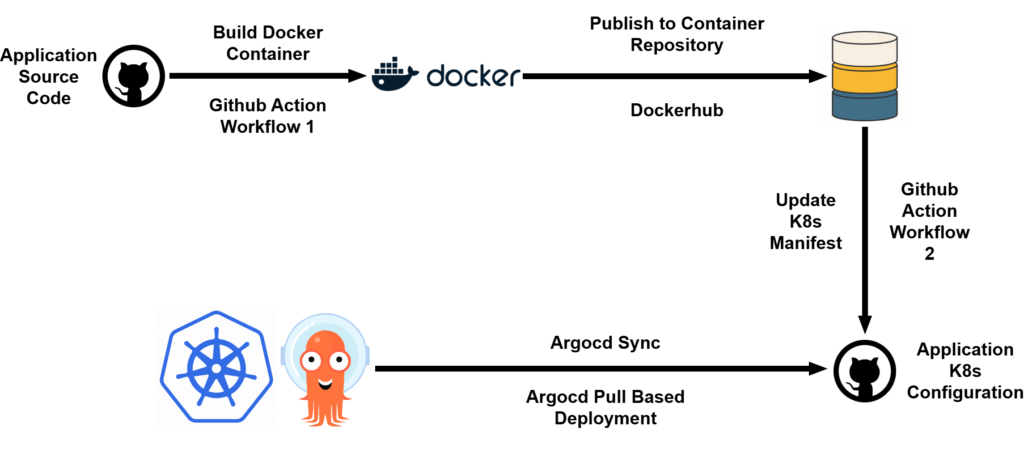
To achieve this, our GitHub Actions workflow needs a new deploy job that will:
- Wait for the
build-and-pushjob to complete successfully. - Authenticate with the Kubernetes cluster so it can issue commands.
- Update the Kubernetes
Deploymentmanifest to point to the new Docker image tag. - Apply the updated manifest to the cluster, triggering a rolling update.
Let's walk through how to implement this securely and efficiently.
2. Setting Up Secure Access to Kubernetes
Just as we used secrets for AWS credentials, we must never expose our Kubernetes cluster's configuration directly in a workflow file. The standard way to access a Kubernetes cluster is via a kubeconfig file. Our first step is to provide this file to our GitHub Actions runner securely.
The process involves two key steps:
- Retrieving the content of your
kubeconfigfile. - Storing this content as an encrypted secret in your GitHub repository.
How to Build and Deploy a Spring Boot Microservice on a Kubernetes Cluster
The article 'How to Build and Deploy a Spring Boot Microservice on a Kubernetes Cluster' provides a clear, step-by-step guide for this entire process. We'll start by focusing on the section that covers securing your Kubernetes configuration.
Please read 'Step 5: Get Kubernetes Config and Create GitHub Actions Secret Variable'. This section explains how to get your cluster's configuration and, crucially, how to store it as a secret named KUBECONFIG in your GitHub repository. This is a critical security practice for any production-grade pipeline.
By storing the kubeconfig content in a GitHub secret, you allow your workflow to authenticate with your cluster without ever exposing sensitive credentials in your codebase.
3. Automating Deployment with GitHub Actions
With authentication handled, we can now build the deploy job. We'll use a pre-built, trusted GitHub Action from Azure, azure/k8s-deploy, which simplifies the process of deploying to any Kubernetes cluster.
Let's first understand the core components of the workflow and the Kubernetes manifests.
How to Build and Deploy a Spring Boot Microservice on a Kubernetes Cluster
Let's continue with the same article. The next sections detail the Kubernetes manifest files and the final GitHub Actions workflow that ties everything together.
Please read through the following sections: 'Step 6: Create Kubernetes Deployment, Service, and Ingress Resources.': Focus on the Deployment part of the YAML. Notice the image field. This is the field our CD pipeline will need to update automatically. 'Step 7: Create GitHub Actions Workflow': Study the complete workflow provided. Pay close attention to the deploy job. This is the blueprint for what we are about to build. Notice how it uses the KUBECONFIG secret and how it's structured to run after the build job.
Dissecting the deploy Job
Let's construct our full ci-cd.yml workflow. It will contain the build-and-push job from our previous lesson and add the new deploy job.
name: Build, Push to ECR, and Deploy to Kubernetes

on:
  push:
    branches: [ main ]

env:
  ECR_REPOSITORY: my-spring-app
  AWS_REGION: us-east-1 # Change to your region

jobs:
  # This job is from our previous lesson
  build-and-push:
    runs-on: ubuntu-latest
    outputs:
      image: ${{ steps.build-image.outputs.image }}
    steps:
      - name: Checkout repository
        uses: actions/checkout@v3

      - name: Configure AWS credentials
        uses: aws-actions/configure-aws-credentials@v2
        with:
          aws-access-key-id: ${{ secrets.AWS_ACCESS_KEY_ID }}
          aws-secret-access-key: ${{ secrets.AWS_SECRET_ACCESS_KEY }}
          aws-region: ${{ env.AWS_REGION }}

      - name: Login to Amazon ECR
        id: login-ecr
        uses: aws-actions/amazon-ecr-login@v1

      - name: Build, tag, and push image to Amazon ECR
        id: build-image
        env:
          ECR_REGISTRY: ${{ steps.login-ecr.outputs.registry }}
          IMAGE_TAG: ${{ github.sha }}
        run: |
          docker build -t $ECR_REGISTRY/$ECR_REPOSITORY:$IMAGE_TAG .
          docker push $ECR_REGISTRY/$ECR_REPOSITORY:$IMAGE_TAG
          echo "image=$ECR_REGISTRY/$ECR_REPOSITORY:$IMAGE_TAG" >> $GITHUB_OUTPUT

  # This is our new deployment job
  deploy:
    runs-on: ubuntu-latest
    needs: build-and-push # Ensures this job runs only after build-and-push succeeds
    steps:
      - name: Checkout repository
        uses: actions/checkout@v3

      # 1. Set the Kubernetes context
      - name: Set Kubernetes context
        uses: azure/k8s-set-context@v3
        with:
          method: kubeconfig
          kubeconfig: ${{ secrets.KUBECONFIG }} # Use the secret we created

      # 2. Deploy to Kubernetes
      - name: Deploy to Kubernetes cluster
        uses: azure/k8s-deploy@v4
        with:
          manifests: |
            kubernetes/deployment.yaml
            kubernetes/service.yaml
          images: |
            ${{ needs.build-and-push.outputs.image }}
          action: 'deploy'
Key Elements of the New deploy Job:
needs: build-and-push: This line creates a dependency. Thedeployjob will only start if thebuild-and-pushjob completes successfully. This is fundamental to a reliable pipeline.outputsandneeds...outputs: We've modified thebuild-and-pushjob to output the full image name and tag. Thedeployjob then consumes this output using theneedscontext. This is the correct way to pass data between jobs.azure/k8s-set-context@v3: This action takes thekubeconfigdata from your GitHub secret and configures thekubectlcommand-line tool on the runner, enabling it to communicate with your cluster.azure/k8s-deploy@v4: This is the core of our CD step.manifests: We provide the path to our Kubernetes manifest files (e.g.,deployment.yaml).images: This is where the magic happens. We pass the full image URL from the previous job. The action intelligently finds theimagefield in yourdeployment.yamland substitutes its value with this new one before applying it. This is a clean and robust alternative to using command-line tools likesedto modify files.action: 'deploy': This tells the action to perform a standard deployment, which typically results in a rolling update in Kubernetes.
4. Deep Dive: The k8s-deploy Action
For a senior-level interview, it's good to know more about the tools you use. The azure/k8s-deploy action is highly configurable.
Deploy to Kubernetes cluster · Actions
The official documentation for the 'Deploy to Kubernetes cluster' action provides a wealth of information about its capabilities. Understanding these options prepares you for more advanced deployment scenarios.
Quickly scan through the 'Action capabilities' and 'Action inputs' sections. You don't need to memorize everything, but take note of the following: Artifact substitution: This is the feature we are using with the images input. Deployment strategy: Notice that besides the basic deployment, it supports canary and blue-green. We'll explore these in our next lesson. imagepullsecrets: This input allows you to specify the name of the Kubernetes secret needed to pull images from a private registry. This is a common point of failure and an important configuration.
This action handles many complexities of Kubernetes deployments, allowing you to define your CD process declaratively within your workflow file.
Test your understanding! (Interview Question)
You have set up a CI/CD pipeline that builds a Docker image, pushes it to a private Amazon ECR repository, and then attempts to deploy it to Kubernetes. The build-and-push job succeeds, but the deploy job fails. When you inspect the Pods in Kubernetes, you see their status is ImagePullBackOff. What are the most likely causes of this error, and how would you debug it?
Show answer
This is a classic and very common real-world problem. The ImagePullBackOff status means the Kubernetes node was unable to pull the specified Docker image from the registry. Here's a systematic approach to debugging it:
-
Authentication Failure (Most Common Cause): The Kubernetes cluster does not have the necessary credentials to access the private ECR repository.
- Diagnosis: Check if an
imagePullSecretis configured for the service account in the deployment's namespace, or if it's specified directly in theDeploymentmanifest's pod spec (spec.template.spec.imagePullSecrets). - Fix: Create a Kubernetes secret of type
docker-registrycontaining the credentials for ECR. Then, reference this secret in yourDeployment.yaml. In an AWS environment (EKS), the best practice is to use an IAM Role for Service Accounts (IRSA), which grants the Pod's service account permission to pull from ECR without needing to manage secrets manually.
- Diagnosis: Check if an
-
Incorrect Image Name or Tag: The image URL or tag specified in the
Deploymentmanifest is incorrect and does not exist in the registry.- Diagnosis: Run
kubectl describe pod <pod-name>to see the exact image URL it's trying to pull. Compare this string character-for-character with the image URL that was pushed by thebuild-and-pushjob (you can check the GitHub Actions logs). - Fix: Correct any typos or logic errors in the GitHub workflow that constructs the image tag and passes it to the
deployjob.
- Diagnosis: Run
-
Network/Firewall Issues: The Kubernetes worker nodes may not have network connectivity to the Amazon ECR service endpoints.
- Diagnosis: This is less common in a properly configured cloud environment but possible. You would need to check the VPC network ACLs, security groups, and route tables associated with the worker nodes to ensure they can reach the ECR endpoints.
- Fix: Adjust the networking rules to allow egress traffic from the nodes to the ECR service on port 443.
Conclusion
Congratulations! You have now designed and implemented a complete, end-to-end CI/CD pipeline. Your workflow automatically tests your code, packages it into a container, versions it, stores it in a secure registry, and deploys it to a Kubernetes cluster. This level of automation is the standard for high-performing engineering teams and is a crucial topic in technical interviews for senior roles.
Key Takeaways:
- Continuous Deployment (CD) for Kubernetes automates the rollout of new application versions.
- Sensitive data like the
kubeconfigfile must be stored in encrypted GitHub Secrets. - The
needskeyword in GitHub Actions is used to create dependencies between jobs, ensuring a sequential flow (build then deploy). - Specialized actions like
azure/k8s-deploysimplify deployment by handling details like manifest parsing and image substitution. - Understanding common failure modes like
ImagePullBackOffand their solutions is critical for both production operations and interviews.
Preview of the Next Lesson:
Our current pipeline uses a rolling update, which is the default strategy in Kubernetes. While effective, it's just one of several ways to deploy new code. In our next lesson, "Explain zero-downtime deployment strategies like rolling updates and blue-green deployments," we will dive deeper into the mechanics of rolling updates and compare them to other powerful strategies like Blue-Green and Canary deployments, which help further reduce risk and downtime.